|
Author
|
Message
|
|
Peter (RL)
|
Peter (RL)
Posted 9 Years Ago
|
|
Group: Administrators
Last Active: Last Year
Posts: 23.1K,
Visits: 36.6K
|
v6.53 (6.53.3511.1) released on November 14th, 2016
Fixed: Projects saved in iClone 6.52 have the following timeline track defects: Feedback Tracker Report 1 | Feedback Tracker Report 2- When the timeline Object Related Track button is set to on and the character is selected or the Timeline Track Menu List is checked, the object does not appear in the timeline track. - When the Timeline Object Related Track button is set to on, and a character is applied, the object will appear in the timeline track, but not the default sub-track (sometimes everything is turned off and sometimes a strange timeline track will appear). *Note: Both issues are caused by incorrect timeline status data. This update will remove the timeline track status from projects saved with iClone 6.52. Fixed: The "Hide Inner Mesh" checkbox does not work for certain characters with "Auto Hide Mesh" activated in iClone Character Creator. Fixed: iClone crashes after loading .ini files saved from the Character Collision Shape Editor. Forum Report Peter
Forum Administrator www.reallusion.com
|
|
|
|
|
rgreenidge
|
rgreenidge
Posted 9 Years Ago
|
|
Group: Forum Members
Last Active: Last Year
Posts: 257,
Visits: 1.7K
|
Thanks, that was a quick fast fix for me Reallusion.
Home built; ASRock X570 Pro 4, AMD Ryzen 9-5950X CPU, AMD RADEON RX6900XT, 16GB video card, 131GB of RAM.
|
|
|
|
|
digitath
|
digitath
Posted 9 Years Ago
|
|
Group: Forum Members
Last Active: Last Year
Posts: 57,
Visits: 1.5K
|
Thank you Reallusion! You are great!
|
|
|
|
|
mariusjensen01
|
mariusjensen01
Posted 9 Years Ago
|
|
Group: Forum Members
Last Active: 4 Years Ago
Posts: 27,
Visits: 2.2K
|
Fine, but now the problem with indigo settings is there again. Just like before the patch, to correct that problem, iclone chashes when you try to change the Indigo settings. Do I have to install that patch again?
|
|
|
|
|
hattori kun
|
hattori kun
Posted 9 Years Ago
|
|
Group: Forum Members
Last Active: 3 Years Ago
Posts: 868,
Visits: 4.1K
|
Thank you RL.
So this is a stable release?
|
|
|
|
|
wires
|
|
|
Group: Forum Members
Last Active: 4 Months Ago
Posts: 5.7K,
Visits: 26.5K
|
mariusjensen01 (11/17/2016)
Fine, but now the problem with indigo settings is there again. Just like before the patch, to correct that problem, iclone chashes when you try to change the Indigo settings. Do I have to install that patch again?Have you installed the Indigo RT plugin update patch that was released? If not you can download it from your Member account.
Gerry
System: Win 10 Pro (21H2), Asus X99-E WS, CPU i7-5930K -3,5 GHz, 32 GB DDR4 2666-16 RAM, NVidia GTX 1080 Ti GPU - 11 GB VRAM(Driver Studio-536.99), Samsung 850 Pro 512 GB SSD, 6 TB HD storage.
|
|
|
|
|
justaviking
|
justaviking
Posted 9 Years Ago
|
|
Group: Forum Members
Last Active: Last Year
Posts: 8.2K,
Visits: 26.5K
|
wires (11/17/2016)
Have you installed the Indigo RT plugin update patch that was released? If not you can download it from your Member account.Okay, I need help with something dumb. I don't see anything related to Indigo on my "account" page. I thought maybe you have to go to the "product page" for the Indigo plug-in... http://www.reallusion.com/iclone/indigo_upgrade.aspx...but when you login, it just takes you back to the list of your products on your Member page. I see no Indigo on my list of Registered Products, and it also does not show if I open my Patch/Bonus page for iClone 6. Where did they hide it?
iClone 7... Character Creator... Substance Designer/Painter... Blender... Audacity...
Desktop (homebuilt) - Windows 10, Ryzen 9 3900x CPU, GTX 1080 GPU (8GB), 32GB RAM, Asus X570 Pro motherboard, 2TB SSD, terabytes of disk space, dual monitors.
Laptop - Windows 10, MSI GS63VR STEALTH-252, 16GB RAM, GTX 1060 (6GB), 256GB SSD and 1TB HDD
|
|
|
|
|
animagic
|
animagic
Posted 9 Years Ago
|
|
Group: Forum Members
Last Active: Yesterday
Posts: 15.8K,
Visits: 31.4K
|
Dennis, it should be listed with your iClone 6: 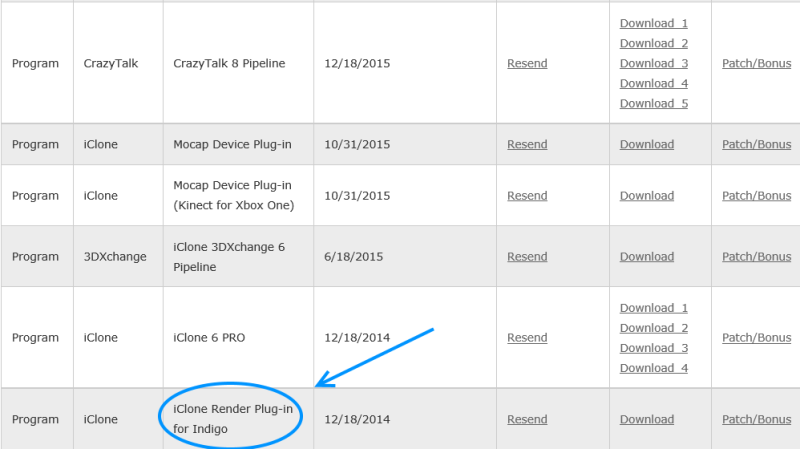
|
|
|
|
|
wires
|
|
|
Group: Forum Members
Last Active: 4 Months Ago
Posts: 5.7K,
Visits: 26.5K
|
Dennis. as Job posted - it should be in your user account under Registered Products. Click on Patch/Bonus to get the 1.53 patch. 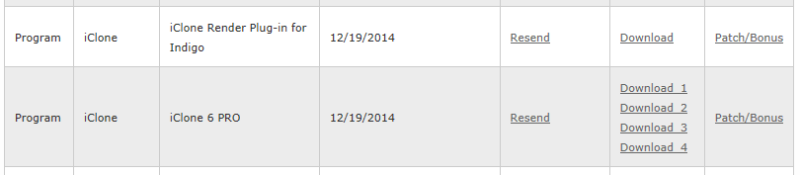
System: Win 10 Pro (21H2), Asus X99-E WS, CPU i7-5930K -3,5 GHz, 32 GB DDR4 2666-16 RAM, NVidia GTX 1080 Ti GPU - 11 GB VRAM(Driver Studio-536.99), Samsung 850 Pro 512 GB SSD, 6 TB HD storage.
|
|
|
|
|
justaviking
|
justaviking
Posted 9 Years Ago
|
|
Group: Forum Members
Last Active: Last Year
Posts: 8.2K,
Visits: 26.5K
|
Thanks, Gerry and Job.
I guess I'll have to contact Support and find out why the Indigo plug-in doesn't show up for me.
iClone 7... Character Creator... Substance Designer/Painter... Blender... Audacity...
Desktop (homebuilt) - Windows 10, Ryzen 9 3900x CPU, GTX 1080 GPU (8GB), 32GB RAM, Asus X570 Pro motherboard, 2TB SSD, terabytes of disk space, dual monitors.
Laptop - Windows 10, MSI GS63VR STEALTH-252, 16GB RAM, GTX 1060 (6GB), 256GB SSD and 1TB HDD
|
|
|
|