|
By Peter (RL) - 10 Years Ago
|
v6.53 (6.53.3511.1) released on November 14th, 2016
Fixed: Projects saved in iClone 6.52 have the following timeline track defects: Feedback Tracker Report 1 | Feedback Tracker Report 2
- When the timeline Object Related Track button is set to on and the character is selected or the Timeline Track Menu List is checked, the object does not appear in the timeline track.
- When the Timeline Object Related Track button is set to on, and a character is applied, the object will appear in the timeline track, but not the default sub-track (sometimes everything is turned off and sometimes a strange timeline track will appear).
*Note: Both issues are caused by incorrect timeline status data. This update will remove the timeline track status from projects saved with iClone 6.52.
Fixed: The "Hide Inner Mesh" checkbox does not work for certain characters with "Auto Hide Mesh" activated in iClone Character Creator.Fixed: iClone crashes after loading .ini files saved from the Character Collision Shape Editor. Forum Report |
|
By rgreenidge - 10 Years Ago
|
|
Thanks, that was a quick fast fix for me Reallusion.
|
|
By digitath - 10 Years Ago
|
|
Thank you Reallusion! You are great!
|
|
By mariusjensen01 - 10 Years Ago
|
|
Fine, but now the problem with indigo settings is there again. Just like before the patch, to correct that problem, iclone chashes when you try to change the Indigo settings. Do I have to install that patch again?
|
|
By hattori kun - 10 Years Ago
|
Thank you RL.
So this is a stable release?
|
|
By wires - 10 Years Ago
|
|
mariusjensen01 (11/17/2016)
Fine, but now the problem with indigo settings is there again. Just like before the patch, to correct that problem, iclone chashes when you try to change the Indigo settings. Do I have to install that patch again?
Have you installed the Indigo RT plugin update patch that was released? If not you can download it from your Member account.
|
|
By justaviking - 10 Years Ago
|
|
wires (11/17/2016)
Have you installed the Indigo RT plugin update patch that was released? If not you can download it from your Member account.
Okay, I need help with something dumb.
I don't see anything related to Indigo on my "account" page.
I thought maybe you have to go to the "product page" for the Indigo plug-in...
http://www.reallusion.com/iclone/indigo_upgrade.aspx
...but when you login, it just takes you back to the list of your products on your Member page.
I see no Indigo on my list of Registered Products, and it also does not show if I open my Patch/Bonus page for iClone 6.
Where did they hide it?
|
|
By animagic - 10 Years Ago
|
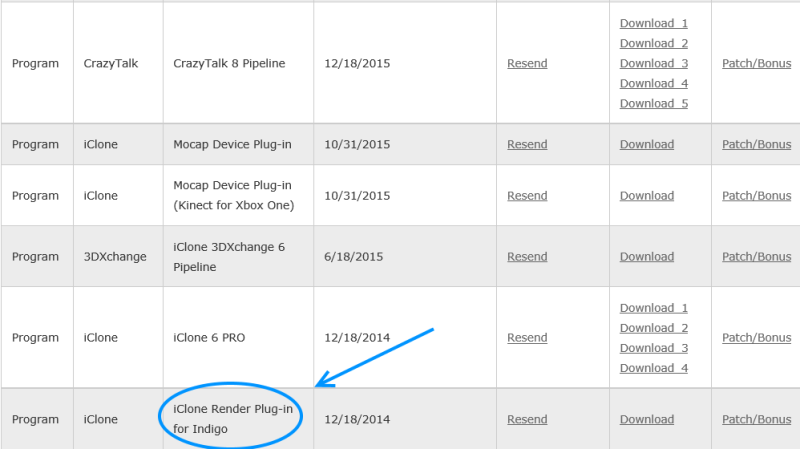
Dennis, it should be listed with your iClone 6:
|
|
By wires - 10 Years Ago
|
Dennis. as Job posted - it should be in your user account under Registered Products. Click on Patch/Bonus to get the 1.53 patch. 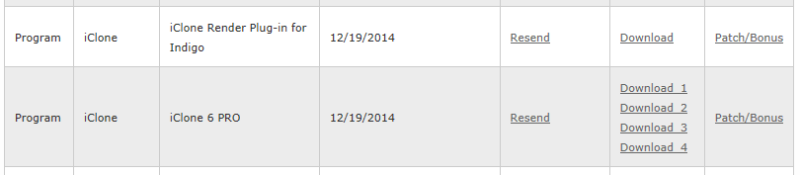 |
|
By justaviking - 10 Years Ago
|
Thanks, Gerry and Job.
I guess I'll have to contact Support and find out why the Indigo plug-in doesn't show up for me.
|
|
By wires - 10 Years Ago
|
Dennis,
Have you tried to register your Plugin serial number in your account?

|
|
By justaviking - 10 Years Ago
|
wires (11/18/2016)
Dennis, Have you tried to register your Plugin serial number in your account?
Wow, that seems very obvious now that you point it out. Thanks, I'll try that this evening when I'm home.
UPDATE:
Solved. Thank you.
At first I was getting an "Invalid serial number" error, but then I realized I was using the "Indigo RT" license rather than the "Plugin" license.
I'll go sit in the corner of shame for a while, :blush: but before I go I will say, "Thank you" one more time :)
|
|
By erisku - 10 Years Ago
|
|
Hi there
I installed the 6.53 patch but now Iclone does not start at all and I get a german language message that something is wrong with MSVCP120.dll.
how can I fix this.
---------------------------------------------
Update: I just download Iclone full file and installed it again. It works now.
------------------------------------------------
br
Eris
|
|
By animagic - 10 Years Ago
|
erisku (11/19/2016)
Hi there
I installed the 6.53 patch but now Iclone does not start at all and I get a german language message that something is wrong with MSVCP120.dll.
how can I fix this.
br
Eris
For some reason, a number of users have experienced this issue. It indicates that a specific Microsoft C++ runtime library package is missing. It is unclear why this happens.
The remedy is to go to the page https://www.microsoft.com/en-us/download/details.aspx?id=40784, download the library package, and install it. That should resolve your problem.
|
|
By erisku - 10 Years Ago
|
Thanks animagic for the fast response.
br.
Eris
|
|
By mr_vidius - 10 Years Ago
|
 in God's name.. what the heck did RL do? content verify fails after reaching about 1/3 thru. saying my internet connection has failed. which is bunk because I have never had that issue in God's name.. what the heck did RL do? content verify fails after reaching about 1/3 thru. saying my internet connection has failed. which is bunk because I have never had that issue
until the 6.52 patch. since the 6.53 patch. all G3 clone cloth has issues like in the pic below.. and now iclone crashes when trying to replace heads on G2, G3, and G5 characters.
it would appear that iclone is totally useless now. if I go back to the version before the 6.52. what happens to content I downloaded in 6.53?
I reinstalled the G3 clone cloth vol 1 & 2 to see if that was the issue. but nope. problem still remains. well, so much for that.. another useless product. and now I won't be able to make the deadline again.. thanks RL!
I can't wait till iclone 7 is released. looking forward to the bugs in that.
vidius
|
|
By mr_vidius - 10 Years Ago
|
what's new in iclone 6.53? a version that does not work! loaded with bugs.. and a complete failure.
vidius
|
|
By wires - 10 Years Ago
|
|
I can't reproduce the problems on my system.
|
|
By mark - 10 Years Ago
|
Well...just got around to loading some G3's into the new patch of iC6 and I got what Mr. Vidius has got!!!!! Not good!!!:crying:
Are you on Windows 10 Gerry? I'm on Windows 7 ....and Mr. Vidius what OS are you on, if I might ask? ;)
|
|
By duchess110 - 10 Years Ago
|
|
mark (11/21/2016)
Well...just got around to loading some G3's into the new patch of iC6 and I got what Mr. Vidius has got!!!!! Not good!!!:crying:
Are you on Windows 10 Gerry? I'm on Windows 7 ....and Mr. Vidius what OS are you on, if I might ask? ;)
Same problem here with G3 stray vertex not weighted also hands and feet not connected.
PC Spec
Windows 7 pro
Intel I7 6900k
Asus X99-E WS
RAM 32GB HyperX Savage DDR4
Video Card 12GB TitanX Pascal
|
|
By Postfrosch - 10 Years Ago
|
I have the problem with G3 synonymous not on my computer.
It works flawlessly. I've done extra 2 new G 3 avatars with clothes.
Folded flawlessly. Also fold G2 and G5
(At least so far)
I have Win 10
Greetings from Germany
Postfrosch
|
|
By mark - 10 Years Ago
|
I'm starting to think it may be a DirectX issue with Windows 7 and not being able to upgrade DirectX beyond a certain version...I think version 10 is as far as W7 can go?:ermm: I Don't want to have to go to Windows 10 but looks like the writing on the wall is getting pretty clear!!!:doze:
|
|
By mr_vidius - 10 Years Ago
|
|
windows 7 uses direct X 11
|
|
By mark - 10 Years Ago
|
Thanks good to know!
|
|
By wires - 10 Years Ago
|
|
mark (11/21/2016)
Well...just got around to loading some G3's into the new patch of iC6 and I got what Mr. Vidius has got!!!!! Not good!!!:crying:
Are you on Windows 10 Gerry? I'm on Windows 7 ....and Mr. Vidius what OS are you on, if I might ask? ;)
Mark,
I'm on Windows 10, and I know that Job is also on 10 and can't reproduce the problems.
|
|
By mark - 10 Years Ago
|
Thanks Gerry! It may be a Windows 7/10 thing I'm thinking (heck I don't know) and to clarify I am on DirectX11...but I think that's as far as I can go with DirectX on Windows 7. My display drivers are up to date...
|
|
By animagic - 10 Years Ago
|
I am on Windows 10, but like mentioned, Windows 7 supports DirectX 11. I did some work yesterday with legacy characters and had no issues.
I believe it is not a DirectX problem, because all legacy avatars work under DirectX 9 as well. If you start iClone under DirectX 9, do you see the same problems?
|
|
By Peter (RL) - 10 Years Ago
|
Thank you all for reporting the issue with G5 and older characters. We are urgently looking into this issue which only seems to affect Windows 7 users.
As soon as I have more information about this I will update again.
|
|
By justaviking - 10 Years Ago
|
I can provide some additional details.
Comment added to FeedBack Tracker Issue #841: http://www.reallusion.com/FeedBackTracker/Issue/iclone-crashes-when-you-replace-heads
(Windows 7... iClone 6.53... DirectX 11)
This is the easiest way I found to reproduce the problem...
STEPS:
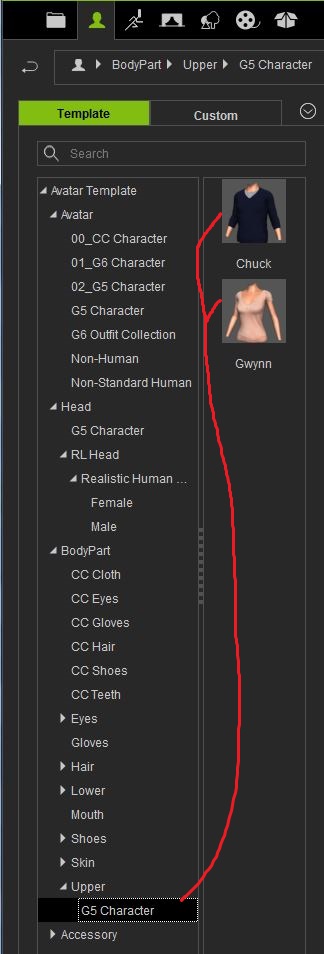
1) Add "Chuck" (G5) to the scene
2) Drag Gwynn's body onto Chuck (avert your eyes, it's a disturbing sight)
3) Drag Chuck's body back onto the avatar
It is now broken.
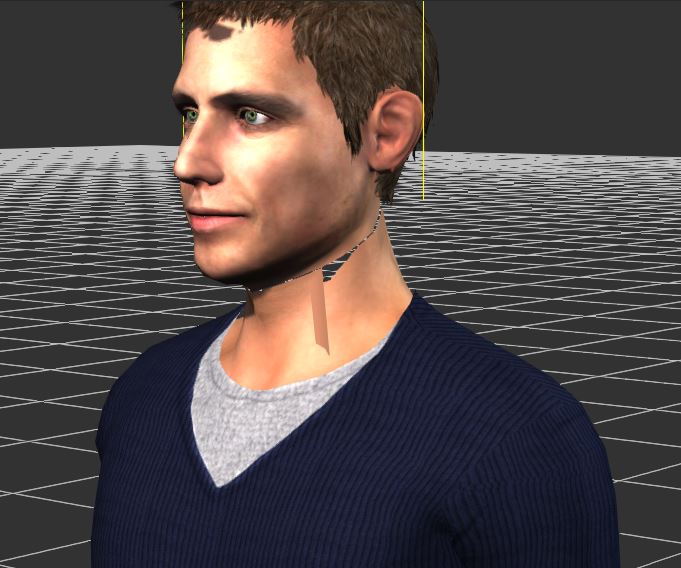
Viewing in wireframe mode is interesting. You can see a polygon running from neck way down to nearly the left knee (in this case).
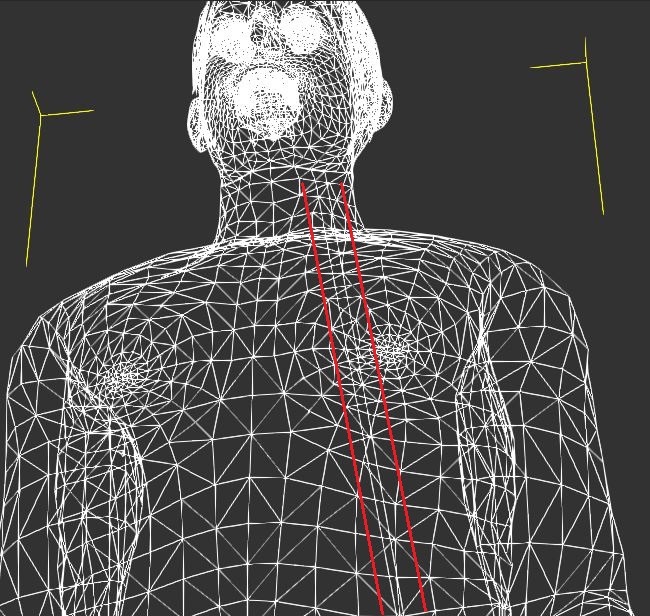
|
|
By theschemer - 10 Years Ago
|
justaviking (12/31/2016)
I can provide some additional details. Comment added to FeedBack Tracker Issue #841: http://www.reallusion.com/FeedBackTracker/Issue/iclone-crashes-when-you-replace-heads(Windows 7... iClone 6.53... DirectX 11) This is the easiest way I found to reproduce the problem... STEPS: 1) Add "Chuck" (G5) to the scene 2) Drag Gwynn's body onto Chuck (avert your eyes, it's a disturbing sight) 3) Drag Chuck's body back onto the avatar It is now broken. Viewing in wireframe mode is interesting. You can see a polygon running from neck way down to nearly the left knee (in this case).
Thanks JAV for looking into this. If you could add a note to the Feedback Tracker here too after testing some clothes.
Thanks for looking into that. Can you try just changing some clothes on Chuck so you can add your findings to the other Feedback Tracker below?
link:
http://www.reallusion.com/FeedBackTracker/Issue/problem-with-clone-cloth/#issue_comments
I appreciate it,
TS
|
|
By justaviking - 10 Years Ago
|
I was able to reproduce the "clothing" problem.
FeedBack Tracker Issue #839: http://www.reallusion.com/FeedBackTracker/Issue/problem-with-clone-cloth/#issue_comments
My interpretation is that it is simply a different manifestation of the "head" issue, which I recreated by swapping out the torso, and reported here:
https://forum.reallusion.com/FindPost309467.aspx
In fact, the "head" issue is really a "torso" issue, based on what I'm seeing. (I explain that below, in "Further Analysis" paragraph.) The results are extremely similar. A couple of mesh polygons - always in the BASE OF THE LEFT SIDE OF THE NECK - are broken, with a couple of the vertices getting attached to somewhere else, such as the left foot or the left wrist. If you move the hand, you will see the polygon follows the hand, so it's not simply floating out in space.
I'm not sure the problem behaves 100% consistently, but I was able to reproduce it quickly and easily. If this post doesn't help Reallusion, I don't know what will.
HOW I QUICKLY DUPLICATED THE ISSUE:
1) First, install a free T-Shirt clothing pack
Other clothing options may also cause the problem, but this way we are all doing the same thing.
http://city.reallusion.com/ContentPreview.aspx?i=JICa5e02fdb278a2ff51&Refer=5
2) Start a new iC6 project
3) Add a G5 character - I used "Chuck" initially, and also duplicated the problem using "Gywnn" (Fig 1)
4) DRAG a new T-shirt onto the avatar (Fig 2)
5) Keep an eye on the neck area
6) Just work your way down the list of T-shirts - If it doesn't break the first time (thought it might), try the next shirt, and the one after that...
7) After only a few shirt changes, you should see something odd in the neck (Fig 3)
FURTHER ANALYSIS:
The problem mesh is actually the RL_Upper (torso) mesh... AND... hand or foot (that I've seen so far).
When observing the problem, I selected the RL_Upper mesh and lowered the strength of the Diffuse texture (turning it white), and that made it clear that the broken polygon was actually part of the torso, not the head. (Fig 4).
You can also see that it's joining with another mesh at the mid-point, approximately. When I made the RL_Upper mesh pale, the bottom half of the "strand" connected to the foot stayed flesh colored, and is part of the RL_Lower mesh. (Fig 5 and Fig 6)
ADDITIONAL OBSERVATON:
I always notice the problem in the same area (left jugular). It might even be the same polygons. Remember it's actually the top of the torso (RL_Upper mesh), not part of the head. Sometimes it attaches to the foot, or the hand, and maybe the knee, but always on the left when I've seen it. In the case of a foot connection, it was five polygons. (Fig 7)
I even managed to make two breaks simultaneously, simply by changing the shirt multiple times. (Fig 8)
Sometimes changing the shirt actually restores (fixes) the broken polygons.
ONE FINAL OBSERVATION:
I do not thing the shirts are at fault. The same shirt may work, may connect to the foot, or connect to the hand. So it's not like the yellow shirt has specific behavior related to it. I also have not found a pattern to how it breaks, but I'll leave that to the Reallusion developers to figure out.
FIG 1

Fig 2

Fig 3

Fig 4

Fig 5

Fig 6

Fig 7

Fig 8

x
|
|
By theschemer - 10 Years Ago
|
Thanks for you assistance in this. I appreciate it. Don't forget to add it and a vote to the Feedback Tracker. :)
TS
|
|
By justaviking - 10 Years Ago
|
|
theschemer (12/31/2016)
Thanks for you assistance in this. I appreciate it. Don't forget to add it and a vote to the Feedback Tracker.
You're welcome.
I've already spent my 10 votes (but hopefully at least two will be freed up after I confirm iC7 resolves them).
Hopefully my documentation of this issue (documented with a vengeance!) shows my support. ;)
P.S.
I cross-reference the "head" and "clothing" issues. I think they are two manifestations of the same underlying flaw.
FeedBack Tracker Issue #839: http://www.reallusion.com/FeedBackTracker/Issue/problem-with-clone-cloth
FeedBack Tracker Issue #841: http://www.reallusion.com/FeedBackTracker/Issue/iclone-crashes-when-you-replace-heads
P.P.S.
I sure wish we could edit our "comments" in Feedback Tracker. I sort of goofed my P.S. in #841. :blush:
|
|
By mr_vidius - 10 Years Ago
|
|
animagic (11/22/2016)
I am on Windows 10, but like mentioned, Windows 7 supports DirectX 11. I did some work yesterday with legacy characters and had no issues.
I believe it is not a DirectX problem, because all legacy avatars work under DirectX 9 as well. If you start iClone under DirectX 9, do you see the same problems?
the problems do occur in both direct x 9 and direct x 11. I highly doubt it's a direct x issue. it's a software issue ( iclone 6.53 patch) I reverted back to 6.51on my business computer, and the issues are gone (except for the little ones 6.52 was supposed to correct). my play computer still has 6.53 and the issues. the problem is in iclone. they did something to it when they created the 6.53 patch. maybe, if they started with 6.5 and worked up from there, they might discover what they did. or maybe not. since iclone has now become so complex now that maybe they forgot how they wrote it in the first place :w00t:
vidius
|
|
By hattori kun - 9 Years Ago
|
Is everyone using the iC653_Hotfix.zip? Is it pretty stable?
So I download IC6_PRO_Enu.exe and just apply the iC653_Hotfix.zip after that? No other patches to install anymore.
|
|
By wires - 9 Years Ago
|
|
hattori kun (5/28/2017)
Is everyone using the iC653_Hotfix.zip? Is it pretty stable?
So I download IC6_PRO_Enu.exe and just apply the iC653_Hotfix.zip after that? No other patches to install anymore.
It would seem that this patch isn't really intended for every user.
v6.53 (6.53.3511.1) Hotfix released on May 22nd, 2017A supported hotfix is available from Reallusion. However, this hotfix is intended to correct only the problem that is described in below. Apply this hotfix only to iClone that are experiencing the problem described in below. This hotfix might receive additional testing. Therefore, if you are not severely affected by this problem, we recommend that you wait for the next software update that contains this hotfix.
Note If additional issues occur or if any troubleshooting is required, you might have to contact our techincal support.
Fixed: iClone crashes when changing G3/G5 character heads. - Fixed: Split or distorted mesh when G5 or prior generation characters change clothes and heads.
- Fixed: Some of the trees appear without leaves (Total Plants Biosphere Collection Pack)
- Fixed: Watermark appears in iClone on purchased iAvatars with morph sliders.
- Fixed: Certain G3, G5 characters looks different, their hairs do not conform correctly when opened in iClone 6.53.
Also, this isn't an installer patch. The user is required to unzip the file and then run iClone using the exe file in the Bin 64 folder. From the Readme file:
. Make sure installed iClone 6.53 Pro.
. Unzip IC6.53_20170421.1.zip
. Run iClone6.53 hotfix via \IC6.53_20170421.1\Bin64\iClone.exe
|
|
By animagic - 9 Years Ago
|
|
hattori kun (5/28/2017)
Is everyone using the iC653_Hotfix.zip? Is it pretty stable?
So I download IC6_PRO_Enu.exe and just apply the iC653_Hotfix.zip after that? No other patches to install anymore.
This hotfix seems to be specifically for Windows 7 users that have problems with G3/G5 characters.
|
|
By hattori kun - 9 Years Ago
|
Thanks guys. I'm on win 10 so I guess this doesn't apply.
|