Profile Picture

Making original Cloth / Accessories for a HUGE character?

Posted By Alon Dan 9 Years Ago
You don't have permission to rate!
1
2
3

Making original Cloth / Accessories for a HUGE character?

Author
Message
Kelleytoons
Kelleytoons
Posted 7 Years Ago
View Quick Profile
Distinguished Member

Distinguished Member (37.8K reputation)Distinguished Member (37.8K reputation)Distinguished Member (37.8K reputation)Distinguished Member (37.8K reputation)Distinguished Member (37.8K reputation)Distinguished Member (37.8K reputation)Distinguished Member (37.8K reputation)Distinguished Member (37.8K reputation)Distinguished Member (37.8K reputation)

Group: Forum Members
Last Active: Last Year
Posts: 9.2K, Visits: 22.1K
There are LOTS of video tutorials on how to do this (including some that I've made).  I'll point you to the last crash course one I just did, but essentially the process is you export your base from CC as an FBX, open with Blender, fit the clothing, parent to the rig, select the body and then shift select the item and select weight painting, transfer the weights by name, and export without leaf bones in the armature.  Then bring back into CC using the fbx key you just created.  You can do all of this in less than five minutes (more or less depending on how fast your computer is and how long it takes to import/export from Blender).

Here's my tutorial:


Alienware Aurora R16, Win 11, i9-149000KF, 3.20GHz CPU, 64GB RAM, RTX 4090 (24GB), Samsung 870 Pro 8TB, Gen3 MVNe M-2 SSD, 4TBx2, 39" Alienware Widescreen Monitor
Mike "ex-genius" Kelley
zubas
zubas
Posted 7 Years Ago
View Quick Profile
New Member

New Member (7 reputation)New Member (7 reputation)New Member (7 reputation)New Member (7 reputation)New Member (7 reputation)New Member (7 reputation)New Member (7 reputation)New Member (7 reputation)New Member (7 reputation)

Group: Forum Members
Last Active: 2 Years Ago
Posts: 2, Visits: 29
Hello everyone.
I am having the same challenges also.
I am working with Iclone 7, cc, 3D excahnge pipeline, and B4artists (blender fork)
When I want to import the base model and cloth FBX exported from blender, I get (CC_Base_Hip   Bone   CRITICAL   Missing the specific bone.
I have been going back and fort for seems like forever.
Any assistance is highly appreciated.

Obi
Alon Dan
Alon Dan
Posted 9 Years Ago
View Quick Profile
Distinguished Member

Distinguished Member (3.2K reputation)Distinguished Member (3.2K reputation)Distinguished Member (3.2K reputation)Distinguished Member (3.2K reputation)Distinguished Member (3.2K reputation)Distinguished Member (3.2K reputation)Distinguished Member (3.2K reputation)Distinguished Member (3.2K reputation)Distinguished Member (3.2K reputation)

Group: Forum Members
Last Active: 4 Years Ago
Posts: 136, Visits: 350
Same model (from CC), same Vest (BlendeR), exactly same steps nothing changed.

The only thing I've done was restarting the machine, but as I said... I already done this since the re-installation of RL software a few times and I had the same errors for days.

I'm so confused now, but yeah... I will try make MORE and see if this random issue will attack me again. :)
Rampa
Rampa
Posted 9 Years Ago
View Quick Profile
Distinguished Member

Distinguished Member (37.5K reputation)Distinguished Member (37.5K reputation)Distinguished Member (37.5K reputation)Distinguished Member (37.5K reputation)Distinguished Member (37.5K reputation)Distinguished Member (37.5K reputation)Distinguished Member (37.5K reputation)Distinguished Member (37.5K reputation)Distinguished Member (37.5K reputation)

Group: Forum Members
Last Active: Last Week
Posts: 8.2K, Visits: 62.6K
Super! :)

Was that the same model that started working? Or did you start from scratch, redoing the entire process?
Alon Dan
Alon Dan
Posted 9 Years Ago
View Quick Profile
Distinguished Member

Distinguished Member (3.2K reputation)Distinguished Member (3.2K reputation)Distinguished Member (3.2K reputation)Distinguished Member (3.2K reputation)Distinguished Member (3.2K reputation)Distinguished Member (3.2K reputation)Distinguished Member (3.2K reputation)Distinguished Member (3.2K reputation)Distinguished Member (3.2K reputation)

Group: Forum Members
Last Active: 4 Years Ago
Posts: 136, Visits: 350
UPDATE:

OK! This is weird... The good news (kind of) is that after restarting the machine:
I've done EXACTLY THE SAME STEPS as I already did zillion times.

Now it finally let me import into CC I can see the Vest (cloth model) in CC and when changing Calibrate poses it works well consider it's a low poly cloth (I should add more faces but it was for the test).

The bad news (also kind of) is that I HAVE NO IDEA what I've done wrong, and I have that strong feeling that it will happen again on the next time I will add another model such as pants, armor or anything else... 

So, of course I should ignore it and just go for it and continue working on the character's clothing but I'm sure that it wasn't the reset of the PC that solved it, because I've already done it a few times after I re-installed all the RL software so this is VERY RANDOM to me.

I didn't change ANYTHING this time, that's what bothers me, how come it works now... again, I know that I should just focus on creating but in my experience, if I won't understand and solve something it will pop-up again and I will not have a clue how to deal with it.

This is very weird, I will try to continue working on the character during the next week and see if I ran into more weird errors with no special reason.

I've tried to think so hard if I changed anything, but NOPE! same exact steps I've done... that's very random for me.
What do you guys think? any theories why this happens with no special reason?

Please share you thoughts I'm very curious to solve this mystery not just for me but for the community and for people who may ran into this issue in the future.

Suddenly it works, what's with the random lucky import/export... 
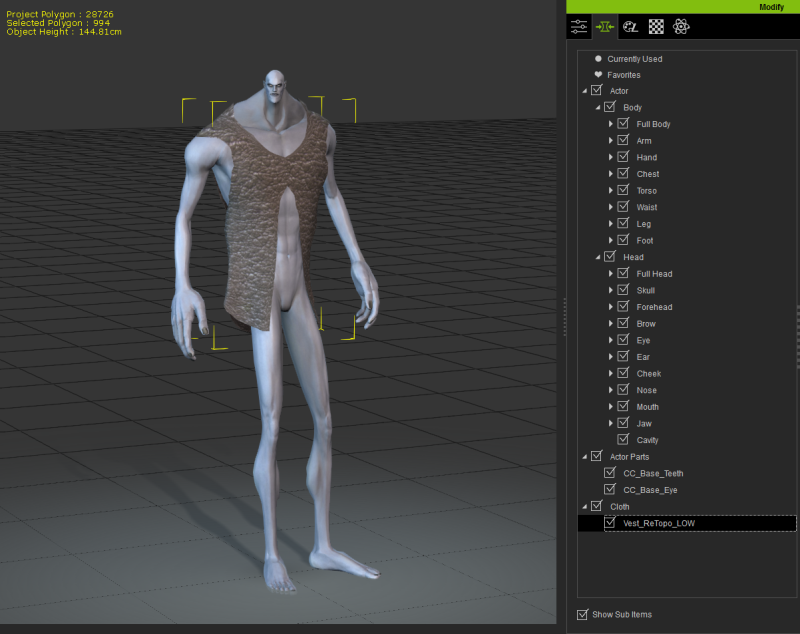
https://forum.reallusion.com/uploads/images/1174af15-f339-47c8-9460-77ec.png
Rampa
Rampa
Posted 9 Years Ago
View Quick Profile
Distinguished Member

Distinguished Member (37.5K reputation)Distinguished Member (37.5K reputation)Distinguished Member (37.5K reputation)Distinguished Member (37.5K reputation)Distinguished Member (37.5K reputation)Distinguished Member (37.5K reputation)Distinguished Member (37.5K reputation)Distinguished Member (37.5K reputation)Distinguished Member (37.5K reputation)

Group: Forum Members
Last Active: Last Week
Posts: 8.2K, Visits: 62.6K
That's the missing materials you showed on your blender model. I wonder why they are going missing?

Try loading that exported FBX file in 3DX, or back into Blender, to double check that the materials are there.

Starting from scratch is a good idea. Test each step of the way to see if you can isolate where the problem occurs.
Alon Dan
Alon Dan
Posted 9 Years Ago
View Quick Profile
Distinguished Member

Distinguished Member (3.2K reputation)Distinguished Member (3.2K reputation)Distinguished Member (3.2K reputation)Distinguished Member (3.2K reputation)Distinguished Member (3.2K reputation)Distinguished Member (3.2K reputation)Distinguished Member (3.2K reputation)Distinguished Member (3.2K reputation)Distinguished Member (3.2K reputation)

Group: Forum Members
Last Active: 4 Years Ago
Posts: 136, Visits: 350
It's that same CRITICAL error again:
https://forum.reallusion.com/uploads/images/0168b1f4-a687-4f79-a874-3ccd.png

I will finish some work here and will try everything again from scratch after restart the computer.
I will update in here, but if anybody else ran into this and can share the solution, please also feel free to let me know.
Rampa
Rampa
Posted 9 Years Ago
View Quick Profile
Distinguished Member

Distinguished Member (37.5K reputation)Distinguished Member (37.5K reputation)Distinguished Member (37.5K reputation)Distinguished Member (37.5K reputation)Distinguished Member (37.5K reputation)Distinguished Member (37.5K reputation)Distinguished Member (37.5K reputation)Distinguished Member (37.5K reputation)Distinguished Member (37.5K reputation)

Group: Forum Members
Last Active: Last Week
Posts: 8.2K, Visits: 62.6K
Which error are you getting now?

Can you post a screenshot of the error you get now?
Alon Dan
Alon Dan
Posted 9 Years Ago
View Quick Profile
Distinguished Member

Distinguished Member (3.2K reputation)Distinguished Member (3.2K reputation)Distinguished Member (3.2K reputation)Distinguished Member (3.2K reputation)Distinguished Member (3.2K reputation)Distinguished Member (3.2K reputation)Distinguished Member (3.2K reputation)Distinguished Member (3.2K reputation)Distinguished Member (3.2K reputation)

Group: Forum Members
Last Active: 4 Years Ago
Posts: 136, Visits: 350
Yes, it's the very first thing I do before clicking the Export button,
I even have a preset of the FBX from Blender to CC so I won't need to mess with it. :)

I will do some more tests, I will also restart my machine for any case... I'm starting to think it's a bug or something, I will also try to use the older version of Blender instead of the latest one.

I'm doing any test I can think of LOL! I must solve this somehow it's driving me crazy hehe.
I will keep on update after a few more tests.
Rampa
Rampa
Posted 9 Years Ago
View Quick Profile
Distinguished Member

Distinguished Member (37.5K reputation)Distinguished Member (37.5K reputation)Distinguished Member (37.5K reputation)Distinguished Member (37.5K reputation)Distinguished Member (37.5K reputation)Distinguished Member (37.5K reputation)Distinguished Member (37.5K reputation)Distinguished Member (37.5K reputation)Distinguished Member (37.5K reputation)

Group: Forum Members
Last Active: Last Week
Posts: 8.2K, Visits: 62.6K
That looks fine.

Did you un-check the leaf-bone box in the export?

Also Make sure you are running Blender 2.77a.

1
2
3


Reading This Topic