|
Author
|
Message
|
|
hoaphamkhanh
|
hoaphamkhanh
Posted 8 Years Ago
|
|
Group: Forum Members
Last Active: 8 Years Ago
Posts: 4,
Visits: 21
|
I used the Neuron Plugin-trial and iclone 7-trial. When I installed Neuron Plugin again encountered this error? How do i connect iclone 7 with axis neuron?
|
|
|
|
|
ninjarama
|
ninjarama
Posted 8 Years Ago
|
|
Group: Forum Members
Last Active: 5 Months Ago
Posts: 12,
Visits: 145
|
I don't know at what point the Perception Neuron Plug-in was fixed, but things are working now (with the pro version of Axis)!! I did download the latest version of the plugin from my reallusion account and I also updated the firmware on each of the neuron sensor so I'm not sure if any of that had to do with it as well.
The main problem now is with the mocap sensors and calibration inside Axis software... so janky, especially with the feet and the fingers. No matter how many times I run the calibration, fingers are curling and feet are like pigeon toes! Nothing to do with iClone though...
I'm glad the plugin doesn't crash anymore! Hopefully it all still works with iClone 7 =)
|
|
|
|
|
mtakerkart
|
mtakerkart
Posted 9 Years Ago
|
|
Group: Forum Members
Last Active: 3 Months Ago
Posts: 3.2K,
Visits: 29.2K
|
I don't know for the joint limitations.
Don't forget to setup your body profil in the axis Neuron with your real body measurements, it helps.
Like in "hollywood" I suggest also to put real props on your body to simulate the avatar size body.
The more you're accurate on reccord the more you save time in edition.
Yes motion capture take practice performance for fast/good result ;)
|
|
|
|
|
davood.kharmanzar
|
davood.kharmanzar
Posted 9 Years Ago
|
|
Group: Forum Members
Last Active: 2 Weeks Ago
Posts: 140,
Visits: 3.2K
|
mtakerkart (12/22/2016)
it's helpfull to Broadcast live inside Iclone with your stylised character. The performer can see the space limit moves to not penetrate the character shape.yup ... i'm just using live broadcasting ... and i'm performer :] but it's very hard to matching me with characters :\ is it possible to define joint rotation limitations for iclone character?
|
|
|
|
|
mtakerkart
|
mtakerkart
Posted 9 Years Ago
|
|
Group: Forum Members
Last Active: 3 Months Ago
Posts: 3.2K,
Visits: 29.2K
|
You can edit position Arms/Hand with the "Edit motion layer" Tab.
Suggestion: When performing with actors and the Neuron suit , it's helpfull to Broadcast live
inside Iclone with your stylised character. The performer can see the space limit moves to not
penetrate the character shape.
|
|
|
|
|
davood.kharmanzar
|
davood.kharmanzar
Posted 9 Years Ago
|
|
Group: Forum Members
Last Active: 2 Weeks Ago
Posts: 140,
Visits: 3.2K
|
howto matching the motions of source actor of neuron mocap with the stylized iclone's character?
my biggest problem is matching the motion arms and hands of neuron actor with iclone's stylized character like as tokomotion characters ... arm and hand going into the body or face :\
is it possible to retargeting inside iclone? (like as ikinema for motionbuilder?)
|
|
|
|
|
anthony.ur
|
anthony.ur
Posted 9 Years Ago
|
|
Group: Forum Members
Last Active: 4 Years Ago
Posts: 2,
Visits: 7
|
Every time I launch the Mocap Plugin, and select preview the software instantly crashes. OS is Windows 10, latest Nvidia Driver, GTX 765m, Latest version of Axis Neuron Pro, latest Iclone 6.52 Latest Neuron Plugin 1.1. I am pulling my hair out with this trying to resolve the technical issue. I have already uninstalled and reinstalled both. Brand new user to iClone and I am not happy thus far. 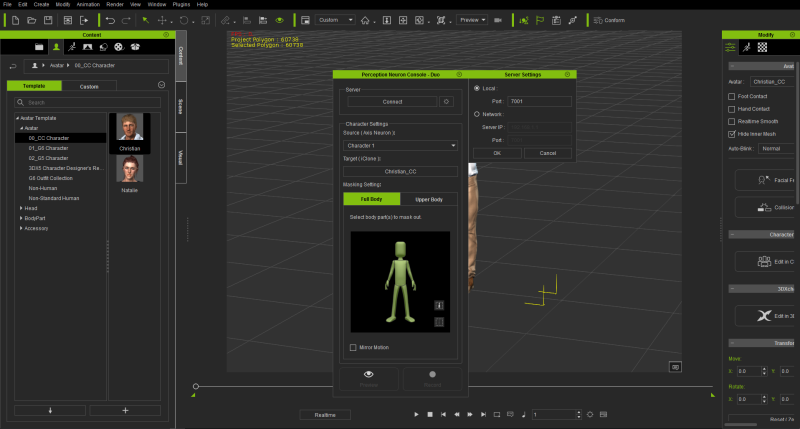 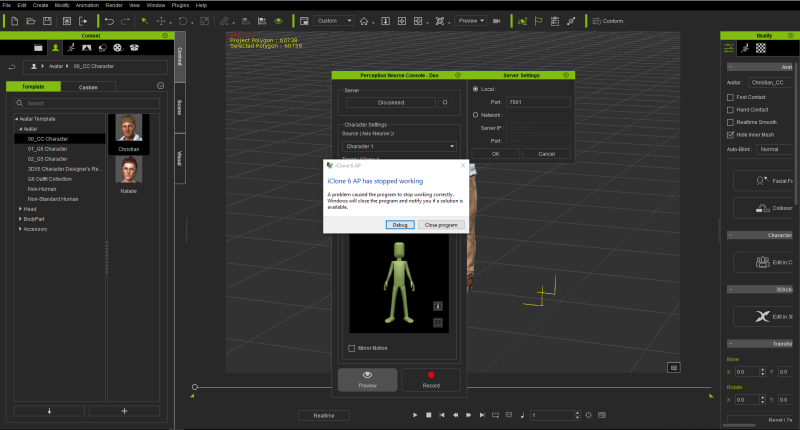
|
|
|
|
|
ninjarama
|
ninjarama
Posted 9 Years Ago
|
|
Group: Forum Members
Last Active: 5 Months Ago
Posts: 12,
Visits: 145
|
Can you explain how you got it to work? I have the exact same issue... I clicked on the plugin from the menu (as shown in your .gif image) and it instantly crashes iClone. Thanks!
|
|
|
|
|
gareth_15
|
gareth_15
Posted 9 Years Ago
|
|
Group: Forum Members
Last Active: Last Year
Posts: 5,
Visits: 29
|
all fixed, reinstalled all again
seemed to work, maybe plugin had partial download
very very powerful stuff
Gareth
www.luxastudio.com
|
|
|
|
|
gareth_15
|
gareth_15
Posted 9 Years Ago
|
|
Group: Forum Members
Last Active: Last Year
Posts: 5,
Visits: 29
|
Hi Beat
Where did you find this plugin
Axis Neuron 3.7????
I can only find 3.6
Gareth
|
|
|
|