|
Author
|
Message
|
|
marc_44
|
marc_44
Posted 10 Years Ago
|
|
Group: Forum Members
Last Active: 9 Years Ago
Posts: 3,
Visits: 72
|
Hi, I'm trying to export the Heidi character out of iclone for use in Unity. However, her hair disappears when I click to edit in 3dxchange. Iclone Click to Edit in 3dxchange Click to Edit in 3dxchange Hair Missing in 3dxchange Hair Missing in 3dxchange
 I don't have this problem when I try to export the male character (Mason) and I don't see any different properties for Heidi's hair. Any idea on how to keep her hair? Thanks
|
|
|
|
|
jesus.amaro
|
jesus.amaro
Posted 10 Years Ago
|
|
Group: Forum Members
Last Active: 10 Years Ago
Posts: 1,
Visits: 7
|
Hello,
I Just installed iclone 3dxchange pipeline 6.52 in windows 10 and it would not open, it opens a small empty window and closes it, thats all it does, i Unistall and reinstall but it does the same thing...
Thnks for the help
|
|
|
|
|
Peter (RL)
|
Peter (RL)
Posted 10 Years Ago
|
|
Group: Administrators
Last Active: 2 Years Ago
Posts: 23.1K,
Visits: 36.6K
|
Important: If you do find any additional bugs, issues or glitches in the 6.51 update, please can you first report them in the Feedback Tracker. Then feel free to discuss the issues in this thread. However do make use of the Feedback Tracker first to log the issue.
Peter
Forum Administrator www.reallusion.com
|
|
|
|
|
Viktors
|
Viktors
Posted 10 Years Ago
|
|
Group: Forum Members
Last Active: 8 Years Ago
Posts: 16,
Visits: 30
|
3DXchange 6.51 have a problem with replace mesh for CC characters. Export mesh, replace with same mesh and UV change 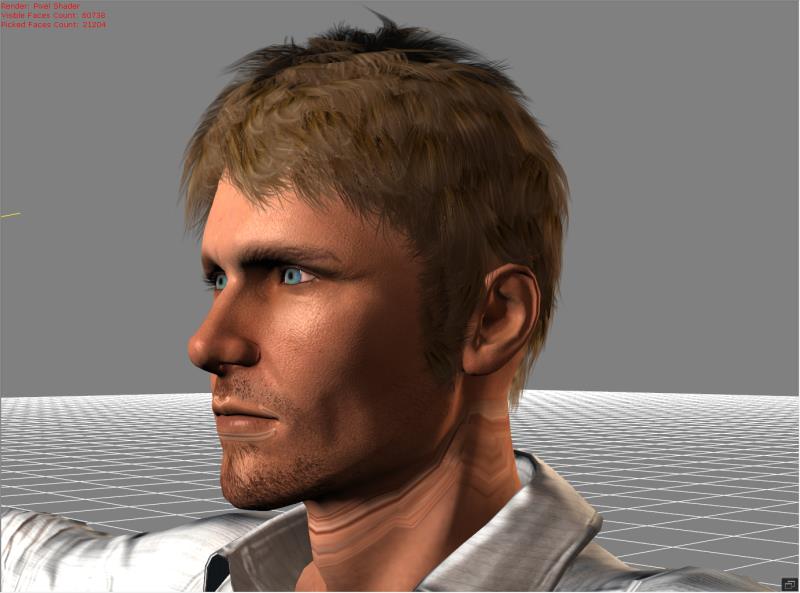
|
|
|
|
|
illusionLAB
|
illusionLAB
Posted 10 Years Ago
|
|
Group: Forum Members
Last Active: 4 Years Ago
Posts: 393,
Visits: 4.8K
|
OK, I just noticed that there's a v6.51 just released which is meant to address this "not enough memory" issue... cheers!
|
|
|
|
|
RobertoColombo
|
RobertoColombo
Posted 10 Years Ago
|
|
Group: Forum Members
Last Active: 5 Years Ago
Posts: 1.6K,
Visits: 3.0K
|
animagic (7/26/2016)
I can confirm Roberto's issue. I just tried to replace a diffuse texture on an FBX file and even though it shows in the Diffuse thumbnail, it doesn't update on the item.
EDIT: After I replaced another texture on the same item, it did show up. I then did an undo and the first texture was replaced as well...:unsure:Hi Job, thanks for the feedback. I just sent a fbx file (which shows the issue in 3DX6 but work correctly in 3DX5) to RL so that they can check this case and hopefully fix it. Cheers Roberto
My PC:
OS: Windows 10 Pro English 64-bit / CPU: Intel i7-9700 3.6GHz / MB: ASUS ROG Strix Z390 RAM: 32GB DDR4 2.6GHz / HD: 2TB+3TB / SSD: 2x512GB Samsung 860 EVO + 1x2TB Samsung
VB: Palit GTX2080 TI GamingPro 11GB / AB: embedded in the MB and VB (audio from the MOTU M4 I/F) / DirectX: 12
|
|
|
|
|
illusionLAB
|
illusionLAB
Posted 10 Years Ago
|
|
Group: Forum Members
Last Active: 4 Years Ago
Posts: 393,
Visits: 4.8K
|
I just discovered I am unable to export FBX or OBJ models from 3Dxchange Pipeline 6.5 - "not enough memory" is the error message. Of course I had no problems on the same computer with the previous build, so one can assume that this is a result of the latest version.
|
|
|
|
|
jollyro
|
jollyro
Posted 10 Years Ago
|
|
Group: Forum Members
Last Active: 2 Years Ago
Posts: 84,
Visits: 503
|
I got a funny thing happening, when I installed the Update. My Program disappeared from my computer. Windows said, it is there, it was in the registry, but I could not find any trace of the executable file anywhere on my PC. I had no other choice than uninstalling 3DXchange and install the new version. Worked perfect, so far no trouble. Just mentioning, no idea if it is the software or my computer or Win 10... By the way, Apple now helps Windows.... 
|
|
|
|
|
animagic
|
animagic
Posted 10 Years Ago
|
|
Group: Forum Members
Last Active: Last Month
Posts: 15.8K,
Visits: 31.4K
|
I can confirm Roberto's issue. I just tried to replace a diffuse texture on an FBX file and even though it shows in the Diffuse thumbnail, it doesn't update on the item. EDIT: After I replaced another texture on the same item, it did show up. I then did an undo and the first texture was replaced as well...:unsure:
|
|
|
|
|
RobertoColombo
|
RobertoColombo
Posted 10 Years Ago
|
|
Group: Forum Members
Last Active: 5 Years Ago
Posts: 1.6K,
Visits: 3.0K
|
Hi Peter, I reported the issue in the feedbacl tracker, but in reality I am not sure whether it is a real bug or simly I am missing something. Let me report the issue also here.
I have 3DXChange 5 and 6 and I noticed the following different behavior, which puzzles me:
- in version 5, I can assign a texture to the Diffuse channel of an imported FBX file and the texture correctly appears - in version 6, given THE SAME FBX FILE, after assigning the same texture in the same way as just described, the texture does not appear
No idea what I am missing: any suggestion is more than welcomed...
Thanks Regards
Roberto
My PC:
OS: Windows 10 Pro English 64-bit / CPU: Intel i7-9700 3.6GHz / MB: ASUS ROG Strix Z390 RAM: 32GB DDR4 2.6GHz / HD: 2TB+3TB / SSD: 2x512GB Samsung 860 EVO + 1x2TB Samsung
VB: Palit GTX2080 TI GamingPro 11GB / AB: embedded in the MB and VB (audio from the MOTU M4 I/F) / DirectX: 12
|
|
|
|