|
Author
|
Message
|
|
justaviking
|
justaviking
Posted 9 Years Ago
|
|
Group: Forum Members
Last Active: Last Year
Posts: 8.2K,
Visits: 26.5K
|
TheOldBuffer (4/10/2016)
Can't import sketchup files with 3dx.
I'm sure Ive seen another post somewhere with same problem but I cant find it,
Anyone have any clues?I did it a few weeks ago, with mixed results. While looking for a canoe, two of three models failed, one worked perfectly. Also did a fishing rod with no problems. I did not spend time investigating why those two failed, but maybe you're encountering the same problem.
iClone 7... Character Creator... Substance Designer/Painter... Blender... Audacity...
Desktop (homebuilt) - Windows 10, Ryzen 9 3900x CPU, GTX 1080 GPU (8GB), 32GB RAM, Asus X570 Pro motherboard, 2TB SSD, terabytes of disk space, dual monitors.
Laptop - Windows 10, MSI GS63VR STEALTH-252, 16GB RAM, GTX 1060 (6GB), 256GB SSD and 1TB HDD
|
|
|
|
|
TheOldBuffer
|
TheOldBuffer
Posted 9 Years Ago
|
|
Group: Forum Members
Last Active: Last Year
Posts: 429,
Visits: 6.4K
|
Ive never had a problem before converting sketchup files until now. The error message I get says the file Im trying to import is too new and to try importing a file older than 2016 but Ive tried files of various age , size, whatever and still no joy.
John
Homebuilt computer - Windoze 10, INTEL i9 9900 k @ 5.1 GHz, EVGA RTX 2080 TI XC ULTRA, 16GB 3100 MHz RAM, Asus Maximus Hero XI motherboard, Sound blaster Z series. iClone6 & 7 Pipeline, Crazytalk 8, Crazytalk Animator 2, Facefilter, Pop video 3, Hitfilm 4Pro, Cubase 8.5 Pro,
|
|
|
|
|
animagic
|
animagic
Posted 9 Years Ago
|
|
Group: Forum Members
Last Active: Last Month
Posts: 15.8K,
Visits: 31.4K
|
I don't have 2016 installed so I tried up to 2015 (downloaded from 3D warehouse). For a while Sketchup 8 or earlier was to version use (when it was still Google). But I've never encountered (as far as I can remember) that I couldn't use a model at least in one version. Is it a model you created yourself or downloaded? If the latter, we could test it.
|
|
|
|
|
wires
|
|
|
Group: Forum Members
Last Active: 4 Months Ago
Posts: 5.7K,
Visits: 26.5K
|
I just downloaded this model in 3 versions, 8, 15 and 16. 8 and 15 open in 3DXchange without any problems (except for the fact that it is upside down). The 16 model just crashed 3DXchange during loading.
Gerry
System: Win 10 Pro (21H2), Asus X99-E WS, CPU i7-5930K -3,5 GHz, 32 GB DDR4 2666-16 RAM, NVidia GTX 1080 Ti GPU - 11 GB VRAM(Driver Studio-536.99), Samsung 850 Pro 512 GB SSD, 6 TB HD storage.
|
|
|
|
|
TheOldBuffer
|
TheOldBuffer
Posted 9 Years Ago
|
|
Group: Forum Members
Last Active: Last Year
Posts: 429,
Visits: 6.4K
|
3dx will not open any sketchup files even ones I have previously had no problems converting. Its only after I updated to 6.42 I've had problems. up till then I've never had a problem with any sketchup file.
My system is set to open 3dx by default when double clicking a sketchup file. I havent tried using "open" command inside 3dx. I'll try that later as it could be a windoze problem.
Homebuilt computer - Windoze 10, INTEL i9 9900 k @ 5.1 GHz, EVGA RTX 2080 TI XC ULTRA, 16GB 3100 MHz RAM, Asus Maximus Hero XI motherboard, Sound blaster Z series. iClone6 & 7 Pipeline, Crazytalk 8, Crazytalk Animator 2, Facefilter, Pop video 3, Hitfilm 4Pro, Cubase 8.5 Pro,
|
|
|
|
|
GrannyJ
|
GrannyJ
Posted 9 Years Ago
|
|
Group: Forum Members
Last Active: 4 Years Ago
Posts: 502,
Visits: 1.5K
|
I just downloaded this 3d Warehouse model: https://3dwarehouse.sketchup.com/model.html?id=5847f240511c68c4543df75232f6ff2b in all formats & it opened with 6.42, no problem at all.... Also downloaded this model: https://3dwarehouse.sketchup.com/model.html?id=u5d9385fb-9bdb-42fa-8504-9add490d1551in all formats available & all opened without issue in 3Dxchange 6.42

iClone Certified Content Developer and Author of the Pinky Frink® Adventure Series & the Pinky Frink® Learning Books
site: Granny J's 3D Attic SKYPE = grannyjsplace email: grannyj@grannyjs3dattic.com
MY RIG: GPU: Dual GeForce GTX 970M | CPU: Intel(R) Core(TM)i7-5930K @3.50GHz| 32.00 GB RAM | OS: Win 7 Pro SP1 | DX11
|
|
|
|
|
wires
|
|
|
Group: Forum Members
Last Active: 4 Months Ago
Posts: 5.7K,
Visits: 26.5K
|
The models that you linked to are only available up to SU 2015, at the moment it would appear that only SU 2016 models cannot be opened in 3DXchange - see the comments in my post above. It's not something that surprizes me though as SU 2016 is fairly new.
Gerry
System: Win 10 Pro (21H2), Asus X99-E WS, CPU i7-5930K -3,5 GHz, 32 GB DDR4 2666-16 RAM, NVidia GTX 1080 Ti GPU - 11 GB VRAM(Driver Studio-536.99), Samsung 850 Pro 512 GB SSD, 6 TB HD storage.
|
|
|
|
|
TheOldBuffer
|
TheOldBuffer
Posted 9 Years Ago
|
|
Group: Forum Members
Last Active: Last Year
Posts: 429,
Visits: 6.4K
|
Ive just tried opening the file that GrannyJ posted and I'm getting the same error. I'm thinking I should reinstall 3dx, it is only since I installed 6.42 I've had any sort of problem with 3dx its normally very stable and reliable.Thanks to everyone who has replied and helped. John 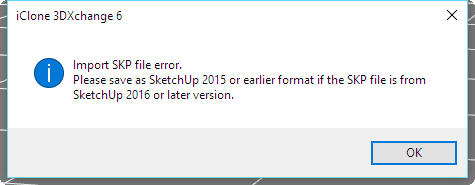 Homebuilt computer - Windoze 10, INTEL i9 9900 k @ 5.1 GHz, EVGA RTX 2080 TI XC ULTRA, 16GB 3100 MHz RAM, Asus Maximus Hero XI motherboard, Sound blaster Z series. iClone6 & 7 Pipeline, Crazytalk 8, Crazytalk Animator 2, Facefilter, Pop video 3, Hitfilm 4Pro, Cubase 8.5 Pro,
|
|
|
|
|
TheOldBuffer
|
TheOldBuffer
Posted 9 Years Ago
|
|
Group: Forum Members
Last Active: Last Year
Posts: 429,
Visits: 6.4K
|
I've uninstalled and then reinstalled 3dx and still got exactly the same problem. Doh !
Homebuilt computer - Windoze 10, INTEL i9 9900 k @ 5.1 GHz, EVGA RTX 2080 TI XC ULTRA, 16GB 3100 MHz RAM, Asus Maximus Hero XI motherboard, Sound blaster Z series. iClone6 & 7 Pipeline, Crazytalk 8, Crazytalk Animator 2, Facefilter, Pop video 3, Hitfilm 4Pro, Cubase 8.5 Pro,
|
|
|
|
|
Rampa
|
|
|
Group: Forum Members
Last Active: Last Week
Posts: 8.2K,
Visits: 62.6K
|
Almost all 3DWarehouse models are available in older Sketchup versions, and you should always use an older one for compatibility.
|
|
|
|