|
By Peter (RL) - 10 Years Ago
|
Hi Everyone,
3DXchange 6.4 has been released today and with it comes a number of fixes and enhancements.
However if you do still find any bugs, issues, glitches or other general annoyances, please can you post them here.
As always, do feel free to post general feedback in your own threads, but it will help us greatly if we can keep all outstanding 3DXchange issues in one place. This will help the development team track and eradicate any nagging problems.
Please do try to provide your full system specifications and a detailed description of the problem when posting.
Many Thanks.
|
|
By rampart - 10 Years Ago
|
I downloaded installed patch 6.4 for 3dxchange.
Oops! When I load application and click update it says I have 6.4.1327 Installed, and the latest version is 6.4.2527
So where do you get this file or the message a mistake?
|
|
By jamie3d - 10 Years Ago
|
|
Windows is telling me 3dexchange 6.4 instal has an invalid signature and could harm my pc?
|
|
By Peter (RL) - 10 Years Ago
|
|
rampart (2/2/2016)
I downloaded installed patch 6.4 for 3dxchange.
Oops! When I load application and click update it says I have 6.4.1327 Installed, and the latest version is 6.4.2527
So where do you get this file or the message a mistake?
There was an issue with build numbers but this has now been corrected. The latest build of 3DXchange 6 is 6.4.1327. Apologies for the confusion.
|
|
By Peter (RL) - 10 Years Ago
|
|
jamie3d (2/3/2016)
Windows is telling me 3dexchange 6.4 instal has an invalid signature and could harm my pc?
There is an issue with the signature in the updates but it won't harm your computer to install anyway.
However you can update using LiveUpdate if you prefer. If you do use LiveUpdate, please update iClone 6 first, then perform the Character Creator and if applicable the 3DXchange 6 update. You can start LiveUpdate from Start > All Apps > Reallusion > LiveUpdate.
|
|
By shavmark - 10 Years Ago
|
this issue is still present in 6.4 https://forum.reallusion.com/241119/Export-to-FBX-resets-images-to-applocaltemp3dfx
I tried http://usa.autodesk.com/adsk/servlet/pc/item?siteID=123112&id=22694909 and by doing an import/export and it seemed to help by moving the files out of the temp space as appropriate.
|
|
By animagic - 10 Years Ago
|
I can confirm this. I exported an iAvatar to a specific directory and found only the FBX file. There should also be a <avatar-name>.FBM folder with the textures. The only way to have this folder created is by reimporting the exported character as this forces the creation of a .FBM folder.
This used to work; I have an export from November 2015 that is correct.
EDIT: To clarify: this is a problem, because as soon as you close 3DXchange your exported FBX file will have no textures.
|
|
By Wolfzone Digital - 10 Years Ago
|
I can also confirm this. When exporting to .fbx no texture file.
Also the fbx does not keep the all the viseme and facial morphs of CC characters so facial animation breaks down.
|
|
By 3DUncovered - 10 Years Ago
|
Exporting to fbx to use in unreal engine 4, something is happening with the root bone.. lost compatibility with previous exports because the root bone has now gone after export.. hips become root.. although it does look like these is remains root bone from ground as can see in screenshot. Whats changed, how can I get the root bone back how it was?   |
|
By animagic - 10 Years Ago
|
|
@3DUncovered: Did you try to reimport an exported model from 3DXchange to see if the root disappears then as well? Obviously export to import breaks down somewhere; the question is where.
|
|
By Peter (RL) - 10 Years Ago
|
Thanks for bringing this to our attention again. To be honest I'm not sure how this slipped through the net in the latest update. We will try to get this fixed as soon as possible.
Apologies for the inconvenience caused.
|
|
By 3DUncovered - 10 Years Ago
|
animagic (2/26/2016)
@3DUncovered: Did you try to reimport an exported model from 3DXchange to see if the root disappears then as well? Obviously export to import breaks down somewhere; the question is where.
Yes.. I've done this.. and it breaks down during the export from 3DXchange.
Comparison of the exported FBX reimported back into 3DXchange, between v6.3 and v6.4 shows the now missing Node/Bone.
 
|
|
By tournamentdan - 10 Years Ago
|
Peter (RL) (2/27/2016)
Thanks for bringing this to our attention again. To be honest I'm not sure how this slipped through the net in the latest update. We will try to get this fixed as soon as possible. Apologies for the inconvenience caused.
I find it hard to understand how this could slip through. Especially when I also confirmed this in my own thread over two months ago.
https://forum.reallusion.com/269234/FBX-export-problem
Then again you did not acknowledge that there was anything wrong in his post. Nor mine. So how could you know there was a problem if you don't read the posts? Also how can you not test your product before releasing a version?
This has not worked for months. It should of been fixed within hours.
|
|
By javiersevillasanchez - 10 Years Ago
|
3DUncovered (2/25/2016)
Exporting to fbx to use in unreal engine 4, something is happening with the root bone.. lost compatibility with previous exports because the root bone has now gone after export.. hips become root.. although it does look like these is remains root bone from ground as can see in screenshot. Whats changed, how can I get the root bone back how it was?
Yes, I'm experience the same problem. The Root has disappeared.
There's a walk around here:
https://www.youtube.com/watch?v=-qpyZkF1LWE
But that means that you have to go and do that with each animation, needless to say that you have to spend an extra $4,000.
PLEASE BRING THE ROOT BACK!!
|
|
By sterlingy - 10 Years Ago
|
Guys,
I'm not sure what to do. I'm going to be travelling for the next two weeks and intend on working with CC, iClone and Unreal Engine. Currently running iClone 6.3 (because I haven't used my laptop for this stuff in a long time.) Based on what I have read on this thread, I might screw myself over if I update to 6.4. What do people suggest?
-Sterling
|
|
By Snarp Farkle - 10 Years Ago
|
|
sterlingy (3/24/2016)
Guys,
I'm not sure what to do. I'm going to be travelling for the next two weeks and intend on working with CC, iClone and Unreal Engine. Currently running iClone 6.3 (because I haven't used my laptop for this stuff in a long time.) Based on what I have read on this thread, I might screw myself over if I update to 6.4. What do people suggest?
-Sterling
As long as you can take your current custom folders and templates with you it should be fine I think. You may not be able to make custom sliders though.
|
|
By sterlingy - 10 Years Ago
|
My concern is that exporting motion files from my character will not match the skeletons already inside Unreal Engine. This is an absolute disaster and the fix would be to re-export and import everything, plus all the additional setup in UE4. In short DAYS of work.
The above problem is that it has been posted that the root bone in the current 6.4 build is not the same as in previous builds.
-Sterling
|
|
By TheOldBuffer - 10 Years Ago
|
Can't import sketchup files with 3dx.
I'm sure Ive seen another post somewhere with same problem but I cant find it,
Anyone have any clues?
Thanks
John
|
|
By animagic - 10 Years Ago
|
|
sterlingy (3/24/2016)
My concern is that exporting motion files from my character will not match the skeletons already inside Unreal Engine. This is an absolute disaster and the fix would be to re-export and import everything, plus all the additional setup in UE4. In short DAYS of work.
The above problem is that it has been posted that the root bone in the current 6.4 build is not the same as in previous builds.
If the 6.3 functionality is sufficient for your needs I would stick with that. The root bone problem in 6.4 has been confirmed, but right now there is no fix (other then adding the root bone in Maya; there is a tutorial for that).
You would probably then want to have iClone at 6.3 as well, in order for 3DXchange to handle iClone imports. My understanding is that versions need to be in sync.
|
|
By animagic - 10 Years Ago
|
|
TheOldBuffer (4/10/2016)
Can't import sketchup files with 3dx.
I'm sure Ive seen another post somewhere with same problem but I cant find it,
Anyone have any clues?
I just tried this and it works for me. Is it a very large model?
|
|
By justaviking - 10 Years Ago
|
|
TheOldBuffer (4/10/2016)
Can't import sketchup files with 3dx.
I'm sure Ive seen another post somewhere with same problem but I cant find it,
Anyone have any clues?
I did it a few weeks ago, with mixed results.
While looking for a canoe, two of three models failed, one worked perfectly. Also did a fishing rod with no problems. I did not spend time investigating why those two failed, but maybe you're encountering the same problem.
|
|
By TheOldBuffer - 10 Years Ago
|
Ive never had a problem before converting sketchup files until now. The error message I get says the file Im trying to import is too new and to try importing a file older than 2016 but Ive tried files of various age , size, whatever and still no joy.
John
|
|
By animagic - 10 Years Ago
|
I don't have 2016 installed so I tried up to 2015 (downloaded from 3D warehouse). For a while Sketchup 8 or earlier was to version use (when it was still Google). But I've never encountered (as far as I can remember) that I couldn't use a model at least in one version.
Is it a model you created yourself or downloaded? If the latter, we could test it.
|
|
By wires - 10 Years Ago
|
|
I just downloaded this model in 3 versions, 8, 15 and 16. 8 and 15 open in 3DXchange without any problems (except for the fact that it is upside down). The 16 model just crashed 3DXchange during loading.
|
|
By TheOldBuffer - 10 Years Ago
|
3dx will not open any sketchup files even ones I have previously had no problems converting. Its only after I updated to 6.42 I've had problems. up till then I've never had a problem with any sketchup file.
My system is set to open 3dx by default when double clicking a sketchup file. I havent tried using "open" command inside 3dx. I'll try that later as it could be a windoze problem.
|
|
By GrannyJ - 10 Years Ago
|
I just downloaded this 3d Warehouse model: https://3dwarehouse.sketchup.com/model.html?id=5847f240511c68c4543df75232f6ff2b in all formats & it opened with 6.42, no problem at all....
Also downloaded this model: https://3dwarehouse.sketchup.com/model.html?id=u5d9385fb-9bdb-42fa-8504-9add490d1551
in all formats available & all opened without issue in 3Dxchange 6.42
|
|
By wires - 10 Years Ago
|
The models that you linked to are only available up to SU 2015, at the moment it would appear that only SU 2016 models cannot be opened in 3DXchange - see the comments in my post above. It's not something that surprizes me though as SU 2016 is fairly new.
|
|
By TheOldBuffer - 10 Years Ago
|
Ive just tried opening the file that GrannyJ posted and I'm getting the same error. I'm thinking I should reinstall 3dx, it is only since I installed 6.42 I've had any sort of problem with 3dx its normally very stable and reliable.Thanks to everyone who has replied and helped.
John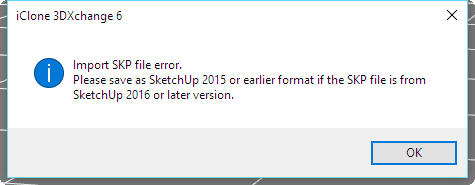
|
|
By TheOldBuffer - 10 Years Ago
|
|
I've uninstalled and then reinstalled 3dx and still got exactly the same problem. Doh !
|
|
By Rampa - 10 Years Ago
|
|
Almost all 3DWarehouse models are available in older Sketchup versions, and you should always use an older one for compatibility.
|
|
By TheOldBuffer - 10 Years Ago
|
I've tried files from all the download options going way back. None will open and I get the same message.
Every other type of file opens as expected its only sketchup that wont.
|
|
By TheOldBuffer - 10 Years Ago
|
|
On a brighter note, Iclone 6.42 has been running very stable since the last update. YAAAAAAAAAAAAAAAAAAAAAAAAAAAAAAAAAAAAAAAAAAAAAY !
|
|
By javiersevillasanchez - 10 Years Ago
|
I see it beneficial to open a different thread just for this issue. It is important enough.
We are experiencing many problems, even adding the Root in Maya.
I followed https://www.youtube.com/watch?v=6QGh06nF6 and https://www.youtube.com/watch?v=-qpyZkF1LWE but Morph Targets are lost, so facial expressions are not imported into Unreal.
I don't know how to downgrade to 6.3. Every time that I try to install it, I get the "There's a new version" message, so I can't unistall just 3dxchange.
We are either programmers or Artists, and we lack knowledge of certain tools such as Maya, that's why we decided to go for iClone.
We only need to know if this is going to be fixed or not.
Many thanks.
|
|
By Peter (RL) - 10 Years Ago
|
|
New Feedback Tracker Beta - Now Open
No application is 100% free of issues or bugs, as there is always room to improve. So we have created a place where we can all work together to make your products better by making your suggestions visible to all, having them well-categorized, easy to track and easy to implement.
For this we have decided to allow all users to actively participate in our product improvement and development cycles with help from our brand-new Feedback Tracker platform that will put you in the developer seat, allowing you to suggest, vote, prioritize and track all product issues, findings, and enhancements. Ensuring the most efficient and transparent collaboration with you -- our partners. To find the Feedback Tracker please click HERE. What can the Feedback Tracker do for you?
** Check reported bugs, saving your time on duplicated reporting.
** Report bugs and suggested feature enhancements.
** Voting priority for feature enhancements and bug fixes.
|