Profile Picture

Vector Displacement - Help?

Posted By Alon Dan 10 Years Ago
You don't have permission to rate!
Author
Message
Alon Dan
Problem.png
Alon Dan
Posted 10 Years Ago
View Quick Profile
Distinguished Member

Distinguished Member (3.2K reputation)Distinguished Member (3.2K reputation)Distinguished Member (3.2K reputation)Distinguished Member (3.2K reputation)Distinguished Member (3.2K reputation)Distinguished Member (3.2K reputation)Distinguished Member (3.2K reputation)Distinguished Member (3.2K reputation)Distinguished Member (3.2K reputation)

Group: Forum Members
Last Active: 4 Years Ago
Posts: 136, Visits: 350
Hello All,
I'm trying to make vector displacement work in iClone but I'm not sure what I'm doing wrong and need some help to solve this.

This is what I've done while testing this:
1 - Created something in ZBrush (High Poly).
2 - ZRemeshed it to get a Low-Poly version from the original High-Poly version.
3 - UV mapped, and did some poly paint to have a very basic Diffuse Map (texture color).
4 - Exported the Maps I need for this test:  Vector Displacement, Normal Map, Texture from Polypaint (diffuse map).
5 - Exported the Low-Poly version .OBJ 

So far so good for this test I do, now for the problem:
1 - I've Imported the Low-Poly version .OBJ to 3DXchange.
2 - I've imported the maps:  Normal Map, Diffuse Map (can't see a way to import Vector Displacement map in 3DXchange).
3 - Apply to iClone, and there I've imported the Vector Displacement Map.

The problem is that I'm not sure what I do wrong but I can only see the Low-Poly .OBJ ugly faces even with the Vector Displacement import, I thought it will also SMOOTH the object but I think I do something wrong and not sure how do I get to see the very detailed (not these ugly low-poly faces, but the smooth details of the vector displacement map)

Can somebody please tell me what I did wrong, maybe I skipped something? 
Sorry about my bad English and thanks ahead!
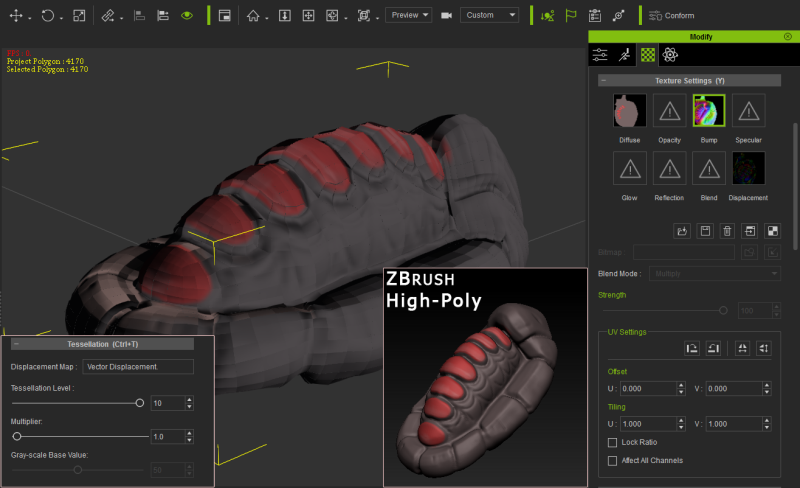
https://forum.reallusion.com/uploads/images/0368c051-bd50-4be2-a1fa-fde9.png


Threaded View

Threaded View
Forum Post Vector Displacement - Help? By Alon Dan ( 10 Years Ago )
Forum Post your put a normal map or grey bump map in the bump map space and a... By urbanlamb ( 10 Years Ago )
Forum Post [quote][b]urbanlamb (11/16/2015)[/b][hr]your put a normal map or grey... By Alon Dan ( 10 Years Ago )
Forum Post dont use the exr files I find they dont work most of the time...... By urbanlamb ( 10 Years Ago )
Forum Post When I convert the exr (32bit float) to .PNG it it's looking much... By Alon Dan ( 10 Years Ago )
Forum Post Try upping the "Tesselation" value. It is different than the real-time... By Rampa ( 10 Years Ago )
Forum Post [quote][b]rampa (11/16/2015)[/b][hr]Try upping the "Tesselation"... By Alon Dan ( 10 Years Ago )
Forum Post I usually just type in 99 if I want totally smooth, because it's easy.... By Rampa ( 10 Years Ago )
Forum Post [quote][b]rampa (11/16/2015)[/b][hr]I usually just type in 99 if I... By Alon Dan ( 10 Years Ago )
Forum Post Displacement does not work across UV lines. It's basically a rendering... By Rampa ( 10 Years Ago )
Forum Post Yeah this is the one issue with tesselation. You need to be mindful... By urbanlamb ( 10 Years Ago )
Forum Post you mean ...................................Sw00000p is right??? By wendyluvscatz ( 10 Years Ago )
Forum Post [quote][b]wendyluvscatz (11/17/2015)[/b][hr]you mean... By urbanlamb ( 10 Years Ago )
Forum Post [quote][b]rampa (11/17/2015)[/b][hr]Displacement does not work across... By Alon Dan ( 10 Years Ago )
Forum Post It is extremely dependent on the UV's, so use it where it does not... By Rampa ( 10 Years Ago )
Forum Post Thanks for trying to help me in this, I appreciate it :) OK, so I... By Alon Dan ( 10 Years Ago )
Forum Post You might want to make sure your vertexes are welded. There is a box... By Rampa ( 10 Years Ago )


Reading This Topic