|
Author
|
Message
|
|
e1_scheer
|
e1_scheer
Posted 11 Years Ago
|
|
Group: Forum Members
Last Active: 3 Years Ago
Posts: 120,
Visits: 1.1K
|
Hi,
Every time i load in a G6 character and push the neuron mocap plugin Iclone crashes with the following
error message :; "iclone 6ap has stopped working"
Problem Event Name: APPCRASH
Application Name: iClone.exe
Application Version: 6.2.2416.1
Application Timestamp: 567162d8
Fault Module Name: ICCreateFaceQt.dll
Fault Module Version: 0.0.0.0
Fault Module Timestamp: 5671620c
Exception Code: c0000005
Exception Offset: 00000000008be79d
OS Version: 6.1.7601.2.1.0.768.3
Locale ID: 2060
Additional Information 1: 8e82
Additional Information 2: 8e82304a30d732412bc6937cd552553c
Additional Information 3: 3076
Additional Information 4: 307682633391d8bcf916f49b6e1c9994
Any help would be welcome,
e1
|
|
|
|
|
Beat_CH
|
Beat_CH
Posted 11 Years Ago
|
|
Group: Forum Members
Last Active: 10 Years Ago
Posts: 5,
Visits: 39
|
Dear all,
I tested several setups in the Neuron-Settings.
The following settings are working fine:
Rotation: YXZ (figure move identical as in the neuron., Other settings: Orientation of the figure changes.)
Displacement: on, (if off. figure moves at the same spot)
Reference: off (if on: figure collapses)
So far it works fine with the data-recording, when starting the Plug-in via "Pull-Down-Menu": Plugins.
Regards
Beat
|
|
|
|
|
e1_scheer
|
e1_scheer
Posted 11 Years Ago
|
|
Group: Forum Members
Last Active: 3 Years Ago
Posts: 120,
Visits: 1.1K
|
Just tried it on another machine with windows 10 installed instead of win 7,
but I get the same crash. Just wondering, does the neuron mocap plugin
actually work with the latest iclone trial version or do you need a specific
iclone version?
e1
|
|
|
|
|
animagic
|
animagic
Posted 11 Years Ago
|
|
Group: Forum Members
Last Active: Last Month
Posts: 15.8K,
Visits: 31.4K
|
e1_scheer (12/20/2015)
Hi,
Every time i load in a G6 character and push the neuron mocap plugin Iclone crashes with the following
error message :; "iclone 6ap has stopped working"
<snip>
Fault Module Name: ICCreateFaceQt.dll
<snip>
Any help would be welcome,
e1 ICCreateFaceQt.dll is a new DLL that has been added in the 6.3 release to allow creating a face from a photo. I have had a few crashes as well with the same error. I'm not using Neuron, so it seems that the problem is broader. I hope we will see a fix soon!
|
|
|
|
|
sterlingy
|
sterlingy
Posted 11 Years Ago
|
|
Group: Forum Members
Last Active: Today @ 5:12 AM
Posts: 206,
Visits: 714
|
Finally received my Neuron. A few things missing, but I have it working with the Axis software. When I connect with the iClone plugin, I'm left with a message: 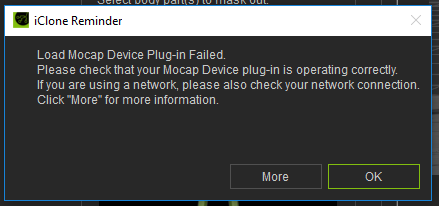 -Sterling
Stick with the flock, end up a lamb chop!
www.ShivooStudios.com
|
|
|
|
|
e1_scheer
|
e1_scheer
Posted 11 Years Ago
|
|
Group: Forum Members
Last Active: 3 Years Ago
Posts: 120,
Visits: 1.1K
|
Is it possible to roll back to a version of iclone 6 and the mocap plugin that work?
Can you download archived installs from the reallusion website?
@sterling
have you changed your axis neuron settings to broadcast the bvh data
that fixed your error message for me
e1
|
|
|
|
|
MnerosNaRa
|
MnerosNaRa
Posted 11 Years Ago
|
|
Group: Forum Members
Last Active: 2 Years Ago
Posts: 99,
Visits: 1.5K
|
well I got the mocap suite today. I have the plug in, I have fallowed the step by step instructions. but when i go to open the plug in I crash, I dont even get an error message. so I'm not sure how/or where to go from here, I hope there is an update in the future soon. I have all the RL updates, I'm on win 10. PN works great on its own.
|
|
|
|
|
sterlingy
|
sterlingy
Posted 11 Years Ago
|
|
Group: Forum Members
Last Active: Today @ 5:12 AM
Posts: 206,
Visits: 714
|
e1_scheer (12/22/2015)
@sterling
have you changed your axis neuron settings to broadcast the bvh data
that fixed your error message for me
e1Yes, I had changed that setting before I tried to use iClone. I also closed and restarted everything to make sure the setting had stuck, which it had, but still no luck. I should give my system specs if it matters: GTX 980Ti AMD 8 Core 4GHz CPU 32 GB Ram Win10 Pro All RL software running the latest updates -Sterling
Stick with the flock, end up a lamb chop!
www.ShivooStudios.com
|
|
|
|
|
Beat_CH
|
Beat_CH
Posted 11 Years Ago
|
|
Group: Forum Members
Last Active: 10 Years Ago
Posts: 5,
Visits: 39
|
Hi,
I used it with the following settings in neuron (using Win 7, and Iclone 6.21, Trialversion)
Neuron Settings:
Broadcasting:
BVH. Port: 7001
Output format:
Freq: 1
Block..: Binary
Rotation: YXZ
Displacement: on
Reference: off
In Iclone:
Start the Plug-in Using the Pull-Down menu: "Plugins" in the Top Menu bar
It does not work using the Avatar-Modify Window under Motion, Device Mocap.
Regards
Beat
|
|
|
|
|
sterlingy
|
sterlingy
Posted 11 Years Ago
|
|
Group: Forum Members
Last Active: Today @ 5:12 AM
Posts: 206,
Visits: 714
|
BEAT_CH, I did as you suggested and started the plugin from the menu, and everything work perfectly. THANK YOU!! I didn't monkey with any of the other settings. When I have time, I'll give it a more thorough look. Two things I noticed in my first test are that the thumbs are having problems and the feet aren't aligned with the floor. To be fair, I really didn't spend much time on this. I just wanted to see if things would connect, and they did. -S
Stick with the flock, end up a lamb chop!
www.ShivooStudios.com
|
|
|
|