|
By Realtimer (RL) - 11 Years Ago
|
Do you have any issues with the Live Motion Capture System? If you do, then please post your issues in this thread.
NOTE: In order to streamline the solution process, we kindly ask that you be as detailed and specific with your issues as possible, so that our team can replicate the problem.
BEFORE YOU BEGIN - Make sure that you have first checked that your PC system has all the necessary system requirements, and tested your issues then, before reporting a bug. For more information on system requirements, go HERE.

|
|
By ceesmailkajr - 11 Years Ago
|
With Mirror Motion enabled, finger and hand bones are mixed up between left and right hand.
|
|
By dallasvr - 11 Years Ago
|
|
oops. see one thread up under subject Load Mocap Device Plug-in Failed
|
|
By CyBoRgTy - 11 Years Ago
|
|
I cannot get Perception Neuron to work with iClone (I want to make it clear - Perception Neuron works great for me without iClone). I installed the mocap plugin and followed all steps seen here and in the video tutorial. When I select 'Connect' in the Device Mocap - Device Console, I get the 'Load Mocap Device Plugin Failed' message. If instead I select Connect from within the Plugin menu -> Neuron Mocap plugin - Neuron Console, it appears to connect but the Preview / Record buttons are still not available. I uninstalled and reinstalled the Neuron Mocap Plugin, but it still fails as I stated above.
iClone is at the latest patch level. Any ideas?
|
|
By CyBoRgTy - 11 Years Ago
|
I found what the problem was.
I ran netstat -ab to see what ports services/processes were listening on as well as the name of the executable that spawned the listening process. I found I have the Sentinel Key Server running and it listens on port 7001, which is the port Neuron is bvh broadcasting on by default. When I stop the Sentinel service, the connection between Axis Neuron and iClone works.
While I try to figure out how to get the Sentinel service to list on another port, I was wondering - is there a way to get the iClone Neuron Plugin to listen on a different port (I tried using a colon with the IP address (i.e.192.168.1.195:7004) and that made iClone crash?
|
|
By CyBoRgTy - 11 Years Ago
|
Actually for me, it does not make sense to change the Sentinel port (if I could) because I don't know what apps on my system uses it and they might not work after I made that change. So, right now, the only way for me to use the bvh broadcast streaming from Axis Neuron, I have to stop the Sentinel Service.
I'm probably NOT the only person who might have another service using port 7001. So, it would be nice if there was a way to identify another port in the iClone Neuron plugin..
|
|
By Eric (RL) - 11 Years Ago
|
Hello CyBoRgTy,
Currently there is no way to change the listening port for the plug-in. However, we will note this down and hopefully incorporate this function for future releases.
|
|
By CyBoRgTy - 11 Years Ago
|
Thanks for the consideration.
On a different problem, I have the 31 neuron suit and notice problems with the fingers and thumb. In Axis Neuron, everything moves as expected and the exported mocaps look fine. But when using the Neuron plugin in iClone, the thumb stays pointing out and the finger barely move (or move in odd manner). Any ideas?
|
|
By Beat_CH - 11 Years Ago
|
Dear all,
I started new with the Neuron and the iClone-plug-in in a trial version of Iclon6.21
The installation worked fine. The Plug-in works fine with the plug-in via the Plugin-Menu.
The neuron with 31 sensors runs fine via USB-cable.
The only issue is that the Iclone-avatar is not moving in the same way as the stick-figure is does in the neuron.
In Iclone the figure collapses, the legs and arms are twisted as soon as switching on the "preview" or "record" mode, while in the neuron the figure moves as performed by the subject.
Does somebody has any ideas why this happens?
Are there some setup issues in the Axcis Neuron setting, like in Output Format, BVH-Data?
Thank you very much for your help.
Beat
|
|
By animagic - 11 Years Ago
|
|
Beat_CH (12/17/2015)
The only issue is that the Iclone-avatar is not moving in the same way as the stick-figure is does in the neuron.
In Iclone the figure collapses, the legs and arms are twisted as soon as switching on the "preview" or "record" mode, while in the neuron the figure moves as performed by the subject.
I don't have Neuron, so I don't know exactly how things are set up in iClone, but what you describe sometimes happens when foot contact is turned on and there is a terrain. So you may want to check foot contact.
|
|
By e1_scheer - 11 Years Ago
|
Hi,
Every time i load in a G6 character and push the neuron mocap plugin Iclone crashes with the following
error message :; "iclone 6ap has stopped working"
Problem Event Name: APPCRASH
Application Name: iClone.exe
Application Version: 6.2.2416.1
Application Timestamp: 567162d8
Fault Module Name: ICCreateFaceQt.dll
Fault Module Version: 0.0.0.0
Fault Module Timestamp: 5671620c
Exception Code: c0000005
Exception Offset: 00000000008be79d
OS Version: 6.1.7601.2.1.0.768.3
Locale ID: 2060
Additional Information 1: 8e82
Additional Information 2: 8e82304a30d732412bc6937cd552553c
Additional Information 3: 3076
Additional Information 4: 307682633391d8bcf916f49b6e1c9994
Any help would be welcome,
e1
|
|
By Beat_CH - 11 Years Ago
|
Dear all,
I tested several setups in the Neuron-Settings.
The following settings are working fine:
Rotation: YXZ (figure move identical as in the neuron., Other settings: Orientation of the figure changes.)
Displacement: on, (if off. figure moves at the same spot)
Reference: off (if on: figure collapses)
So far it works fine with the data-recording, when starting the Plug-in via "Pull-Down-Menu": Plugins.
Regards
Beat
|
|
By e1_scheer - 11 Years Ago
|
Just tried it on another machine with windows 10 installed instead of win 7,
but I get the same crash. Just wondering, does the neuron mocap plugin
actually work with the latest iclone trial version or do you need a specific
iclone version?
e1
|
|
By animagic - 11 Years Ago
|
|
e1_scheer (12/20/2015)
Hi,
Every time i load in a G6 character and push the neuron mocap plugin Iclone crashes with the following
error message :; "iclone 6ap has stopped working"
<snip>
Fault Module Name: ICCreateFaceQt.dll
<snip>
Any help would be welcome,
e1
ICCreateFaceQt.dll is a new DLL that has been added in the 6.3 release to allow creating a face from a photo. I have had a few crashes as well with the same error. I'm not using Neuron, so it seems that the problem is broader. I hope we will see a fix soon!
|
|
By sterlingy - 11 Years Ago
|
Finally received my Neuron. A few things missing, but I have it working with the Axis software.
When I connect with the iClone plugin, I'm left with a message:
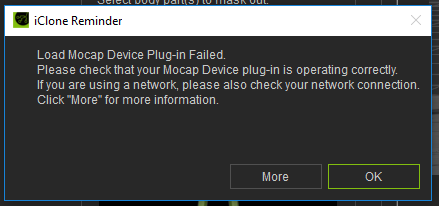
-Sterling
|
|
By e1_scheer - 11 Years Ago
|
Is it possible to roll back to a version of iclone 6 and the mocap plugin that work?
Can you download archived installs from the reallusion website?
@sterling
have you changed your axis neuron settings to broadcast the bvh data
that fixed your error message for me
e1
|
|
By MnerosNaRa - 11 Years Ago
|
well I got the mocap suite today. I have the plug in, I have fallowed the step by step instructions. but when i go to open the plug in I crash, I dont even get an error message. so I'm not sure how/or where to go from here, I hope there is an update in the future soon. I have all the RL updates, I'm on win 10. PN works great on its own.
|
|
By sterlingy - 11 Years Ago
|
|
e1_scheer (12/22/2015)
@sterling
have you changed your axis neuron settings to broadcast the bvh data
that fixed your error message for me
e1
Yes, I had changed that setting before I tried to use iClone. I also closed and restarted everything to make sure the setting had stuck, which it had, but still no luck.
I should give my system specs if it matters:
GTX 980Ti
AMD 8 Core 4GHz CPU
32 GB Ram
Win10 Pro
All RL software running the latest updates
-Sterling
|
|
By Beat_CH - 11 Years Ago
|
Hi,
I used it with the following settings in neuron (using Win 7, and Iclone 6.21, Trialversion)
Neuron Settings:
Broadcasting:
BVH. Port: 7001
Output format:
Freq: 1
Block..: Binary
Rotation: YXZ
Displacement: on
Reference: off
In Iclone:
Start the Plug-in Using the Pull-Down menu: "Plugins" in the Top Menu bar
It does not work using the Avatar-Modify Window under Motion, Device Mocap.
Regards
Beat
|
|
By sterlingy - 11 Years Ago
|
BEAT_CH,
I did as you suggested and started the plugin from the menu, and everything work perfectly. THANK YOU!!
I didn't monkey with any of the other settings. When I have time, I'll give it a more thorough look.
Two things I noticed in my first test are that the thumbs are having problems and the feet aren't aligned with the floor. To be fair, I really didn't spend much time on this. I just wanted to see if things would connect, and they did.
-S
|
|
By mtakerkart - 11 Years Ago
|
|
Same problem here. Works perfectly with 6.2 but crash with 6.3 when pressing preview or record..... please reallusion can you fix it??
|
|
By MnerosNaRa - 11 Years Ago
|
After a few days I was able to get it to work, I had to purge my comp of everything mocap - Ipisoft, and MS Kenect dirvers and software, Iclone Kenect Plugin, ect. works like a charm now
|
|
By sterlingy - 11 Years Ago
|
|
How well did your feet align to the floor plane?
|
|
By MnerosNaRa - 11 Years Ago
|
Some times it's great, other times it sucks. In the case of this film if looked it was both good and bad.(some editing required) however
when standing the feet did not move, which is nice. the kenect always had jittering of the feet.
|
|
By animagic - 11 Years Ago
|
|
Thanks to everyone posting their results! I hope you'll have some time to play over the holidays.
|
|
By sterlingy - 11 Years Ago
|
|
animagic (12/24/2015)
Thanks to everyone posting their results! I hope you'll have some time to play over the holidays.
My entire holiday is going to be playing with this thing. I'm trying to get the wifi hooked up.
More samples to come and not "stupid dance moves" as someone referred to my first test. :P
-S
|
|
By sterlingy - 11 Years Ago
|
Today, I put the rig on myself for the first time. Previously, I had other people wear it. Despite Noitom telling me I was too tall, I got it to work fairly well. I'm 6'7"
Also, I got it to work over WiFi, and I did not use a dedicated WiFi router for that, as they suggest. Worked like a charm. Another thing that I did was use a 18000mAh battery. The kind of thing you carry around to juice your phone or tablet on long days away from an outlet. I stuffed it in my back pocked, and I was tether free. Simply amazing to work this way.
I tried to get everything running on my laptop, but I couldn't get the plugin to run. iClone would just crash. All of the RL software was updated to the latest builds
|
|
By MnerosNaRa - 11 Years Ago
|
sterlingy (12/24/2015)
animagic (12/24/2015)
Thanks to everyone posting their results! I hope you'll have some time to play over the holidays.My entire holiday is going to be playing with this thing. I'm trying to get the wifi hooked up. More samples to come and not "stupid dance moves" as someone referred to my first test. :P -S
LOL, please do not be offended by my comment in my video, that was based of the norm I see in mo-cap examples, and not at any one person.
I understand why fighting and dancing is used the most in testing and show casing, but to me the most impressive resultants are the casual/
still standing ones, Slight gestures and movements. Those are the hardest to make fluid and natural. I think so far as i have seen and experienced,
PN wins in this regard.
Cheers
|
|
By sterlingy - 11 Years Ago
|
MnerosNaRa (12/25/2015)
sterlingy (12/24/2015)
animagic (12/24/2015)
Thanks to everyone posting their results! I hope you'll have some time to play over the holidays.My entire holiday is going to be playing with this thing. I'm trying to get the wifi hooked up. More samples to come and not "stupid dance moves" as someone referred to my first test. :P -S LOL, please do not be offended by my comment in my video, that was based of the norm I see in mo-cap examples, and not at any one person.
I was just poking fun at you. I wasn't offended in any way. I also agree with you that more "real" situations are called for. That of course takes a bit more forethought to demonstrate. As per your example, showing you reaching for a TV remote. The better example would be showing interaction with other objects. These things just take time, and I think it is pretty evident that the pipeline between Axis and iClone needs to be refined before it is more fluid. In my last example, I wanted to use the prop sensor so the character could grab the mic, but I also wanted to just bang something out quickly. The hands having issues was only the beginning of why i didn't even bother.
I also tried to edit hands with the motion layer, and found all sorts of issues with fingers not curling the way they should have.
Regardless, all we can do is keep testing everything and provide substantial feedback so the developers can adjust where needed.
Cheers,
Sterling
|
|
By Firepro - 11 Years Ago
|
So close but no cigar. Got my new Perception Neuron suit, works okay with Neuron software but when trying to connect to iClone i get either failed plugin or if use the Plugins dropdown then iClone crashes, pretty much as others have reported. I had Kinect 2 and uninstalled it but no help.
RL please fix as soon as possible. Thanks!
|
|
By Firepro - 11 Years Ago
|
While the bugs in the plug-in get fixed I was wondering if I can still use the BVH motion files from the Neuron software? I am trying to use the BVH file format for importing into DAZ3d so that I can create aniblocks. I got the procedure down for Kinect created files in iClone and converted through 3dXchange, but I am not having much luck using the BVH coming from the Neuron software.
If anyone has a procedure to get the Neuron software generated motion files into DAZ (with or without 3Dxchange or iClone) it would be greatly appreciated.
|
|
By sterlingy - 11 Years Ago
|
|
Firepro (12/25/2015)
So close but no cigar. Got my new Perception Neuron suit, works okay with Neuron software but when trying to connect to iClone i get either failed plugin or if use the Plugins dropdown then iClone crashes, pretty much as others have reported. I had Kinect 2 and uninstalled it but no help.
RL please fix as soon as possible. Thanks!
What are your system specs? specifically GFX card and OS?
-S
|
|
By sterlingy - 11 Years Ago
|
|
Firepro (12/25/2015)
While the bugs in the plug-in get fixed I was wondering if I can still use the BVH motion files from the Neuron software? I am trying to use the BVH file format for importing into DAZ3d so that I can create aniblocks. I got the procedure down for Kinect created files in iClone and converted through 3dXchange, but I am not having much luck using the BVH coming from the Neuron software.
If anyone has a procedure to get the Neuron software generated motion files into DAZ (with or without 3Dxchange or iClone) it would be greatly appreciated.
I would also like to know how this pipeline would work. There are a ton of FBX formats that the Axis software can save in. I'm not sure what is best for 3DXchange. Then you have to re-target in 3DXchange, which is really just a temporary fix if you need something usable right away. Certain, if you can't even run the plugin, this is critical, but without the hands working properly, it would also come in useful. I suspect we won't get a resolution to even a 3DXchange solution until after the new year.
-S
|
|
By animagic - 11 Years Ago
|
|
FBX 2012 would be pretty good for 3DXchange. I believe that's the format it saves in when exporting.
|
|
By Firepro - 11 Years Ago
|
sterlingy (12/25/2015)
Firepro (12/25/2015)
So close but no cigar. Got my new Perception Neuron suit, works okay with Neuron software but when trying to connect to iClone i get either failed plugin or if use the Plugins dropdown then iClone crashes, pretty much as others have reported. I had Kinect 2 and uninstalled it but no help.
RL please fix as soon as possible. Thanks!What are your system specs? specifically GFX card and OS? -S
My system specs are as follows:
Windows 10 - 64 bit Home edition
AMD A8-5500 APU 3.2 GHz with Radeon HD Graphics
16 GB RAM
I have a more powerful computer I use for most of my work but it is still on Win 7, so have pretty much dedicated this AMD machine to do MOCAP. Works fine with the iClone Kinect 2 plugin.
|
|
By Firepro - 11 Years Ago
|
|
MnerosNaRa (12/24/2015)
After a few days I was able to get it to work, I had to purge my comp of everything mocap - Ipisoft, and MS Kenect dirvers and software, Iclone Kenect Plugin, ect. works like a charm now
Just wondering, other than doing an uninstall on the Kinect Plugin, are there other files/drivers that need to be removed that are associated with the Kinect device? Thanks.
|
|
By mtakerkart - 11 Years Ago
|
|
Because of the 6.3 bug , I use the bhv from Axis Neuron and retarget in 3dxchange. Of course T-pose is the best to easily retarget.
|
|
By MnerosNaRa - 11 Years Ago
|
|
Just wondering, other than doing an uninstall on the Kinect Plugin, are there other files/drivers that need to be removed that are associated with the Kinect device? Thanks.
For me, it required uninstalling the Kenect drivers as well as the Plugings assoisated with the Kenect senser.
the other drivers/files are easy to unintall they show up in the unintall option in windows explorer.
|
|
By MnerosNaRa - 11 Years Ago
|
|
Firepro (12/25/2015)
While the bugs in the plug-in get fixed I was wondering if I can still use the BVH motion files from the Neuron software? I am trying to use the BVH file format for importing into DAZ3d so that I can create aniblocks. I got the procedure down for Kinect created files in iClone and converted through 3dXchange, but I am not having much luck using the BVH coming from the Neuron software.
If anyone has a procedure to get the Neuron software generated motion files into DAZ (with or without 3Dxchange or iClone) it would be greatly appreciated.
I was playing around with this for a while and gave up. My issues where as fallows.
Exporting in FBX format in to 3d Exchange = Mad mocap. It was juttery, and just plain not exporting properly.
Exporting as BVH = Really good results, but matchinh it to the Iclone puppet was impossible, all the joints on the BVH where diagonal so It was impossible for me to match a T-Pose.
There are options when exporting, none seemed to matter. Not sure if this is a Neuron Axis thing or a 3dExchange thing. Im hoping someone here could confirm the same issue
|
|
By sterlingy - 11 Years Ago
|
|
mtakerkart (12/25/2015)
Because of the 6.3 bug , I use the bhv from Axis Neuron and retarget in 3dxchange. Of course T-pose is the best to easily retarget.
I'm assuming that if you are using the 3DXchange method, then you are getting perfect 1-to1 mocap data into iClone for every bone, including the hands?
-Sterling
|
|
By mtakerkart - 11 Years Ago
|
|
I'm assuming that if you are using the 3DXchange method, then you are getting perfect 1-to1 mocap data into iClone for every bone, including the hands?
You can select the maya setup in 3dxchange , auto-retarget done!! but yes I have to reset the rotation bone to zero.
When I said T-pose , means you have to make a t-pose when you mocap in Axis neuron and THIS t-pose is your reference.
|
|
By mtakerkart - 11 Years Ago
|
Yesterday an auto-update of Iclone poped, it's 6.3.2422.1.
Now all is working .
|
|
By sterlingy - 11 Years Ago
|
|
mtakerkart (12/26/2015)
Yesterday an auto-update of Iclone poped, it's 6.3.2422.1.
Now all is working .
All, as in hands fixed and everything?
-Sterling
|
|
By mtakerkart - 11 Years Ago
|
|
I can't answer for hands because I've an 11 Neurons kit, but now I've no iclone crash when broadcasting from Neuron Axis.
|
|
By sterlingy - 11 Years Ago
|
|
mtakerkart (12/26/2015)
I can't answer for hands because I've an 11 Neurons kit, but now I've no iclone crash when broadcasting from Neuron Axis.
I saw that update and decided not to install it for fear that things would stop working for me. Had it been an update to the plugin, I would have done it in a heart beat. I wish they would have a log of changes for these patches, so we would know what to expect.
-S
|
|
By Firepro - 11 Years Ago
|
|
mtakerkart (12/26/2015)
Yesterday an auto-update of Iclone poped, it's 6.3.2422.1.
Now all is working .
Confirmed, new update fixed PN Plugin crash, tested with 3-neuron arm, still have to use Plug-In Menu. Thank you RL!
|
|
By sterlingy - 11 Years Ago
|
I've installed the latest patch, and I'm still having trouble with the thumb. It would seem that the rotation on one axis is not functioning correctly.
Also, and I think this is a Neuron issue, but when I put my fingers together, the appear to still be spread apart. Does this happen for others?
-S
|
|
By mtakerkart - 11 Years Ago
|
I suggest you to switch the sensor having trouble with upper arm for exemple to see if it's the sensor. If yes ,may you've an magnetic sensor issue.
You can fix it with the Neuron doctor.Just follow the instructions. 7 of mine had trouble, Daniel from Neuron helped me to fix it with a Skype session.
|
|
By sterlingy - 11 Years Ago
|
|
Is that for the thumb issue or the fact that I can't un-spread all of my fingers?
|
|
By mtakerkart - 11 Years Ago
|
|
My suggestion was for the thumb issue. Did you try the Arm setup with only 11 sensor ? Just to see if you can spread your fingers with one hand?
|
|
By sterlingy - 11 Years Ago
|
|
mtakerkart (12/26/2015)
My suggestion was for the thumb issue. Did you try the Arm setup with only 11 sensor ? Just to see if you can spread your fingers with one hand?
I did all of that. But the problem has to be on the iClone side because in Axis, everything looks just fine.
|
|
By e1_scheer - 11 Years Ago
|
Hi all,
That was quick, if the broadcasting issue is now fixed. I ended up rolling back a version
to get everything to work and will upgrade once we get confirmation that everything does work.
I also want to pick up on a few of the issues raised earlier.
If after establishing the connection you still get an error message, saying there is no connection,
try pushing the play button in Neuron. I've found that to be the culprit a lot of the time. You need
to see the sensor lights go on in the neuron UI, for there to be a signal that can be sent over.
As for the thumb, I'm having the same issue as reported by others. All fingers seem to work
except for the thumb that sticks out like "a sore thumb". I've tried fixing the Tpose in xchange but
that doesn't seem to make a difference
oddbody
|
|
By johnb4467 - 10 Years Ago
|
|
e1_scheer (12/28/2015)
As for the thumb, I'm having the same issue as reported by others. All fingers seem to work
except for the thumb that sticks out like "a sore thumb". I've tried fixing the Tpose in xchange but
that doesn't seem to make a difference
oddbody
Newer to the thread, but it's somewhat encouraging to see that I'm not the only one having a rough time with the thumbs. Here's a side-by-side youtube video I captured showing Axis & the preview in iClone for reference:
So it sounds like trying to capture the motion in Axis & then importing into xChange doesn't make a difference?
Do any of you happen to have a bone-naming-template you'd be willing to share for the Axis skeleton (when going through conversion process of the BVH file)? I'll be going through that process eventually, if I end up not being able to fix things in a direct-to-iClone capture.
Glad to be part of the group. :)
John
|
|
By johnb4467 - 10 Years Ago
|
|
sterlingy (12/26/2015)
Also, and I think this is a Neuron issue, but when I put my fingers together, the appear to still be spread apart. Does this happen for others?
-S
I think I saw somewhere that this is actually a limitation of the Perception Neuron suit -- it can't properly figure out movement for the fingers moving apart. It might have been an early youtube review, now that I think about it.
Then again...I may just be crazy. ;)
|
|
By johnb4467 - 10 Years Ago
|
|
animagic (12/25/2015)
FBX 2012 would be pretty good for 3DXchange. I believe that's the format it saves in when exporting.
I'm pretty certain I read somewhere that animation coming into 3Dxchange needs to be in FBX 2011 -- though don't quote me on that.
|
|
By johnb4467 - 10 Years Ago
|
It looks like it is indeed something to do with the capture plug-in, as once I went Axis BVH --> 3DXchange Characterization --> Iclone ... it works wonderfully. Here's that same animation from my previous post, but having gone the above-mentioned route:
|
|
By sterlingy - 10 Years Ago
|
|
johnb4467 (1/9/2016)
It looks like it is indeed something to do with the capture plug-in, as once I went Axis BVH --> 3DXchange Characterization --> Iclone ... it works wonderfully. Here's that same animation from my previous post, but having gone the above-mentioned route:
RL is aware of the hand problem and I'm told is working on it. Another thing I learned from Noitom is that in the calibration process, the position of your fingers during the process isn't the same for everyone. This has to do with the size of the wearer's hands/fingers. When you are in the T-Pose, you may want to curl your fingers a bit, This helped me because I was having trouble with the avatar in Axis making a tight fist.
Also you want to do various test between the body size settings in the Axis software, compared to body size of the 3D character. In other words, there's lots of testing before you may get it right.
Cheers,
Sterling
|
|
By johnb4467 - 10 Years Ago
|
sterlingy (1/9/2016)
johnb4467 (1/9/2016)
It looks like it is indeed something to do with the capture plug-in, as once I went Axis BVH --> 3DXchange Characterization --> Iclone ... it works wonderfully. Here's that same animation from my previous post, but having gone the above-mentioned route:
RL is aware of the hand problem and I'm told is working on it. Another thing I learned from Noitom is that in the calibration process, the position of your fingers during the process isn't the same for everyone. This has to do with the size of the wearer's hands/fingers. When you are in the T-Pose, you may want to curl your fingers a bit, This helped me because I was having trouble with the avatar in Axis making a tight fist. Also you want to do various test between the body size settings in the Axis software, compared to body size of the 3D character. In other words, there's lots of testing before you may get it right. Cheers, Sterling
That's great to hear in regards to the plugin. To be honest, the 3DXpress pipeline works great enough for now, so if it takes them a bit...all is still well in the world. ;)
When you mentioned "curl your fingers a bit", do you mean not straighten them as much then? Just trying to fully understand, though it does sound like experimentation on an individual basis is a bit warranted overall. Thanks for sharing!
I think I may do a custom character body for myself, since that seems like it would throw off results as much as anything else...have you done that (putting in measurements manually in Axis)?
|
|
By sterlingy - 10 Years Ago
|
|
johnb4467 (1/10/2016)
When you mentioned "curl your fingers a bit", do you mean not straighten them as much then? Just trying to fully understand, though it does sound like experimentation on an individual basis is a bit warranted overall. Thanks for sharing!
I think I may do a custom character body for myself, since that seems like it would throw off results as much as anything else...have you done that (putting in measurements manually in Axis)?
It's trial and error with the hands. The diagram for the T-Pose shows the fingers straight out and the thumb at a slightly downward angle, but if you aren't getting good results, curl the fingers a bit and maybe change the angle of the thumb.
The measurement system in Axis is meant to match the size of the person wearing the rig, and the avatar in Axis will also change size, Usually, you will want to measure the actual actor and use those measurements. The presets in Axis are just that, presets. Everyone is different, with slight proportions also being different. However, there may be a case where your CG character is two feet tall, and you might want to experiment with setting the Axis measurements to match the measurements of the CG character. Like I said, it's trial and error.
Personally, I haven't used my measurements because I haven't had anyone to measure me. Most of what I've mentioned is what Noitom told me personally. I have tried curling the fingers during T-Pose, and it worked like a charm.
Hope that helps.
-Sterling
|
|
By fertigo - 10 Years Ago
|
I just can't install it on win10 with iClone 6. It work's on my laptop with win8.1. I tried to disable firewall deinstall/install iclone 6 trial but with no success :(
http://imgur.com/goZDmXN
It would be also great if someone could tell me what preset I have to choose in 3dxchange to get my animations manually from Axis to iClone.
|
|
By mtakerkart - 10 Years Ago
|
@Fertigo
It's the Maya preset. Before clicking on convert button , you must have the same T-pose as the 3dxchange T-pose.
|
|
By gosolo2 - 10 Years Ago
|
Watching the video on Youtube " Iclone Live Mocap with Perception Neuron " it seems so easy and straight forward that I bought the Iclone6 Pro version 6.3 straight away... I know there is no problem with my Perception Neuron ( I have a neuron full body motion )... Axis Neuron version 3.5.24. The suit works perfectly without Iclone6 Pro 6.3.. I have a USB connecting the suit to my PC. I followed all the steps in Settings - Broadcasting ... ( TCP window ) - BVH - Port 7001 On Output Format - BVH data- Frequency Reducing 1 ----- Block type- Binary ----- Rotation - YXZ ----- Displacement Box tick. To acsses the Animation interface I am not using the Modify Character > Animation > Device Mocap window.... instead I am using Top Menu > Animation > Device Mocap. When I press connect I get a Iclone Reminder window with the message " Load Device Mocap Plug-in Failed. Please check that your Mocap device plug-in is operating correctly ....."
They say I could download The Neuron Mocap Plug-in Beta but when I try the link http://iclone.neuronmocap.com I get a DNS error... I tried to change browsers, I have flushed my DNS, changed my DNS server address but no luck. I know others are experiencing the same problem. Do I have to have that specific plug in to make Iclone6 Pro "talk" to Axis Neuron? I've noticed in the Iclone6 Pro the options to chose the Neuron Plugin is not even showing. It should be somewhere between Window and Help button on the Menu bar but there is nothing there.
|
|
By sterlingy - 10 Years Ago
|
gosolo2 (1/24/2016)
They say I could download The Neuron Mocap Plug-in Beta but when I try the link http://iclone.neuronmocap.com I get a DNS error... I tried to change browsers, I have flushed my DNS, changed my DNS server address but no luck. I know others are experiencing the same problem. Do I have to have that specific plug in to make Iclone6 Pro "talk" to Axis Neuron? I've noticed in the Iclone6 Pro the options to chose the Neuron Plugin is not even showing. It should be somewhere between Window and Help button on the Menu bar but there is nothing there.
Sorry you are having problems when I know you really want to get into the thick of it. You do need to download the plugin. The page is missing for me too. They must have moved it. Also, it is not as simple as just having the install file. You will also need a SN#, I would send them a support ticket. and if you haven't heard anything by midday on Monday, call them.
-Sterling
|
|
By johnb4467 - 10 Years Ago
|
|
mtakerkart (1/22/2016)
@Fertigo
It's the Maya preset. Before clicking on convert button , you must have the same T-pose as the 3dxchange T-pose.
Haha, oh gosh...is it? I think I created one manually, because I didn't know that...lol. Oh well...I suppose I learned something along the way. ;)
|
|
By johnb4467 - 10 Years Ago
|
gosolo2 (1/24/2016)
Watching the video on Youtube " Iclone Live Mocap with Perception Neuron " it seems so easy and straight forward that I bought the Iclone6 Pro version 6.3 straight away... I know there is no problem with my Perception Neuron ( I have a neuron full body motion )... Axis Neuron version 3.5.24. The suit works perfectly without Iclone6 Pro 6.3.. I have a USB connecting the suit to my PC. I followed all the steps in Settings - Broadcasting ... ( TCP window ) - BVH - Port 7001 On Output Format - BVH data- Frequency Reducing 1 ----- Block type- Binary ----- Rotation - YXZ ----- Displacement Box tick. To acsses the Animation interface I am not using the Modify Character > Animation > Device Mocap window.... instead I am using Top Menu > Animation > Device Mocap. When I press connect I get a Iclone Reminder window with the message " Load Device Mocap Plug-in Failed. Please check that your Mocap device plug-in is operating correctly ....." They say I could download The Neuron Mocap Plug-in Beta but when I try the link http://iclone.neuronmocap.com I get a DNS error... I tried to change browsers, I have flushed my DNS, changed my DNS server address but no luck. I know others are experiencing the same problem. Do I have to have that specific plug in to make Iclone6 Pro "talk" to Axis Neuron? I've noticed in the Iclone6 Pro the options to chose the Neuron Plugin is not even showing. It should be somewhere between Window and Help button on the Menu bar but there is nothing there.
I'm sorry to hear you're having so many problems. :(
I will vouch and say though...that it does work. I know that doesn't make your situation any easier, but just know that once you figure out the hurdle you're at -- you'll be set to go.
I'm assuming that since they've been working with the mocap plugin beta, that things may be getting shuffled around...hence the page not showing up. I've been lucky enough to meet the Reallusion guys at Siggraph last year, and they're good people -- so I'm sure they'll get your issue resolved if you end up needing to contact them. :)
John
|
|
By sterlingy - 10 Years Ago
|
Hey folks,
I am now forced to use 3DXchange to bring my data from Axis into iClone, but I seem to be having some problems in 3DXchange. Can someone outline in detail the steps required. Pretend I know nothing about 3DXchange.
Here's what I have done: Export the BVH data from Axis with rotation YXZ and displacement enabled.
Load data into 3DXchange.
Click Convert to Non-Standard
Select Preset Maya Human-IK

Enable Active then select 00_Tpose (I GET THIS)

I didn't have to know that clicking convert wasn't going to give me the proper results, but I clicked anyway and I was right.
So what am I doing wrong? For one, it would appear that the skeleton is rotated at the hip.
Cheers,
Sterling
|
|
By mtakerkart - 10 Years Ago
|
|
May if you click on the " Align to ground" before converting it helps....
|
|
By sterlingy - 10 Years Ago
|
So I seem to have worked out a few things, but when the performer's hands are on a table (should be at rest not moving) and the upper body moves, the hands seem to move a little bit on the Avatar in iClone. Does anyone know a way to lock the hands into position for a specified number of frames and then unlock them to continue using the mocap when the performer actually moves his/her hands?
-Sterling
|
|
By shmedia - 10 Years Ago
|
I too can not get my 32 neuron suite to work with I-clone. I am running on windows 10 and perception neuron does not seem to broadcast. I followed all the suggestions. I have the pro version of axis neuron. I have the newest version of I-clone 6.4. Every time I open the plugin the record and preview buttons are grayed out and locked. Any suggestions what to try? I have update/ uninstalled and reinstalled both axis and I-clone about two times each. I make sure the "use old headers" box is checked. Nothing I try seems to fix it.
So I figured I could at least take the motion files into 3d exhange and use them that way. However, I can't apply the motions to the existing figure. It say figure does not match , it also says convert to non standard. If I try this won't let me set bones. both legs seem to be opposite. Any suggestions would be welcome.
|
|
By sterlingy - 10 Years Ago
|
|
shmedia (2/28/2016)
I too can not get my 32 neuron suite to work with I-clone. I am running on windows 10 and perception neuron does not seem to broadcast. I followed all the suggestions. I have the pro version of axis neuron. I have the newest version of I-clone 6.4. Every time I open the plugin the record and preview buttons are grayed out and locked. Any suggestions what to try? I have update/ uninstalled and reinstalled both axis and I-clone about two times each. I make sure the "use old headers" box is checked. Nothing I try seems to fix it.
So I figured I could at least take the motion files into 3d exhange and use them that way. However, I can't apply the motions to the existing figure. It say figure does not match , it also says convert to non standard. If I try this won't let me set bones. both legs seem to be opposite. Any suggestions would be welcome.
For starters, are you launching the plugin from the plugin dropdown menu?
Make sure your character in iClone is selected when you are trying to sync with Axis
Sometimes, I have had to play the mocap in Axis for the preview or record button to become active.
As for 3DXchange, you load the BVH in and then click convert to non-standard. next you may have to rotate the hip bone, depending on which way your real actor was facing when you recorded the mocap. Rotate so that the skeleton is facing the camera in 3DXchange. Now select the Maya preset and click on Active. You should have recorded your mocap with a t-pos at the start. Next to the actove button make sure t-pose is selected in the dropdown (default). And click CONVERT.
Next make sure your character is selected in iClone and then under the list of Animations window, click "add to iclone"
Hope that helps.
|
|
By shmedia - 10 Years Ago
|
Hi,
Thanks for your response. It took some doing because during my first test recording I failed to record a T-Pose (Stupid me). Anyway, I had a pose close enough that I could rotate the bones back to a basic T-pose. Then followed the steps you suggested. They seem to be working ok now. I need to work on posing the figures a little better in the T-pose, but this is the most progress I have had so far. I made sure to save the T-pose for this actor so I can bring it it again for other recordings made with this subject. Thanks a bunch. I ordered the suite in November 2015. I didn't get it until January 2016 and have been trying to get the plugin and/or 3d exchange to work every since. I believe the plugin not working may be due to a windows 10 issue. I currently am having problems with a frozen start bar. When windows 10 updates I can't use the search windows or the the start button. Fixed it myself twice by following online tips, but after the third time a month ago I could not. Will send it in to be fixed next week. Hopefully, if that starts working the broadcast feature in neuron will work properly as well. Anyway, thank for a little light at the end of the tunnel.Go here for video.
|
|
By sterlingy - 10 Years Ago
|
I'm glad I could provide some help. I further advise that you ZERO your rig before each recording of the mocap, and then just start your real actor in the t-pose before they do their performance. Zeroing the rig, resets the sensors and clears out drift that occurs over time.
-Sterling
|
|
By animagic - 10 Years Ago
|
|
Thanks everyone for reporting their progress and issues. I'm still an interested bystander, but from what I've seen this will beat the Kinect. It would be helpful if you indicate of you needed to do much cleaning up of the motions and what you used for it.
|
|
By david.janko - 10 Years Ago
|
I select Connect from within the Plugin menu -> Neuron Mocap plugin - Neuron Console, it appears to connect but the Preview / Record buttons are still not available
the port 7001 is free i stop the sentinel program on this port but still no preview or records button
any ideas?
|
|
By sterlingy - 10 Years Ago
|
|
david.janko (3/1/2016)
I select Connect from within the Plugin menu -> Neuron Mocap plugin - Neuron Console, it appears to connect but the Preview / Record buttons are still not available
the port 7001 is free i stop the sentinel program on this port but still no preview or records button
any ideas?
Just a random thought. For a while, the connection between Axis and iClone was not working with the Pro version of Axis. Which version are you using. Since I mocap with two rigs, I don't use the plguin as it doesn't support more than one rig. It may be the case that Axis Pro is still not working with iClone. I'm not near my mocap machine, so I can't check at the moment.
|
|
By luke (RL) - 10 Years Ago
|
|
david.janko (3/1/2016)
I select Connect from within the Plugin menu -> Neuron Mocap plugin - Neuron Console, it appears to connect but the Preview / Record buttons are still not available
the port 7001 is free i stop the sentinel program on this port but still no preview or records button
any ideas?
Can you check your version of Axis Neuron ? If you're using 2740, it's not support right now, because Noitom changed the stream format in this version, we gonna fix this asap, thanks
|
|
By david.janko - 10 Years Ago
|
axis neuron version is 3.6.32.3903
this is the pro version axis neuron in fact
thx
an another "track" to test for me i was in a "cul de sac" as we said here.
|
|
By david.janko - 10 Years Ago
|
it' work's fine with the standard version not the pro.
just crazy
|
|
By tycho6 - 10 Years Ago
|
Hi !
To make the new AXIS Pro version work again with iClone you simply go to File \ Settings\ Broadcasting and click the checkbox Use old header.
This enables the compatible data stream.
Regards,
Marcus
|
|
By sterlingy - 10 Years Ago
|
In the early days of this plugin, I remember issues with the thumb. It would see that the problem still exists:
Here it is in Axis. (IGNORE the broken index finger) Just note that the thumb is bent in toward the middle finger:

Here it is in iClone, via plugin:

Was this fixed then broken or just never fixed?
|
|
By luke (RL) - 10 Years Ago
|
|
Yes, we will solve this issue at official launch.
|
|
By DebMark Productions - 10 Years Ago
|
|
I have iClone 6.4 and am working on a project. I make a path for my character to follow and he goes from 0 to 100 and then I disconnect him from the path one frame after he reaches 100 and then about 40 frames later I translate him to where I want him to walk, using the same walk cycle continuously as he had on the path. As he starts walking away from the path, he immediately disappears to a different location far away on the first frame of his new walk away from the path. I reposition him at the coordinates he should be at on the first frame. So he reappears and continues his walk. When I play back the movement, he disappears to a different location on one frame and reappears on the next frame. There is no indication on the timeline of any change in his position to this distant location. What I have to do in my Vegas editor is to delete the disappearing character frame but there seems to be a slight blurb in the video at that missing frame. This has happened on 3 totally separate path walks. Is there an explanation of this and is there a way to do what I want without the character repositioning itself?
|
|
By davood.kharmanzar - 10 Years Ago
|
hi,
here is my neuron's settings ...

and my iclone 6.42 with neuron's plugin that was connected to the mocap software ...

but my preview and record buttons was disabled !! why? :/
|
|
By luke (RL) - 10 Years Ago
|
You need to enable the "use old header" checkbox should be work
|
|
By davood.kharmanzar - 10 Years Ago
|
|
thanks a lot ;)
|
|
By davood.kharmanzar - 10 Years Ago
|
seems that the neuron plugin needs an UI update for iclone 6.5 ...

|
|
By nickcmcclure - 10 Years Ago
|
I'm using the iClone 6.5 trial and I've been trying to get the Perception Neuron Plug-in to work to no avail. I've tried using Axis Neuron Pro and the Standard version of Axis Neuron but when I go to connect in the Neuron Plugin, the buttons are grayed out and I can't preview my animation. Am I doing something wrong? Below are the settings I'm using along with what it looks like in iClone.
http://imgur.com/zGdkyuI
http://imgur.com/Pxg3ogH
http://imgur.com/Fy8ZbKC
I would really like to purchase this software, but this is a pretty crucial feature that I need to work. Some help would be greatly appreciated.
|
|
By tycho6 - 10 Years Ago
|
nickcmcclure (8/2/2016)
I'm using the iClone 6.5 trial and I've been trying to get the Perception Neuron Plug-in to work to no avail. I've tried using Axis Neuron Pro and the Standard version of Axis Neuron but when I go to connect in the Neuron Plugin, the buttons are grayed out and I can't preview my animation. Am I doing something wrong? Below are the settings I'm using along with what it looks like in iClone. http://imgur.com/zGdkyuIhttp://imgur.com/Pxg3ogHhttp://imgur.com/Fy8ZbKCI would really like to purchase this software, but this is a pretty crucial feature that I need to work. Some help would be greatly appreciated.
Hello nickcmcclure !
To make the AXIS Pro software work with iClone you simply go to File \ Settings\ Broadcasting and click the checkbox Use old header.
This enables the compatible data stream.
Hope that helps . . .
Regards,
Marcus
|
|
By Melanie (RL) - 10 Years Ago
|
Hi folks,
We'll be releasing official version of iClone mocap plug-in very soon and please keep in mind that beta is ending on 8/3. We will soon announce what's new with new release. :)
Melanie
info_54_54 (8/2/2016)
nickcmcclure (8/2/2016)
I'm using the iClone 6.5 trial and I've been trying to get the Perception Neuron Plug-in to work to no avail. I've tried using Axis Neuron Pro and the Standard version of Axis Neuron but when I go to connect in the Neuron Plugin, the buttons are grayed out and I can't preview my animation. Am I doing something wrong? Below are the settings I'm using along with what it looks like in iClone. http://imgur.com/zGdkyuIhttp://imgur.com/Pxg3ogHhttp://imgur.com/Fy8ZbKCI would really like to purchase this software, but this is a pretty crucial feature that I need to work. Some help would be greatly appreciated. Hello nickcmcclure ! To make the AXIS Pro software work with iClone you simply go to File \ Settings\ Broadcasting and click the checkbox Use old header. This enables the compatible data stream. Hope that helps . . . Regards, Marcus
|
|
By Mr. Perfect - 10 Years Ago
|
|
Hello folks! I have a question. I am expecting my Neuron suite to be delivered tomorrow. Just to make sure I don't make mistakes, it says to keep everything away from magnetic sources... How far away? By example, if I have it connected to my notebook or computer, in order to start recording, I have to get close to them. Will they interfere? Any experience to share? Thanks!
|
|
By tycho6 - 10 Years Ago
|
|
Mr. Perfect (8/16/2016)
Hello folks! I have a question. I am expecting my Neuron suite to be delivered tomorrow. Just to make sure I don't make mistakes, it says to keep everything away from magnetic sources... How far away? By example, if I have it connected to my notebook or computer, in order to start recording, I have to get close to them. Will they interfere? Any experience to share? Thanks!
Hi Mr.Perfect !
Great you have your Perception Neuron suit soon !
Yes - magnetic fields are to avoid.
A notebook with a hard drive can cause a strong magnetic field and will interfere. SSD drives don't make trouble.
Use a mouse and not the touch pad and stay away from the computer if possible.
Any steel in buildings or furniture causes magnetic fields as well so this is also an issue for successful calibration.
With a teslameter app you can test environments and see where it is good to calibrate and capture.
If you are at least one meter away from a magnetic source it should be okay for the IMUs of your suit.
Drift adds over time so after a successful calibration simply use the Zero function with an A-Pose in Axis close to recording.
But first of all - with your new suit- take your time fixing the sensors properly and secure (so they can't move) and be patient to calibrate well ;-)
Regards,
Marcus
|
|
By Mr. Perfect - 10 Years Ago
|
info_54_54 (8/16/2016)
Mr. Perfect (8/16/2016)
Hello folks! I have a question. I am expecting my Neuron suite to be delivered tomorrow. Just to make sure I don't make mistakes, it says to keep everything away from magnetic sources... How far away? By example, if I have it connected to my notebook or computer, in order to start recording, I have to get close to them. Will they interfere? Any experience to share? Thanks! Hi Mr.Perfect ! Great you have your Perception Neuron suit soon ! Yes - magnetic fields are to avoid. A notebook with a hard drive can cause a strong magnetic field and will interfere. SSD drives don't make trouble. Use a mouse and not the touch pad and stay away from the computer if possible. Any steel in buildings or furniture causes magnetic fields as well so this is also an issue for successful calibration. With a teslameter app you can test environments and see where it is good to calibrate and capture. If you are at least one meter away from a magnetic source it should be okay for the IMUs of your suit. Drift adds over time so after a successful calibration simply use the Zero function with an A-Pose in Axis close to recording. But first of all - with your new suit- take your time fixing the sensors properly and secure (so they can't move) and be patient to calibrate well ;-) Regards, Marcus
Hey Marcus! I only have SSD's in my Computers, so I should be ok with that. I don't own a teslameter, I don't know if it would make sence sice I don't really have Option to escape from certaim rooms. A TV in standby or a Radio, are they magnetic fields as well? Probably yes, ha? There is not much in the room I use, besides of a few Computers, a TV and a Surround System... but still, they could be a Problem I guess. Well, not that I Need to make Long recordings or perfect stuff, but better be sure. ;)
|
|
By tycho6 - 10 Years Ago
|
Mr. Perfect (8/16/2016)
info_54_54 (8/16/2016)
Mr. Perfect (8/16/2016)
Hello folks! I have a question. I am expecting my Neuron suite to be delivered tomorrow. Just to make sure I don't make mistakes, it says to keep everything away from magnetic sources... How far away? By example, if I have it connected to my notebook or computer, in order to start recording, I have to get close to them. Will they interfere? Any experience to share? Thanks! Hi Mr.Perfect ! Great you have your Perception Neuron suit soon ! Yes - magnetic fields are to avoid. A notebook with a hard drive can cause a strong magnetic field and will interfere. SSD drives don't make trouble. Use a mouse and not the touch pad and stay away from the computer if possible. Any steel in buildings or furniture causes magnetic fields as well so this is also an issue for successful calibration. With a teslameter app you can test environments and see where it is good to calibrate and capture. If you are at least one meter away from a magnetic source it should be okay for the IMUs of your suit. Drift adds over time so after a successful calibration simply use the Zero function with an A-Pose in Axis close to recording. But first of all - with your new suit- take your time fixing the sensors properly and secure (so they can't move) and be patient to calibrate well ;-) Regards, Marcus Hey Marcus! I only have SSD's in my Computers, so I should be ok with that. I don't own a teslameter, I don't know if it would make sence sice I don't really have Option to escape from certaim rooms. A TV in standby or a Radio, are they magnetic fields as well? Probably yes, ha? There is not much in the room I use, besides of a few Computers, a TV and a Surround System... but still, they could be a Problem I guess. Well, not that I Need to make Long recordings or perfect stuff, but better be sure. ;)
Hi !
Having only SSD eliminates the main source for magnetic fields in your computer. So that's fine.
You don't need to buy an expensive teslameter.
But if you have a smartphone just get an app for measurement. That is precise enough to make sure where to use the suit.
The app uses the build in magnetometer . . .
For Android and IOS you can get a teslameter app (most are even free !). Simply search for "teslameter app"...
Avoid old CRT TV sets, loudspeakers, refrigerators, power supply and steel . . .
New displays should be fine . . .
But check with the app yourself what makes trouble . . . ;-)
Regards,
Marcus
|
|
By Mr. Perfect - 10 Years Ago
|
|
info_54_54 (8/16/2016)
Hi !
Having only SSD eliminates the main source for magnetic fields in your computer. So that's fine.
You don't need to buy an expensive teslameter.
But if you have a smartphone just get an app for measurement. That is precise enough to make sure where to use the suit.
The app uses the build in magnetometer . . .
For Android and IOS you can get a teslameter app (most are even free !). Simply search for "teslameter app"...
Avoid old CRT TV sets, loudspeakers, refrigerators, power supply and steel . . .
New displays should be fine . . .
But check with the app yourself what makes trouble . . . ;-)
Regards,
Marcus
Funny! I just came back with this app on my phone and you are talking about it! :-) Well, it showes mostly around 50-52 µtesla, no matter where I go in the room. Is that ok? I hope so! :-)
|
|
By tycho6 - 10 Years Ago
|
[/quote]
Funny! I just came back with this app on my phone and you are talking about it! :-) Well, it showes mostly around 50-52 µtesla, no matter where I go in the room. Is that ok? I hope so! :-)
[/quote]
:-)
That's really fine.
Noitom says all values under 1500 µT are okay.
There is always magnetism around us: planet earth . . . ;-)
So there is a basic magnetic "noise" which is no big problem.
But keep the sensors in the anti-magnetic box if not in use because permanent exposure to magnetic fields will cause them to drift and you have to calibrate each sensor . . .
Or use the new Noitom shielded suitcase ;-)
Regards,
Marcus
|
|
By Mr. Perfect - 10 Years Ago
|
|
info_54_54 (8/16/2016)
:-)
That's really fine.
Noitom says all values under 1500 µT are okay.
There is always magnetism around us: planet earth . . . ;-)
So there is a basic magnetic "noise" which is no big problem.
But keep the sensors in the anti-magnetic box if not in use because permanent exposure to magnetic fields will cause them to drift and you have to calibrate each sensor . . .
Or use the new Noitom shielded suitcase ;-)
Regards,
Marcus
Marcus, thank you sooo much for your help! I guess I will contact you some day. You have so much experience and I have so many questions! As I told you a few days ago, I bought the suit just for fun, for my Hobby. I love playing around with 3D so much, that I would like maybe one day to start a Business with it. But just don't know where to start with it. Would be great to make my Hobby to a Job. Who knows, maybe one day... :-)
Greetings
Ralf
|
|
By Mr. Perfect - 10 Years Ago
|
|
BUMMER! I am so frustrated! I just got my Suite delivered after only 6 days. Unpacked and... missing the gear for the arms!!! Instead I got an extra pair of gloves inside the "arm gear" bag! I am just more than frustrated right now! :-(
|
|
By Mr. Perfect - 10 Years Ago
|
|
Jeeeezzz! How confusing was that? I found the gear hidden in the gloves! It did not say anything about an extra handgear for the Noiton when you only use 11 or 18 Neurons! Ok! Everything is fine now! :-)
|
|
By Aysterix - 10 Years Ago
|
|
Yes! I just started having this issue a few days ago, any luck as to the reason why?
|