|
Author
|
Message
|
|
steve_20140811193313686
|
steve_20140811193313686
Posted 10 Years Ago
|
|
Group: Forum Members
Last Active: 3 Years Ago
Posts: 7,
Visits: 52
|
When you go to preference and change the default scene to empty the naked lady still shows up on new project.
|
|
|
|
|
Mythcons1
|
Mythcons1
Posted 10 Years Ago
|
|
Group: Forum Members
Last Active: 10 Years Ago
Posts: 25,
Visits: 158
|
I apologize if I am posting this in the wrong section. They are numerous threads that appear similar to me.
I have noticed a glaring issue when creating custom hair (not a derivative of an existing product). I can get my mesh loaded as hair, but if I try to save it as a hair item, the preview icon goes white and the character screen goes black. It functions fairly well in iClone, but it cannot be saved as an item in Character Creator.
In addition, I reported an error to the Tech Support team, regarding the Essential Skins pack. We have corresponded, but I haven't received additional support after explaining the issue fully. Under the decal options, I do not receive an option to import or place custom maps. I have uninstalled, reinstalled, cleared the files, etc., and the options for inputting textures in the decals box does not exist for me.
|
|
|
|
|
TheOldBuffer
|
TheOldBuffer
Posted 10 Years Ago
|
|
Group: Forum Members
Last Active: 2 Years Ago
Posts: 429,
Visits: 6.4K
|
Thanks to all for advice. I opened a support ticket and the reply was very quick indeed. The answer was to delete the downloader folder completely and reinstall the downloader. (you called it Snarp ) For some reason the downloader I was asked to install was an older version than the one that was on my system but it works perfectly and I now have all my new content, sliders and projects installed to CC. John
Homebuilt computer - Windoze 10, INTEL i9 9900 k @ 5.1 GHz, EVGA RTX 2080 TI XC ULTRA, 16GB 3100 MHz RAM, Asus Maximus Hero XI motherboard, Sound blaster Z series. iClone6 & 7 Pipeline, Crazytalk 8, Crazytalk Animator 2, Facefilter, Pop video 3, Hitfilm 4Pro, Cubase 8.5 Pro,
|
|
|
|
|
Peter (RL)
|
Peter (RL)
Posted 10 Years Ago
|
|
Group: Administrators
Last Active: 2 Years Ago
Posts: 23.1K,
Visits: 36.6K
|
TheOldBuffer (5/9/2016)
I have a problem when trying to install CC characters. They install perfect into Iclone but I get the following error message when the installer tries to install into CC. I do have the latest 1.43 version installed. Has anyone else had this problem ? Thanks John . 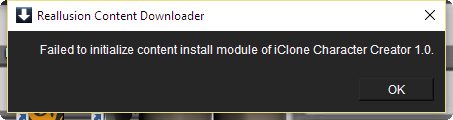 This issue can be a security level issue. Try the following to see if it helps. Please use Windows File Explorer to navigate to the folder below. C:\Program Files (x86)\Common Files\Reallusion\Downloader\bin Then right click the file RLDownloaderR2.exe and choose "Properties". Now select the "Compatibility" tab and put a check in the box marked "Run This Program As An Administrator". Finally click OK to set your changes. Now try to download your content again.
Peter
Forum Administrator www.reallusion.com
|
|
|
|
|
Snarp Farkle
|
Snarp Farkle
Posted 10 Years Ago
|
|
Group: Forum Members
Last Active: 2 Years Ago
Posts: 770,
Visits: 3.6K
|
TheOldBuffer (5/9/2016)
I have a problem when trying to install CC characters. They install perfect into Iclone but I get the following error message when the installer tries to install into CC. I do have the latest 1.43 version installed. Has anyone else had this problem ? Thanks John . That's an odd one TheOldBuffer, I've never seen that one before, maybe someone can come up with a better suggestion but mine would be to reinstall the RLcontent downloader, there's a link somewhere here in the forum.
Dell XPS 8900, Intel(R) Core(TM) i7-6700 CPU @ 3.40GHz, 3408 Mhz, 4 Core(s), 8 Logical Processor(s), 16 GB RAM, - 4 GB GeForce GTX 745, NVIDIA compatible.
Acer Aspire V Nitro Laptop, 2.5GHz Intel Core i5-7300HQ processor with 6MB cache, 256GB solid state drive, 16GB Ram, 4 GB NVIDIA GeForce GTX 1050 Ti graphics.
|
|
|
|
|
TheOldBuffer
|
TheOldBuffer
Posted 10 Years Ago
|
|
Group: Forum Members
Last Active: 2 Years Ago
Posts: 429,
Visits: 6.4K
|
I have a problem when trying to install CC characters. They install perfect into Iclone but I get the following error message when the installer tries to install into CC. I do have the latest 1.43 version installed. Has anyone else had this problem ? Thanks John .
Homebuilt computer - Windoze 10, INTEL i9 9900 k @ 5.1 GHz, EVGA RTX 2080 TI XC ULTRA, 16GB 3100 MHz RAM, Asus Maximus Hero XI motherboard, Sound blaster Z series. iClone6 & 7 Pipeline, Crazytalk 8, Crazytalk Animator 2, Facefilter, Pop video 3, Hitfilm 4Pro, Cubase 8.5 Pro,
|
|
|
|
|
Snarp Farkle
|
Snarp Farkle
Posted 10 Years Ago
|
|
Group: Forum Members
Last Active: 2 Years Ago
Posts: 770,
Visits: 3.6K
|
Snarp Farkle (5/2/2016)
andrew.genaille (5/2/2016)
Hi,I bought the essential clothes collection; The all white items are fine but the clothes with designs all come up with the Water mark. Went looking for a fix in the forums and couldn't find any. Thoughts?Those items are derivative content that someone modified and so they are extra, if you will, and if you want to one use those you'll need to purchase it in the content store. :exclamation:[[UDATE]] :exclamation:I was WRONG, and I'm not kidding either! If you buy the "Essential Clothing Pack" those items should not show a watermark, mine are working fine now albeit I just spent three days wiping my drive and reinstalling Win10 and then all my Reallusion content... TWICE... and everything else I use. Windows was giving me grief for months and I couldn't rule out that it wasn't a part of my Reallusion issues so it had to go, now all my purchased content is working fine, no more watermarks, no more grief! :D If you are still having watermark issues with the essentials packs please be patient, there is an reason for it so there is an answer, just got to find the right one for you! There isn't a software developer in existence that can develop content to match every system configuration out there, start with the basics which is if you have at least the minimum system requirements then work up from there, you'll find the answer and if not you might end up going down the lonely road called "Wipe The Drive Trail" like I did, it's an ugly road and you shouldn't travel it unless you have to and you know what you are doing, for me it as the last shortcut to happiness! :crying:
Patience makes me happy, frustration makes me stupid! :blink:
If everyone had the exact same super computer these issues would not exist in my opinion, but there must be a thousand different system configurations at play here, an IT nightmare to be sure, and no one here has all the answers but will always try to help, that's what's nice about this forum!
I apologize if I led some of you astray, my suggestions were born out of frustration of finally accepting the only "maybe answers" I could find on the subject since November of last year when I bought the content, I allowed my patience to turn into frustration and my frustration to turn stupid, that's MY BAD, sorry. :Whistling: Looking back I think that this is all new territory for everyone, RL included. I'm still learning, you're still learning, it's a beautiful thing! There are so many intelligent creative people on this forum that try to help us, they don't have to but they do and I really appreciate each and every one of you who feed my cranial grey matter with new stuff! ;)
Dell XPS 8900, Intel(R) Core(TM) i7-6700 CPU @ 3.40GHz, 3408 Mhz, 4 Core(s), 8 Logical Processor(s), 16 GB RAM, - 4 GB GeForce GTX 745, NVIDIA compatible.
Acer Aspire V Nitro Laptop, 2.5GHz Intel Core i5-7300HQ processor with 6MB cache, 256GB solid state drive, 16GB Ram, 4 GB NVIDIA GeForce GTX 1050 Ti graphics.
|
|
|
|
|
Snarp Farkle
|
Snarp Farkle
Posted 10 Years Ago
|
|
Group: Forum Members
Last Active: 2 Years Ago
Posts: 770,
Visits: 3.6K
|
andrew.genaille (5/2/2016)
Hi,I bought the essential clothes collection; The all white items are fine but the clothes with designs all come up with the Water mark. Went looking for a fix in the forums and couldn't find any. Thoughts?Those items are derivative content that someone modified and so they are extra, if you will, and if you want to one use those you'll need to purchase it in the content store.
Dell XPS 8900, Intel(R) Core(TM) i7-6700 CPU @ 3.40GHz, 3408 Mhz, 4 Core(s), 8 Logical Processor(s), 16 GB RAM, - 4 GB GeForce GTX 745, NVIDIA compatible.
Acer Aspire V Nitro Laptop, 2.5GHz Intel Core i5-7300HQ processor with 6MB cache, 256GB solid state drive, 16GB Ram, 4 GB NVIDIA GeForce GTX 1050 Ti graphics.
|
|
|
|
|
andrew.genaille
|
andrew.genaille
Posted 10 Years Ago
|
|
Group: Forum Members
Last Active: 2 Years Ago
Posts: 189,
Visits: 10.0K
|
Hi,I bought the essential clothes collection; The all white items are fine but the clothes with designs all come up with the Water mark. Went looking for a fix in the forums and couldn't find any. Thoughts?
|
|
|
|
|
maroalone_me
|
maroalone_me
Posted 10 Years Ago
|
|
Group: Forum Members
Last Active: 10 Years Ago
Posts: 34,
Visits: 128
|
i upgrad to c.c 1.4 and i see the new tool bar of morphing but i dont see any new clloth ? or i should buy it and it dosent come with upgrades ?
|
|
|
|