|
Author
|
Message
|
|
Grimhilda
|
Grimhilda
Posted 11 Years Ago
|
|
Group: Forum Members
Last Active: Last Year
Posts: 426,
Visits: 886
|
@Jrm21,
As Carrara fan, I'm sorry to hear that the program is unstable for you. I do get the odd crash but not often.
Maybe, if you do buy a PC, the PC version might work better? That would be a great bonus.
|
|
|
|
|
Grimhilda
|
Grimhilda
Posted 11 Years Ago
|
|
Group: Forum Members
Last Active: Last Year
Posts: 426,
Visits: 886
|
Hi Armstrong, Although you've quoted me and expressed an opposing point of view, I don't disagree with your thinking. This thread actually has a pre-history: the main questions being asked by the OP, who is considering buying Iclone, were first raised over in the DAZ forums and have now appeared here where, I suppose, more informed opinions were being sought. I think it's fair to say that the majority of DAZ users concentrate on producing still images. Indeed there are never-ending discussions on the forums on how to achieve greater realism through the use of new generations of figures, better render engines, advanced lighting, texturing techniques and so on. I think it's also fair to say that many of the DAZ users who are currently taking an interest in Iclone, are attracted to returning their animated characters back to DAZ software for rendering because the results are perceived to be better. My remarks to the OP were made in that context. Some DAZ users (I don't refer to the OP here) could be disappointed in the differences between Iclone and their favourite DAZ software. However, animating DAZ scenes in the full glory they're capable of would take forever and a day for the average home PC user. That's what I meant when I said that 'something's got to give'. (I think it was also Planetstardragon who said elsewhere that there's: low-cost, speedy completion and highly-polished final quality. We can only get two out of those three. Fighting a hard battle against that is to be admired but may not be for those just doing this for fun). Again I'm not opposed to what you say about the viewer taking in all the secondary elements of a scene. Spartan sets are generally less satisfying than they could be. What was behind my comment was the common advice to animators that only what the camera sees really needs to be there - a facade will do rather than a building complete with interior, for example.
My view is that sometimes elements, such as textures, can be more relaxed in a moving scene than they might need to be for a still render. Especially if depth-of-field settings softens them further. Regards
|
|
|
|
DELETED2
|
DELETED2
Posted 11 Years Ago
|
|
Group: Banned Members
Last Active: 11 Years Ago
Posts: 2.4K,
Visits: 6.1K
|
Grimhilda (6/26/2015)
...//... (A) I think, in practice, something's got to give: if we want lots of footage we may need to compromise on visual beauty. It is, in my view, a mistake anyway to treat animations to the same extreme attention to detail that a still render might enjoy. ...//... (B) With iclone6, much higher quality is possible. The final pieces of iclone's new-character jigsaw are coming together in a way that might make you prefer to keep everything Reallusion rather than DAZ. Regarding A... 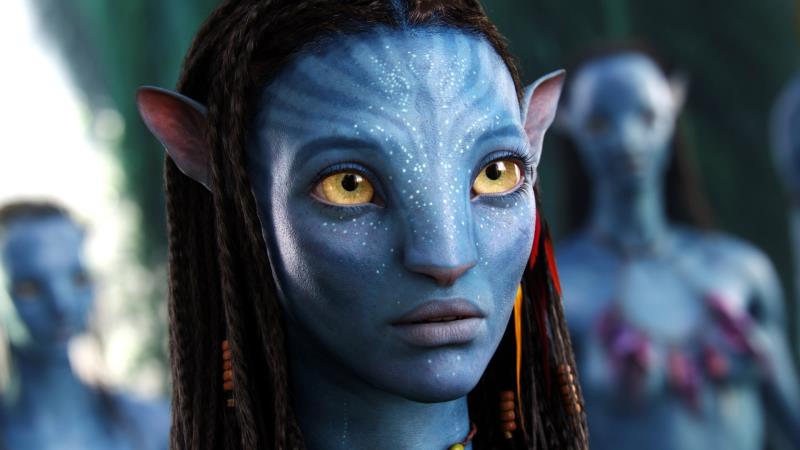  You have a choice. You have a choice.
WIN or Fail miserably.
Psychologically NEVER EVER assume that the subconscious isn't ALWAYS at work even while you're inanely staring at the movie as it flickers past your senses.... CUT QUALITY... CUT YOUR OWN THROAT.
REDUCE CONTENT... REDUCE IMPACT.
THIN SET ... THIN AUDIENCE.
NEVER EVER skimp on set quality. If the set needs the prop put the prop on the set.
If you think it should be there PUT IT THERE.
If its MISSING, FIND IT.
There are two types of people in this world.
Simpson Animators.
&
Avatar Animators.
You DONT get to choose which you are.
The amount of work and effort you put into your production automatically classifies you to everybody else.
Regarding (B)... You said the "P" word. Possible. possible - adjective (CAN ACHIEVE) A1 able to be done or achieved, or able to exist: Yes, with iClone it is possible.
|
|
|
|
|
jrm21
|
jrm21
Posted 11 Years Ago
|
|
Group: Forum Members
Last Active: 10 Years Ago
Posts: 5,
Visits: 107
|
@jgrant - I have been coming to the realization that building a PC is the best option. It just doesn't seem like booting my Mac into Windows will be a rewarding experience. My reason for looking at iClone is to relive frustration, not create more. :) Thanks for the info. I don't mind dedicating the time. My concern is if it will yield a better environment/process than I currently have - if not, I have simply spent a lot on hardware and software to end up back where I started.
@Grimhilda:
Great points. First off, I am a hobbyist. I would simply like to create some short animations for myself. My main goal is to produce music videos for songs that I write. Nothing commercial - I just really enjoy the process of creating things like this.
Yes, any serious production usually has a large crew associated with it. Lots of people specializing in various aspects of the production usually results in better quality and almost always in improved production times. I'm not trying to create a Pixar quality animation all on my own. At the same time, there is a certain minimum "look" I would like. I have been able (more or less) to get results that I find acceptable with Carrara (balancing render times vs quality). While I really like Carrara, it has always been unstable for me. It presents many problems doing what I want to do which are related to speed, stability and workflow (as opposed to my own artistic limitations or lack of proficiency with the software).
Telling the story is definitely important. For me, much of the enjoyment is in creating the story and having the final product "look" the way I want it too. Even if my clay + stop motion skills were acceptable, it is not a "look" that I feel would tell my story the way I want it told. At least it is far enough away from what I think can be realistically achieved using the tools at my disposal.
I have looked at some iClone videos and will look at some more. It's hard to judge as everyone's vision, talent and proficiency differs. What I "like" may have been done by a master artist and took a month to render. Or, it could have been done by someone with similar skill as myself and rendered in a reasonable amount of time.
I will see if I have a friend with a PC he can loan me for a week or two. Seems that messing with the demo is probably the best way to figure out if iClone is right for me.
Thank you all very much for the replies.
|
|
|
|
|
Grimhilda
|
Grimhilda
Posted 11 Years Ago
|
|
Group: Forum Members
Last Active: Last Year
Posts: 426,
Visits: 886
|
I don't know if I'm helping but I'll try and add a few more considerations.
Whenever I see short animations of up to ten minutes which I consider amazing or superb or absolutely fantastic and first class, I see from the credits that high-end software has been used (I include Blender) and that it is almost invariably a team effort.
When I've read the background to some of these works, it can turn out that quite a fair-sized budget has been spent. Or else sometimes the creators are students who have teamed up in their final year and have had at their disposal all the software and rendering facilities of their place of study and their existence is devoted full-time to complete the work.
Compare that to the lone, would-be animator with the best PC he/she can afford and who has to choose software that will give him/her a fighting chance of getting a film made.
I think, in practice, something's got to give: if we want lots of footage we may need to compromise on visual beauty. It is, in my view, a mistake anyway to treat animations to the same extreme attention to detail that a still render might enjoy because the eye can only take in so much of a motion-filled scene at a time.
In your case, where you are investing a lot of money in Iclone and 3dXchange on top of the cost of a new PC, I think you need to be clear of what you will be happy to achieve. Is telling your story of paramount importance? Then you could do that with clothes-pegs, modelling clay and a stop-motion camera.
But an infinitely better solution would be to use iclone. Great stories were told with great visual beauty by others here on this forum using early versions of iclone. The figures weren't DAZ quality but Clone-cloth ensured that there was no lack of individuality and almost no limit to what kind of characters could be represented.
With iclone6, much higher quality is possible. The final pieces of iclone's new-character jigsaw are coming together in a way that might make you prefer to keep everything Reallusion rather than DAZ.
Another thought is that, if you eventually bought pipeline, you could export your characters' animations as BVH. Assuming that your iclone films would have been made using some (or many) of your DAZ items then, who knows, you might be able to rebuild the scenes back in Carrara and use the iclone-generated motions. (I really don't know if the motions would transfer from Reallusion characters to DAZ since I don't have Pipeline).
My last piece of advice would be to look at as many iclone films as you can. Go over, in your mind, the ideas you have and consider them being done to the standards you see in those films. Quality will vary - some are superb and all have merit.
I've never made a film in any software but here is some of my nonsense:
https://www.youtube.com/watch?v=mPtVqcziRRI
This next one shows an attempt to animate a dragon in Carrara. I then put in a Carrara-rendered background. Lastly I brought in a Genesis character and a DAZ building to render them all in iclone.
https://www.youtube.com/watch?v=RBndJEuaW9U
Both of these use iclone 5
|
|
|
|
|
jgrant
|
jgrant
Posted 11 Years Ago
|
|
Group: Forum Members
Last Active: 2 Years Ago
Posts: 170,
Visits: 2.1K
|
I'm a Mac User and a recent convert to the IC6 family. Consider the following options:
1. Adopt a PC workflow and spend time looking at what IC6 can offer regarding their new character creator plug-in coming soon for their 3dX Program.
2. Consider the low-poly textures necessary for real-time animation and the benefits/issues of hi-poly models and textures when bringing across.
3. Dedicate at lest 90 days working exclusively with IC6 content and software to understand the workflow, animation protocols and rendering options within the program before importing.
4. Dedicate 90 days in preselecting, building and compiling assets for your animated projects in IC6. Coming to terms with the options available in 3dX will be (at least it is for me) a time-consuming and trial and error process as your understand the needs of IC6 and the value of staying within their architecture.
For me, I am working on coming to terms with the game-specific visual requirements for IC6 - and trying to use a Mac for a system that is decidedly PC focused will end up frustrating you more. I bought a new PC, purchased Reallusion elements I needed and am systematically working my way through exercises and render samples ad tests. This will help you make the call on if this platform is right for you.
There is a LOT I like about IC6 and I am adapting my Daz/Poser libraries to feed this new eco-system for my own animation work. I wish you much luck in your journey :)
|
|
|
|
|
jrm21
|
jrm21
Posted 11 Years Ago
|
|
Group: Forum Members
Last Active: 10 Years Ago
Posts: 5,
Visits: 107
|
@Lord Ashes - thanks for the info. Bear with me, as I think you lost me on a few points.
I watched some iClone videos. One reviewed the process of brining DAZ characters into iClone through 3DXchange. I noted that the character needed to be fully "dressed" at the start of the process. I am guessing doing so will avoid the issue you mention. I can see the limitations in this process, however, am I correct in thinking that if you "dress" the character prior to import, everything will work as expected in iClone (movements/morphs/etc.)?
On the EULA limitations. Anything I do is for "personal" use. I have no plans to re-sell content I create. Or am I misunderstanding you? Is this something that limits the ability to use RL marketplace items on/with imported DAZ characters?
If I already have DAZ characters, is there a significant advantage to using iClone characters instead? Is the upcoming "character creation tool" something that would effectively replace the need to use DAZ morphs on iClone characters?
Still a little confused on how this all fits together. :)
|
|
|
|
|
Lord Ashes
|
Lord Ashes
Posted 11 Years Ago
|
|
Group: Forum Members
Last Active: 7 Months Ago
Posts: 1.3K,
Visits: 1.6K
|
One more thing to note:
The DAZ EULA prohibits the re-sale of any content (outside of the DAZ Store) which includes any DAZ Studio (provided) meshes. This means you can export Genesis 1 and Genesis 2 figures to iClone for personal use only but you can not use them for Reallusion Marketplace content.
If you are interested in getting some of the DAZ body morph benefits using iClone characters (to avoid the DAZ EULA), I developed a "shrink wrap" process which basically takes an RL (iClone) character, exports it using 3DXChange, imports it into DAZ Studio, transfers it to a DAZ figure as if it was clothing, applies morphs to the DAZ figure which causes the RL figure (since DAZ thinks it is clothing) to also change, then exports the morphed RL figure, and lastly imports the morphed RL character back into iClone. You can see an example of this in the RL Marketpalce if you do a search for "Chuck Buff".
"We often compare ourselves to the U.S. and often they come out the best, but they only have the right to bear arms while we have the right to bare breasts"
Bowser and Blue, Busting The Breast
|
|
|
|
|
Lord Ashes
|
Lord Ashes
Posted 11 Years Ago
|
|
Group: Forum Members
Last Active: 7 Months Ago
Posts: 1.3K,
Visits: 1.6K
|
jrm21 (6/20/2015)
3DXchange looks like it has everything needed to bring my DAZ library over to iClone. I have seen tutorials for figures such as "Genesis" people. What about other props - clothing, building, vehicles, scenery elements? What about animals - horse, dog, etc? Can these all be transferred to iClone and then animated? Do the textures translate as well?
Figures and props come over fairly well. However clothing does not! Although you can make come clothing work (see my RealWear line) most of it will not work because iClone does not have functionality for clothing to automatically bend and move with the character if it is not implemented as part of the character mesh. This means that if you create a dress or pair of pants as a replacement to the existing iClone character mesh then the clothing will automatically bend with the character but if you implement real clothing (like DAZ) which are not part of the character mesh then such clothing will be static. This is why clothing such as corsets and panties are easy to make (or import from DAZ) because they only pin to a single body part. You can see, in my RealWear line, I also have a prototype trench coat which is much more complex to create (can not just be exported from DAZ) because it needs to be made from multiple parts each pinned to the appropriate body part. In such a case you need to design the clothing parts so that when they move and/or rotate they will not expose holes. iClone does provide a function in 3DXchange to replace parts of the iClone character meshes but this is a very limited function because the replacement mesh needs to have the same amount of verticies to work. Thus you'd basically need to take the exported mesh and convert that to your clothing without deleting or adding vertecies. If you just grabbed any old exported clothing then the vertecies would not match and 3DXchange would not allow you to import it as a replacement.
"We often compare ourselves to the U.S. and often they come out the best, but they only have the right to bear arms while we have the right to bare breasts"
Bowser and Blue, Busting The Breast
|
|
|
|
|
jrm21
|
jrm21
Posted 11 Years Ago
|
|
Group: Forum Members
Last Active: 10 Years Ago
Posts: 5,
Visits: 107
|
[b]Grimhilda (6/24/2015)
My own position is that I enjoy using both iclone and Carrara. I bring things in from DAZ/Hexagon/Carrara to iclone but not the other way round.
Thanks for the info. The above... bringing items in from DAZ products to animate and render in iClone is exactly the workflow I have in mind. My big roadblock seems to be hardware. My Mac (booting to Windows) video card doesn't seem to cut it. I am talking to a friend about _maybe_ building an inexpensive PC. Even inexpensive is an investment - then there is the price of software - so I am trying to figure out if this path is viable. My situation does not allow me to use a trial version, making the decision that much more difficult. I do enjoy using Carrara. It simply has always had tremendous stability and speed issues for me. It can be very frustrating to work with. I have been using it for a while (going back to the Ray Dream Designer days). What generally happens is that I start some projects and get familiar with the tools. Then I hit a wall of bugs, crashes, slowdowns or just plain limitations in posing/animating figures/props. After wasting hours doing something that should take minutes, or losing work to crash, I get frustrated. I give up for some months and start over again. Little actually gets finished. iClone looks like a capable animation tool using pre-made content. For the projects I have in mind, I am happy being the "director/cameraman/screenwriter" - I don't want to be the actor (content creator). My hope is that iClone, on a capable system, can provide a stable platform with tools to help me achieve this goal. I'm not looking for a "press a button" magic movie maker. Just something where I don't have to fight against the software to produce output. I see the iClone help videos and it looks like the ticket. After some work, it seems I can import my current content and have some stable tools designed to animate this content. The "live" preview appears serviceable to get a very good idea of what the final render will look like (in terms of character/item motion). I guess my main concerns at this point are... Does iClone make sense for me given the above? What is a realistic system I need to build to get decent performance from iClone?
|
|
|
|