Profile Picture

OFFICIAL iClone 6.1 Issues Thread

Posted By Peter (RL) 11 Years Ago
You don't have permission to rate!
1
2
3
4
5
6
7
...
14

Author
Message
animagic
animagic
Posted 11 Years Ago
View Quick Profile
Distinguished Member

Distinguished Member (33.4K reputation)Distinguished Member (33.4K reputation)Distinguished Member (33.4K reputation)Distinguished Member (33.4K reputation)Distinguished Member (33.4K reputation)Distinguished Member (33.4K reputation)Distinguished Member (33.4K reputation)Distinguished Member (33.4K reputation)Distinguished Member (33.4K reputation)

Group: Forum Members
Last Active: Last Month
Posts: 15.8K, Visits: 31.4K
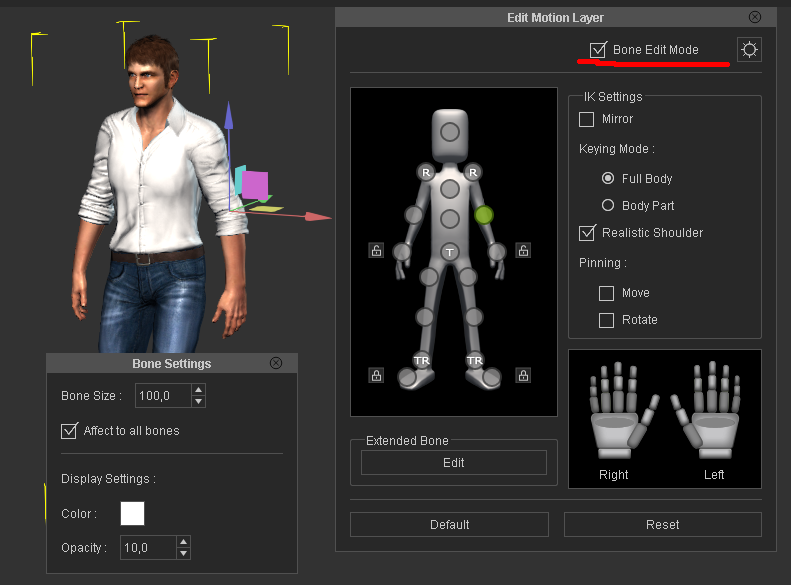
The Motion Editor still incorrectly shows the "Body Part Only" setting when the setting is actually the other option, whatever that's called. It seems to be specifically the case when you open the Motion Editor for the first time.


https://forum.reallusion.com/uploads/images/436b0ffd-1242-44d6-a876-d631.jpg

Dragonskunk
Dragonskunk
Posted 11 Years Ago
View Quick Profile
Distinguished Member

Distinguished Member (8.2K reputation)Distinguished Member (8.2K reputation)Distinguished Member (8.2K reputation)Distinguished Member (8.2K reputation)Distinguished Member (8.2K reputation)Distinguished Member (8.2K reputation)Distinguished Member (8.2K reputation)Distinguished Member (8.2K reputation)Distinguished Member (8.2K reputation)

Group: Forum Members
Last Active: 3 Years Ago
Posts: 368, Visits: 1.4K
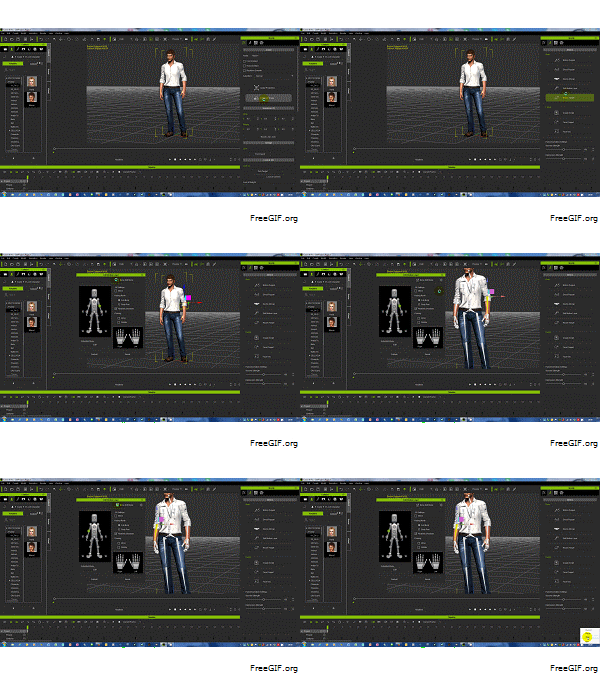
My camera (not preview) does not change using Transform in the Modify panel. It does change but only frame 1, I'm at frame 200 and I'm changing all the numbers but it doesn't budge even if I Reset (Zero Out) but when I go to frame 1 that is where it zeroed out.


https://forum.reallusion.com/uploads/images/f0d5a6aa-f907-4e06-b7ab-3cc3.jpg
etourist
etourist
Posted 11 Years Ago
View Quick Profile
Distinguished Member

Distinguished Member (2.0K reputation)Distinguished Member (2.0K reputation)Distinguished Member (2.0K reputation)Distinguished Member (2.0K reputation)Distinguished Member (2.0K reputation)Distinguished Member (2.0K reputation)Distinguished Member (2.0K reputation)Distinguished Member (2.0K reputation)Distinguished Member (2.0K reputation)

Group: Forum Members
Last Active: 2 Years Ago
Posts: 184, Visits: 1.2K
Christy0 (6/30/2015)

I too had this problem, thanks to Zeronimo I got it resolved. It's an AlienRespawn problem, I just uninstalled AlienRespawn and all was well after that.


Does this mean I have to install AlienRespawn so I can uninstall it? ;-)

Thanks for the letting me know I'm not the only one with this problem though.

- TET
Animation and Video Life
The Lazy Animator - Tutorials for Cartoon Animator
Christy0
Christy0
Posted 11 Years Ago
View Quick Profile
Distinguished Member

Distinguished Member (3.9K reputation)Distinguished Member (3.9K reputation)Distinguished Member (3.9K reputation)Distinguished Member (3.9K reputation)Distinguished Member (3.9K reputation)Distinguished Member (3.9K reputation)Distinguished Member (3.9K reputation)Distinguished Member (3.9K reputation)Distinguished Member (3.9K reputation)

Group: Forum Members
Last Active: Last Year
Posts: 1.0K, Visits: 2.7K
etourist (6/30/2015)
I have a completely brand new computer that I purchased specifically to run iClone 6. Purchased within the last month so everything is up to date (including all my drivers and iClone). Running iClone on Windows 8.1

The software works fine except if I have to access a windows explorer style file menu either through selecting something like 'Save File' in the File menu or trying to import a script (.wav) file etc. Anything that accesses a typical Explorer file Open/save window. Once I do that the program almost immediately crashes.

I think it may be because the windows are opening by default on my OneDrive files. Even the restore project window opens by default on my OneDrive.

Failing that has anyone had a similar issue and found a resolution. I haven't been able to find anything by scanning this thread and doing key word searches on this forum.

I too had this problem, thanks to Zeronimo I got it resolved. It's an AlienRespawn problem, I just uninstalled AlienRespawn and all was well after that.


https://forum.reallusion.com/uploads/images/e9080617-e063-46e7-ad69-a9c8.png https://forum.reallusion.com/uploads/images/f125ca23-2f9f-40dc-b6cd-d1a8.png https://forum.reallusion.com/uploads/images/d5dd533e-e6d4-4ee9-9a17-91da.png

Grimhilda
Grimhilda
Posted 11 Years Ago
View Quick Profile
Distinguished Member

Distinguished Member (1.9K reputation)Distinguished Member (1.9K reputation)Distinguished Member (1.9K reputation)Distinguished Member (1.9K reputation)Distinguished Member (1.9K reputation)Distinguished Member (1.9K reputation)Distinguished Member (1.9K reputation)Distinguished Member (1.9K reputation)Distinguished Member (1.9K reputation)

Group: Forum Members
Last Active: Last Year
Posts: 426, Visits: 886
Thanks Bray42 for your further help.
I have most things I need installed now.

Sorry, Etourist, I haven't used iclone6 often enough yet to see if this will be a problem for me (I too have bought a Windows 8.1 computer for Iclone).  I hope you get a solution.
etourist
etourist
Posted 11 Years Ago
View Quick Profile
Distinguished Member

Distinguished Member (2.0K reputation)Distinguished Member (2.0K reputation)Distinguished Member (2.0K reputation)Distinguished Member (2.0K reputation)Distinguished Member (2.0K reputation)Distinguished Member (2.0K reputation)Distinguished Member (2.0K reputation)Distinguished Member (2.0K reputation)Distinguished Member (2.0K reputation)

Group: Forum Members
Last Active: 2 Years Ago
Posts: 184, Visits: 1.2K
I have a completely brand new computer that I purchased specifically to run iClone 6. Purchased within the last month so everything is up to date (including all my drivers and iClone). Running iClone on Windows 8.1

The software works fine except if I have to access a windows explorer style file menu either through selecting something like 'Save File' in the File menu or trying to import a script (.wav) file etc. Anything that accesses a typical Explorer file Open/save window. Once I do that the program almost immediately crashes.

I think it may be because the windows are opening by default on my OneDrive files. Even the restore project window opens by default on my OneDrive.

Does anyone know if there is a registry entry I can change to restore the default location to somewhere on my local hard drive?

Failing that has anyone had a similar issue and found a resolution. I haven't been able to find anything by scanning this thread and doing key word searches on this forum.


- TET
Animation and Video Life
The Lazy Animator - Tutorials for Cartoon Animator
lpatter
lpatter
Posted 11 Years Ago
View Quick Profile
Distinguished Member

Distinguished Member (2.3K reputation)Distinguished Member (2.3K reputation)Distinguished Member (2.3K reputation)Distinguished Member (2.3K reputation)Distinguished Member (2.3K reputation)Distinguished Member (2.3K reputation)Distinguished Member (2.3K reputation)Distinguished Member (2.3K reputation)Distinguished Member (2.3K reputation)

Group: Forum Members
Last Active: 10 Years Ago
Posts: 145, Visits: 898
I installed Iclone 6.1 the day it was released and just got around to using it.
It is sooooooo sluggish and chews up battery like a pig. I have not read through the issues or know if there is a patch of 6.1.  I had tons of errors with it recognizing my keystrokes. All I was doing before was typing text file and emails.
I shut down the computer and it is a little better on the errors with the keystrokes but it seems to be sooooo sloooooow. It is now worse than the performance on my Iclone 5.
Hope there is a fix and not my fault. I want to take advantage of the speed and new features in the next 30 days.
Thanks for fixing everything so far.
This reply doesn't seem to recognize the paste command Ctrl-V. So I will type my computer specs

Lenovo Y50 gaming laptop Intel Core i7 4700 HQ (2.GHz) 16GB memory 1 TB HDD SSD NVIDIA GeForce GTX 860M 2 GB 15.6" Windows 8.1 64 bit

There was a 6.11 patch and I upgraded and my world is right-side up again!!!
One SHOULD ALWAYS check for updates before bothering OTHER people. But I forgot. My bad.
So I will BUY something.
I hope I can finally start using Iclone 6.


***** UPDATE *****
So I bought the Displacement building assets and Trenton at the after-release price as punishment for not reading before complaining.
It seems as if God has rewarded me for complaining. I LOVEEEEE Them.
SO I bought MORE stuff (gears from Mel Holden to add to my Wheels from W.Veeke) and I love those too.
I am waiting to buy something that disappoints me.


Alien Maniac
Alien Maniac
Posted 11 Years Ago
View Quick Profile
Distinguished Member

Distinguished Member (8.6K reputation)Distinguished Member (8.6K reputation)Distinguished Member (8.6K reputation)Distinguished Member (8.6K reputation)Distinguished Member (8.6K reputation)Distinguished Member (8.6K reputation)Distinguished Member (8.6K reputation)Distinguished Member (8.6K reputation)Distinguished Member (8.6K reputation)

Group: Forum Members
Last Active: 5 Years Ago
Posts: 693, Visits: 2.1K
Grimm

I don't know whether I could just manually copy that over from my other computer?
YES you can but check the file ext name, you may have to change that manually.
They changed that in 6. You may also be able to drag and drop files from 5 into 6 or Copy and paste a dir to its proper location.

The best thing to do is:
goto the member page or mkt place and re download the updated packs for 6. Many packs from 5 were re-fixed for 6.

There is a list of them somewhere here in the forum. IC6


MSI GE66 Raider, Intel 10th Gen, I7, SC Turbo to 5.3 GHZ, 240HZ, 64GB 3300 Ram,  2x 1TB M2 SSD Drives, NVIDIA GPU RTX 2070/8GB, 55" Sony 4K Monitor  External data drives total 7 TB. and an AUDIO Studio Recording system.

Grimhilda
Grimhilda
Posted 11 Years Ago
View Quick Profile
Distinguished Member

Distinguished Member (1.9K reputation)Distinguished Member (1.9K reputation)Distinguished Member (1.9K reputation)Distinguished Member (1.9K reputation)Distinguished Member (1.9K reputation)Distinguished Member (1.9K reputation)Distinguished Member (1.9K reputation)Distinguished Member (1.9K reputation)Distinguished Member (1.9K reputation)

Group: Forum Members
Last Active: Last Year
Posts: 426, Visits: 886
Just to say that I found the 'Defeated Motions' in a sub-folder called 'Non-DRM items'.
Things are looking up!
Grimhilda
Grimhilda
Posted 11 Years Ago
View Quick Profile
Distinguished Member

Distinguished Member (1.9K reputation)Distinguished Member (1.9K reputation)Distinguished Member (1.9K reputation)Distinguished Member (1.9K reputation)Distinguished Member (1.9K reputation)Distinguished Member (1.9K reputation)Distinguished Member (1.9K reputation)Distinguished Member (1.9K reputation)Distinguished Member (1.9K reputation)

Group: Forum Members
Last Active: Last Year
Posts: 426, Visits: 886
Thanks for your reply Bray2.
I did some deeper digging using Windows Explorer and found the content I knew I had installed.
I also saw which items I had installed more than once (because the 'Not Installed' content area in Iclone6 doesn't seem to refresh).  I deleted the duplicates and have been going through the 'Not Installed' folder and clicking on each item/pack to install.  This has been working well and I may manually delete the 'Not Installed' folder contents at the end of the process (Naturally, I'll keep a copy).

An issue I will have to deal with is that the 'Not Installed' folder doesn't show everything I bought for Iclone5 - which is on another computer.  For example, the 'Defeated Army' motion pack (It's called something like that).

I don't know whether I could just manually copy that over from my other computer?

1
2
3
4
5
6
7
...
14


Reading This Topic