|
Author
|
Message
|
|
dovletka
|
dovletka
Posted 9 Years Ago
|
|
Group: Forum Members
Last Active: 4 Years Ago
Posts: 19,
Visits: 48
|
So, four months later I seem to have realised what my issue was. The culprit for the clothes falling down and stripping the character was the physics settings. With some tweaking in the gradient it can be fixed. However my issue is that it's a cloak with a hood and it is separate import. When I attach the cloak to head it creates a kind of a "pivot point" at the top of her head. When I attach it to the chest the chest becomes the pivot point My question is has anybody had an experience animating a figure with a hooded cloak. It would probably make sense to import it from DAZ with the cape on but I wasn't successful with it. Any ideas welcome.
|
|
|
|
|
dovletka
|
dovletka
Posted 9 Years Ago
|
|
Group: Forum Members
Last Active: 4 Years Ago
Posts: 19,
Visits: 48
|
Hi rampa, The cloak originally was a part of the DAZ figure same as the skirt and other props. So I exported the entire figure including the cloak into BVH with the hope the cloak animation will follow. Then opened the bvh in 3Dxhange and converted the figure to iclone. The cloak animation didn't work. Then I exported only the figure with the cloak as FBX and turned off animation flag in the dialogue box. Followed the steps with converting to an iclone usable format. The cloak was still an issue as you can see in pic.1. As far as I understand I cannot have the cloak as a separate item and then attach it in iClone, it will stay stiff instead of following the figure's moves. Ugh... I removed the cloak and tried to apply the soft cloth to the skirt. Same ugly results. I suppose the issue is still with the excessive poligons. Let me see if I can get better results by reducing the number of poligons to an acceptable level. Meanwhile, I have a question. What if I export the cloak and then its animation separately? Will I be able to apply the animation to it and then combine it with the character's animation?
|
|
|
|
|
vidi
|
|
|
Group: Forum Members
Last Active: 2 Months Ago
Posts: 10.8K,
Visits: 40.2K
|
You can use any FBX Human Like Figure in 3Dxchange
-------------------------------------------------------------------
liebe Grüße vidi
|
|
|
|
|
Bushy2490
|
Bushy2490
Posted 9 Years Ago
|
|
Group: Forum Members
Last Active: Last Year
Posts: 86,
Visits: 532
|
Hi, Iclone 6.5 keeps loading the lounge as default - how do I get it so it loads with a clear screen. Is it possible to use poser figures in Iclone via 3dxchange or is it just Daz - also does anyone have a link and installation details for the memory patch for 3dxchange as keep running into out of memory when trying to open Daz figures.
|
|
|
|
|
dovletka
|
dovletka
Posted 9 Years Ago
|
|
Group: Forum Members
Last Active: 4 Years Ago
Posts: 19,
Visits: 48
|
Thank you, animagic
I saw a tutorial where they used decimation. Decimator plug-in for DAZ3D costs $100, almost 2/3 of iClone. Well, I'll get back to my project when I have extra $100. Thank you again.
|
|
|
|
|
Rampa
|
|
|
Group: Forum Members
Last Active: 2 Months Ago
Posts: 8.2K,
Visits: 62.6K
|
Is the cloak a separate object? All DAZ clothing needs to be merged with the figure in the export options for DAZ FBX. There are very few instances when you can get away with just attaching a piece of clothing. The cloak is to complex to get away with that.
|
|
|
|
|
animagic
|
animagic
Posted 9 Years Ago
|
|
Group: Forum Members
Last Active: Last Month
Posts: 15.8K,
Visits: 31.4K
|
I believe there is indeed a limit of 20k per clothing item. Seeing that your project is almost one million polygons for just one character, you may have to look at applying some decimation in DAZ. Real-time systems such as iClone and game engines try to do the most with a minimum of polygons, using various kinds of maps (including normal and displacement maps) to create the illusion of detail.
|
|
|
|
|
dovletka
|
dovletka
Posted 9 Years Ago
|
|
Group: Forum Members
Last Active: 4 Years Ago
Posts: 19,
Visits: 48
|
Hi, Can someone direct me to where I can find a solution to my issue with soft cloth animation? The character and clothing are originally imported from DAZ (Victoria 6). I converted it into an iClone character via 3Dxchange. Originally the cloak was moving along with the character but after exporting it to iClone it just pokes through and when animated looks like this. I am at the point of desperation. I tried to adjust physics but to no avail. I am short of dropping the idea of having the cloak altogether. While changing the Weight Map I got a pop-up saying I have reached the maximum of 20,000 poligons. Could that play some role? Thank you all! 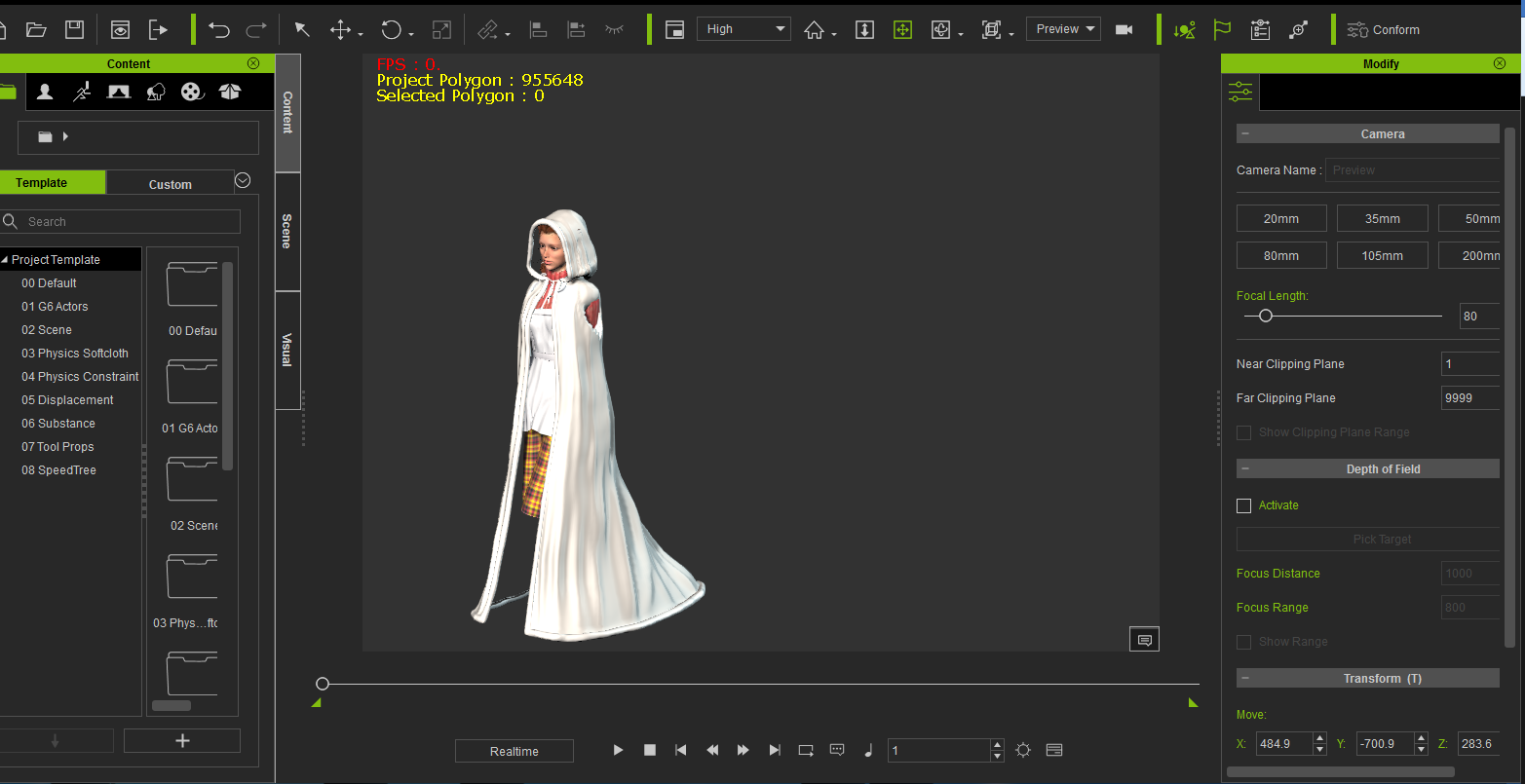 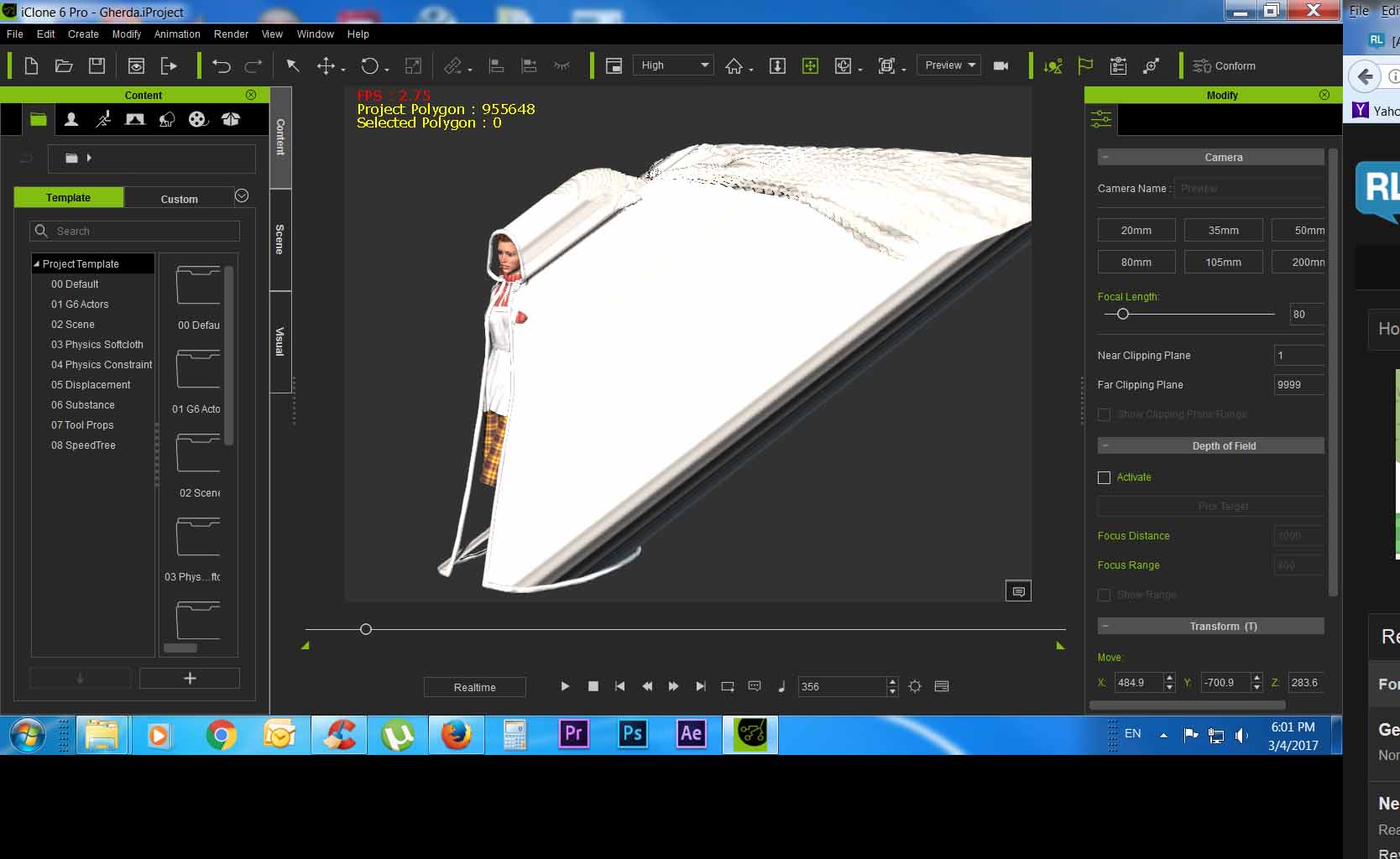
|
|
|
|
|
Lord Ashes
|
Lord Ashes
Posted 11 Years Ago
|
|
Group: Forum Members
Last Active: 8 Months Ago
Posts: 1.3K,
Visits: 1.6K
|
rampa (3/30/2015)
I think the general assumption with PhysX based clothing is that the clothing is bone weighted, and so is already part of the avatar. It does work both ways though.
My experience has been that quicker ramping between black and white is best. Gradual blends, especially on the limbs, are very prone to pass-throughs.Thanks for the info. As I was saying in one of the other responses, I am a amateur when it comes to this stuff (doing it as a hobby and not professionally) and thus my knowledge has not reach things like bone weights. In DAZ all my objects were rigid objects with DAZ taking care of "folding" them when the character moved. This made it easy but it also did not produce the nice soft cloth effects that can be done with iClone (hence one of the reasons why I am looking into iClone). So now I have learned a bit about weight maps for soft cloth and trying to make some clothing that applies those principles. Exporting an Avatar to modify its clothing and then re-importing it is, so far, beyond my capabilities. In any case, thanks for the info about the black/white as opposed to large gradients. I also found that if you don't put enough black (or maybe missing pure black) in the weight map, the object slowly slips down. My first attempt had my skirt sort of melting down the body. When I added a bit more black to the weight map the problem fixed itself.
"We often compare ourselves to the U.S. and often they come out the best, but they only have the right to bear arms while we have the right to bare breasts"
Bowser and Blue, Busting The Breast
|
|
|
|
|
Lord Ashes
|
Lord Ashes
Posted 11 Years Ago
|
|
Group: Forum Members
Last Active: 8 Months Ago
Posts: 1.3K,
Visits: 1.6K
|
animagic (3/30/2015)
If it is a separate piece of clothing, then you will need to make it an accessory (attach it to the character).Yes it is a separate piece of clothing. I noticed that unlike DAZ, iClone characters come with default clothing but then you can select different Upper and Lower parts to effectively change it. I am nowhere near at the level to edit Avatar and figure out how to make some parts of the Avatar rigid (i.e. the Avatar's body) and other parts soft (i.e. the clothing). Currently my 3D modeling skills (and time) are limited to making fairly simple objects and simple clothing (or better yet getting free models and modifying them to suit my needs). As such my clothing is all separates which would go over some very tight iClone character clothing (to avoid the iClone clothing from peeking through).
Also, make sure to run any clothing simulation By Frame. You can then "bake" the soft cloth animation so it stays. Watching the tutorials is good advice.
Thanks. I was aware of that (from the numerous tutorials that I did watch).
"We often compare ourselves to the U.S. and often they come out the best, but they only have the right to bear arms while we have the right to bare breasts"
Bowser and Blue, Busting The Breast
|
|
|
|