|
By Lord Ashes - 11 Years Ago
|
I really like the supposed Soft Cloth capabilities of iClone 6 and when I run the sample project (the example with the 3 different table cloths) it works fine. I even recreated the same effect using rigid bodies instead of weight maps and it still works great.
Next I wanted to ensure that I would be able to do the same with my imported objects, so I created a soft cloth mesh (basically a rectangle of many small meshes), imported it into iClone 6 and used it, instead of the provided soft cloths, in the table cloth examples.
So far so good.
However, as soon as I tried some more complex soft cloth examples involving characters or custom meshes everything started to fail.
Here are some issues that I encountered:
- If the rigid body is too small (or the collision margin setting is too low) then the rigid body rips through the soft cloth as opposed to having the soft cloth slip over (and off) the rigid body. For example, a table cloth falling on a pole.
- G5 Characters, by default, do not appear to be rigid bodies and thus dropping soft cloths on them causes the soft cloth to pass right through them. Do I need to turn their Physics on and select them as rigid bodies?
- G6 Characters, by default, influence soft cloth somewhat. Dropping a soft cloth table cloth on top of a G6 character causes the soft cloth to bend around some parts of the character (for example the head) but not all parts (the cloth cuts through the arms for example).
- In some cases the movement of characters causes the soft cloth to move but in other cases the character just pokes though the soft cloth. For example, I made a very simple quick skirt by using a circular soft cloth with a hole in the middle (for the waist). When soft cloth physics were applied, the soft cloth dropped down the character until the hips of the character prevented it from dropping further (as expected). However, as the character moved, instead of pushing the skirt, the legs just cut through (poked through) the skirt instead of moving it.
I also had some issues getting Soft Cloth to work with my custom objects although this may be due to the last issue above. I imported a skirt mesh which had a bunch of fringe tassels attached to the hem. Although the skirt itself had a fairly low polygon count (and thus I would expect it to be fairly rigid) the tassels had a high polygon count so that they could bend as needed by the physics. When I imported this mesh into iClone 6, activated its Physics, selected Soft Cloth and applied my weight maps (tried both freefall weights where the skirt was held up by the characters hips and weight maps that held up the skirt on their own). However, when character movement was applied the mesh seemed to have remained very rigid and when the character moved, the character moved through it as opposed to moving it.
Can anyone let me know if these are bugs/limitations of the Soft Cloth or if I am doing something wrong...
Currently I am a DAZ Studio user but I am thinking of investing into iClone because it renders much quicker than my DAZ Studio and the soft cloth would be a great bonus.
|
|
By wires - 11 Years Ago
|
|
Take a look at some of the RL tutorials available here, click on the "Show more" button to view the whole series.
|
|
By spacecat56 - 11 Years Ago
|
|
Lord Ashes (3/29/2015)
...
- In some cases the movement of characters causes the soft cloth to move but in other cases the character just pokes though the soft cloth. For example, I made a very simple quick skirt by using a circular soft cloth with a hole in the middle (for the waist). When soft cloth physics were applied, the soft cloth dropped down the character until the hips of the character prevented it from dropping further (as expected). However, as the character moved, instead of pushing the skirt, the legs just cut through (poked through) the skirt instead of moving it....
I saw that in one of the tuts and they fixed it by editing the weight map to make the bottom heavier/darker. Still, while not yet trying to do much of anything with the soft cloth I see lots of such tears and pokes with the default G6 content. And turning on soft-soft collision is good for a laugh and not much else, AFAICT.
|
|
By Lord Ashes - 11 Years Ago
|
I followed the concept of the tutorial and I did get somewhat better results. My skirt now moves around with the character movements and most of the time the movement of the character pushes the skirt in the appropriate directions (as opposed to tearing) but it is nowhere near perfect. I think it would be usable in a clip but it would probably need a lot of tweaks to prevent any poke through.
The one thing that did not seem to get mentioned in the tutorial is that when using Weight Maps you need to Link To or Attach (have not figured out the difference) the clothing to the character otherwise the clothing will remain in its initial position when the Avatar moves.
|
|
By animagic - 11 Years Ago
|
|
If it is a separate piece of clothing, then you will need to make it an accessory (attach it to the character). Also, make sure to run any clothing simulation By Frame. You can then "bake" the soft cloth animation so it stays. Watching the tutorials is good advice.
|
|
By Rampa - 11 Years Ago
|
I think the general assumption with PhysX based clothing is that the clothing is bone weighted, and so is already part of the avatar. It does work both ways though.
My experience has been that quicker ramping between black and white is best. Gradual blends, especially on the limbs, are very prone to pass-throughs.
|
|
By Lord Ashes - 11 Years Ago
|
|
animagic (3/30/2015)
If it is a separate piece of clothing, then you will need to make it an accessory (attach it to the character).
Yes it is a separate piece of clothing.
I noticed that unlike DAZ, iClone characters come with default clothing but then you can select different Upper and Lower parts to effectively change it.
I am nowhere near at the level to edit Avatar and figure out how to make some parts of the Avatar rigid (i.e. the Avatar's body) and other parts soft (i.e. the clothing).
Currently my 3D modeling skills (and time) are limited to making fairly simple objects and simple clothing (or better yet getting free models and modifying them to suit my needs). As such my clothing is all separates which would go over some very tight iClone character clothing (to avoid the iClone clothing from peeking through).
Also, make sure to run any clothing simulation By Frame. You can then "bake" the soft cloth animation so it stays. Watching the tutorials is good advice.
Thanks. I was aware of that (from the numerous tutorials that I did watch).
|
|
By Lord Ashes - 11 Years Ago
|
|
rampa (3/30/2015)
I think the general assumption with PhysX based clothing is that the clothing is bone weighted, and so is already part of the avatar. It does work both ways though.
My experience has been that quicker ramping between black and white is best. Gradual blends, especially on the limbs, are very prone to pass-throughs.
Thanks for the info. As I was saying in one of the other responses, I am a amateur when it comes to this stuff (doing it as a hobby and not professionally) and thus my knowledge has not reach things like bone weights.
In DAZ all my objects were rigid objects with DAZ taking care of "folding" them when the character moved. This made it easy but it also did not produce the nice soft cloth effects that can be done with iClone (hence one of the reasons why I am looking into iClone). So now I have learned a bit about weight maps for soft cloth and trying to make some clothing that applies those principles.
Exporting an Avatar to modify its clothing and then re-importing it is, so far, beyond my capabilities.
In any case, thanks for the info about the black/white as opposed to large gradients. I also found that if you don't put enough black (or maybe missing pure black) in the weight map, the object slowly slips down. My first attempt had my skirt sort of melting down the body. When I added a bit more black to the weight map the problem fixed itself.
|
|
By dovletka - 9 Years Ago
|
Hi,
Can someone direct me to where I can find a solution to my issue with soft cloth animation? The character and clothing are originally imported from DAZ (Victoria 6). I converted it into an iClone character via 3Dxchange. Originally the cloak was moving along with the character but after exporting it to iClone it just pokes through and when animated looks like this. I am at the point of desperation. I tried to adjust physics but to no avail. I am short of dropping the idea of having the cloak altogether. While changing the Weight Map I got a pop-up saying I have reached the maximum of 20,000 poligons. Could that play some role? Thank you all!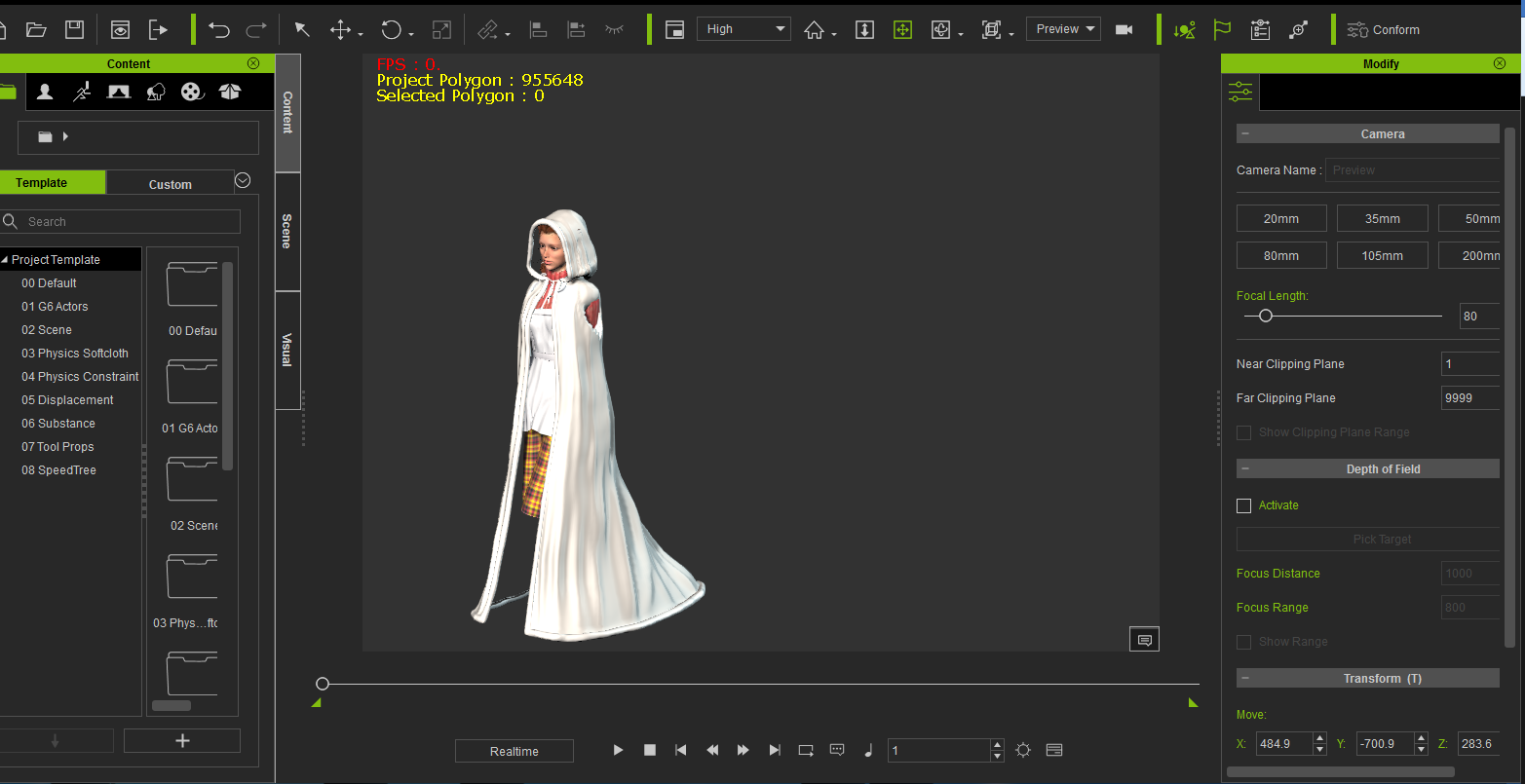 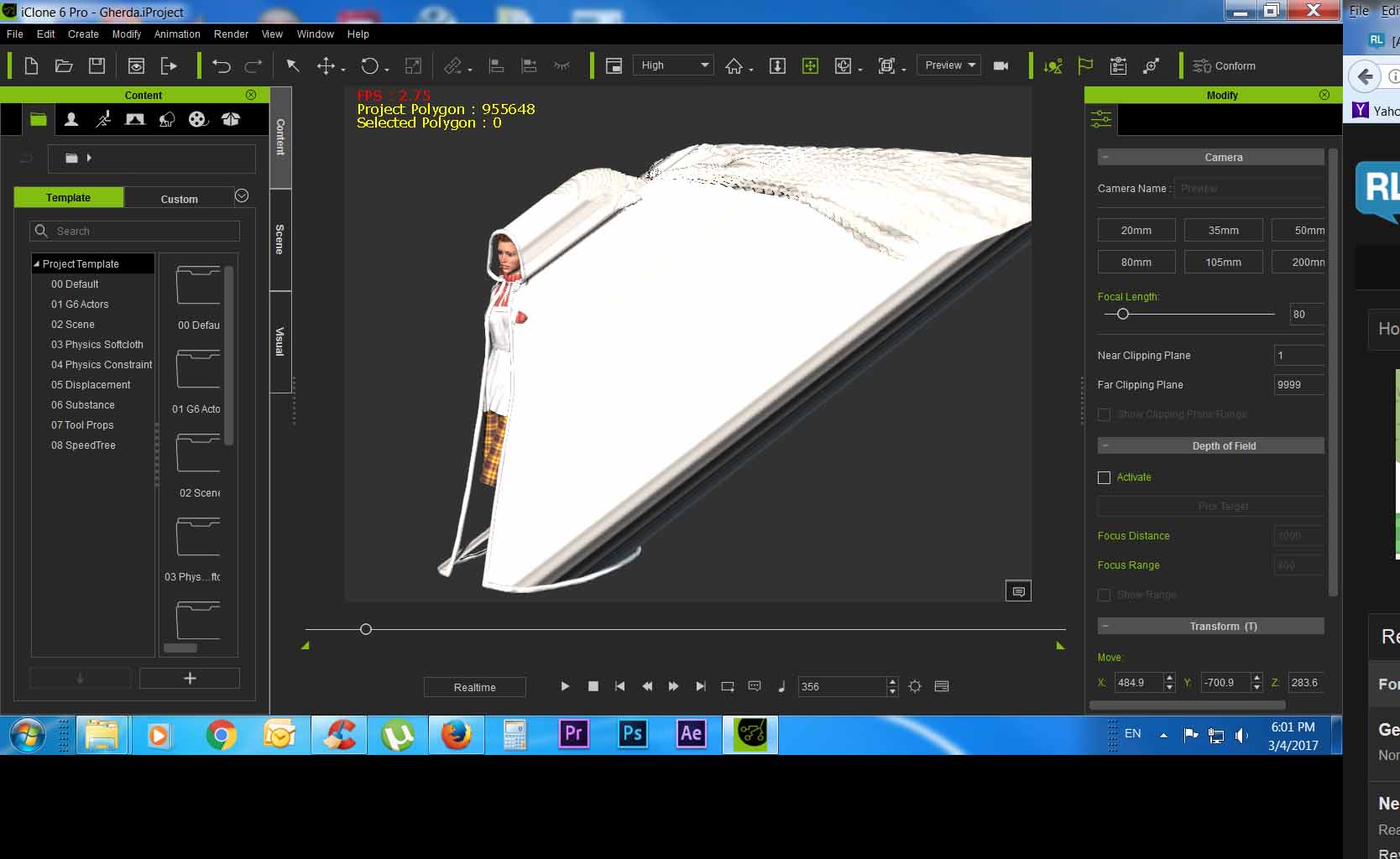
|
|
By animagic - 9 Years Ago
|
|
I believe there is indeed a limit of 20k per clothing item. Seeing that your project is almost one million polygons for just one character, you may have to look at applying some decimation in DAZ. Real-time systems such as iClone and game engines try to do the most with a minimum of polygons, using various kinds of maps (including normal and displacement maps) to create the illusion of detail.
|
|
By Rampa - 9 Years Ago
|
|
Is the cloak a separate object? All DAZ clothing needs to be merged with the figure in the export options for DAZ FBX. There are very few instances when you can get away with just attaching a piece of clothing. The cloak is to complex to get away with that.
|
|
By dovletka - 9 Years Ago
|
Thank you, animagic
I saw a tutorial where they used decimation. Decimator plug-in for DAZ3D costs $100, almost 2/3 of iClone. Well, I'll get back to my project when I have extra $100. Thank you again.
|
|
By Bushy2490 - 9 Years Ago
|
Hi,
Iclone 6.5 keeps loading the lounge as default - how do I get it so it loads with a clear screen.
Is it possible to use poser figures in Iclone via 3dxchange or is it just Daz - also does anyone have a link and installation details for the memory patch for 3dxchange as keep running into out of memory when trying to open Daz figures.
|
|
By vidi - 9 Years Ago
|
|
You can use any FBX Human Like Figure in 3Dxchange
|
|
By dovletka - 9 Years Ago
|
Hi rampa,
The cloak originally was a part of the DAZ figure same as the skirt and other props. So I exported the entire figure including the cloak into BVH with the hope the cloak animation will follow. Then opened the bvh in 3Dxhange and converted the figure to iclone. The cloak animation didn't work. Then I exported only the figure with the cloak as FBX and turned off animation flag in the dialogue box. Followed the steps with converting to an iclone usable format. The cloak was still an issue as you can see in pic.1. As far as I understand I cannot have the cloak as a separate item and then attach it in iClone, it will stay stiff instead of following the figure's moves. Ugh... I removed the cloak and tried to apply the soft cloth to the skirt. Same ugly results. I suppose the issue is still with the excessive poligons. Let me see if I can get better results by reducing the number of poligons to an acceptable level.
Meanwhile, I have a question. What if I export the cloak and then its animation separately? Will I be able to apply the animation to it and then combine it with the character's animation?
|
|
By dovletka - 9 Years Ago
|
So, four months later I seem to have realised what my issue was. The culprit for the clothes falling down and stripping the character was the physics settings. With some tweaking in the gradient it can be fixed. However my issue is that it's a cloak with a hood and it is separate import. When I attach the cloak to head it creates a kind of a "pivot point" at the top of her head. When I attach it to the chest the chest becomes the pivot point My question is has anybody had an experience animating a figure with a hooded cloak. It would probably make sense to import it from DAZ with the cape on but I wasn't successful with it. Any ideas welcome.
|