|
Author
|
Message
|
|
KenCoon
|
KenCoon
Posted 11 Years Ago
|
|
Group: Forum Members
Last Active: 7 Years Ago
Posts: 687,
Visits: 18.4K
|
I have walls linked to the floor. (I thought.) I rechecked to make sure.
I had curtains attached to the windows. ( I thought).
I saved the scene and then reopened it. Things were okay.
I opened it this morning and everything was messed up. Walls turned, curtains over blank walls and the floor had gone way back.
I straightened it out again this morning and was going to put the curtains on the windows and noticed the walls had turned and were not attached to the floor again.
I must be doing something wrong.
I check to make sure things are saved before going to the next step but then it seems the animations are lost when I go to another part of the scene.
Ken:)
|
|
|
|
|
KenCoon
|
KenCoon
Posted 11 Years Ago
|
|
Group: Forum Members
Last Active: 7 Years Ago
Posts: 687,
Visits: 18.4K
|
Thanks. I put a hold on Blender to learn more about iClone6 and finish the movie.
I guess I should Attach the walls and floor and attach the curtains too so that they will all stay together. Forget about link for now.
I will try that and then save and come back to see what the computer does to things.
I thought I had this part finished last night and was going on to make about 7 scenes today.
Thanks again.
Ken:)
|
|
|
|
|
hattori kun
|
hattori kun
Posted 11 Years Ago
|
|
Group: Forum Members
Last Active: 4 Years Ago
Posts: 868,
Visits: 4.1K
|
Here you go. https://www.reallusion.com/iclone/help/iclone5/PRO/17_Linkage/Link_and_Attach.htmAttach is like parenting in other appz. Means that when you parent other objects to a master, the objects will go to the master hierarchy and follow its behavior(position, rotation, scale). Link is like adding a constraint in other appz. In this case its a position and rotation contraint. There's no change in hieararchy at all its just a link. But I had a feature request to separate these position and rotation contraints into two for mult linking control but that's another topic. One trick with hierarchy objects is that they can be duplicated easily by picking its master and duplicating only that. Look at the Iclone scene I uploaded. Move the two masters around and see the difference. See the difference when you duplicate the master Attach and the master link in this file. This behavior is similar in other appz.
|
|
|
|
|
KenCoon
|
KenCoon
Posted 11 Years Ago
|
|
Group: Forum Members
Last Active: 7 Years Ago
Posts: 687,
Visits: 18.4K
|
Since my last post I went back and set everything up again and attached each wall to the floor individually so that they were all attached to the floor. I moved them around to make sure everything moved the same.
I then put curtains on two windows. The third curtain on the other wall could not be selected for some reason. I looked on the scene and opened everything to see if it was linked or attached to something and it could not be found yet it was on the screen. I saved everything and closed out iClone6 and then opened it again.
All the attachments seem to be still there but the walls have moved out and changed size. The curtains were no longer next to the windows.
something is not working right.
I am going to try to begin with a new project and build from there attaching everything.
This is getting frustrating as i cannot seem to get one scene to hold together through a save and open cycle.
I think I need a program to record the screen as I do it and make it into a "tutorial type" movie so you could see what is happening.
I hope my new computer is not messing up again.
Ken:)
|
|
|
|
|
hattori kun
|
hattori kun
Posted 11 Years Ago
|
|
Group: Forum Members
Last Active: 4 Years Ago
Posts: 868,
Visits: 4.1K
|
|
|
|
|
|
KenCoon
|
KenCoon
Posted 11 Years Ago
|
|
Group: Forum Members
Last Active: 7 Years Ago
Posts: 687,
Visits: 18.4K
|
It looks like changing the file name and beginning all over has solved the problem. There must have been something in the other file that kept things going weird.
thanks for all the help. I am going to keep that list. I have the old books from iClone5 printed out. I have not looked for one on iClone6 as the other one almost wrecked my printer.
Ken:)
|
|
|
|
|
colour
|
colour
Posted 11 Years Ago
|
|
Group: Forum Members
Last Active: 3 Years Ago
Posts: 5.2K,
Visits: 8.1K
|
Nothing complicated, Ken See iC5 Screenshot. 1) Show Grid & World Axis 2) Select 3D Props / Floor & Wall. 3) Double-Click on both Templates for exact position on World Axis. 4) Move Wall. (Don't Attach Wall to Floor). 5) If you want Curtains to Move with wind, Link them to Wall. 6) Ensure you do the above at Frame 1. Time taken; 5 minutes. Mark has a great Video Tut for creating a room. 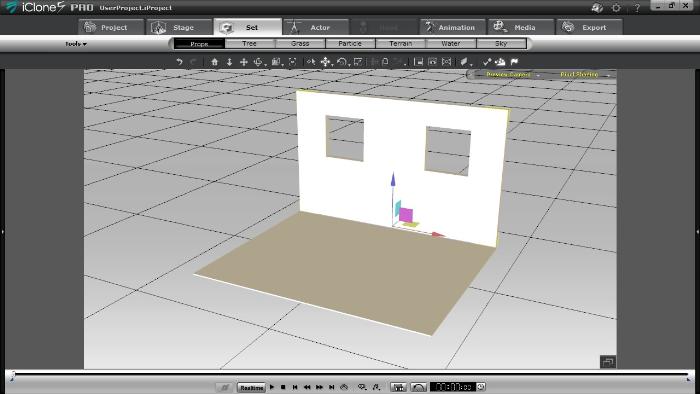
----------------------------------------------------------------------------------------- REALLUSION FORUM ANNUAL PINHEAD COMMUNITY PROJECTS. New Pinhead Website & Project to be announced in September 2015 -----------------------------------------------------------------------------------------
|
|
|
|
|
KenCoon
|
KenCoon
Posted 11 Years Ago
|
|
Group: Forum Members
Last Active: 7 Years Ago
Posts: 687,
Visits: 18.4K
|
I need to check out the tut.
I was attaching the walls to the floor so the house would stay together. I have the curtains attached to the windows now and everything seems to be staying in place when I turn the scene.
I am not used to the world view vs the other one. I saw them but didn't know what the difference was. I sort of it was like holding the Alt key down when moving things and not holding it down.
I am almost ready to begin filming again. I watched a movie today on you tube that was apparently with the same name but made by a Studio with a big cast. It was filmed. Gave me some ideas for costume and tables and things. The house was a lot more complicated with an upstairs in the movie.
For now I am going to press on with what I have going.
thanks for the help everyone. I hope things hold together for me from here on out.
Ken:)
|
|
|
|
|
prabhatM
|
prabhatM
Posted 11 Years Ago
|
|
Group: Forum Members
Last Active: 6 Years Ago
Posts: 1.8K,
Visits: 8.1K
|
ATTACH and LINK in ICLONE :
===================
It's not complex, There is NOTHING MUCH TO UNDERSTAND :
ATTACH :
You can ATTACH a Prop to another Prop or Avatar, it will be part of the Parent and will follow it.
LINK :
You can LINK a Prop to another Prop or Avatar, it will STAY as an INDEPENDENT OBJECT, but follow the Parent.
AT THE RUNTIME / During Animation :
1) If you DETACH the CHILD PROP at Frame 430, it will not follow the Parent at all and LOSE all the animation starting from the frame 0.
2) If you DELINK the CHILD PROP at Frame 430, it will follow the Parent till the point of DELINKING ( Frame 430 ) and then become independent.
THE DIFFERENCE :
You can UNLINK your Object at the runtime / later on the timeline, yet maintain the Parent's animation before getting unlinked..
EXAMPLES :
ATTACH : You can ATTACH a Hair Prop to an Avatar, it will follow the Avatar throughout the animation. If you detach it any time, it will not follow the Avatar.
LINK: If you LINK an Arrow to a Bow, it will follow the Bow throughout the animation. You can RELEASE the ARROW at frame number 2450, without affecting the previous animation of following the Bow. It can stay LINKED to the Bow till 2450 and later can be UNLINKED and follow its own animation.
Another Example : Your Avatar is holding a sunglass that he would throw onto the table.
DON'T ATTACH THE SUNGLASS, LINK IT and later DELINK at the time of throw.
============================
Keep it Simple. Don't confuse the OP. Explain things in the context of ICLONE, rather than other softwares.
|
|
|
|
|
KenCoon
|
KenCoon
Posted 11 Years Ago
|
|
Group: Forum Members
Last Active: 7 Years Ago
Posts: 687,
Visits: 18.4K
|
I think this is why I put Blender on hold for awhile until I get good at iClone6.
Ken:)
|
|
|
|