|
By KenCoon - 10 Years Ago
|
I have walls linked to the floor. (I thought.) I rechecked to make sure.
I had curtains attached to the windows. ( I thought).
I saved the scene and then reopened it. Things were okay.
I opened it this morning and everything was messed up. Walls turned, curtains over blank walls and the floor had gone way back.
I straightened it out again this morning and was going to put the curtains on the windows and noticed the walls had turned and were not attached to the floor again.
I must be doing something wrong.
I check to make sure things are saved before going to the next step but then it seems the animations are lost when I go to another part of the scene.
Ken:)
|
|
By KenCoon - 10 Years Ago
|
Thanks. I put a hold on Blender to learn more about iClone6 and finish the movie.
I guess I should Attach the walls and floor and attach the curtains too so that they will all stay together. Forget about link for now.
I will try that and then save and come back to see what the computer does to things.
I thought I had this part finished last night and was going on to make about 7 scenes today.
Thanks again.
Ken:)
|
|
By hattori kun - 10 Years Ago
|
Here you go.
https://www.reallusion.com/iclone/help/iclone5/PRO/17_Linkage/Link_and_Attach.htm
Attach is like parenting in other appz. Means that when you parent other objects to a master, the objects will go to the master hierarchy and follow its behavior(position, rotation, scale).
Link is like adding a constraint in other appz. In this case its a position and rotation contraint.
There's no change in hieararchy at all its just a link. But I had a feature request to separate these position and rotation contraints into two for mult linking control but that's another topic.
One trick with hierarchy objects is that they can be duplicated easily by picking its master and duplicating only that. Look at the Iclone scene I uploaded. Move the two masters around and see the difference.
See the difference when you duplicate the master Attach and the master link in this file. This behavior is similar in other appz.
|
|
By KenCoon - 10 Years Ago
|
Since my last post I went back and set everything up again and attached each wall to the floor individually so that they were all attached to the floor. I moved them around to make sure everything moved the same.
I then put curtains on two windows. The third curtain on the other wall could not be selected for some reason. I looked on the scene and opened everything to see if it was linked or attached to something and it could not be found yet it was on the screen. I saved everything and closed out iClone6 and then opened it again.
All the attachments seem to be still there but the walls have moved out and changed size. The curtains were no longer next to the windows.
something is not working right.
I am going to try to begin with a new project and build from there attaching everything.
This is getting frustrating as i cannot seem to get one scene to hold together through a save and open cycle.
I think I need a program to record the screen as I do it and make it into a "tutorial type" movie so you could see what is happening.
I hope my new computer is not messing up again.
Ken:)
|
|
By hattori kun - 10 Years Ago
|
Here's a more thorough list
https://www.reallusion.com/iclone/help/iclone5/PRO/17_Linkage/The_Comparison_of_Linkage_and_Attaching.htm
|
|
By KenCoon - 10 Years Ago
|
It looks like changing the file name and beginning all over has solved the problem. There must have been something in the other file that kept things going weird.
thanks for all the help. I am going to keep that list. I have the old books from iClone5 printed out. I have not looked for one on iClone6 as the other one almost wrecked my printer.
Ken:)
|
|
By colour - 10 Years Ago
|
|
Nothing complicated, Ken See iC5 Screenshot. 1) Show Grid & World Axis 2) Select 3D Props / Floor & Wall. 3) Double-Click on both Templates for exact position on World Axis. 4) Move Wall. (Don't Attach Wall to Floor). 5) If you want Curtains to Move with wind, Link them to Wall. 6) Ensure you do the above at Frame 1. Time taken; 5 minutes. Mark has a great Video Tut for creating a room. 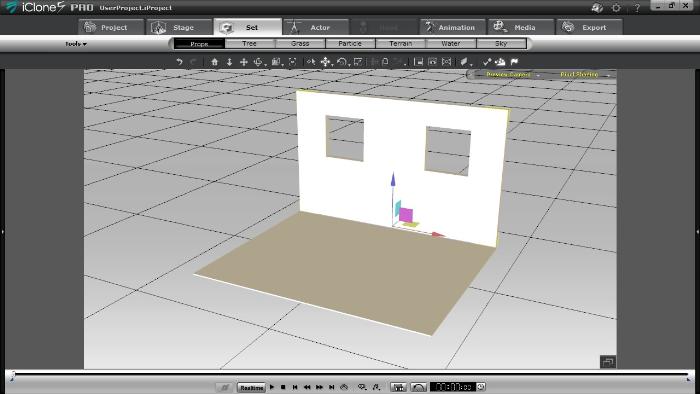
|
|
By KenCoon - 10 Years Ago
|
I need to check out the tut.
I was attaching the walls to the floor so the house would stay together. I have the curtains attached to the windows now and everything seems to be staying in place when I turn the scene.
I am not used to the world view vs the other one. I saw them but didn't know what the difference was. I sort of it was like holding the Alt key down when moving things and not holding it down.
I am almost ready to begin filming again. I watched a movie today on you tube that was apparently with the same name but made by a Studio with a big cast. It was filmed. Gave me some ideas for costume and tables and things. The house was a lot more complicated with an upstairs in the movie.
For now I am going to press on with what I have going.
thanks for the help everyone. I hope things hold together for me from here on out.
Ken:)
|
|
By prabhatM - 10 Years Ago
|
ATTACH and LINK in ICLONE :
===================
It's not complex, There is NOTHING MUCH TO UNDERSTAND :
ATTACH :
You can ATTACH a Prop to another Prop or Avatar, it will be part of the Parent and will follow it.
LINK :
You can LINK a Prop to another Prop or Avatar, it will STAY as an INDEPENDENT OBJECT, but follow the Parent.
AT THE RUNTIME / During Animation :
1) If you DETACH the CHILD PROP at Frame 430, it will not follow the Parent at all and LOSE all the animation starting from the frame 0.
2) If you DELINK the CHILD PROP at Frame 430, it will follow the Parent till the point of DELINKING ( Frame 430 ) and then become independent.
THE DIFFERENCE :
You can UNLINK your Object at the runtime / later on the timeline, yet maintain the Parent's animation before getting unlinked..
EXAMPLES :
ATTACH : You can ATTACH a Hair Prop to an Avatar, it will follow the Avatar throughout the animation. If you detach it any time, it will not follow the Avatar.
LINK: If you LINK an Arrow to a Bow, it will follow the Bow throughout the animation. You can RELEASE the ARROW at frame number 2450, without affecting the previous animation of following the Bow. It can stay LINKED to the Bow till 2450 and later can be UNLINKED and follow its own animation.
Another Example : Your Avatar is holding a sunglass that he would throw onto the table.
DON'T ATTACH THE SUNGLASS, LINK IT and later DELINK at the time of throw.
============================
Keep it Simple. Don't confuse the OP. Explain things in the context of ICLONE, rather than other softwares.
|
|
By KenCoon - 10 Years Ago
|
I think this is why I put Blender on hold for awhile until I get good at iClone6.
Ken:)
|
|
By prabhatM - 10 Years Ago
|
sw00000p (3/14/2015)
prabhatM (3/14/2015)
ATTACH and LINK in ICLONE :
===================
It's not complex, There is NOTHING MUCH TO UNDERSTAND :
ATTACH :
You can ATTACH a Prop to another Prop or Avatar, it will be part of the Parent and will follow it.LINK :
You can LINK a Prop to another Prop or Avatar, it will STAY as INDEPENDENT OBJECT, but follow the Parent.
============================
Keep it Simple. Don't confuse the OP. Explain things in the context of ICLONE, rather than other softwares.
Do this in Blender, May, 3ds Max, XSI, Carrara, Houdini, and dozens of other apps that use Standard Industry practices and, .... THIS WILL NOT WORK!
Ken, I seriously hope you DON'T fall into this "Brain-Dead" pool. :P
...and join Armstrong!:)
While eating rice, don't talk about the Noodles. Keep the context intact.
We do Left hand drive in India. We may do Right Hand drive when we go to another country. But here and now, somebody is having problem with the Left hand Drive. Don't teach him the Right Hand Drive.
I told you before, when you extend your helping hand, don't extend it to SHOW THE POWER OF YOUR OWN GRIP. Extend it to help the needy.
|
|
By KenCoon - 10 Years Ago
|
Thanks for all the help. I understand it now.
I think my scene is working now so I must have understood it right.
Thanks again for all the help.
Ken:)
|
|
By hattori kun - 10 Years Ago
|
I think people who don't speak native english will misunderstand.
They may not be named exactly as in other appz but they are similar in function.
Many stuff in cg have different names but are actually the same. It is up to the user to understand the function more than the name. ;)
Like I said Attach is like parenting in other appz. Its a hierarchal function. That means there's a parent child relationship. The child will inherit the behavior(position,rotation,scale) of the parent. All animation packages have a parenting function.
Link is like any other constraint. Its a position, rotation constraint in this case. It does not affect the hierarchy. An object that is linked to another will NOT be part of that hierarchy and so will not be copied over when that hierarchy is duplicated.
The manual clearly explains what these two functions are. Its plain english.
|
|
By colour - 10 Years Ago
|
|
Boy oh Boy All this complex technobabble.:ermm: It's quite simple: 1) Attach = Whatever you're attaching, becomes part of what you're attaching it to. 2) Link = Whatever you're Linking just moves with whatever you're linking it to. Got it, get it, good. But there are exceptions:D
|
|
By prabhatM - 10 Years Ago
|
sw00000p (3/15/2015)
colour (3/15/2015)
Boy oh Boy
All this complex technobabble.:ermm:
It's quite simple:
1) Attach = Whatever you're attaching, becomes part of what you're attaching it to.
2) Link = Whatever you're Linking just moves with whatever you're linking it to.
Got it, get it, good.
But there are exceptions:DColour Sir, This is perfectly fine using iClone, but this is NOT how attach and link workswith Standard Industry tools. Attach = Creates ONE Object (NO Hierarchy) Link = (Parent Child Relationship) Hope you NEVER try and apply this to a software that uses Standard Industry Tools! :w00t: Easy to see how long timeiClone users have problems importing from other software. ...Not you Colour... others! :) Kind Regards, sw00000p :cool:
Like people learnt ICLONE-way here, they will learn OTHER-SOFTWARE-way when they work with other softwares.
|
|
By prabhatM - 10 Years Ago
|
In a regular tech group discussion for a project, many times, you will find somebody "enthusiastically" suggesting something ( hurriedly without thinking ) that may not be appropriate. Others' suggestions are accepted and the group tries to move on. But the first guy would keep mumbling under his breath"...but...you know...you don't understand..."
He would keep doing this till the meeting is over....many times even would carry forward to the lunch and tea sessions. Just to prove he was not wrong and looking for an honourable EXIT route.
But there are even more serious types !
There are people who refuse to recognise the EXIT route and continue to mumble.
For eternity.
CAUSE : Rote Learning and Behavioural issues.
|
|
By planetstardragon - 10 Years Ago
|
Be Nice To Hattori!! ^.^
|
|
By prabhatM - 10 Years Ago
|
Very Interesting thread.
1) Somebody asked a question about some issues he faced in ICLONE on the ICLONE forum.
2) He is advised to learn Blender....Blender.....Blender......Blender and Blender...and also is warned how difficult it would be for him to learn Blender ! [ As if Blender followed 100% industry standard ! ]
3) Then to prove a point he is shown the Screen Prints of 3dsMAX !!
Did I make a comment before ?
LOOP : Refer to my earlier comment.
|
|
By planetstardragon - 10 Years Ago
|
here we go again with your comfort zone issues, it's a good thing you weren't Thomas Edison, else we'd all be using computers by candle light! ^.^
swoop, if you are boring, no amount of technology is going to fix that.
|
|
By planetstardragon - 10 Years Ago
|
|
yeah, that's how you learn, by making mistakes. You don't teach by heckling people. ^.^
|
|
By prabhatM - 10 Years Ago
|
|
sw00000p (3/15/2015)
...albeit, you need reputable training material to start with.
Imagine those "reputable ICLONE training materials" talking about BLENDER with 3DSMAX ScreenShots !!!!
|
|
By planetstardragon - 10 Years Ago
|
swoop, I enjoy when I do something that makes you grit your teeth because it worked in a way you would have never done it. :D
|
|
By planetstardragon - 10 Years Ago
|
|
it's ok to pick on prabbat though...so have fun! :w00t:
|
|
By prabhatM - 10 Years Ago
|
sw00000p (3/15/2015)
prabhatM (3/15/2015)
sw00000p (3/15/2015)
...albeit, you need reputable training material to start with.
Imagine those reputable ICLONE training materials talking about BLENDER with 3DSMAX ScreenShots !!!! Hey! What's up your Crawl? You have something to say? SAY IT! Sick you your chit! :crazy:
I have said in clear terms. Unfortunately, the autistic brain does not pick up the thread. The mumbling goes on.
|
|
By KenCoon - 10 Years Ago
|
Okay! I have the answer.
You can stop arguing now.
Ken:)
|
|
By colour - 10 Years Ago
|
|
Did you get the answer from here, Ken:D
|
|
By KenCoon - 10 Years Ago
|
I got the answer from the first few posts.
We have some of those scenes over here live. Sad situation.
they come from the province to make it big and when they don't they cannot tell them back home so they tell them things are going good. the people back there take them at their word and soon they are here too writing back telling people they are making it okay for the same reason. People live in the medians of some of the streets, under bridges, and in the parks. Kids are begging and being watched to make sure what they are doing.
Ken:)
|
|
By Cricky - 10 Years Ago
|
Essentially in the world of fishing as an analogy;
You ATTACH a Hook, but you only LINK the worm. :D
|
|
By prabhatM - 10 Years Ago
|
|
Cricky (3/15/2015)
Essentially in the world of fishing as an analogy;
You ATTACH a Hook, but you only LINK the worm. :D
Terrific !
|
|
By planetstardragon - 10 Years Ago
|
attaching is absolute, linking is relative.
"If you can't explain it simply, you don't understand it well enough." - Albert Einstein
|
|
By mtakerkart - 10 Years Ago
|
Hi Ken , because I'm a very noob in 3D , lot of time I prefer video as explainations....
Hope this video helps you.
|
|
By prabhatM - 10 Years Ago
|
|
planetstardragon (3/15/2015)
attaching is absolute, linking is relative.
"If you can't explain it simply, you don't understand it well enough." - Albert Einstein
0.01 /100
|
|
By planetstardragon - 10 Years Ago
|
|
did i type it too fast for you ? lol
|
|
By prabhatM - 10 Years Ago
|
|
planetstardragon (3/15/2015)
did i type it too fast for you ? lol
You got 0.01 because you suggested there would be 2 objects when you used the word "Relative". But that's all.
You may appeal to Cricky for RE-EVALUATION.
And you can hire your lawyer/coach/mentor/teacher/guru/tech expert Sw00000p to plead your case.
|
|
By planetstardragon - 10 Years Ago
|
heh, not good with concepts are you. No where did i suggest 2 objects.
when you attach an object(s), they 'can' inherit spacial values from the object they are attached to...absolutely - such as scaling and position
when you link an object(s), it follows the relative position of the item it is linked to.
|
|
By prabhatM - 10 Years Ago
|
|
planetstardragon (3/15/2015)
heh, not good with concepts are you. No where did i suggest 2 objects.
when you attach an object(s), they 'can' inherit spacial values from the object they are attached to...absolutely - such as scaling and position
when you link an object(s), it follows the relative position of the item it is linked to.
If you try to argue, get your concept right.
When something "inherits" from somethingelse, it's always RELATIVE, not ABSOLUTE.
The 2nd Object is Scaled BY 20% because the 1st Object got scaled by 20%. The ratio remains same.
Ever heard of "SCALE FACTOR" (Cx)?
Hire Sw00000p. He will explain it with the help of TCB.
|
|
By planetstardragon - 10 Years Ago
|
you are the one trying to argue, and it started with your ratings as if it mattered to me. lol
when you reduce a size of a character by 50 percent, everything attached can get absolutely reduced by 50 percent. The math that goes beyond that is relative as all of 3D is relative and based on perception.
like i said, you just don't understand concepts....I'll hire swoop, to supervise you.
|
|
By prabhatM - 10 Years Ago
|
|
planetstardragon (3/15/2015)
you are the one trying to argue, and it started with your ratings as if it mattered to me. lol
when you reduce a size of a character by 50 percent, everything attached can get absolutely reduced by 50 percent. The math that goes beyond that is relative as all of 3D is relative and based on perception.
like i said, you just don't understand concepts....I'll hire swoop, to supervise you.
Children learn the concept of RATIO in class IV.
Thank God, you are not a Doctor. Else you would have been a mass murderer.
Told you before...you always create a cesspool for yourself and then sink.
|
|
By planetstardragon - 10 Years Ago
|
sounds personal, best to stay on topic. have patience, maybe one day you'll understand why you lost so many debates and find peace with it.
|
|
By prabhatM - 10 Years Ago
|
|
planetstardragon (3/15/2015)
sounds personal, best to stay on topic. have patience, maybe one day you'll understand why you lost so many debates and find peace with it.
Your usual MUMBLING parting shot.
====
Now let me be the devil's advocate.
You said : "ATTACH is ABSOLUTE. LINK is RELATIVE."
-
This is philosophically true.
ATTACH : In olden times, the wife after marriage used to lose her identity and follow her husband ABSOLUTELY. The relationship was ABSOLUTE.
LINK : In modern days, the wife follows her husband, but also has her own agenda. She can separate from the LINK (marriage ) and follow her own ambition. The relationship is RELATIVE so long it works for both.
-
In ICLONE it's same like Marriage, philosophically.
|
|
By planetstardragon - 10 Years Ago
|
prabhatM (3/15/2015)
planetstardragon (3/15/2015)
sounds personal, best to stay on topic. have patience, maybe one day you'll understand why you lost so many debates and find peace with it.
Your usual MUMBLING parting shot. ==== Now let me be the devil's advocate. You said : "ATTACH is ABSOLUTE. LINK is RELATIVE." - This is philosophically true. ATTACH : In olden times, the wife after marriage used to lose her identity and follow her husband ABSOLUTELY. The relationship was ABSOLUTE. LINK : In modern days, the wife follows her husband, but also has her own agenda. She can separate from the LINK (marriage ) and follow her own ambition. - In ICLONE it's not the same.
are you trying to tell me you have a crush on one of your avatars, but it's not the same as olden times ? sounds personal, best to stay on topic.
|
|
By prabhatM - 10 Years Ago
|
planetstardragon (3/15/2015)
prabhatM (3/15/2015)
planetstardragon (3/15/2015)
sounds personal, best to stay on topic. have patience, maybe one day you'll understand why you lost so many debates and find peace with it.
Your usual MUMBLING parting shot. ==== Now let me be the devil's advocate. You said : "ATTACH is ABSOLUTE. LINK is RELATIVE." - This is philosophically true. ATTACH : In olden times, the wife after marriage used to lose her identity and follow her husband ABSOLUTELY. The relationship was ABSOLUTE. LINK : In modern days, the wife follows her husband, but also has her own agenda. She can separate from the LINK (marriage ) and follow her own ambition. - In ICLONE it's not the same. are you trying to tell me you have a crush on one of your avatars, but it's not the same as olden times ? sounds personal, best to stay on topic.
Another Cesspool you just created for yourself. Actually, you are pretty good at it !
|
|
By planetstardragon - 10 Years Ago
|
|
naw, i get it, ...the make human rig eyes are wrong like that ...poor things look more crosseyed than a cat with a muskeeter on it's nose!
|
|
By prabhatM - 10 Years Ago
|
Ha....ha...ha...Quite a spectacle. The screen prints are worth preserving !
A small anecdote :
---------------------
Once I was attending a lower court in relation to a corporate case of my company. I was waiting for my turn to come and was busy reading a newspaper. Suddenly, I heard the lawyer of the previous case shouting, waving a bunch paper.....
" I don't accept this ruling..." He was shouting at the top of his voice. His client was standing next to him, totally crestfallen.
The lawyer tore the paper in his hand with full force ( not the case paper ) dramatically.
( Turning to his client who lost the case ) " We are not going to accept this...We will go to the higher court...We will show what power we have...We will go upto the Supreme court .... Come ! we will file the appeal in the higher court today itself..."
He dragged his client out of the court and continued to shout even in the corridor.
After they left, there was a silence for a minute. Then somebody said...."what a paper tearing argument ! He really tore the case apart !"
Everybody burst into laughter.
The young judge commented - " Poor client ! He is being torn apart ! He is being taken on a long ride!!"
There was another round of laughter.
====
@ Planet
You keep nodding.
What did you learn ? The eyes should be LINKED or ATTACHED in ICLONE?
I told you before he will be explain you with the help of TCB !
|
|
By planetstardragon - 10 Years Ago
|
ya...i've been using those type of errors to learn modo..... :D I'm learning little bits at a time in between projects....not trying to rush it.
and don't worry about prabbaht, it took me a long time to get him to follow me around obsessively like he does....hopefully he'll learn something and become a useful member of society one day! He needed someone to look up to. ♥
|
|
By prabhatM - 10 Years Ago
|
|
planetstardragon (3/16/2015)
and don't worry about prabbaht, it took me a long time to get him to follow me around obsessively like he does....hopefully he'll learn something and become a useful member of society one day! He needed someone to look up to. ♥
Squant-eyed Back Patting !!
It's natural because of the company you keep. No wonder you have developed such poor taste for logic !
Oh! that's an alibi for being creative !!;)
PRABHAT ( not prabbaht. )
A little wisdom from Indian Panchtantra : Voluminous books are not necessarily full of wisdom.
|
|
By planetstardragon - 10 Years Ago
|
wow, how could you say such bad things about swoop after he's taken so much time to help you with your life ? -smh-
have you no compassion prabhat ? the guy is pouring out his heart here in free lessons, free...and all you can say is he's bad company ?! man-o-man!!
|
|
By prabhatM - 10 Years Ago
|
|
planetstardragon (3/16/2015)
wow, how could you say such bad things about swoop after he's taken so much time to help you with your life ? -smh-
have you no compassion prabhat ? the guy is pouring out his heart here in free lessons, free...and all you can say is he's bad company ?! man-o-man!!
A little wisdom from Indian Panchtantra : Voluminous books are not necessarily full of wisdom.
|
|
By planetstardragon - 10 Years Ago
|
prabhatM (3/16/2015)
planetstardragon (3/16/2015)
wow, how could you say such bad things about swoop after he's taken so much time to help you with your life ? -smh-
have you no compassion prabhat ? the guy is pouring out his heart here in free lessons, free...and all you can say is he's bad company ?! man-o-man!!A little wisdom from Indian Panchtantra : Voluminous books are not necessarily full of wisdom.
"A wise man can learn more from a foolish question than a fool can learn from a wise answer." - Bruce Lee
|
|
By prabhatM - 10 Years Ago
|
planetstardragon (3/16/2015)
prabhatM (3/16/2015)
planetstardragon (3/16/2015)
wow, how could you say such bad things about swoop after he's taken so much time to help you with your life ? -smh-
have you no compassion prabhat ? the guy is pouring out his heart here in free lessons, free...and all you can say is he's bad company ?! man-o-man!!A little wisdom from Indian Panchtantra : Voluminous books are not necessarily full of wisdom. "A wise man can learn more from a foolish question than a fool can learn from a wise answer." - Bruce Lee
"NO ONE, wise or fool, can learn from a FOOLISH ANSWER." - Prabhat MOHANTY
|
|
By planetstardragon - 10 Years Ago
|
that is an assumption that no one can learn from someone elses mistakes.
maybe if you tried writing it down on a notepad before posting, you may catch these subtleties before i do ? #tryagain
|
|
By prabhatM - 10 Years Ago
|
|
planetstardragon (3/16/2015)
that is an assumption that no one can learn from someone elses mistakes.
maybe if you tried writing it down on a notepad before posting, you may catch these subtleties before i do ? #tryagain
You will never be fast enough for me.
|
|
By planetstardragon - 10 Years Ago
|
|
your arguments are failing in record time, no argument here!
|
|
By prabhatM - 10 Years Ago
|
|
planetstardragon (3/16/2015)
your arguments are failing in record time, no argument here!
Naturally, as expected, you wouldn't get the Nuance.
I am quick enough to understand from half a sentence, in a BLINK.
[ I practiced that diligently when I was young. ]
|
|
By planetstardragon - 10 Years Ago
|
swoop, i'm so sorry about this. Perhaps we can continue this wonderful discussion of the finer points of bone alignments when prabhat calms down and decides to stay on topic. Apparently he has some issues to sort through that are urgent.
go on prabhat , and then what happened ?
|
|
By prabhatM - 10 Years Ago
|
|
planetstardragon (3/16/2015)
swoop, i'm so sorry about this. Perhaps we can continue this wonderful discussion of the finer points of bone alignments when prabhat calms down and decides to stay on topic. Apparently he has some issues to sort through that are urgent.
go on prabhat , and then what happened ?
I will WAIT for another loose ball, another foolish answer from the so called industry expert.
In the meanwhile, the so called industry expert may try to understand the meaning of "BREVITY" for his own good.
|
|
By planetstardragon - 10 Years Ago
|
|
unfortunately brevity doesn't work for you prabhat, you were dazed and confused when I presented the concept of absolute and relative.
|
|
By prabhatM - 10 Years Ago
|
|
planetstardragon (3/16/2015)
unfortunately brevity doesn't work for you prabhat, you were dazed and confused when I presented the concept of absolute and relative.
Reread your own justification, before I became the Devil's advocate and gave you the possibility with the marriage example.
And you expected to explain the difference to Ken ( I hope ) with that reply : ATTACH IS ABSOLUTE AND LINK IS RELATIVE ?
You were acting like the so called Industry expert. Talk less ( Morse Code ) when more is needed and unnecessarily more when less is needed.
|
|
By prabhatM - 10 Years Ago
|
|
In the age of SMART, PRECISION BOMBING, the CRUDE CARPET BOMBING has no relevance.
|
|
By colour - 10 Years Ago
|
|
Here's an example of Link & Attach. Turn sound on . Click HD Icon, to view in High Definition. 3D Warehouse SKP Model. All front & back faces attached to Carousel root. I Animated it. Doubt if any of you waffling Flaming Guys would even know where to start.:ermm: So - Cut the waffle & flaming. Learn iClone. Forget about Max, Maya, Poser & "Uncle Tom Cobbly And All". Get Animating & show us what you've achieved. Good, bad or ugly ;)
|
|
By justaviking - 10 Years Ago
|
|
Oy. Here we go again... Because Link and Attach are similar to each other, it is common for a newbie to ask what the difference is between them. - A pen and a pencil both write and draw on paper, so what's the difference?
- Just like Link and Attach; similar yet different.
Colour gave a great answer in this post, back on Page 3: My favorite example: - You can "keyframe" the LINK of an item.
- If you want to pass an object from one avatar to another, such as Mason handing a book to Heidi:
- Link the book to Mason's hand
- At the moment Heidi takes it from him, you unlink it from Mason and Link it to Heidi's hand
- That is what makes Link really useful to me.
sw00000p (3/15/2015)
[responding to Colour...] This is perfectly fine using iClone, but this is NOT how attach and link works with Standard Industry tools.
Attach = Creates ONE Object (NO Hierarchy)
Link = (Parent Child Relationship)
Hope you NEVER try and apply this to a software that uses Standard Industry Tools! :w00t:
Easy to see how long time iClone users have problems importing from other software.
...Not you Colour... others! :)
Need I point out the obvious? Again? Ken was asking an iClone question. He did not even use 3DXchange. He had an iClone curtain prop linked or attached to an iClone wall inside iClone. He wanted to know the difference between the iClone Link function and the iClone Attach function. Will knowing the answer to that question help him understand "industry standard" tools? Maybe not, though the concepts often transfer from tool to tool, you just have to relearn/translate some of the specific terminology. On the other hand, will learning about "industry standard" tools and terminology explain to him the difference between Link and Attach behavior in iClone? I think not. I'm not against other software. but when an iClone user asks a question about iClone functionality, it is possible that an iClone-centric answer will be the most use to him.
|
|
By animagic - 10 Years Ago
|
|
I'm with Viking here. If someone asks a question about iClone, just answer the question, like Colour did. All that's relevant is that iClone uses Link and Attach in a useful and easy to understand way. There is Merge if you want to create a single object. I will refrain from saying anything about the so-called discussion in this thread, it would be insulting.
|
|
By RobertoColombo - 10 Years Ago
|
Hi guys,
I do not want to enter the though discussion but reather give one more perspective about how using the "attach" for other reasons, in addition to the "normal" usage.
Here we go.
Sometimes the attach follows the natural idea of a prop hierarchy but other times I use a dummy prop and attach multiple props to it, not necessarily because they are part of thr same structure.
The idea of the dummy prop is for:
1. acting as a kind of "folder", like a directory, which makes the scene manager more readable
2. enabling a way to turn on/off with one click the viewing of multiple props (very useful when I work on some animation and the object being animated is covered by many props)
3. creating a better way to find props, because I know where to find them, rather than scrolling a huge list
That´s it.
Cheers
Roberto
|
|
By planetstardragon - 10 Years Ago
|
|
lol, poor ken, he's going to be able to give a thesis on the difference between attach and link after this thread is over heh
|
|
By RobertoColombo - 10 Years Ago
|
Hi sw00000p,
you can call me just Roberto (that´s only for friends, so do not misuse it... ;) )
In the scenario you described, I have to detach all the childs... and then re-attach again.... I think there are no other ways :ermm:
It just happened yesterday, with the project I am working it... :hehe:
Anyway, usually, I do the attachment when I am enough/almost sure there are no more modification in the scaling.
That´s kind of possible if I follow the order that I mostly like (which can be different from others, but that´s what I naturally tend to do):
1. create the scene (props)
2. attach for better "scene manager window" ordering
3. add the actors
4. animate
5. etc. etc.
Of course, it is not always so deterministic (at least in my limited experience), but al least this order of things give some kind of rule and help me to properly size the scene.
I wish RL could improve the scene manager window to allow:
1. to create sub-folders to have things better ordered/organized
2. to be able to move up/down the props
Now, without taking the "left" or "right" party for the link-attach discussion, I just want to tell this little story: when I was younger and "played" with synthetisers and expander, I remember that each producer used a different naming for the idea of "preset" (i.e. a set of parameters plus a specific sound).
Very confusing... but at the end of the day, once grabbed the concept, it was easy to make a link between "what does it do" with "how is it called".
I am not an expert like you about CGA industry standards, but I think that the way you explained is pretty much clear: important is to understand and make this link.
"Merge" in iClone: similar to "Attach " in Blender
"Attach" in Blender: it merges the objects.
"Attach" in iClone: similar to parenting in Blender.
"Link" in iClone: maybe somebody can help here to find the analogy in Blender :unsure:
Perhaps a bit confusing... but not that difficult.
Going back to Ken´s question, with all the respect for him, I feel that he should 1st chew a bit more iClone and keep Blender for the future: I believe the learning curve between the 2 is very different (in fact I can do something decent with iClone, but almost nothing with Blender :D).
Cheers
Roberto
|
|
By KenCoon - 10 Years Ago
|
|
But what about detach and unlink?:D
|
|
By gizmo - 10 Years Ago
|
|
lol. Love it!
|
|
By colour - 10 Years Ago
|
|
KenCoon (3/17/2015)
But what about detach and unlink?:DMy brain became detached a long-time-ago, Ken :ermm:
|
|
By vidi - 10 Years Ago
|
|
But what about detach and unlink?
...
|
|
By prabhatM - 10 Years Ago
|
|
KenCoon (3/17/2015)
But what about detach and unlink?:D
Please refer to my First Reply. I have explained ATTACH-DETACH and LINK-UNLINK in details.
|
|
By RobertoColombo - 10 Years Ago
|
PrabhatM,
that was a joke from Ken :)
Even Vidi, from Germany (!!!), understood it :D :P :D
Cheers
Roberto
|
|
By prabhatM - 10 Years Ago
|
|
RobertoColombo (3/17/2015)
PrabhatM,
that was a joke from Ken :)
Even Vidi, from Germany (!!!), understood it :D :P :D
Cheers
Roberto
:D Time to Unlink (not Detach) from this thread.:P:w00t:
|
|
By hattori kun - 10 Years Ago
|
|
hattori kun (3/15/2015)
Like I said Attach is like parenting in other appz. Its a hierarchal function. That means there's a parent child relationship. The child will inherit the behavior(position,rotation,scale) of the parent. All animation packages have a parenting function.
Link is like any other constraint. Its a position, rotation constraint in this case. It does not affect the hierarchy.
Attach is like parenting in other appz. Child will inherit the behavior(position,rotation,scale)
3dmax
http://docs.autodesk.com/3DSMAX/15/ENU/3ds-Max-Help/index.html?url=files/GUID-D5446135-7734-4F9A-A1A1-3564FB89147B.htm,topicNumber=d30e231067
You link from the currently selected object (child) to any other object (parent).
A child inherits the transformations (move, rotate, scale) applied to the parent
Modo
http://modo.docs.thefoundry.co.uk/modo/601/help/pages/animation/Hierarchy.html?zoom_highlight=parenting
In 3D animation these hierarchies are also known as 'Parenting' or 'Parent/Child' relationships
Iclone
https://www.reallusion.com/iclone/help/iclone5/PRO/17_Linkage/Link_and_Attach.htm
Basically, the Link never changes the Hierarchy Structure of the current project while Attach does change the structure
:w00t:
Link is like adding a constraint in other appz. It does not affect the hierarchy.
3dmax
http://3dmax-tutorials.com/Position_Constraint.html
A position constraint causes an object to follow the position of an object.
Modo
http://modo.docs.thefoundry.co.uk/modo/601/help/pages/animation/tools/TransformConstraints.html#position
Transform Constraints Types
Position: A 'Position' constraint allows an item to follow the world position of another item.
Iclone
https://www.reallusion.com/iclone/help/iclone5/PRO/17_Linkage/Link_and_Attach.htm
Basically, the Link never changes the Hierarchy Structure of the current project while Attach does change the structure
:w00t:
Iclone, Lightwave, 3dmax, Modo. Look very closely when you parent items to another item in the scene editor/graph/outline/list. They become part of a hierarchy and inherits the position, rotation, scale of the parent. Link doesn't change/affect the hierarchy. The linked item will follow the motion of the other item depending on the constraint used. Iclone has Link constraint and look at constraint. Similarity in industry standard appz :D
When would they be useful.
Attach- parts are going to be more or less attached to another like the gloves on a hand, a hair on a character, Attach it. :D
Link- when parts are not indefinitely going to be part of another like a cigarette, phone that needs to be picked up by a hand but later put down, Link it. :D
|
|
By prabhatM - 10 Years Ago
|
|
hattori kun (3/17/2015)
When would they be useful.
Attach- parts are going to be more or less attached to another like the gloves on a hand, a hair on a character, Attach it. :D
Link- when parts are not indefinitely going to be part of another like a cigarette, phone that needs to be picked up by a hand but later put down, Link it. :D
This is how it's in ICLONE. Is this same in other Industry softwares ?
|
|
By planetstardragon - 10 Years Ago
|
and that's why i like learning concepts ...
attaching is absolute, linking is relative!
|
|
By bluemidget666 - 10 Years Ago
|
|
I link never attach, Im just not into that kind of commitment.
|
|
By planetstardragon - 10 Years Ago
|
sw00000p (3/17/2015)
bluemidget666 (3/17/2015)
I link never attach, Im just not into that kind of commitment.Commitment! Noooo, nah uh, not me, Never rather... HITCHED to the 'Lil Lady! :P
sounds more like bullet physics with a constraint! :w00t:
|
|
By hattori kun - 10 Years Ago
|
|
sw00000p (3/17/2015)
:pinch: :pinch:
Hope this Helps! :)
In the video that I showed it has Iclone, Lightwave, 3dmax and Modo.:cool:
A direct comparison of the functions of parenting and a constraint which show similarities with Iclone.
In my video with Iclone, Lightwave, 3dmax and Modo
-There is a parenting function that affects the hierarchy and child takes position rotation scale.
-There is a constraint function that doesn't affect the hierarchy and the linked object doesn't change the hierarchy but will follow the motion of another depending on the constraint type.
Common sense would come into play here of the functionality rather than taking stuff literally and being stuck with words.
Btw, Dragonskunk's Lip Sync Test here, hilarious showboating and giving unsolicited help that Dragonskunk clearly didn't want. I'm thinking Dragonskunk, like me, would rather have an ignore button for these types. :D
Render Buffers, Aovs, Passes.... different names, similar function. A rose by any other name would smell as sweet. :D
|
|
By hattori kun - 10 Years Ago
|
|
prabhatM (3/17/2015)
[quote]
This is how it's in ICLONE. Is this same in other Industry softwares ?
More or less. The video I posted shows the function of parenting and constraints in 3dmax, lightwave, modo alongside IClone. There are many different types of constraints in other appz. Case to case where to use them.
For Iclone it has parenting function and a position constraint and a look at constraint. And those functions can be used in different situations similar to other appz.
|
|
By prabhatM - 10 Years Ago
|
hattori kun (3/18/2015)
prabhatM (3/17/2015)
[quote]
This is how it's in ICLONE. Is this same in other Industry softwares ?More or less. The video I posted shows the function of parenting and constraints in 3dmax, lightwave, modo alongside IClone. There are many different types of constraints in other appz. Case to case where to use them. For Iclone it has parenting function and a position constraint and a look at constraint. And those functions can be used in different situations similar to other appz.
If the basic concept and use case is broadly similar, then what is the fuss all about ?
|
|
By planetstardragon - 10 Years Ago
|
I learned a while back how different softwares had different approaches to the same concept, the lightwave / modo / messiah camp, consolidated many of the processes and in a sense redefined ..or rather repackaged the tools to be effective for a single director ...where as Autodesk was designed more in mind for a team - thus a different more focused set of tools...hence blue-green to one was aqua to another ...yet it meant the same thing ...
it makes sense that there would be different observations to things like attach and link, simply because of the different approaches and schools of thought aiming at the same goal.
I will attach a tire to the car because it IS part of the car.
I will link 2 cars with a chain because the 2nd car needs to follow the first.
anything beyond that is a religious debate lol :D
|
|
By prabhatM - 10 Years Ago
|
|
planetstardragon (3/18/2015)
I will attach a tire to the car because it IS part of the car.
I will link 2 cars with a chain because the 2nd car needs to follow the first.
anything beyond that is a religious debate lol :D
Actually, in the 2nd case, you could attach also and the 2nd car would follow the first car.
But if you want to show the 2nd car swinging slightly differently with DIFFERENT FRICTION / DRAG, then you LINK it so that it will follow its own behaviour ( slightly different style of turning at the curves on the road ) too alongwith the behaviour of the 1st car. The animation will look fluid. After sometime you can show the chain being snapped and the 2nd car is left behind or falling off the cliff.
|
|
By planetstardragon - 10 Years Ago
|
right, they are simply tools. One is a hammer, the other is a sledge-hammer - and someone will come in and say "you call that a hammer?" and pull out a wrecking ball. If you focus on the concept, it will become clear what they have in common and when it's best to use each specific one.
that's when someone says...."but but ..we don't have a wrecking ball...." and you respond with "Give me the keys to your car, i have an idea!"
|
|
By KenCoon - 10 Years Ago
|
|
I have a sledge hammer that I use to hit a big tire. Is that okay? :)
|
|
By planetstardragon - 10 Years Ago
|
only if the tire is not moving!
I hope this helps! lol :)
|
|
By hattori kun - 10 Years Ago
|
|
prabhatM (3/18/2015)
If the basic concept and use case is broadly similar, then what is the fuss all about ?
Exactly. The manual is pretty clear on this :D
prabhatM (3/18/2015)
planetstardragon (3/18/2015)
I will attach a tire to the car because it IS part of the car.
I will link 2 cars with a chain because the 2nd car needs to follow the first.
anything beyond that is a religious debate lol :DActually, in the 2nd case, you could attach also and the 2nd car would follow the first car. But if you want to show the 2nd car swinging slightly differently with DIFFERENT FRICTION / DRAG, then you LINK it so that it will follow its own behaviour ( slightly different style of turning at the curves on the road ) too alongwith the behaviour of the 1st car. The animation will look fluid. After sometime you can show the chain being snapped and the 2nd car is left behind or falling off the cliff.
Personally I wouldn't parent another car to another car but will just add a contraint.
Parenting a car to another car will have scaling issues later if you needed to change the scale of the parent car, the other car's scale will get affected. A parented tire is different. The tire needs to scale up with the car it belongs to. Its the same for a window in house. The window has to scale with the house, so parent it.
Constraints/Linking has a slightly different purpose as already mentioned in the manual.:D
|
|
By prabhatM - 10 Years Ago
|
|
sw00000p (3/18/2015)
All the fuss started with Ken asking what's the difference between Link and Attach.
Oh Ken ! Why did you ask such a question ?
If at all you asked, you should have asked it on the Blender forum!
Poor Ken !!!;)
A small scene :
==========
Kartik, an Indian, was learning driving. He was stopped by an Industry Expert.
Industry Expert : Stop ! What are you doing ?
Kartick : I am learning driving.
Industry Expert : You are doing it all wrong !
Kartik : I know, I just started yesterday.....
Industry Expert : Do you have a PASSPORT ?
Kartik: Yes, I have a PASSPORT. But what my passport got do with the driving ?
Industry Expert : You see...you made a passport because you wanted to travel abroad. In few countries, you have to do the Right Hand Drive...you are learning Left Hand Drive....don't learn this.....you will have problem when you go abroad...stop this....
Kartik : ( completely baffled...he got down and handed over the key to the Industry Expert ) I think I would rather travel by a taxi...in India...and abroad....
|
|
By KenCoon - 10 Years Ago
|
I wasn't concerned about blender. I was having a problem with the room in iClone6 not staying together.
I never did find out why it was falling apart. I started all over again and things worked fine.
I only asked the difference in iClone6 and I think we covered that.
Ken:)
|
|
By animagic - 10 Years Ago
|
|
KenCoon (3/18/2015)
I wasn't concerned about blender. I was having a problem with the room in iClone6 not staying together.
I never did find out why it was falling apart. I started all over again and things worked fine.
I only asked the difference in iClone6 and I think we covered that.
Ken:)Ken, I'm glad you were able to find the answer among all this...:unsure:
|
|
By mark - 10 Years Ago
|
|
KenCoon (3/18/2015)
I wasn't concerned about blender. I was having a problem with the room in iClone6 not staying together.
I never did find out why it was falling apart. I started all over again and things worked fine.
I only asked the difference in iClone6 and I think we covered that.
Ken:)
Kinda sounds like you started building the room and the Timeline Play-head wasn't set at 0. I make that mistake all the time :D
You inadvertently created a keyframe so things started animating and moving around. I don't think it was an "Attach-Link" issue or even a "Physics" issue unless that was turned on by accident:P
|
|
By hattori kun - 10 Years Ago
|
|
KenCoon (3/18/2015)
I wasn't concerned about blender. I was having a problem with the room in iClone6 not staying together.
I never did find out why it was falling apart. I started all over again and things worked fine.
I only asked the difference in iClone6 and I think we covered that.
Ken:)
Mark is right. its possible you were not on the first keyframe when you did your edits.
Iclone has autokey "always on" which needs a bit more caution when editing stuff. There's no way to turn it off afaik and I saw a request somewhere to have autokey on/of switch.
In anycase if you decide to try other appz for creating your own content, try out modo its also a good app and easier to learn. Get it on Steam its cheaper with Modo Indie and the price is regional not a global and depends on your location.
Here's Matt Cox's Modo tutorial on parenting and constraints which is similar to Iclones attach and linking. Its good to know these concepts from other appz.
|
|
By prabhatM - 10 Years Ago
|
|
hattori kun (3/19/2015)
In anycase if you decide to try other appz for creating your own content, try out modo its also a good app and easier to learn. Get it on Steam its cheaper with Modo Indie and the price is regional not a global and depends on your location.
How good is Modo ? I do episodic animations. I look for easy animation and quick rendering ( for quick iterations ) tools. I am comfortable with DAZ for my character development. These days I am deep into Toon Shading for most of my productions.
Is Modo good for me ?
|
|
By hattori kun - 10 Years Ago
|
prabhatM (3/19/2015)
hattori kun (3/19/2015)
In anycase if you decide to try other appz for creating your own content, try out modo its also a good app and easier to learn. Get it on Steam its cheaper with Modo Indie and the price is regional not a global and depends on your location.
How good is Modo ? I do episodic animations. I look for easy animation and quick rendering ( for quick iterations ) tools. I am comfortable with DAZ for my character development. These days I am deep into Toon Shading for most of my productions. Is Modo good for me ?
Its not going to beat Iclone for immediacy.
Learning curve like other appz is steep. But as a companion for Iclone to create models, bake textures, rigging, its a good choice. What's the price of Modo Indie on Steam when you check in India?
|
|
By prabhatM - 10 Years Ago
|
|
hattori kun (3/19/2015)
[quote][b] What's the price of Modo Indie on Steam when you check in India?
$299
Just checked the demo reel. It has Bullet Physics. I wonder why did RL give up on the Bullet Physics !
|
|
By prabhatM - 10 Years Ago
|
Here's a small clip I was doing the look test for one of my episode in which I will have lots of action on the horse back ( Fights, acrobats, singing etc ). This is just a 25 seconds of basic animation, extended to 1 minute 18 seconds on the NLE.
I posted for four reasons :
1) As usual Attach of Bow, Link and Unlink of Arrow example.
2) Do you think the basic look, animation is believable ? Suggestions are welcome. Nothing will be used finally from the clip. It's just a test. ( I am doing the Toon Shading deliberately.)
3) I wanted to do a "Super Slow motion" look for the Side view of the horses. Any tool or plug-in you would like to recommend?
4) The DAZ character in this clip was done in less than 15 minutes. I must have done more than 80 characters with Genesis so far, both primary and secondary, each with a unique look. Somebody wasn't convinced about the versatility of the Genesis character. This is a small reference.
@ Colour
Is it good enough ? The actual episode will be 45 minutes long.
|
|
By mark - 10 Years Ago
|
|
My only issue is the "ground"... it has to move quicker beneath their feet in my opinion.;)
|
|
By prabhatM - 10 Years Ago
|
|
mark (3/19/2015)
My only issue is the "ground"... it has to move quicker beneath their feet in my opinion.;)
Yes, I agree. I noticed that. I need a bigger background picture and I need to have separate pictures for the ground and the sky. The sky can't move as fast as the ground. I was also kind of more concerned with the texture based particles and checking out the painted look for the background.
|
|
By colour - 10 Years Ago
|
"prabhatM (3/19/2015)
Here's a small clip I was doing the look test for one of my episode in which I will have lots of action on the horse back ( Fights, acrobats, singing etc ). This is just a 25 seconds of basic animation, extended to 1 minute 18 seconds on the NLE.
I posted for four reasons :
1) As usual Attach of Bow, Link and Unlink of Arrow example.
2) Do you think the basic look, animation is believable ? Suggestions are welcome. Nothing will be used finally from the clip. It's just a test. ( I am doing the Toon Shading deliberately.)
3) I wanted to do a "Super Slow motion" look for the Side view of the horses. Any tool or plug-in you would like to recommend?
4) The DAZ character in this clip was done in less than 15 minutes. I must have done more than 80 characters with Genesis so far, both primary and secondary, each with a unique look. Somebody wasn't convinced about the versatility of the Genesis character. This is a small reference.
@ Colour
Is it good enough ? The actual episode will be 45 minutes long.
Here's my effort - A Couple of years-ago. Click on HD Icon if not Blue, to watch in HD
|
|
By prabhatM - 10 Years Ago
|
sw00000p (3/19/2015)
prabhatM (3/19/2015)
3) I wanted to do a "Super Slow motion" look for the Side view of the horses.SLOW-MOTION (Time_Lapse) frame 29 to 34!:)
Thanks for the link.
I believe in ICLONE, one could STRETCH the segment for some kind of Slow Motion effect.
Actually I had read about a Plugin, that creates the Super Slow motion out of any regular clip. It interpolates and creates a new super slow motion clip. Just can't remember the name.
|
|
By prabhatM - 10 Years Ago
|
sw00000p (3/19/2015)
prabhatM (3/19/2015)
2) Do you think the basic look, animation is believable ?As a test, it's a great start. Suggestions are welcome. • Randomize the horse movements. • (Side-Shot) Add (Secondary) horse and character animation. • Animate the "Ground and Camera." _________________________________________________________________ (Side View: frame 22 thru frame 51) 1 The horse and character have no Hip trajectory. 2. Nor, any secondary motion. Primary Motion: • (Horse's pelvis trajectory at its highest and lowest point). • Secondary Motion: 1. At the (Horse/Hip trajectory (Apex)... the character's body follows, with at least 2 offsetting motions. 2. (2) Upper Spine bones, Head and Arms... (Tangent, smooth with an offset. 3. Head, neck and Upper Spine... One final offset to smooth the animation. Result: As the horse moves: The character's body follows, with the characters Head and upper torso and arms...(having a delayed offset of downward motion). ______________________________________________________ Great Start! :)
Kind Regards, sw00000p :cool:
Yes, it needs quite a bit of Key frame animation. This episode will have a lot to do with the horses and actions. So I need to do a few more tests to get the actions right.
I deliberately choose a particular theme in an episode, so that it gives me an opportunity to deal with a particular genre and later I may do a 120 minute TV film based on that theme.
Asset / action Randomization : I have been getting attracted to the Game engines for that reason.
Ground / Camera Animation : Yes, that's needed. As a proof of concept it's there. But I could not do it emphatically as I did not have a large background picture.
|
|
By planetstardragon - 10 Years Ago
|
if you have access to the original bvh file, just open the bvh file as a text file, change the fps within the file itself to be super slow motion, then import that.
I use to do this with HD bvh files that were like 120 fps, to bring them down to 30 fps before converting them to iclone. saved me the extra step of time stretching.
|
|
By prabhatM - 10 Years Ago
|
@Colour
Thanks for the link. It's nice.
Note : Any special reason, why you don't use [QUOTE]...[/UNQUOTE] ? It's kind of difficult to know where your reply begins.:)
|
|
By prabhatM - 10 Years Ago
|
|
planetstardragon (3/19/2015)
if you have access to the original bvh file, just open the bvh file as a text file, change the fps within the file itself to be super slow motion, then import that.
I use to do this with HD bvh files that were like 120 fps, to bring them down to 30 fps before converting them to iclone. saved me the extra step of time stretching.
That's worth investigating ! Actually I am looking for a tool that could convert any segment to a Super Slow motion segment...more like a dream segment.
|
|
By planetstardragon - 10 Years Ago
|
this is what you look for -
MOTION
Frames:689
Frame Time:0.0333333
-
the frame time is the speed of the motion. .011111 being slower, .0999999 being faster
( or maybe the other way around lol, it's been a while....after 10k motions, I couldn't find anything ..that's when I decided keyframing would be a better path than spending hours looking for one file, then spending hours fixing it lol )
|
|
By planetstardragon - 10 Years Ago
|
sw00000p (3/19/2015)
planetstardragon (3/19/2015)
if you have access to the original bvh file, just open the bvh file as a text file, change the fps within the file itself to be super slow motion, then import that.
I use to do this with HD bvh files that were like 120 fps, to bring them down to 30 fps before converting them to iclone. saved me the extra step of time stretching.Hey Rick, Using Only iClone... to advance or retard a motion,Doesn't ONE... "Grab the Edge and pull it, in or out?" Would not this be faster than editing a bvh and re-importing? :Whistling:
well yeah, but I discovered this at a time when I had to convert my own cmu files, and other files that were HD.....so it was faster to change a bunch of bvh files at a text level and import them at the right speed in iclone.
The iclone stretch function does have a limit, so you'd have to reload restretch and resave if you want to go beyond that limit .....where as you slow the bvh down extremely in the txt file and re-import.
Same idea just a lot faster i suppose.
|
|
By prabhatM - 10 Years Ago
|
sw00000p (3/19/2015)
prabhatM (3/19/2015)
Actually I am looking for a tool that could convert any segment to a Super Slow motion segment...more like a dream segment.One Tool that does this and much, much more: "Curve Editor" :Wow: ...fast and highly accurate, too! ;)
You missed the keyword "Segment". I deliberately did not use the word animation.
If I were to do it in a 3D package, I could use the curve editor for an animated segment where the Pose to Pose data is available.
In this episode, I am doing things like we used to do 35 years back. Taking PRE-RENDERED / PAINTED background and composing stuff on that from many disparate sources.
I want to give a painted look to my background images. Doing the painted look with the environment in 3d Packages is kind of painful.
I am looking for something that would operate on the final composed segment. A plugin for NLE would do great.
|
|
By planetstardragon - 10 Years Ago
|
trying to not think about it lol
Lately I've been looking at iclone more as a compositing tool - where I make stuff in other software and get right to filming and set design in iclone. The less I can depend on iclone for fine tuning, the better.
If they add it, I'd be ecstatic, but if they don't - the show must go on :)
Everything in my workflow is modular. loving it too, I have a go to software for most of my ideas now!
|
|
By prabhatM - 10 Years Ago
|
|
planetstardragon (3/19/2015)
trying to not think about it lol
Lately I've been looking at iclone more as a compositing tool - where I make stuff in other software and get right to filming and set design in iclone. The less I can depend on iclone for fine tuning, the better.
If they add it, I'd be ecstatic, but if they don't - the show must go on :)
Everything in my workflow is modular.
When I got back to the hands on animation after 35 years, I started looking for a software that would do everything I desired. Naturally, I felt frustrated. Sometime back, I decided...."the show must go on"... and moved back to old working style i.e. the story must begun on the NLE and then start adding clips from different sources. I am kind of at peace with myself now.
So glad to know, you found your Zone.
|
|
By planetstardragon - 10 Years Ago
|
the problem i found with the different softwares, is they each had their own approach to 3D...
so I found learning the individual program, did not teach me the principles of animation....but more the philosophy of it's technique as decided by the developers of each program. I understand this from music software as they did the same thing ......x developer thinks you should work on this facet of your project first ...so you have to start by doing x before y ....
since I focus mostly on concepts ...I look for different softwares that approach things in a way that focuses on the things that are most important to me.
same with video editing software ....I don't like video editing software that make me import all my assets first into a bin.......I usually am making clips on the fly for any full videos I make, so I have no idea what all my elements are.....thus I like sony vegas, drag and drop as I make it.
|
|
By planetstardragon - 10 Years Ago
|
|
everything is a remix, with just bits and pieces of the best stuff available to make something even better than what it was before, rinse, wash, repeat. It's the same kitten, just different. lol
|
|
By mark - 10 Years Ago
|
I'm afraid this thread is getting away from it's topic but.....:P
This technique may help you prabhatM with the movement you are going for with you test animation example. I think it was what you were doing to some degree...:)
The good old Hollywood "Rear-Screen" process shot...:P
|
|
By planetstardragon - 10 Years Ago
|
eating bananas is a grave mistake for a fish!
I like my workflow, it allows me to learn more on the fly...not spend 15 years learning every technique that worked for everyone else for a different purpose when I need to get things done now.
It may not be the best technique for a hollywood director with a staff and a multi milliion dollar budget, but it works flawless for me and my current needs :cool:
most of the time, I have no idea what to film...I just know I need to film lol.....in a sense my final video IS my storyboard
|
|
By prabhatM - 10 Years Ago
|
|
mark (3/19/2015)
I'm afraid this thread is getting away from it's topic but.....:P
This technique may help you prabhatM with the movement you are going for with you test animation example. I think it was what you were doing to some degree...:)
The good old Hollywood "Rear-Screen" process shot...:P
Thank you mark. Great tutorial. As usual, you are outstanding. Every frame looks brilliant.
With music et al, you really took us back in time....to the studio !
|
|
By mark - 10 Years Ago
|
Ha, Ha, yes and the original is really a trip back for me...:P:P:P I lived it!!!:P:P:P:P
https://www.youtube.com/watch?v=ypKmNGj-bwY
|
|
By colour - 10 Years Ago
|
|
@ prabhatM SLOW MOTION See iC5 Screen shot. 1) Apply Motion. 2) Select Loop/Speed Switch Icon. Press for Loop. Leave "as is" for Speed 3) Drag RH End of Motion to it's fullest extent for Slow Motion 4) Press for Loop. Drag RH end of Motion to repeat the Slow Motion to end of Clip length. 5) Drag Play Bar Timescale Scrubber to desired motion length. 6) Drag Character to match Timescale. 7) Play-back. 
|
|
By prabhatM - 10 Years Ago
|
|
colour (3/20/2015)
@ prabhatM
SLOW MOTION
See iC5 Screen shot.
1) Apply Motion.
2) Select Loop/Speed Switch Icon. Press for Loop. Leave "as is" for Speed
3) Drag RH End of Motion to it's fullest extent for Slow Motion
4) Press for Loop. Drag RH end of Motion to repeat the Slow Motion to end of Clip length.
5) Drag Play Bar Timescale Scrubber to desiredmotion length.
6) Drag Character to match Timescale.
7) Play-back.
Thank you Colour.
I was looking for an NLE Plugin that would do the Slow Motion on the final composed segment. I found one. Boris FX has something called imageFlow.
|
|
By hattori kun - 10 Years Ago
|
|
Twixtor for AE is better ime.
|
|
By KenCoon - 10 Years Ago
|
I am learning so much from this thread that I had not even imagined.
Thanks.
Ken:)
|
|
By prabhatM - 10 Years Ago
|
|
hattori kun (3/20/2015)
Twixtor for AE is better ime.
Yes, that looks cool.
|
|
By prabhatM - 10 Years Ago
|
|
KenCoon (3/20/2015)
I am learning so much from this thread that I had not even imagined.
Thanks.
Ken:)
A single tutorial per thread from Mark makes it worthwhile.
|