|
Author
|
Message
|
|
colour
|
colour
Posted 10 Years Ago
|
|
Group: Forum Members
Last Active: 2 Years Ago
Posts: 5.2K,
Visits: 8.1K
|
sgreen (1/13/2015) I think I have fixed it! Having spent hours on the Internet and trying various suggestions I came upon one that said to delete every file beginning with D3D from the system32 and WOW64 folders in Windows (system wouldn’t allow me to delete all). I then did a reinstall of Direct X and this worked!Glad you got it fixed :) Thanks for Posting Fix :) Assuming that D3D is "Direct (Draw) 3D"
----------------------------------------------------------------------------------------- REALLUSION FORUM ANNUAL PINHEAD COMMUNITY PROJECTS. New Pinhead Website & Project to be announced in September 2015 -----------------------------------------------------------------------------------------
|
|
|
|
|
Buggane
|
Buggane
Posted 10 Years Ago
|
|
Group: Forum Members
Last Active: 2 Months Ago
Posts: 35,
Visits: 277
|
I think I have fixed it! Having spent hours on the Internet and trying various suggestions I came upon one that said to delete every file beginning with D3D from the system32 and WOW64 folders in Windows (system wouldn’t allow me to delete all). I then did a reinstall of Direct X and this worked!
|
|
|
|
|
Buggane
|
Buggane
Posted 10 Years Ago
|
|
Group: Forum Members
Last Active: 2 Months Ago
Posts: 35,
Visits: 277
|
The only item that appears in the event viewer is the fact that a popup has appeared as follows
- System
- Provider
[ Name] Application Popup - EventID 26
[ Qualifiers] 16384 Level 4 Task 0 Keywords 0x80000000000000 - TimeCreated
[ SystemTime] 2015-01-02T19:31:02.000000000Z EventRecordID 93742 Channel System Computer StuNetCentral Security
- EventData
iClone.exe - Application Error The application was unable to start correctly (0xc000007b). Click OK to close the application
|
|
|
|
|
colour
|
colour
Posted 10 Years Ago
|
|
Group: Forum Members
Last Active: 2 Years Ago
Posts: 5.2K,
Visits: 8.1K
|
sgreen (12/30/2014) Thanks Peter, I have been in touch with the support team and supplied the info but their last reply to me really took the biscuit, and I quote
Thank you for contacting Reallusion. As per our developers feedback, we found it mostly due to your hardware issue. The 64-bit softwares you have are not for 3D Gaming. Help needed to test any 3D Gaming application to check whether you see the same issue: - http://steamcommunity.com/ If yes, you need to rectify your hardware, whereas if it's not please reply us this thread
My PC is up to spec for the software and is running Windows 7 64bit service pack 1 All Windows updates are installed and DirectX, .net and Visual C++ are up to date. I also run several 64 bit packages such as Sony Vegas Pro, Anime Studio Pro, Modo with no issues at all. It would appear I have to find a solution myself on the Steam forums! Why this involves3d gaming (which I also have no problems with) is beyond me but hey ho!
You need to follow my suggestions in my Post above & Post-back. That's a standard first line approach when getting Windows Error Messages, for whatever Program. Not just iClone.
----------------------------------------------------------------------------------------- REALLUSION FORUM ANNUAL PINHEAD COMMUNITY PROJECTS. New Pinhead Website & Project to be announced in September 2015 -----------------------------------------------------------------------------------------
|
|
|
|
|
Buggane
|
Buggane
Posted 11 Years Ago
|
|
Group: Forum Members
Last Active: 2 Months Ago
Posts: 35,
Visits: 277
|
Thanks Peter, I have been in touch with the support team and supplied the info but their last reply to me really took the biscuit, and I quote
Thank you for contacting Reallusion. As per our developers feedback, we found it mostly due to your hardware issue. The 64-bit softwares you have are not for 3D Gaming. Help needed to test any 3D Gaming application to check whether you see the same issue: - http://steamcommunity.com/ If yes, you need to rectify your hardware, whereas if it's not please reply us this thread
My PC is up to spec for the software and is running Windows 7 64bit service pack 1 All Windows updates are installed and DirectX, .net and Visual C++ are up to date. I also run several 64 bit packages such as Sony Vegas Pro, Anime Studio Pro, Modo with no issues at all. It would appear I have to find a solution myself on the Steam forums! Why this involves3d gaming (which I also have no problems with) is beyond me but hey ho!
|
|
|
|
|
Peter (RL)
|
Peter (RL)
Posted 11 Years Ago
|
|
Group: Administrators
Last Active: Last Year
Posts: 23.1K,
Visits: 36.6K
|
sgreen (12/24/2014) I know this is an old topic but did it get resolved please? I am having the same problem. Was hoping it would be OK with iClone6 but that too comes up with the 0xc000007b errorPlease can you contact Technical Support using the link below. Please do remember to include your Dxdag.txt file so we can check your system for any issues. http://www.reallusion.com/CustomerSupport/User/QForm.aspx To generate a dxdiag.txt file see below. a) Select the "Start" button. b) Type "dxdiag" and click "dxdiag.exe" from the search list. c) It will then check your system for a while, after finishing, click "save all information" d) Save "DxDiag.txt". and send this to us as an attachment.
Peter Forum Administrator www.reallusion.com
|
|
|
|
|
colour
|
colour
Posted 11 Years Ago
|
|
Group: Forum Members
Last Active: 2 Years Ago
Posts: 5.2K,
Visits: 8.1K
|
sgreen (12/24/2014) I know this is an old topic but did it get resolved please? I am having the same problem. Was hoping it would be OK with iClone6 but that too comes up with the 0xc000007b errorWelcome to the Forum :) You need to check that Error In Event Viewer, as Posted above. Replicate the Error & note the time. Look for Event Viewer Errors (Red Xs) about that time. Also Google it. Event Viewer should give a description of the Error & if there's an MS Link, Click on it for further info. If it's happening with both iC5 & 6, it could be an MSI ( Microsoft Installer File) prob. Copy & Paste Event Viewer info, into this Thread, for scrutiny.
----------------------------------------------------------------------------------------- REALLUSION FORUM ANNUAL PINHEAD COMMUNITY PROJECTS. New Pinhead Website & Project to be announced in September 2015 -----------------------------------------------------------------------------------------
|
|
|
|
|
Buggane
|
Buggane
Posted 11 Years Ago
|
|
Group: Forum Members
Last Active: 2 Months Ago
Posts: 35,
Visits: 277
|
I know this is an old topic but did it get resolved please? I am having the same problem. Was hoping it would be OK with iClone6 but that too comes up with the 0xc000007b error
|
|
|
|
|
colour
|
colour
Posted 12 Years Ago
|
|
Group: Forum Members
Last Active: 2 Years Ago
Posts: 5.2K,
Visits: 8.1K
|
" rfacko (8/23/2013)
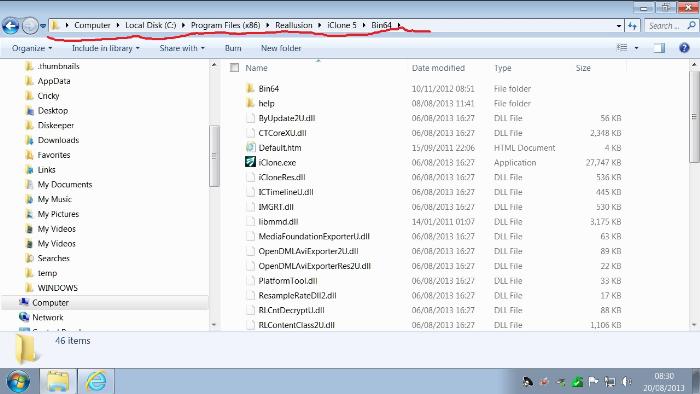
Hey, Colour: I finally uninstalled IC5.5 and then reinstalled it from a new file on my account page. It seems that the one I was using had an error of some sort. With the new install I am now able to have both 32-bit and 64-bit icons. The 32-bit runs fine but I have the same old error message. I cannot access mo-cap. I tried to uninstall but I get a message saying I have to wait until the program is finished loading or some such. I haven't talked about the Mo-cap since it's not run for me since 5.3. My current feed-back from tech support isn't encouraging. Carol felt that I must have fixed the problem. If it wasn't the case she would like more screen captures of the error message(s) I receive. I'm a bit strung-out today so I probably won't get back to her until tomorrow. Thanks for the interest and the help Bob in Florida" Well - I did suggest in one of my previous Posts you were possibly Re-installing from a corrupt Setup EXE File.. My next suggestion would have been to Re-Download from your Reallusion Product History Bonus & Upgrade page, which you've apparently done. What are you trying to uninstall & why? Sometimes when you Uninstall a Program you get a confusing Pop-up stating wait while Windows Configures the Installation etc. This is normal & you should wait for the Un-install process to finish. Since iC5.5 has Installed successfully & the 32 Bit iClone EXE Launches successfully via the Shortcut iCon & the 64Bit doesn't, I would suggest there's some corruption in the Bin 64, somewhere. I don't have MOCAP, however that's another issue & possibly unrelated. I can't remember if you've looked at W7 OS Event Viewer & looked for any Errors at the Time you get the Error Message. If you haven't, I suggest you do-so. There might be a fuller description & possibly a Link to Microsoft with suggested fix(es). .
----------------------------------------------------------------------------------------- REALLUSION FORUM ANNUAL PINHEAD COMMUNITY PROJECTS. New Pinhead Website & Project to be announced in September 2015 -----------------------------------------------------------------------------------------
|
|
|
|
|
planetstardragon
|
planetstardragon
Posted 12 Years Ago
|
|
Group: Forum Members
Last Active: 4 Months Ago
Posts: 11.5K,
Visits: 46.0K
|
The Reallusion team is a small one, it's another reason we try to be helpful on the forum, we appreciate how challenging and how much work it can be for both the users and the company. Plus the more we help, the more we learn on the way, so it's all good. :) that error is not an average one, thats something technical going on in the background locally. Something is apparently interfering with the install or function of iclone- usually the things that cause that are defective hardware - such as a failing drive or failing ram, corrupt software - such as a virus damage, or an overzealous security system, I have a security set up in my computer that's so over zealous - it sometimes block windows from upgrading the system, and I'll get errors just like the one you are experiencing with iclone. so the best approach is to go about this systematically - first rule out bad hardware, then rule out corrupt tsr's or files in your system, and rule out any interference from security systems. Do you have any special set up in your pc that would make it different than the average pc ? ie - a raid set up, a network hook up, - anything that would require your system additional hardware or software that is not average consumer ?
☯🐉 "To define Tao is to defile it" - Lao Tzu
|
|
|
|