|
By rfacko - 12 Years Ago
|
|
I'm desperate. For two years I have not been able to run 64-bit version. I've been dealing with support for a long, long time. At least before 5.5 I could run 32-bit. Now I can't run anything. I keep getting the 0xc000007b error. I've been trying everything I know but no luck. I've removed the program several times and reinstalled. No change. I guess there must be a trace of the old install left somewhere on my HD.I don't expect anyone will have "the" answer but any suggestions would help. Since I really don't handle programming or changes of that sort I'm up a creek. At this point I would be happy to go back to the 32-bit version. Like many others I am unable to get Mo-Cap to load or run. I have a custom custom computer with 16 gig, an Invidia graphics card with lots of ram, 600 gig hard drive. All other 64-bit programs run smoothly. Could someone please give me some advice? Bob in Florida
|
|
By planetstardragon - 12 Years Ago
|
Disclaimer - these are softwares I use with success on my system, but I can not guarantee the same results on someone elses computer as different computers have different set ups...so what might be good and simple for me, may be bad for you ...so do these at your own risk - read the software and any warnings that come with it, and research your system to make sure you don't have any special set ups that may be damaged by these softwares. Then back up before you use them, should you decide to use them.
you could try uninstalling it with Revo Uninstaller "http://www.revouninstaller.com/revo_uninstaller_free_download.html"- revo allows the basic uninstall then combs through your system for any additional file or registry entries the sofware left behind. Becareful when using this because it will track your assets library and you can accidentally erase that - so back up first - the software is pretty straight forward and if you pay attention to it's steps you can avoid mistakes - but this will give you an effective delete button to remove any possibly corrupted registry entries.
After you do revo - you can do a registry cleaner run through with ccleaneer http://www.piriform.com/ccleaner
the type of error you are getting does look like it's related to a corrupt file somewhere, you may want to do a quick scan of your drive to make sure you have no bad sectors in it - that will also help clean out any bad clusters - if it does, and iclone was caught in the middle of one of those errors - there's a chance you may not be able to start iclone normally again after.
|
|
By colour - 12 Years Ago
|
|
That is a Generic Error Code. Different strokes for different folks ;) Doing what Planet has suggested should/might fix it. Also do a Windows OS Error check, before HDD Scan for & attempt recovery of Bad Sectors. Go to; Start / Computer / Right-Click on Local Drive (C:) Icon / Properties / Tools /. Error Check / Check Now & do both (But one at a time). iC5 64Bit isn't a Native 64Bit & is installed with iC5 32Bit Program in Bin64 Folder, in x86 Programs. Since both 32 & 64Bit Versions are Installed at the same time, shortcut Icons for both are added to Desktop & you have the option of switching between the 2. Saved Projects will Open in either.
|
|
By Sen - 12 Years Ago
|
Hi ,
If you try to start ic5.5 64 bits under iclone5/Bin64/iclone.exe , same result or not ?
First Try this :
- install or reinstall http://www.microsoft.com/en-us/download/details.aspx?id=13523 > launch iclone
- if don't work , there is a 32 bit dll called . Windows problem :P . iclone 5.5 64 bits is a 64 bits
software , if a 32 bits dll is called by windows , 64 bits software won't run .
|
|
By Peter (RL) - 12 Years Ago
|
rfacko (8/18/2013)
I'm desperate. For two years I have not been able to run 64-bit version. I've been dealing with support for a long, long time. At least before 5.5 I could run 32-bit. Now I can't run anything. I keep getting the 0xc000007b error. I've been trying everything I know but no luck. I've removed the program several times and reinstalled. No change. I guess there must be a trace of the old install left somewhere on my HD.I don't expect anyone will have "the" answer but any suggestions would help. Since I really don't handle programming or changes of that sort I'm up a creek. At this point I would be happy to go back to the 32-bit version. Like many others I am unable to get Mo-Cap to load or run. I have a custom custom computer with 16 gig, an Invidia graphics card with lots of ram, 600 gig hard drive. All other 64-bit programs run smoothly. Could someone please give me some advice? Bob in Florida Hi Bob, Sorry to hear about your problems with iClone. Please can you contact us at Support using the link below. To help us identify the cause of the problem, please do supply your DxDiag.txt file and a screenshot showing any error messages you are receiving. http://www.reallusion.com/CustomerSupport/User/QForm.aspx Thanks.
|
|
By rfacko - 12 Years Ago
|
|
To: Tutor, tutor, Sen and Peter: I have tried all of those programs, disc error check, etc. Nothing touches that error. I've been working on it for quite a while. I know that if Windows gets a message for the 64-bit version it won't run the 32-bit. Peter: I have contacted Support and have an active file. I'm waiting for a reply and just thought I'd beat the bushes for suggestions. Thank you all for trying. Onward and upward! Bob in Florida
|
|
By rfacko - 12 Years Ago
|
|
Peter: I sent that reply before I read that comment about the DX (?) file. I've sent them a shot of the error message. Now I just have to figure out how to get to that other file. Perhaps I'll get that info tomorrow? Bob in Florida
|
|
By planetstardragon - 12 Years Ago
|
|
The Direct X Diagnose is a simple process to run http://windows.microsoft.com/en-us/windows-vista/run-directx-diagnostic-tool
|
|
By colour - 12 Years Ago
|
rfacko (8/19/2013)
Peter: I sent that reply before I read that comment about the DX (?) file. I've sent them a shot of the error message. Now I just have to figure out how to get to that other file. Perhaps I'll get that info tomorrow? Bob in Florida 1) Go to Start / Search & Enter "dxdiag". 2) Double-click on dxdiag.exe in following Popup, to open it. 3) See Screenshot. Save the dxdiag.txt File to your Desktop & Attach it to your Reallusion Support Form. BTW - I vey briefly Googled the Error Code. My understanding is that you can Launch iC5 32Bit ok, but if you Launch the 64Bit, you get the Error Code Message that then prevents you from Launching both 64 & 32Bit? IMO, that would narrow it down to a problem with the Bin64 Application. Maybe a Screenshot of your Bin64 Application "Containing" Folders Posted on the Forum for comparison for elimination purposes, would be a good starting point?. Since your problem has been on-going for some time bow, I see no reason why you can't continue with attempted problem-solving in this Thread, in addition to Reallusion Technical Support. ADDED - I've added a Screenshot of my iC5.5 Bin64 Application Folders/Files for your comparison. Any Files missing or added, your end? I'll Open another Folder for maybe another comparison. There's reason why I'm doing this for comparison. Screenshot 1: 
Screenshot 2 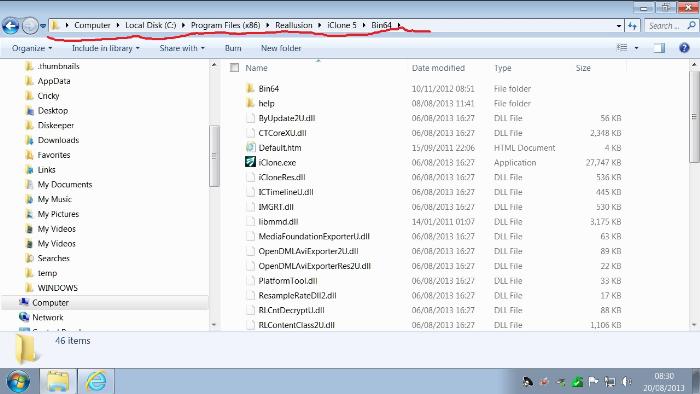
|
|
By colour - 12 Years Ago
|
|
READ MY POST ABOVE FIRST See my 2 Screenshots; Screenshot 1; The 1st iclone.exe File Launches the Program. Screenshot 2; The 2nd iclone.exe File returns the Error Message. I'm not going to tempt providence by Deleting the Second iclone.exe File, but IMO, it's a duplication & shouldn't be there. Look at the date. Do you also have it? ADDED - This comment by Wires in another Thread rather confirms my suspicions: "The ver. 5 installer is so poorly written that it can't see what is already installed and what is not" Screenshot 1: 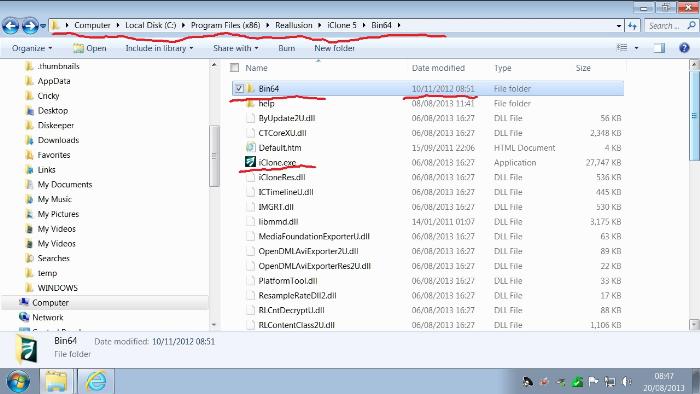
Screenshot 2: 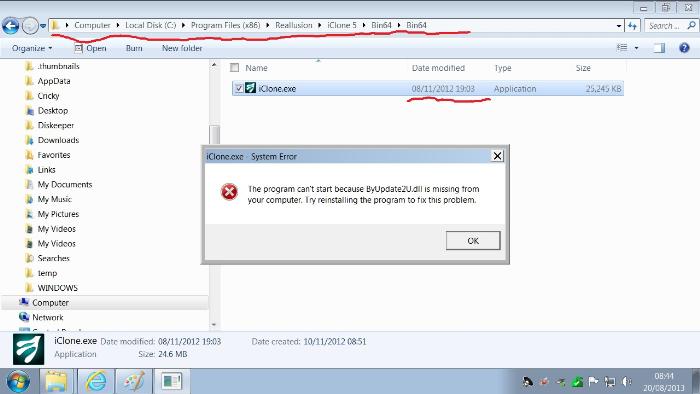
|
|
By rfacko - 12 Years Ago
|
|
Colour: Thank you for all of your work. I don't think you understand what I was attempting to say. Prior to the 5.5 update I was able to run the 32-bit version. However, with 5.5 I can't get anything at all to run. I find no trace of a 32-bit version so I don't know what happened. At this point if I had the 32-bit I could at least run IClone 5. Also - there is no icon for the 32-bit on my desktop. There was one previously. Here is a screen capture of the Bin 64 file. You can see that it isn't complete. There is no Bin64 folder. Does this help? I am attaching a dxdiag file to my memo to support. I'll keep posting. Bob in Florida 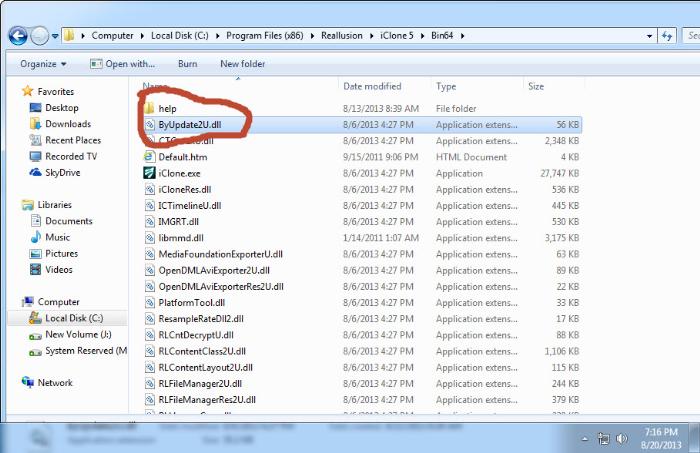
|
|
By planetstardragon - 12 Years Ago
|
looking at your path, you are in your "Bin64" directory - back up one directory ( C:..../reallusion/iclone ) then enter the "Bin" directory for the 32 bit.
|
|
By colour - 12 Years Ago
|
rfacko (8/20/2013)
Colour: Thank you for all of your work. I don't think you understand what I was attempting to say. Prior to the 5.5 update I was able to run the 32-bit version. However, with 5.5 I can't get anything at all to run. I find no trace of a 32-bit version so I don't know what happened. At this point if I had the 32-bit I could at least run IClone 5. Also - there is no icon for the 32-bit on my desktop. There was one previously. Here is a screen capture of the Bin 64 file. You can see that it isn't complete. There is no Bin64 folder. Does this help? I am attaching a dxdiag file to my memo to support. I'll keep posting. Bob in Florida
You're in the Bin64 Folder. As per my previous Post, there's an additional iclone.exe File in another Bin64 Sub-Folder that's superfluous. You haven't got it - So that's ok. Re; Planet's Post above, The Bin64 Folder is a Sub-folder of iC5 32Bit Containing Folder. Where you should have the iC5 32Bit iclone.exe File. Double-Clicking on that should Launch iClone 32But. Right-clicking on it & selecting; "Send to", gives you a Desktop Shortcut Option, which should place a 32Bit Shortcut Icon on your Desktop. Do the same with the 64Bit iclone.exe File. If you keep getting the same Error Message whatever you have done & do, it may be because you're Reinstalling each time from the same Saved Downloaded Setup File. That File might be corrupted, for whatever reason. Which Download method did you use when Downloading & Installing iC5.5 Update, in the first place?. And - Which Browser are you using EG; Internet Explorer ? BTW - I'm surprised that Reallusion Technical support haven't already requested your DXDIAG Text File, if you've already been dealing with them over a period of time. It's usually the first thing they request, as per the Technical Support Request Form.
|
|
By planetstardragon - 12 Years Ago
|
|
@colour, i checked before I posted, they moved the furniture around.
|
|
By rfacko - 12 Years Ago
|
|
Colour: I think you might be onto something,. I had a devil of a time trying to get anything to download because I kept getting a message "no IC5 on your disk. Please purchase and install. Then download" -- well, that's the general gist. Support had me uninstall again and then download the whole file and not the patch. At least that worked and a download was accepted. When I ran it, the 32-bit icon disappeared and the error message began to appear. Perhaps I should go for a clean install and do it directly from the link. BTW, I'm using IE. Bob in Florida
|
|
By colour - 12 Years Ago
|
rfacko (8/21/2013)
Colour: I think you might be onto something,. I had a devil of a time trying to get anything to download because I kept getting a message "no IC5 on your disk. Please purchase and install. Then download" -- well, that's the general gist. Support had me uninstall again and then download the whole file and not the patch. At least that worked and a download was accepted. When I ran it, the 32-bit icon disappeared and the error message began to appear. Perhaps I should go for a clean install and do it directly from the link. BTW, I'm using IE. Bob in Florida I'll Post a suggestion sometime tomorrow UK time, after I've run a few checks my end first. FWIW - I & others had problems Downloading Marketplace Content with IE, when iC5 was first Launched. Reallusion Tech Support had us trying all sorts of Fixes, when the problem was/is Reallusion's Downloader EXE that's Installed with iC5 Program, instead of a separate Standalone Downloader EXE File. The Problem mysteriously disappeared here, either with one of of iC5 Updates or when I Uninstalled iC4 which had its own Downloader EXE File (Which worked via the then Backstage). In any event, there are a number of problems which, IMO are associated with how Reallusion handles IE.
|
|
By Peter (RL) - 12 Years Ago
|
rfacko (8/20/2013)
Colour: Thank you for all of your work. I don't think you understand what I was attempting to say. Prior to the 5.5 update I was able to run the 32-bit version. However, with 5.5 I can't get anything at all to run. I find no trace of a 32-bit version so I don't know what happened. At this point if I had the 32-bit I could at least run IClone 5. Also - there is no icon for the 32-bit on my desktop. There was one previously. Here is a screen capture of the Bin 64 file. You can see that it isn't complete. There is no Bin64 folder. Does this help? I am attaching a dxdiag file to my memo to support. I'll keep posting. Bob in Florida Hi Bob, You can find the 32bit version of iClone 5 in the location below. C:\Program Files (x86)\Reallusion\iClone 5\Bin\iClone.exe Just double click iClone.exe to start it. Then check if you are receiving the same error message? Also check the icons on your Desktop. The 32bit one is called iClone v5.5 Pro The 64bit one is called iClone v5.5 Pro (64bit)
|
|
By colour - 12 Years Ago
|
"Peter (RL) (8/23/2013)
rfacko (8/20/2013)
Colour: Thank you for all of your work. I don't think you understand what I was attempting to say. Prior to the 5.5 update I was able to run the 32-bit version. However, with 5.5 I can't get anything at all to run. I find no trace of a 32-bit version so I don't know what happened. At this point if I had the 32-bit I could at least run IClone 5. Also - there is no icon for the 32-bit on my desktop. There was one previously. Here is a screen capture of the Bin 64 file. You can see that it isn't complete. There is no Bin64 folder. Does this help? I am attaching a dxdiag file to my memo to support. I'll keep posting. Bob in Florida Hi Bob, You can find the 32bit version of iClone 5 in the location below. C:\Program Files (x86)\Reallusion\iClone 5\Bin\iClone.exe Just double click iClone.exe to start it. Then check if you are receiving the same error message? Also check the icons on your Desktop. The 32bit one is called iClone v5.5 Pro The 64bit one is called iClone v5.5 Pro (64bit) " ..............And - From one of my previous Posts: "Re; Planet's Post above, The Bin64 Folder is a Sub-folder of iC5 32Bit Containing Folder. Where you should have the iC5 32Bit iclone.exe File. Double-Clicking on that should Launch iClone 32But. Right-clicking on it & selecting; "Send to", gives you a Desktop Shortcut Option, which should place a 32Bit Shortcut Icon on your Desktop. Do the same with the 64Bit iclone.exe File." Have you tried that yet? If yes & no cigar, I'll Post my suggestion. BTW - It would be interesting to know Reallusion Tech support's latest suggested Fix, having received your latest Support request Form with attached DXDIAG TXT File.
|
|
By rfacko - 12 Years Ago
|
|
Hey, Colour: I finally uninstalled IC5.5 and then reinstalled it from a new file on my account page. It seems that the one I was using had an error of some sort. With the new install I am now able to have both 32-bit and 64-bit icons. The 32-bit runs fine but I have the same old error message. I cannot access mo-cap. I tried to uninstall but I get a message saying I have to wait until the program is finished loading or some such. I haven't talked about the Mo-cap since it's not run for me since 5.3. My current feed-back from tech support isn't encouraging. Carol felt that I must have fixed the problem. If it wasn't the case she would like more screen captures of the error message(s) I receive. I'm a bit strung-out today so I probably won't get back to her until tomorrow. Thanks for the interest and the help Bob in Florida
|
|
By planetstardragon - 12 Years Ago
|
The Reallusion team is a small one, it's another reason we try to be helpful on the forum, we appreciate how challenging and how much work it can be for both the users and the company. Plus the more we help, the more we learn on the way, so it's all good. :)
that error is not an average one, thats something technical going on in the background locally. Something is apparently interfering with the install or function of iclone- usually the things that cause that are defective hardware - such as a failing drive or failing ram, corrupt software - such as a virus damage, or an overzealous security system, I have a security set up in my computer that's so over zealous - it sometimes block windows from upgrading the system, and I'll get errors just like the one you are experiencing with iclone.
so the best approach is to go about this systematically - first rule out bad hardware, then rule out corrupt tsr's or files in your system, and rule out any interference from security systems.
Do you have any special set up in your pc that would make it different than the average pc ? ie - a raid set up, a network hook up, - anything that would require your system additional hardware or software that is not average consumer ?
|
|
By colour - 12 Years Ago
|
"rfacko (8/23/2013)
Hey, Colour:I finally uninstalled IC5.5 and then reinstalled it from a new file on my account page. It seems that the one I was using had an error of some sort. With the new install I am now able to have both 32-bit and 64-bit icons. The 32-bit runs fine but I have the same old error message. I cannot access mo-cap. I tried to uninstall but I get a message saying I have to wait until the program is finished loading or some such. I haven't talked about the Mo-cap since it's not run for me since 5.3. My current feed-back from tech support isn't encouraging. Carol felt that I must have fixed the problem. If it wasn't the case she would like more screen captures of the error message(s) I receive. I'm a bit strung-out today so I probably won't get back to her until tomorrow. Thanks for the interest and the help Bob in Florida" Well - I did suggest in one of my previous Posts you were possibly Re-installing from a corrupt Setup EXE File.. My next suggestion would have been to Re-Download from your Reallusion Product History Bonus & Upgrade page, which you've apparently done. What are you trying to uninstall & why? Sometimes when you Uninstall a Program you get a confusing Pop-up stating wait while Windows Configures the Installation etc. This is normal & you should wait for the Un-install process to finish. Since iC5.5 has Installed successfully & the 32 Bit iClone EXE Launches successfully via the Shortcut iCon & the 64Bit doesn't, I would suggest there's some corruption in the Bin 64, somewhere. I don't have MOCAP, however that's another issue & possibly unrelated. I can't remember if you've looked at W7 OS Event Viewer & looked for any Errors at the Time you get the Error Message. If you haven't, I suggest you do-so. There might be a fuller description & possibly a Link to Microsoft with suggested fix(es). .
|
|
By Buggane - 11 Years Ago
|
|
I know this is an old topic but did it get resolved please? I am having the same problem. Was hoping it would be OK with iClone6 but that too comes up with the 0xc000007b error
|
|
By colour - 11 Years Ago
|
|
sgreen (12/24/2014)
I know this is an old topic but did it get resolved please? I am having the same problem. Was hoping it would be OK with iClone6 but that too comes up with the 0xc000007b errorWelcome to the Forum :) You need to check that Error In Event Viewer, as Posted above. Replicate the Error & note the time. Look for Event Viewer Errors (Red Xs) about that time. Also Google it. Event Viewer should give a description of the Error & if there's an MS Link, Click on it for further info. If it's happening with both iC5 & 6, it could be an MSI ( Microsoft Installer File) prob. Copy & Paste Event Viewer info, into this Thread, for scrutiny.
|
|
By Peter (RL) - 11 Years Ago
|
|
sgreen (12/24/2014)
I know this is an old topic but did it get resolved please? I am having the same problem. Was hoping it would be OK with iClone6 but that too comes up with the 0xc000007b errorPlease can you contact Technical Support using the link below. Please do remember to include your Dxdag.txt file so we can check your system for any issues. http://www.reallusion.com/CustomerSupport/User/QForm.aspx To generate a dxdiag.txt file see below. a) Select the "Start" button.
b) Type "dxdiag" and click "dxdiag.exe" from the search list.
c) It will then check your system for a while, after finishing, click "save all information"
d) Save "DxDiag.txt". and send this to us as an attachment.
|
|
By Buggane - 11 Years Ago
|
Thanks Peter, I have been in touch with the support team and supplied the info but their last reply to me really took the biscuit, and I quote
Thank you for contacting Reallusion.
As per our developers feedback, we found it mostly due to your hardware issue.
The 64-bit softwares you have are not for 3D Gaming.
Help needed to test any 3D Gaming application to check whether you see the same issue: -
http://steamcommunity.com/
If yes, you need to rectify your hardware, whereas if it's not please reply us this thread
My PC is up to spec for the software and is running Windows 7 64bit service pack 1
All Windows updates are installed and DirectX, .net and Visual C++ are up to date. I also run several 64 bit packages such as Sony Vegas Pro, Anime Studio Pro, Modo with no issues at all. It would appear I have to find a solution myself on the Steam forums! Why this involves3d gaming (which I also have no problems with) is beyond me but hey ho!
|
|
By colour - 10 Years Ago
|
|
sgreen (12/30/2014)
Thanks Peter, I have been in touch with the support team and supplied the info but their last reply to me really took the biscuit, and I quote
Thank you for contacting Reallusion.
As per our developers feedback, we found it mostly due to your hardware issue.
The 64-bit softwares you have are not for 3D Gaming.
Help needed to test any 3D Gaming application to check whether you see the same issue: -
http://steamcommunity.com/
If yes, you need to rectify your hardware, whereas if it's not please reply us this thread
My PC is up to spec for the software and is running Windows 7 64bit service pack 1
All Windows updates are installed and DirectX, .net and Visual C++ are up to date. I also run several 64 bit packages such as Sony Vegas Pro, Anime Studio Pro, Modo with no issues at all. It would appear I have to find a solution myself on the Steam forums! Why this involves3d gaming (which I also have no problems with) is beyond me but hey ho!
You need to follow my suggestions in my Post above & Post-back. That's a standard first line approach when getting Windows Error Messages, for whatever Program. Not just iClone.
|
|
By Buggane - 10 Years Ago
|
The only item that appears in the event viewer is the fact that a popup has appeared as follows
- System
- Provider
[ Name] Application Popup
- EventID 26
[ Qualifiers] 16384
Level 4
Task 0
Keywords 0x80000000000000
- TimeCreated
[ SystemTime] 2015-01-02T19:31:02.000000000Z
EventRecordID 93742
Channel System
Computer StuNetCentral
Security
- EventData
iClone.exe - Application Error
The application was unable to start correctly (0xc000007b). Click OK to close the application
|
|
By Buggane - 10 Years Ago
|
|
I think I have fixed it! Having spent hours on the Internet and trying various suggestions I came upon one that said to delete every file beginning with D3D from the system32 and WOW64 folders in Windows (system wouldn’t allow me to delete all). I then did a reinstall of Direct X and this worked!
|
|
By colour - 10 Years Ago
|
|
sgreen (1/13/2015)
I think I have fixed it! Having spent hours on the Internet and trying various suggestions I came upon one that said to delete every file beginning with D3D from the system32 and WOW64 folders in Windows (system wouldn’t allow me to delete all). I then did a reinstall of Direct X and this worked!Glad you got it fixed :) Thanks for Posting Fix :) Assuming that D3D is "Direct (Draw) 3D"
|