|
By Miranda (RL) - 4 Years Ago
|
Hi iClone Users,
We are pleased to introduce the new release of iClone Omniverse Connector, a free plug-in of iClone 7 on Nov 4th.
The iClone 7 (IC7) Omniverse Connector adds the power of a full 3D animation system with characters, motions and unlimited creative variations to NVIDIA Omniverse. Professionals of any skill level can leverage the tools to animate characters with efficiency and without the need to outsource animation production due to cost or human resource challenges. Enable rapid character creation, choose animations from a vast library of motion capture, or blend and edit custom motion with iClone. For Reallusion iClone and CC users, Omniverse is an incredible addition allowing live coordination with other 3D tools, or with other workstations via USD data interchange standard.
Visit the webpage to have the solution overview.
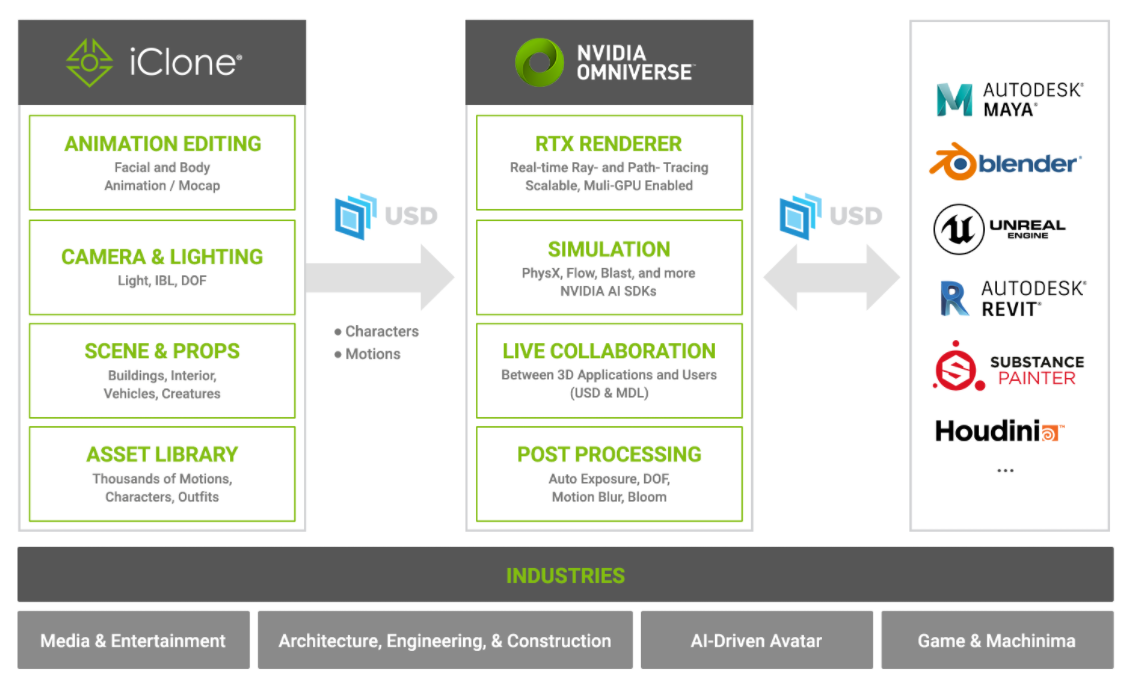
NVIDIA Omniverse
NVIDIA Omniverse™ is an open platform built for virtual collaboration and real-time photorealistic simulation. Complex creator, designer, and engineering visual workflows are transformed as users and teams connect design tools, assets, and projects for collaborative iteration in a virtual world.
Related Resource- Download NVIDIA Omniverse
- Tutorials: a comprehensive training courses, ranging from Omniverse Create to each connector. If Omniverse Create is new to you, please watch the following courses first.
- Documentation: instruction and manual
- Forum: Omniverse announcements, general discussion for all aspects of the Omniverse Platform
Compatible Version- Create 2021.3.7 or above
- Machinima 2021.2.1 or above
The following issues existed in Create 2021.3.6 and Machinima 2021.2.1
1. Omniverse crashes when applying motions.
2. Viewport may stop when turning on blendshape animation in the RTX path-traced mode, but the render (Movie Capture) works properly.
Reallusion Solution
The iClone Ominiverse Connector simplifies character facial and body animation, props, camera, lights, and scene setup while exporting everything to Omniverse. The connector export the main USD file along with other dependencies, such as a light, material, and motion folders, to maintain the flexibility of file updates. PBR, Digital Human, and SSS shaders sent to Omniverse will map corresponding textures and material attributes accordingly. Release NoteCompatible Version
- iClone 7.93
- 3DXchange Pipeline 7.81
*3DXchange Pipeline Edition is required for USD export.
File Update with Live SyncFor iClone 7.93, users who wish to render on the Omniverse will first need to export USD files to a designated folder, and load them into Omniverse Create or Machinima.
This version of Omniverse can only Live-Sync updated files. In order to achieve live updates, the assets will first need to be exported in USD format, then activate the Live-Sync capability in Omniverse Create or Machinima. Automatic updates will be triggered every time the file is overwritten (also works with textures).
Live Sync real-time automatic updates is a feature that is slated for release in a later version. Audio2FaceThe solution to bring Audio2Face animation back to iClone. >> Know More Known Issue- File and folder names must be only alphanumeric characters(aA-zZ), underscores(_), and periods(.), otherwise unforeseen errors may occur.
- Morph animations are only supported for bone-skinned mesh.
*Take this video demo for example, the embedded project 1.Bouncing Ball.iProject was used for testing, in order to show that morph animations can't be exported to Omniverse. - Physics rigid-body and Spring simulation effects are baked frame-by-frame into the animation, in order to carry over to Omniverse. However vertex animations for the likes of soft-cloth and Alembic imports are currently not supported. For more information, see the CC OV Connector Forum.
- Gifs and videos are not supported as textures, and will be ignored when exported in USD format.
- Some non-human characters, e.g. embedded horse, when scaled (avatar proportion) will cause unexpected positional offsets. A workaround is to export the non-human in FBX format, re-import it into iClone, and export it again in USD format.
- The character should be exported with the animation for the best possible result. For example, animation applied from a standard proportion to a smaller character will give unexpected/erroneous results. For more information, see the CC OV Connector Forum.
- iClone and CC exported USD do not currently support Game base characters, causing a stripping of animations, their positions to reset, and their hair and eyeballs to offset. see the image. (Fixed in iClone v7.93.5904.1 / Character Creator v3.44.4709.1)
- Shadows cast from meshes with alpha textures onto a non-flat surface will have jagged edges. For more information, see the CC OV Connector Forum.
- Strange black spots on the character’s eyeballs. For more information, see the CC OV Connector Forum.
Tips (including some known issues & workaround)Related Resource |
|
By Miranda (RL) - 4 Years Ago
|
iClone 7.93 is available on Reallusion Hub now, while the iClone Omniverse Connector shall be available on Omniverse Launcher around 10AM, Nov 4th (PST).
|
|
By Kalex - 4 Years Ago
|
Hi Miranda,
Iclone to Omniverse looks amazing so far. However, I was wondering when the PhysX will be available in Omniverse... Or baked cloth props in iclone ?
Thanks,
Kalex
|
|
By Hewa' s Art - 4 Years Ago
|
Hi Miranda,
Thanks for sharing this information. I used CC3 plugin in the past to Omi..with iClone 7 l am sure will help a lot in the future.
|
|
By Chrisxxxx - 4 Years Ago
|
Hello Miranda,
USD format - okay. But can you tell me what is an USDZ format?
I ask because an AR-App manufacturer asked me to save my animation as USDZ that it can be seen in the mobile app.
Thanks
|
|
By pekka.varis - 4 Years Ago
|
|
As far as I know, it is apples version of the open source USD format.
|
|
By StyleMarshal - 4 Years Ago
|
|
|
By StyleMarshal - 4 Years Ago
|
|
oops
|
|
By toystorylab - 4 Years Ago
|
I still did not try this...
And I really see no need for it, as I have Unreal.
Are there any advantages compared to Unreal?
|
|
By rosuckmedia - 4 Years Ago
|
|
Hi Pieter, I would say no, no benefits. More like an alternative to the Iray plugin. Unfortunately, very good graphics cards are a must.
Greetings Robert
|
|
By toystorylab - 4 Years Ago
|
rosuckmedia (11/5/2021)
Hi Pieter, I would say no, no benefits. More like an alternative to the Iray plugin. Unfortunately, very good graphics cards are a must.
Greetings Robert
Ok... Thanx.
As I have a RTX 3090, graphics should be no problem.
As said, I am very happy with iClone/Unreal workflow.
Though I have several older iClone projects (completely done with environment + animation in iClone) I never published.
Is it possible to export complete iClone scene (animated characters + environment) and get better render?
|
|
By animagic - 4 Years Ago
|
I don't do Unreal, so for me it is an interesting development.
The technical approach is different from Iray, which only provides a series of converted iClone scene frames, which are then rendered.
USD is an interchange format, and you can combine various USD files to build a scene. There is far more to it, as you can read here: https://graphics.pixar.com/usd/release/intro.html.
USD does require a beefy system, so that is a disadvantage. Perhaps there will be USD render farms?
|
|
By animagic - 4 Years Ago
|
|
Chrisxxxx (11/5/2021)
Hello Miranda,
USD format - okay. But can you tell me what is an USDZ format?
I ask because an AR-App manufacturer asked me to save my animation as USDZ that it can be seen in the mobile app.
Thanks
From Wikipedia:
File formats used by the USD standard include: - .usd, which can be either ASCII or binary-encoded
- .usda, ASCII encoded
- .usdc, binary encoded
- .usdz, a package file which is a zero-compression, unencrypted zip archive, which may contain usd, usda, usdc, png, jpeg, m4a, mp3, and wav files.
|
|
By toystorylab - 4 Years Ago
|
Thanx, will check that when I have some more sparetime.
Might be interesting if export is fast/easy, if there is no big hassle with textures
and my Ryzen 9 5950x + RTX 3090 can handle it well/renders at a reasonable amount of time...
|
|
By StyleMarshal - 4 Years Ago
|
animagic (11/5/2021)
I don't do Unreal, so for me it is an interesting development. The technical approach is different from Iray, which only provides a series of converted iClone scene frames, which are then rendered. USD is an interchange format, and you can combine various USD files to build a scene. There is far more to it, as you can read here: https://graphics.pixar.com/usd/release/intro.html. USD does require a beefy system, so that is a disadvantage. Perhaps there will be USD render farms?
Yes you are right , Omniverse is way more easy to use than Unreal in my opinion and you don't have to do Blueprints and so on.
Unreal Engine is a Game Engine and most of its "Building Game Possibilities" I will never use.
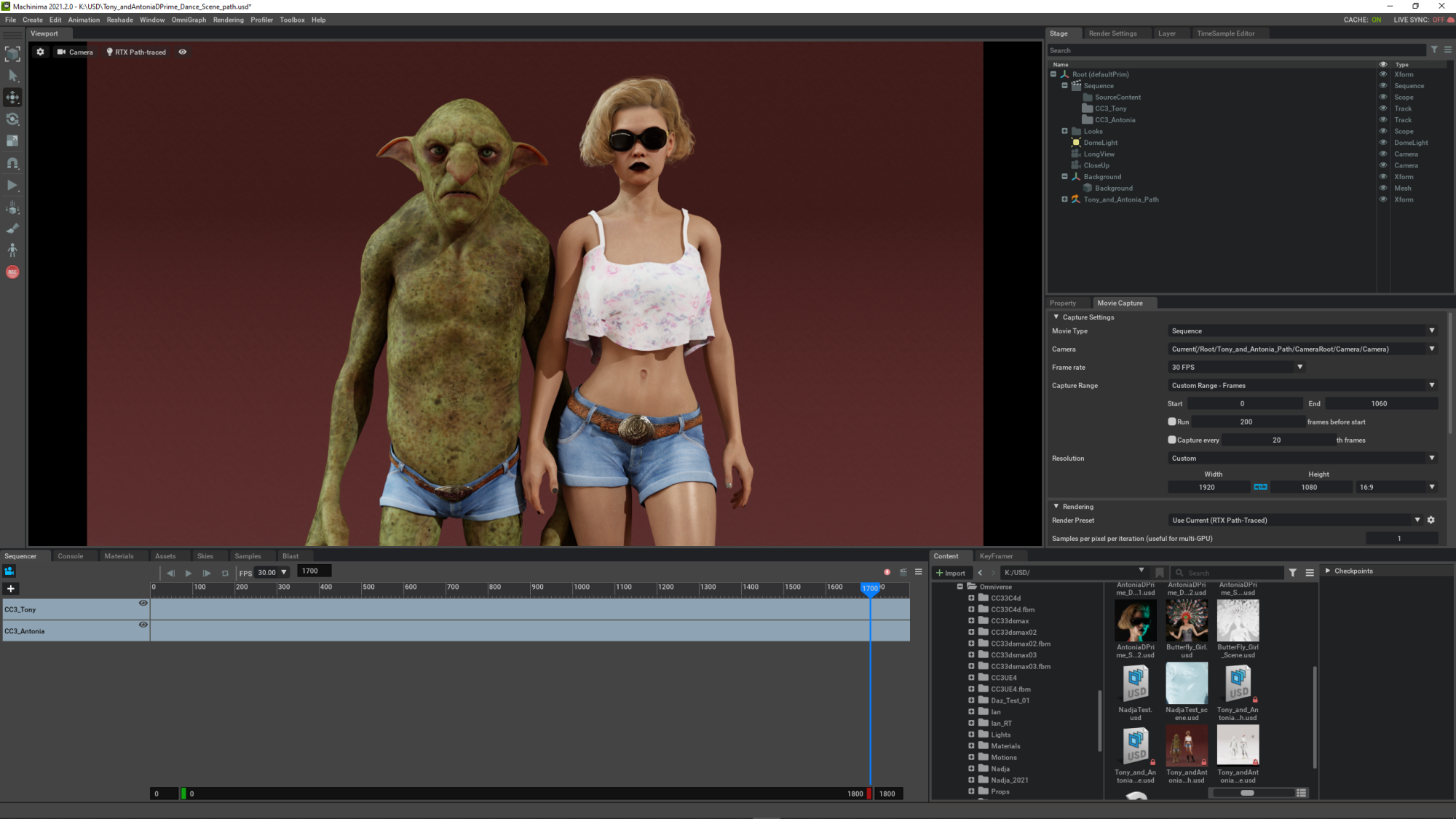
You can export and import complete scenes from IClone to Omniverse or export USD files from UE4 , Maya or Blender to build you own world in Omni..
Some things are missing , like IClones cloth simulations or animated textures... that is for future updates. (it is still Beta)
I am still a big Unreal fan , but I will work with Omniverse too.
|
|
By 3dtester - 4 Years Ago
|
Thank you RL for releasing the iClone Omniverse Connector!
|
|
By 3dtester - 4 Years Ago
|
toystorylab (11/5/2021)
rosuckmedia (11/5/2021)
Hi Pieter, I would say no, no benefits. More like an alternative to the Iray plugin. Unfortunately, very good graphics cards are a must.
Greetings Robert Ok... Thanx. As I have a RTX 3090, graphics should be no problem. As said, I am very happy with iClone/Unreal workflow. Though I have several older iClone projects (completely done with environment + animation in iClone) I never published. Is it possible to export complete iClone scene (animated characters + environment) and get better render?
Yes, you can export complete iClone scenes including lights, cameras, props and animations (hdri also comes in but has to be applied to a dome light).
That's great so far.
BUT: your characters will lack of facial motion, softcloth and hair physics :crying:
So now we can render animated robots in beautifully raytraced visuals :doze:
|
|
By Rampa - 4 Years Ago
|
The facial animation capability is kind of hidden in Omniverse. See this video at 2:45 for instructions on enabling it.
|
|
By StyleMarshal - 4 Years Ago
|
|
3dtester (11/7/2021)
BUT: your characters will lack of facial motion, softcloth and hair physics :crying:
So now we can render animated robots in beautifully raytraced visuals :doze:
Facial Animation does work , you have to activate blend shape / morph animation in the preferences.

|
|
By 3dtester - 4 Years Ago
|
Thank you. that was a simple solution :D
Maybe they should update the "Known Issues".
|
|
By toystorylab - 4 Years Ago
|
Could not get the "Send to Server" thing work, iClone crashed with 3 different projects.
Probably did something wrong. Export worked...
What is the advantage of "send to Server"?
Trees are not supported?
I can see them in my "Create Stage" but they are invisible.


Besides that, render might be better, but noticed sunglass ist totally black, looks better in iClone.


Anyway, at least I made first tests... ;)
|
|
By 3dtester - 4 Years Ago
|
@toystorylab
Some material settings which look good in iClone, are not working in Omniverse.
In the case of glasses, there are NVIDIA MDLs which will make these look superb.
I don't know if tree and plant simulation can be achieved at all...
|
|
By rosuckmedia - 4 Years Ago
|
CC3 + Character I have eye problems in Omniverse see Pictures. does anyone have a solution? Greetings rosuckmedia   |
|
By 3dtester - 4 Years Ago
|
Rob, did you both try exporting the CC3+ Character with RTX Realtime and Path-traced setting?
|
|
By 3dtester - 4 Years Ago
|
|
toystorylab (11/8/2021)
What is the advantage of "send to Server"?
It seems to be required for the "Live Sync" feature.
Automatic updating of items in Omniverse when you overwrite them.
|
|
By rosuckmedia - 4 Years Ago
|
|
3dtester (11/9/2021)
Rob, did you both try exporting the CC3+ Character with RTX Realtime and Path-traced setting?
yes i have tried both same result. Today is a new update for Omniverse Creator, I'll test it later with it. Greetings Robert😊 PS: if I render an MP4 with 60 frames, the video has 62.5 frames
|
|
By animagic - 4 Years Ago
|
I'm just now also joining the Omniverse, rendering out my first simple scene. Exporting went OK, except that I did need export licenses for DRM items, so that's how I'll spend my Content money for the free upgrade...:P
I'm using the path tracing setting as the looks horrid with the real time shader. Using 100 samples/second I need about 10 second per frame (RTX 3090) at 1920x1080.
I have been trying to find out if there's a denoiser setting as in Iray. I may try rendering at 1280x720 and then upscaling with Gigapixel AI as I've had good results with that in the past.
|
|
By StyleMarshal - 4 Years Ago
|
There is a denoiser setting in the "Render Settings". Did you render a complete scene with a lot of triangles?

|
|
By Jeasy - 4 Years Ago
|
This is a timely thread. I've now finished Oyun's Quest Prologue short film thanks to all of your technical assistance and just working on final sound design and mastering.
Next on the agenda is to start learning and working with Omniverse.
Looking forward to trying it out.
Kind Regards,
Jeasy
|
|
By animagic - 4 Years Ago
|
It's a small scene with one CC3+ character and a few props amounting to a bit over 100k triangles.
One thing I noticed and forgot to mention is that the DOF of cameras works differently. I had to make adjustments. This is similar in Iray and Indigo, as I recall.
|
|
By mtakerkart - 4 Years Ago
|
|
except that I did need export licenses for DRM items
Here is a major argument which will make me stay in Iclone. I don't understand why you must have an export license to make a film. I understand for a video game.
|
|
By animagic - 4 Years Ago
|
mtakerkart (11/11/2021)
except that I did need export licenses for DRM items Here is a major argument which will make me stay in Iclone. I don't understand why you must have an export license to make a film. I understand for a video game.
I have asked to make a distinction between exporting for film (rendering) or for games but nothing from RL thus far.
|
|
By kungphu - 4 Years Ago
|
animagic (11/11/2021)
mtakerkart (11/11/2021)
except that I did need export licenses for DRM items Here is a major argument which will make me stay in Iclone. I don't understand why you must have an export license to make a film. I understand for a video game. I have asked to make a distinction between exporting for film (rendering) or for games but nothing from RL thus far.
This would be very welcome. I’ve done quite a bit of shorts in Unreal and the cost isn’t cheap. The ONLY thing I’ve used Unreal for was rendering and assets. Iclone was my character builder and source of animation. Seems like export would be more for game building etc.
|
|
By 3dtester - 4 Years Ago
|
The problem here is that RL can't distinct between personal and commercial usage.
Once the item is exported, they have no control over it.
Sounds sad, but i think this is basically a technical issue.
|
|
By mtakerkart - 4 Years Ago
|
|
The problem here is that RL can't distinct between personal and commercial usage
Reallusion does not charge extra for commercial use in making movies in Iclone. It is not a personal or business issue.
|
|
By 3dtester - 4 Years Ago
|
It is about exporting content.
Should RL trust everyone that he / she will not make commercial use of the exported content?
There is no difference between Omniverse or Unreal Engine. When you are able to export content, you can use it commercially.
So the conclusion is that they have to charge extra costs if you want to export their content. Because they can't assure that you only render it for personal, non-commercial use.
|
|
By 3dtester - 4 Years Ago
|
A solution for this would be to eliminate all export licenses.
So that you can do whatever you want with the content.
Probably, the price would be too high for some.
PS: you have the same issue with Daz3d and Unreal Engine.
They basically don't allow to use their content in other engines (UE has no export licences at all).
The term "render in another engine" is not existing.
|
|
By Zeronimo - 4 Years Ago
|
|
3dtester (11/12/2021)
A solution for this would be to eliminate all export licenses.
So that you can do whatever you want with the content.
Probably, the price would be too high for some.
maybe you meant to say "delete all icontents license", so that only the export export would remain. But that would penalize all those who only make movies.
|
|
By Zeronimo - 4 Years Ago
|
|
Sorry, double post.
|
|
By kungphu - 4 Years Ago
|
|
3dtester (11/12/2021)
A solution for this would be to eliminate all export licenses.
So that you can do whatever you want with the content.
Probably, the price would be too high for some.
PS: you have the same issue with Daz3d and Unreal Engine.
They basically don't allow to use their content in other engines (UE has no export licences at all).
The term "render in another engine" is not existing.
In regards to Daz, I’m not sure who you heard that from but that isn’t true. I export stuff via Daz Bridge all the time to Unreal and never get an error that I need an export license. Daz export license is for game use. Personal use and 2D renderings are included in the standard license.
Daz support passed on that you only need to buy the "license" before you release a game for sale or public usage. However, as long you are still in the "development" stage, you can do whatever you want and are free to use any assets without having to worry about buying the licenses, This is much more inline with what others are proposing. The current iclone/CC3 policy is if it is simply exported to Unreal, you need a license. Doesn’t matter if it’s for personal use, 2D rendering or for a game that you wish to sell. You need a license for all of the above. Daz only requires it if you wish to sell you game and only requires it before you’re ready the sell the game and start making money. Huge difference.
|
|
By 3dtester - 4 Years Ago
|
@kungphu
You are right. Here is an excerpt from the interactive license of Daz:
"Because apps and games redistribute un-rendered versions of the 3D Model you’ve purchased to alter andmanipulate it, they’re not covered by the Standard License Agreement (EULA) and require that you purchase an Interactive License (with only one notable exception — if you are using the content for a game engine that will not be distributed, in whichcase the EULA is sufficient). While plenty of 3D Content from Daz comes with an Interactive License option, select items do not — the creator of each product chooses whether or not to offer an Interactive License."
I admit that last time i read that page is a while ago.
|
|
By animagic - 4 Years Ago
|
I'm currently redoing one of the movies I did for the AccuLips contest, rendering it in Omniverse.
Although things imported nicely for the most part, I had to redo the lighting because, just as in Iray, lighting works differently. One issue was that a point light I used to get a nice eye reflection was also shown in the mirror behind the character.
Something else that I have to investigate further is the hair color. I'm using Smart Hair with the Digital Hair Shader and the resulting look is much lighter than in iClone.
Other than with Iray it is convenient to have an actual scene to play with, which allowed me to easily adjust the lighting.
One peculiarity I found is that when you render to something other than 60 fps, you have to adjust the number of frames rendered. It may be a setting I'm missing but it doesn't seem to be adjusted automatically.
As an experiment, I'm rendering out in 960x540 and then will be upscaling to 1920x1080 using Gigapixel. Here is a frame:

There are still some fireflies, so I'll need to investigate further while I'm learning how to improve the image. I think it's still quite nice as is. And I like having a mirror...:P
|
|
By Miranda (RL) - 4 Years Ago
|
|
Hi everyone!
This issue was fixed in v7.93.5904.1, which just released today. Please get the latest update from Reallusion Hub.
Miranda (RL) (11/3/2021)
Known Issue - iClone and CC exported USD do not currently support Game base characters, causing a stripping of animations, their positions to reset, and their hair and eyeballs to offset. see the image.
|
|
By Miranda (RL) - 4 Years Ago
|
Hi everyone!
NVIDIA launched Create 2021.3.7 and Machinima 2021.2.1 last week.
You shall be able to get the latest update from Omniverse Launcher.
Miranda (RL) (11/3/2021)
Compatible Version- Create 2021.3.7 or above
- Machinima 2021.2.1 or above
The following issues existed in Create 2021.3.6 and Machinima 2021.2.0 1. Omniverse crashes when applying motions. 2. Viewport may stop when turning on blendshape animation in the RTX path-traced mode, but the render (Movie Capture) works properly.
|
|
By animagic - 4 Years Ago
|
So one issue I encounter and that I hope can be resolved is that smoothing in iClone for animated characters does not carry over in Omniverse, which really deteriorates the look.
A similar issue has been brought up by Unreal users and I now understand what they are talking about...:unsure:
|
|
By StyleMarshal - 4 Years Ago
|
|
animagic (11/15/2021)
So one issue I encounter and that I hope can be resolved is that smoothing in iClone for animated characters does not carry over in Omniverse, which really deteriorates the look.
A similar issue has been brought up by Unreal users and I now understand what they are talking about...:unsure:
Yes Yes Yes ! And with the power of your PC , multiple subdivided Characters for nearby shoots are no problem at all !
For Game Characters it is ok but for Cinematics we need the possibility to export subdivided Characters , like the Meta Human.
Please RL :cool:
Comparison of CC3 Default & CC3 Subdivided with Maya


|
|
By animagic - 4 Years Ago
|
In my experience so-far the real-time renderer is barely useable and doesn't provide any advantage over the native renderer. Maybe it works for more cartoon-like setups.
One problem I have is with hair. The hair (using the Digital Hair Shader) shows too light in the ray-trace renderer and I don't know how to fix that. Are there any tips or tutorials on that?
Other than that the project transfer is pretty painless and quite fast.
A hassle though is that even if you have export licenses they are often not automatically acknowledged as such and you need to do an "Activate Purchased Items".
Another problem is that older content, which is perfectly useable, may not have any export license and then needs to be removed from the scene if you can figure out which one it is because iClone doesn't tell you. I believe that export license availability will be mandatory with the new Market Place so that will help.
EDIT: I watched the YouTube tutorial below, but I need a bit more...
|
|
By kungphu - 4 Years Ago
|
|
animagic (11/20/2021)
Another problem is that older content, which is perfectly useable, may not have any export license and then needs to be removed from the scene if you can figure out which one it is because iClone doesn't tell you. I believe that export license availability will be mandatory with the new Market Place so that will help.
EDIT: I watched the YouTube tutorial below, but I need a bit more...
Yeeeeup… I’m not sure how many other people have made complete shorts with Unreal. But this was a pain I frequently have had to deal with using iclone with Unreal. I’ve done about 4 or 5 scripted shorts with iclone to Unreal. The first one was a conversion of an old iclone film. I pretty much pulled my hair out trying to figure out what article(s) didn’t have an export license. Not to mention a stock animation that I mangled and cut up. Trying to pinpoint what the issue is is one thing, but then to realize there is no export license for an older animation/object etc. It gets pretty frustrating. Goes back to that export license and why do we need it just to animate for personal use. Converting old projects can be a mess.
|
|
By toystorylab - 4 Years Ago
|
This sucks:

I have no clue what item is causing problem as "following content" is not "named"...
EDIT
I opened 3 other older projects, all have the same issue!
When iClone is capable to detect missing licenses, it should be capable to name them!
SUCKS!
|
|
By animagic - 4 Years Ago
|
I've come across the same and it is annoying and sometimes even incorrect.
I ended up checking each component of the export separately by clicking the Export USD button and seeing what happens. I was usually able to figure it out. I've also found, like I mentioned, that I often have to do a "Activate Purchase" to have Export licenses recognized.
RL, this process needs streamlining!
|
|
By toystorylab - 4 Years Ago
|
|
animagic (11/23/2021)
I've come across the same and it is annoying and sometimes even incorrect.
I ended up checking each component of the export separately by clicking the Export USD button and seeing what happens. I was usually able to figure it out. I've also found, like I mentioned, that I often have to do a "Activate Purchase" to have Export licenses recognized.
RL, this process needs streamlining!
Thanx for reply. ;)
As I'm familiar with the "Activate Purchase" glitch, I use it whenever I want to export,
so this was not the problem...
Checking each component is a PITA when you have lots of stuff in your scene.
@ RL please check/address this!
|
|
By 3dtester - 4 Years Ago
|
I experience that some meshes are not smoothed in Omniverse.
Unfortunately i am not able to understand exactly the reason for this.
Obviously, it doesn't depend on the settings in iClone.
Is there any fix or feature planned so that smoothing works for all exported props (and also characters)?
Here is a simple "workaround", you can just disable the "Subdivision scheme".
However, it only seems to help in certain cases.


|