|
By Miranda (RL) - 6 Years Ago
|
|
Dear Character Creator Users, We would like to express our heart-felt thanks for your loyal support. It has been one and a half years since the launch of Character Creator 3 (CC3), and we hope that you've had a great time creating characters with it. Last year saw the release of Digital Human Shader, Headshot plug-in and some other substantial enhancements for CC3; And we are excited to disclose that more fantastic features and products will be coming your way this year! In order to make Character Creator a solid universal character platform, we will keep strengthening its utilities around digital human creation, content management, and pipeline process to 3rd party tools The following is a line-up of feature updates scheduled for 2020:- CC Digital Human: HD skin and makeup generation, new character base, facial hair, dynamic wrinkle system, and more.
- Pipeline to 3rd Party Tool
- Smart Gallery - An Intelligent Way to Manage Your Assets
We wish to use the following post to share the roadmap ahead along with relevant technical breakthroughs. Some new features may require the purchase of additional content and plugins. For sales related inquiries, please wait for further notices from Reallusion. 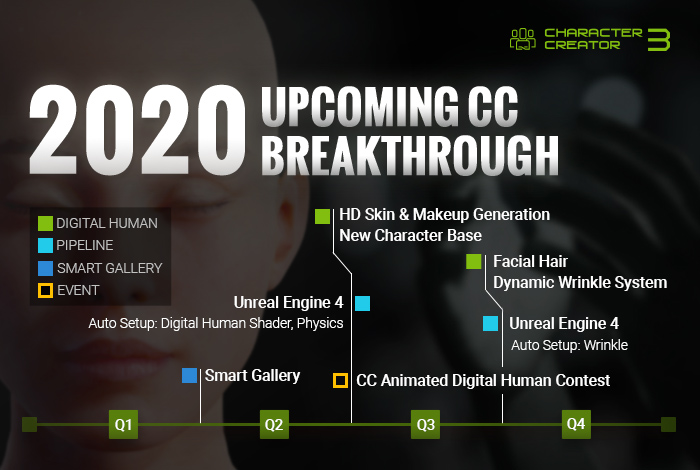 CC Digital HumanHD Skin & Makeup Generation (CC v3.3) CC Digital HumanHD Skin & Makeup Generation (CC v3.3)Skin Generator coverage won't just be limited to the face. It will also become available for the entire human body including the scalp, neck, fingers, and toes. 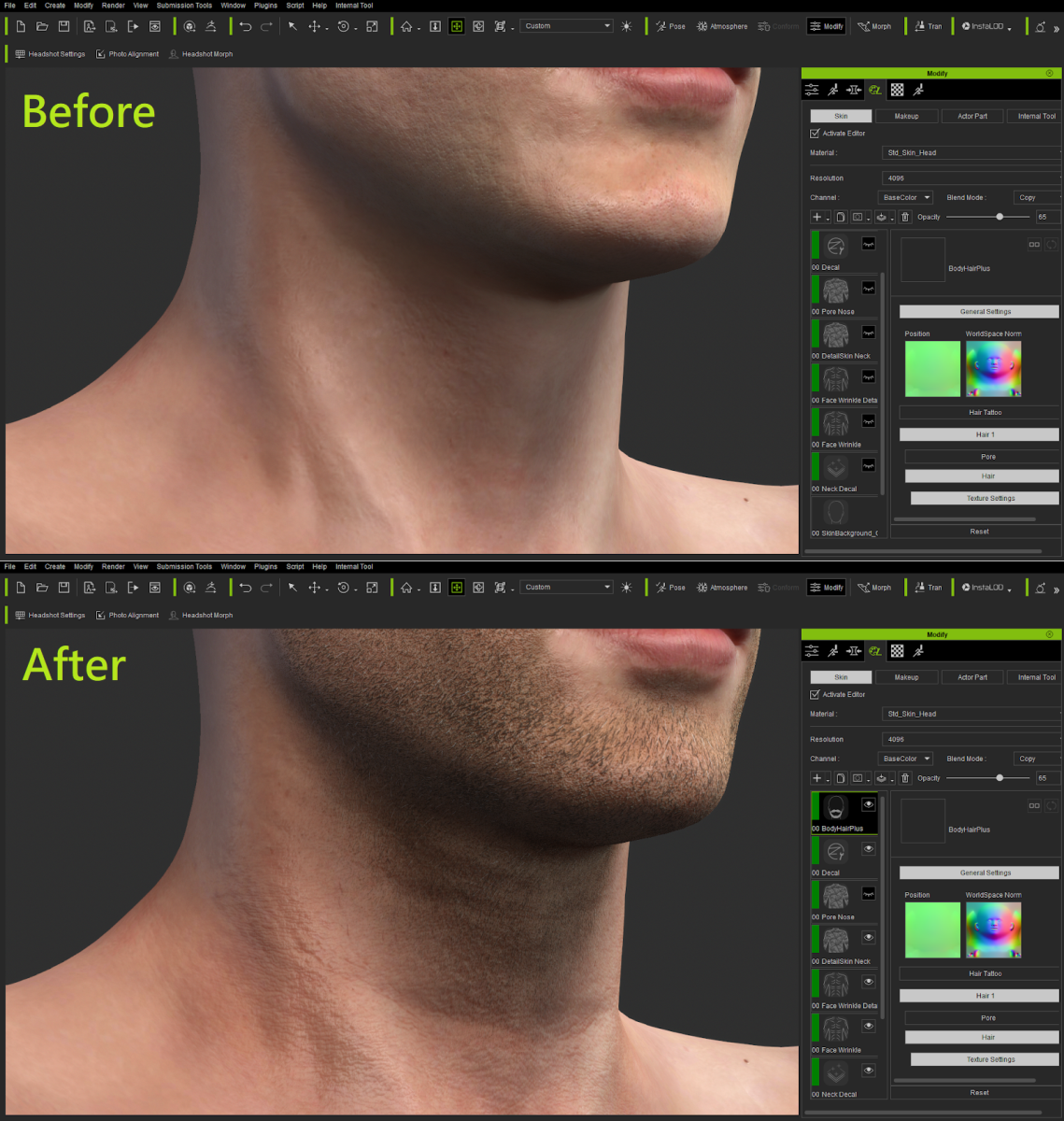 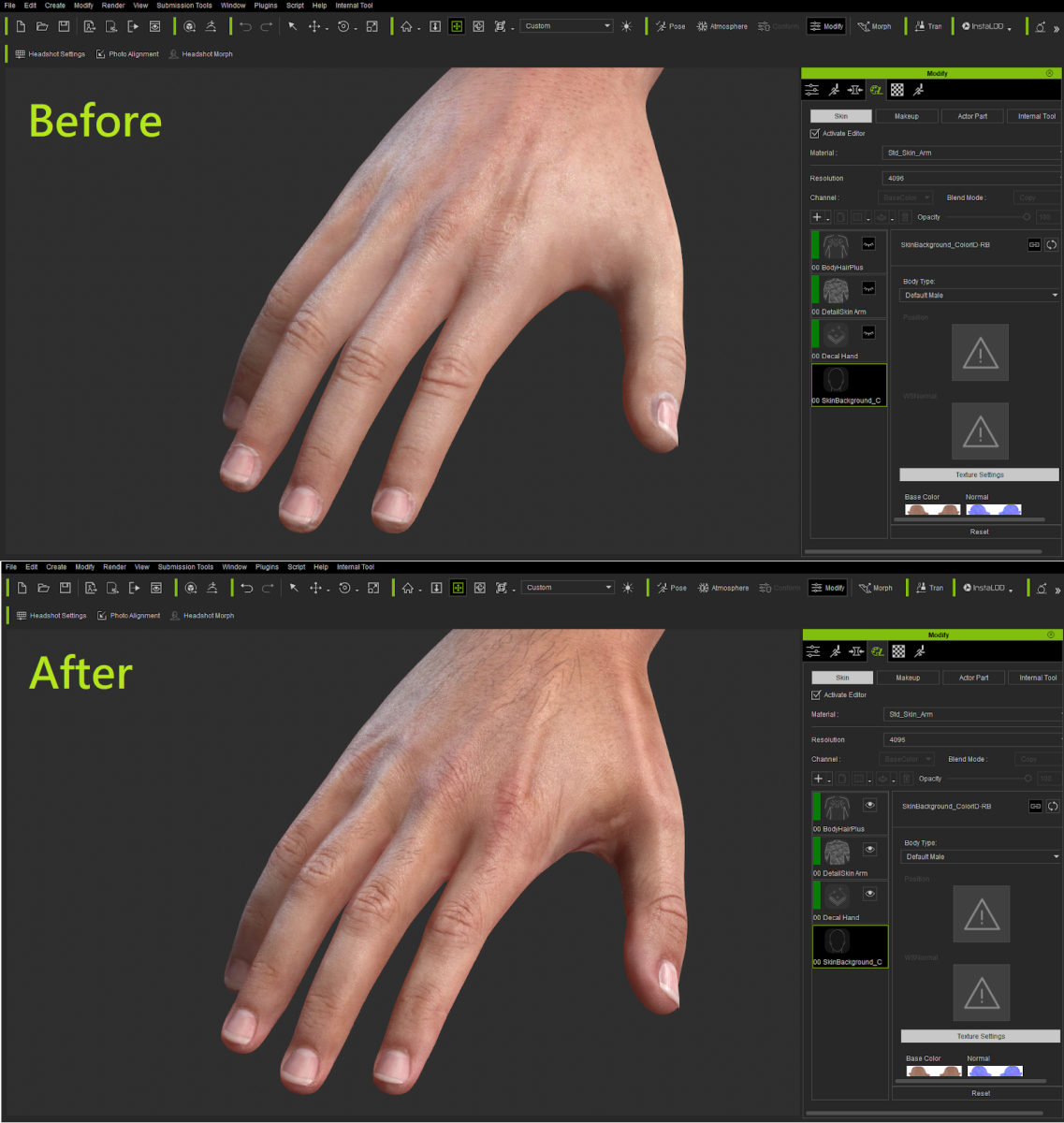 *The interface is subject to change until the official launch. Besides releasing additional embed content and functions for free in regular updates, we will also provide optional plug-in and content packs to satisfy different needs. -- Previous demonstration: Character Creator - 2019 Roadmap (Jan 31st, 2019), What to Expect in the Second Half of 2019 (July 29th, 2019) New Character Base: CC3 Base+ (CC v3.3) In order to support enhanced realism of Digital Human assets, we have made improvements to the character's mesh, UV, and skeletal rig. In the process, we have also make the body mesh easier to sculpt on with tools like ZBrush. - Mesh:
- Eyes now come with additional meshes for the tear line and occlusion overlay. These meshes can be turned on and off, deleted and recreated at any time.
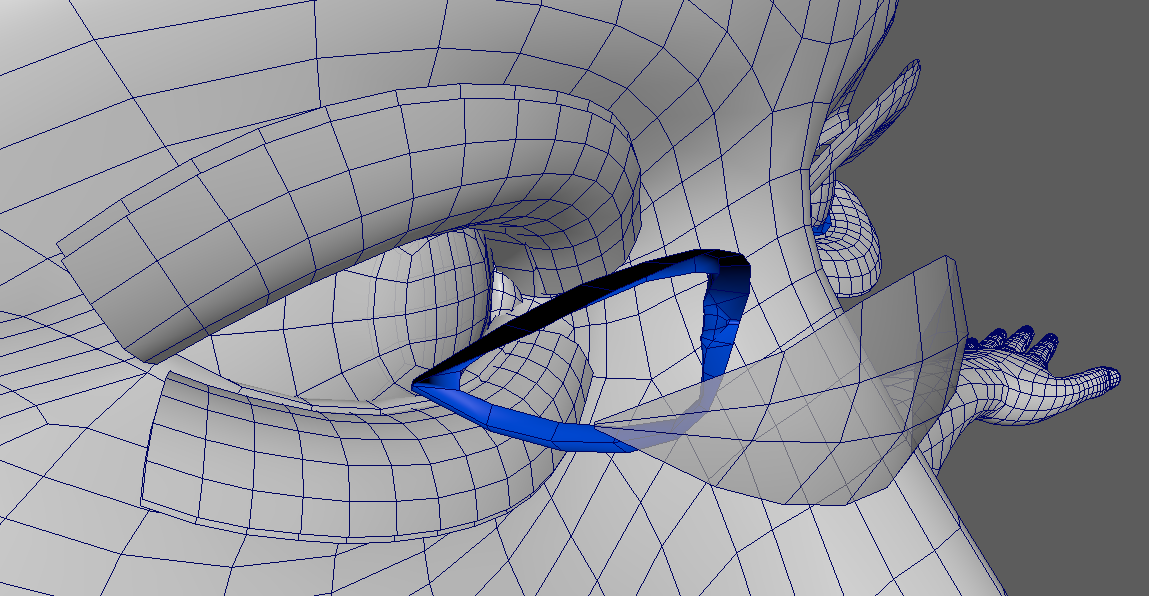
Before-and-after video:
- Evenly-distributed quad face and perfect edge-loops allows for smooth deformations during animation. Sculptors can also rejoice, as the mesh is easier to subdivide and smooth without defects.
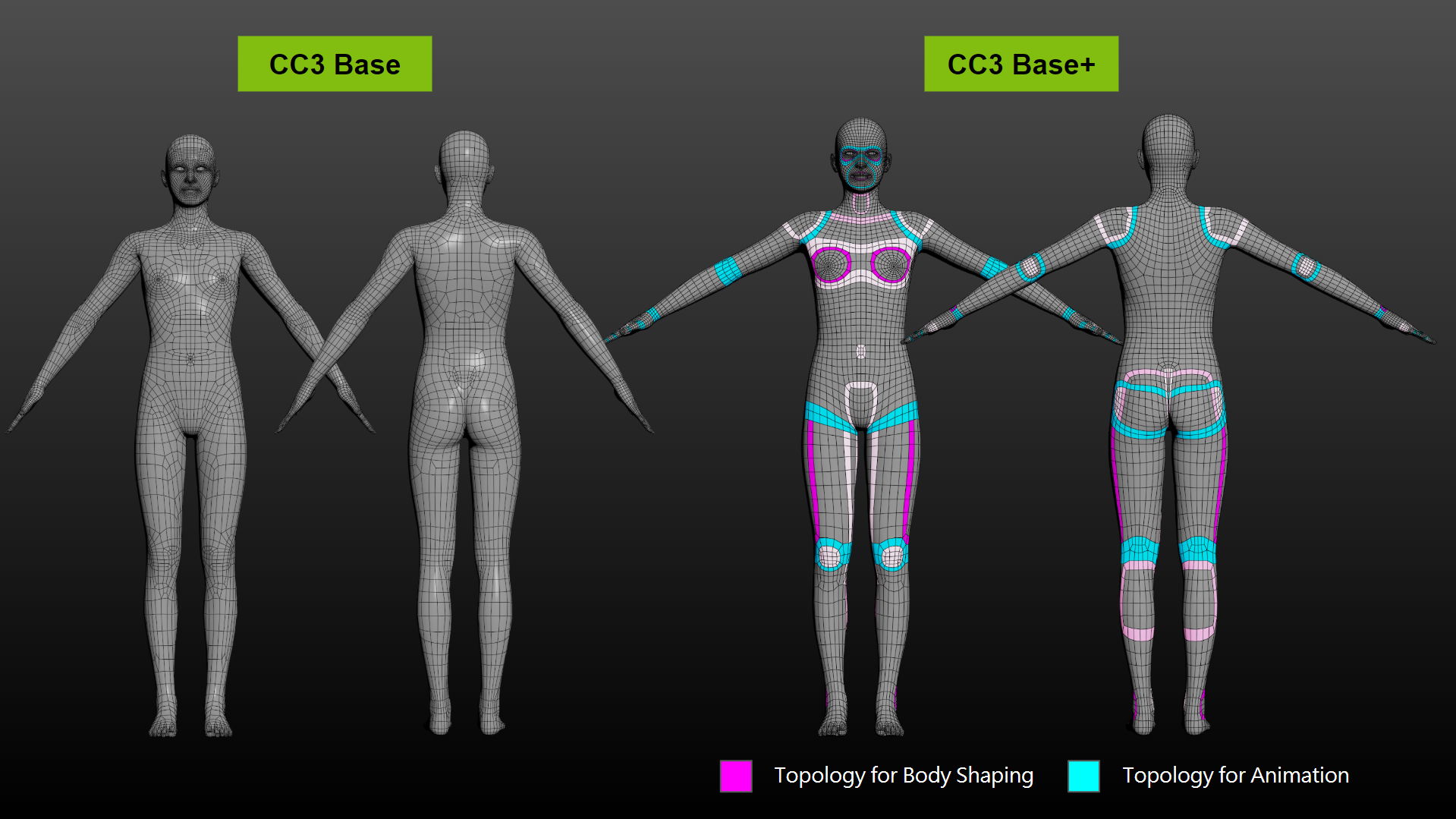
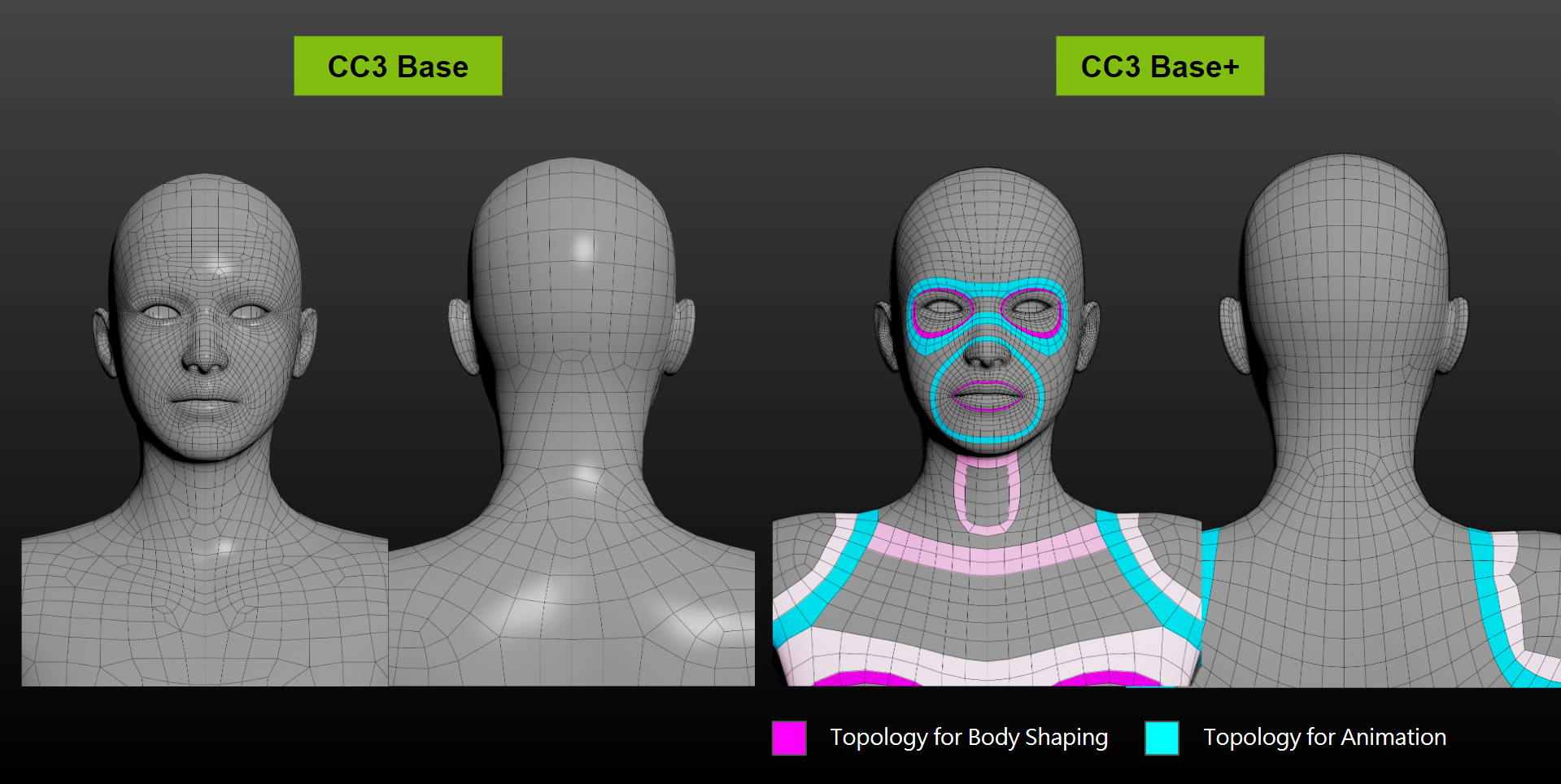
- UV:
- Head UV now includes areas of the neck which helps to maintain head to neck texture continuity which will also benefit the upcoming dynamic wrinkle system.
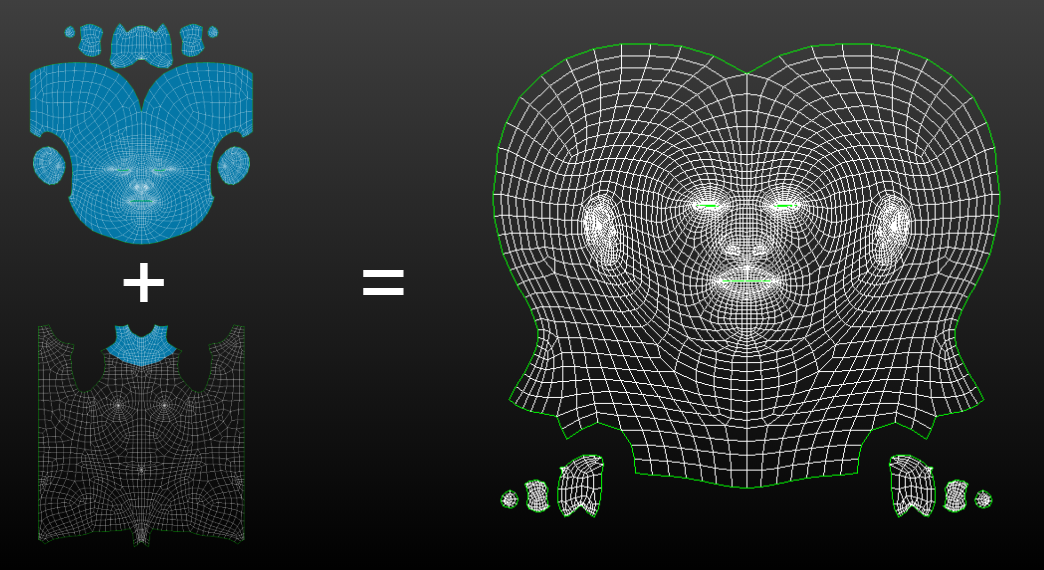
- High details for the nose, lips, hands, etc.
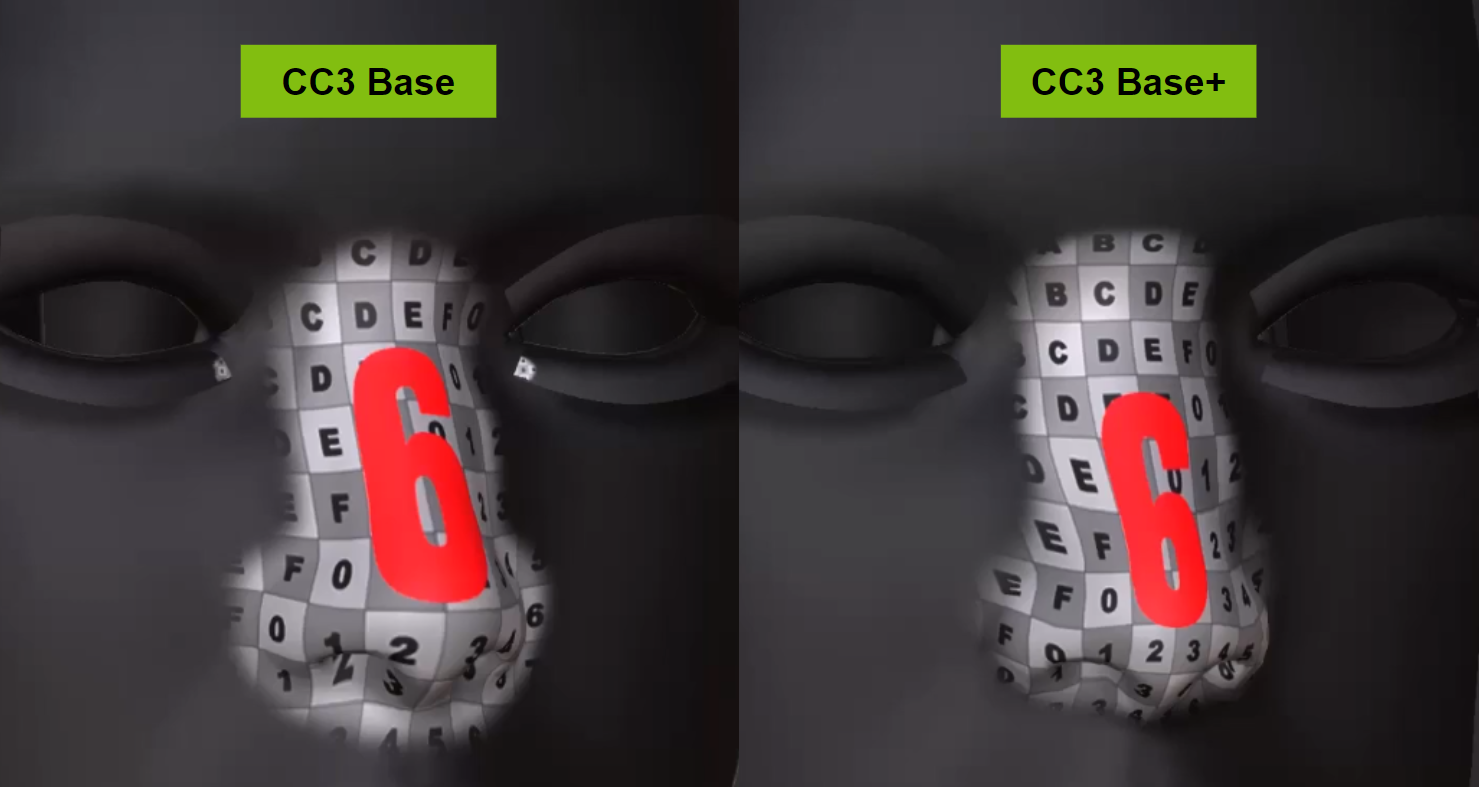
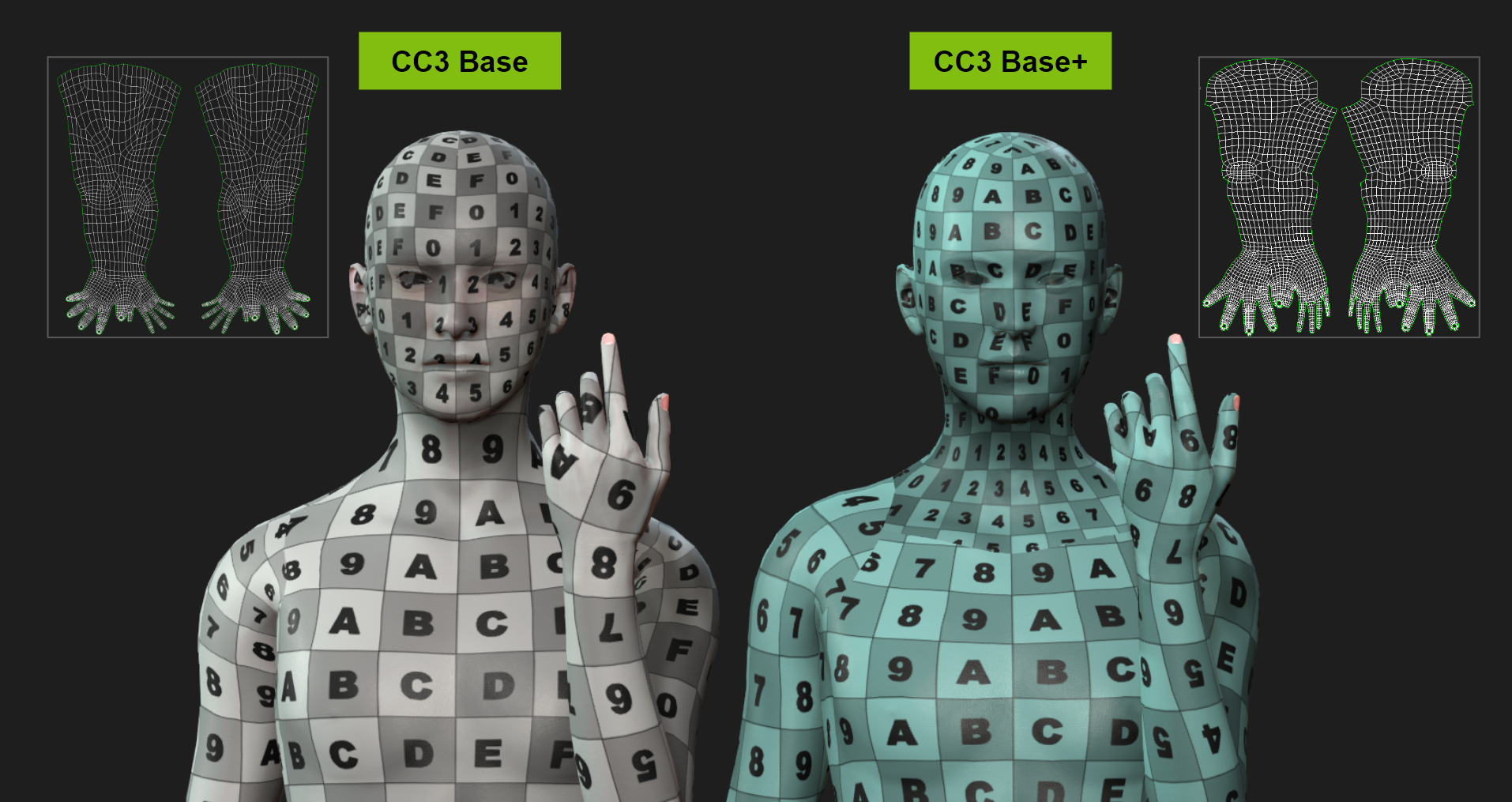
- New UDIM layout for easier single-pass texture baking in Substance Painter and other 3D tools.

- Rigging: Enhanced skin-weights for animation and pose refinement.
More natural joint positions, for example, the shoulders no longer over-extend as they slope downward.
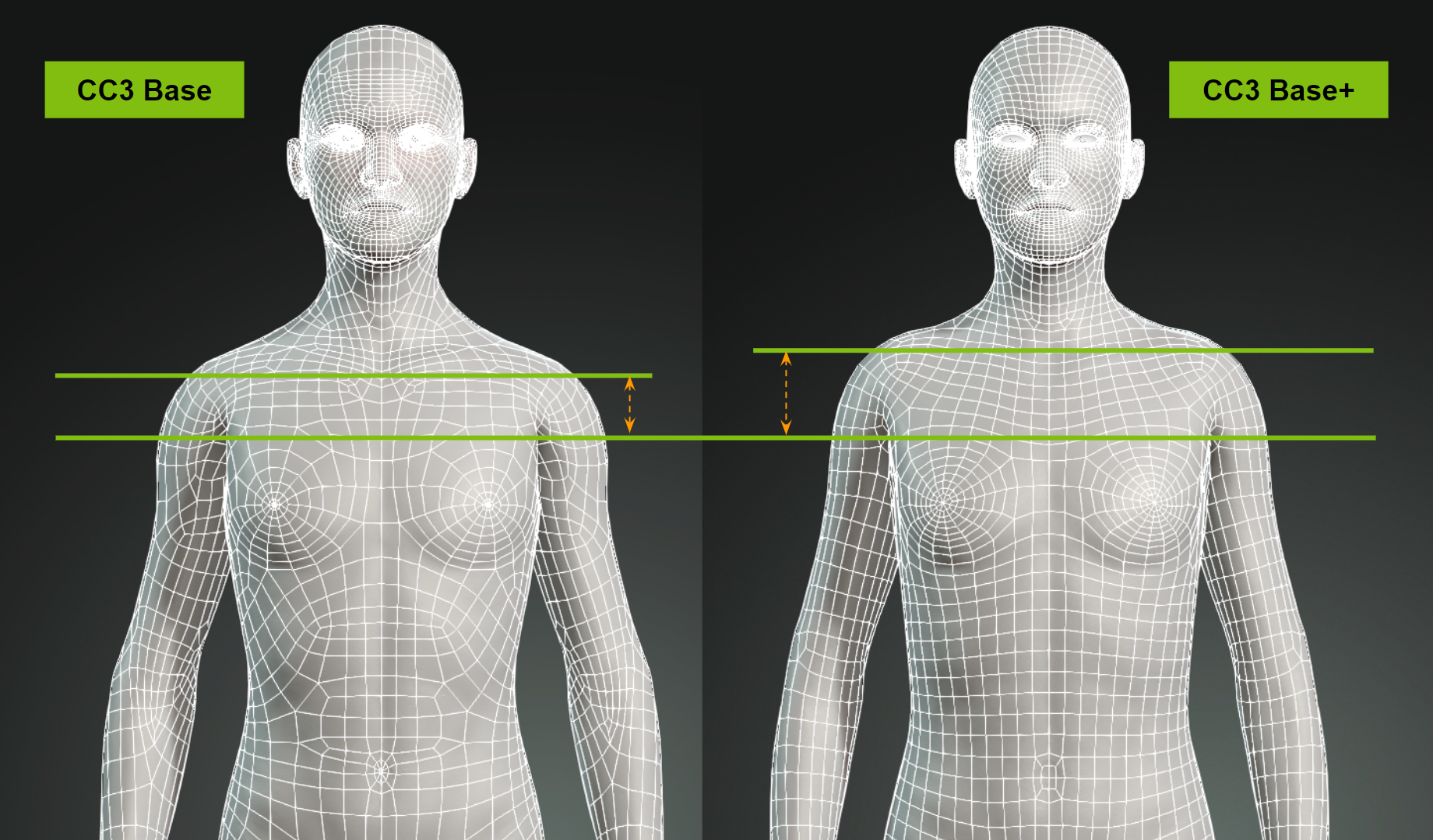
You will be able to convert your existing characters to the new base body system with the release of new auto-conversion utilities and tools for fine-tuning. Meanwhile, embedded assets will be updated to this new base body system.
Facial Hair (CC v3.4)
Facial hair can really help to define a character's personality, therefore, we felt it was a feature that is worthy of our attention. For 2020, we will release a new file format specifically for facial hair. The facial hair system will be able to conform and animate with facial expressions. Moreover, new content packs will be available for composing facial hair on your characters. More information on this will be revealed in the second half of 2020.
Dynamic Wrinkle System (CC v3.4)
This project was postponed from last year to this year because we want to combine enhanced lip-sync mechanism together with expression wrinkles for better performances. You can see the demo posted on What to Expect in the Second Half of 2019. SSS Shader for Accessories & Props (CC v3.3)Besides characters, an SSS shader will also be available for props and accessories (for CC3.3 and iClone 7.8). You will be able to create translucent material effects and build SSS material libraries for your digital assets. *Note: This General SSS shader is for props and accessories, which works slightly different from the Digital Human Shader for characters. Pipeline to 3rd Party ToolsThe pipeline process among other mainstream 3D tools will continue to see enhancements with the main focus placed on Unreal Engine and Unity. Unreal EngineUpdates along with CC 3.3 and iClone 7.8: - Auto Setup v1.1
- Auto-setup will be made compatible with the new CC character base. Support for Reallusion Digital Human Shader will include consistency with their parameter counterparts in the Unreal Engine.
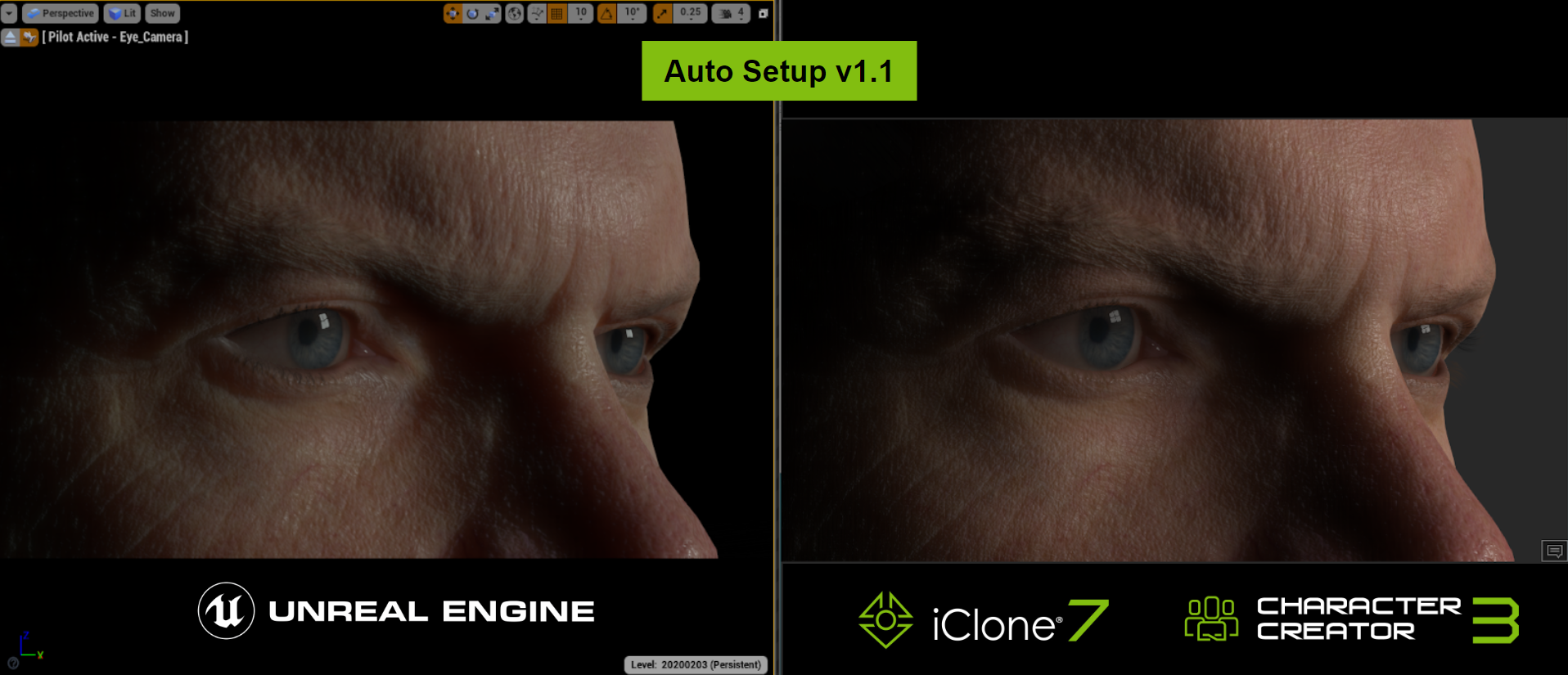
Updates along with CC 3.4 and iClone 7.9: - Auto Setup v1.2
- Dynamic Wrinkle for Unreal Engine
UnityRegularly updating the Auto Setup to be compatible with new version of Unity. Smart Gallery - An Intelligent Way to Manager Your AssetsThe new content management tool Smart Gallery will be officially introduced in iClone and Character Creator soon. Smart Gallery is designed to help you quickly download purchased content and easily manage your assets inside the program.  Please view the announcement HERE for more details. CC Content PacksReallusion will keep introducing new functional base content in 2020, while more Featured Developers continue to enrich content options ranging from hair, clothes, morph, etc. Here are some examples for your reference: Quality Hair Assets by SWAM 3D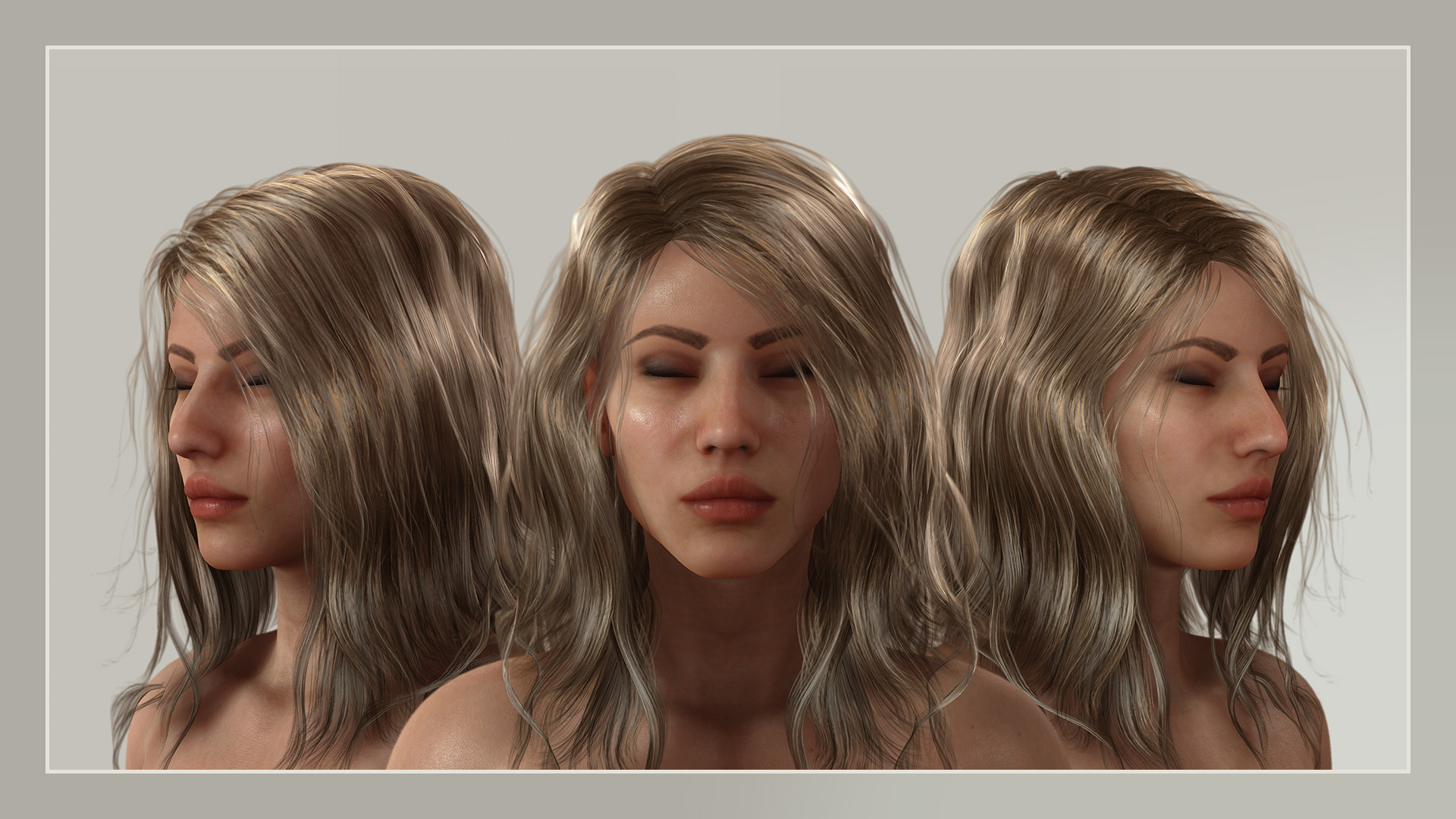 Scanned Casual Clothes by Polygonal Miniatures Scanned Casual Clothes by Polygonal Miniatures 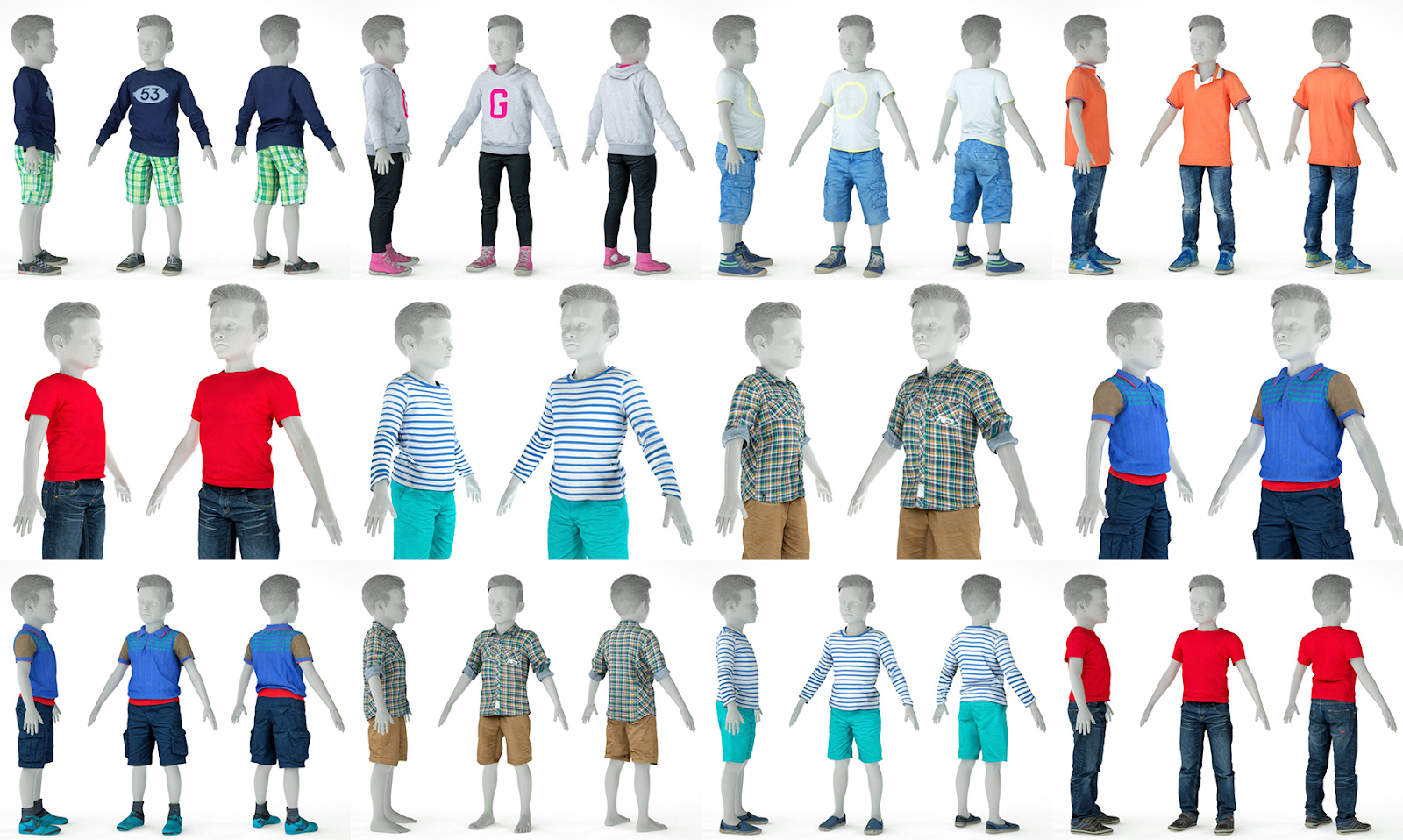 Cartoon Characters by Luis Duarte Cartoon Characters by Luis Duarte 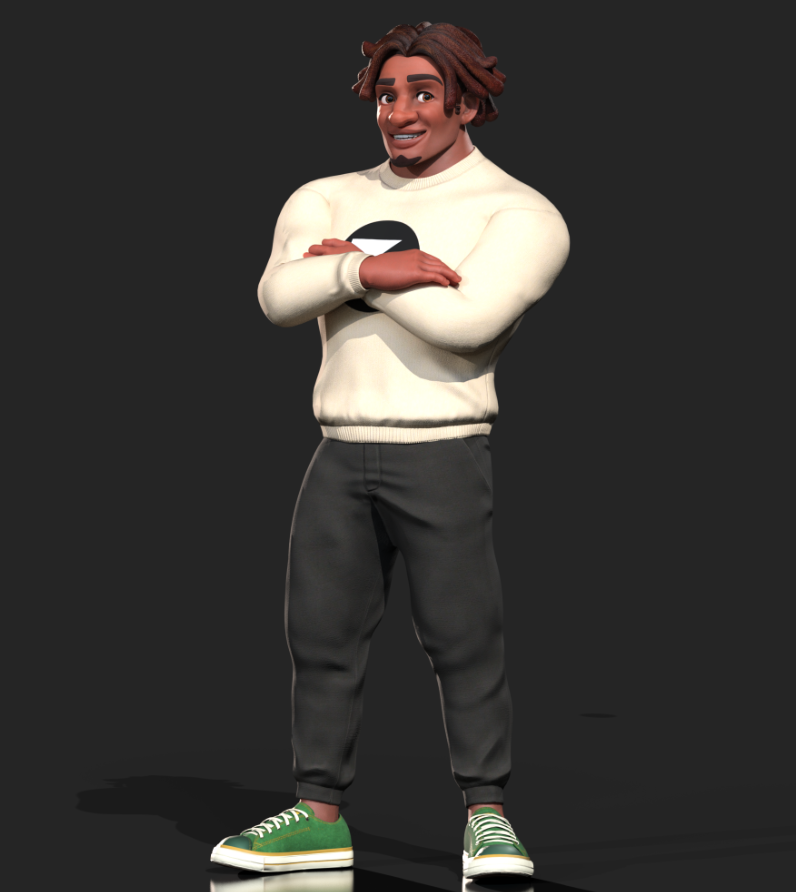
Please stay tuned for more to come! :)
Reallusion Team
|
|
By ccCreator - 6 Years Ago
|
|
All of these additions look great. Anxiously awaiting!
|
|
By vidi - 6 Years Ago
|
|
. New UDIM layout for easier single-pass texture baking in Substance Painter and other 3D tools.
Great!!! :cool::)
|
|
By larryjbiz - 6 Years Ago
|
|
Very Cool!
|
|
By Postfrosch - 6 Years Ago
|
Everything is "super great" and "cool"
It may be so.
But I can only say that the "Appearance Editor (now HD Skin & Makeup Generation (CC v3.3)) has been moved again
- from 1 quarter 2019
- on 4th quarter 2019
- to late 1 quarter 2020 (it was called March 2020)
Now (according to the graphic) it is located in the middle of the 2nd quarter of 2020 (i.e. sometime in May / June 2020).
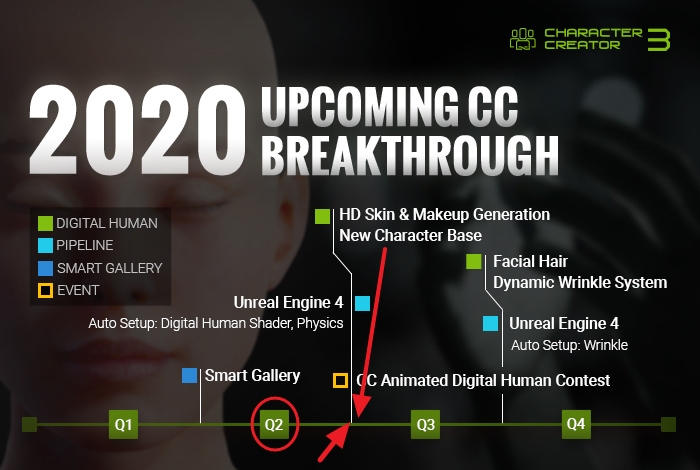
Or am I wrong ? I really don't know what to make of it
Greets from Germany
Postfrosch
|
|
By Peter (RL) - 6 Years Ago
|
Hi Postfrosh
Unfortunately the HD Skin Generator has been pushed back a little from late Q1 to early Q2. This has been a big project for the team and it has taken longer than originally planned. While we try to be open and share our future plans, development times can and do change often. However I can assure you that the previous release timeframes were given in good faith and were in no way intended to mislead. We do of course apologise for the disappointment caused by this delay.
|
|
By Mythcons - 6 Years Ago
|
This looks great. I'm especially liking the facial hair and UDIM work. The cartoon characters are interesting as well.
|
|
By justaviking - 6 Years Ago
|
Thanks for the Roadmap, Miranda.
You will be able to convert your existing characters to the new base body system with the release of new auto-conversion utilities and tools for fine-tuning. Meanwhile, embedded assets will be updated to this new base body system.
That is excellent news. It's always frustrating when older assets get left behind and need to be totally replaced (often via new purchases). It's great to hear we'll be able to update existing characters to take advantage of the new and improved appearances and features.
Looking forward to the releases.
|
|
By StyleMarshal - 6 Years Ago
|
WoW , Brilliant :-)
Dynamic Wrinkle System , thats so great.
|
|
By Ascensi - 6 Years Ago
|
|
Thank you for adding the tear line! I've been really pushing for this and now it will definitely compliment the HD skin -looks a lot more life like. I really hope you will add Vertex weight painting to help drive the physics so heavy skin body areas can bounce around potentially better than the bone based spring FX. I know that you have a lot on your list now.. the realistic look of the character now needs realistic weighted skin movement to match -thank you!
|
|
By Darren01 - 6 Years Ago
|
loving the ongoing enhancements with the new generation CC characters.
Will be interested to see the improvements on the joints, as that's something that still needs some work on otherwise very good characters
I also appreciate that for the last couple of updates of CC characters, they are providing the tools to update existing characters. Previously it has been disheartening when you spend a year or more perfecting your favourite avatar, only to find the latest generation avatar gets released with more features/realism, so then you have to start all over again. So thanks RL for providing us with the tools to update our current characters to the latest bases.
|
|
By joao.henriques - 6 Years Ago
|
|
Will we finally have something ultra advance as body morphs from CC3 to Unity/unreal?
|
|
By Warped Reality VFX - 6 Years Ago
|
These updates look fantastic, is there any chance in the future of being able to import facial expressions from Daz3d using the transformer tool.
Thank you.
|
|
By imaginationseven7 - 6 Years Ago
|
|
Looks great don't forget unity3d :/
|
|
By Pixtim - 6 Years Ago
|
|
Wow this is great! it grows, it advances, it becomes always more incredible! Go there Reallusion team!!!
Ogier
|
|
By zeek1 - 6 Years Ago
|
|
Really excited about the unreal auto setup because that plugin wasn't cheap. Interested to see what the SSS shader does in iclone because I only bought the unreal plugin because of it's real world look and reflections. Question though, will all these new features added to CC3 add more memory to the characters when being exported or will it be the same or hopefully lesser mesh saving but great quality?
|
|
By Siverse - 6 Years Ago
|
|
Totally awesome, if they are implemented, the new base and rig will be a god send, for character sculptors, and content creators, really need this. THanks hoping the rig can deform to make animal hybrid legs, like that of a werewolf etc... also would it be possible to send the new character base to goz zbrush and back to CC3 in an A pose rather than a T pose?
|
|
By darlin.blakime - 6 Years Ago
|
please update the UI to be more friendly, the UI is quite ugly outdated. By the way looking forward for more advanced character feartures
|
|
By Kiwi-Hawk - 6 Years Ago
|
Kia ora
I brought both the ScanLab Virtual humans and sent then back because that have painted on underwear which limits their use with different clothing style
I'm hoping this is not being carried over to any new high quality digital humans given the price by by those of us mature adults outside the US.
Painted clothing that can't be replaced is IMHO just cheap
|
|
By animagic - 6 Years Ago
|
|
darlin.blakime (2/14/2020)
please update the UI to be more friendly, the UI is quite ugly outdated.
That is kind of vague. Also many of us are used to this UI so it would be a bad idea to change it. And, it is NOT ugly.
|
|
By animagic - 6 Years Ago
|
|
Kiwi-Hawk (2/15/2020)
those of us mature adults outside the US.
And even within the US. They do exist, although you wouldn't think so...:P
|
|
By estherau - 6 Years Ago
|
Any of this mac compatible yet? Any plans on this roadmap to include macs?
Kind regards,
esther
|
|
By animagic - 6 Years Ago
|
|
estherau (2/15/2020)
Any of this mac compatible yet? Any plans on this roadmap to include macs?
Kind regards,
esther
I know you have asked this before, but I believe the answer is still "No" to both questions. The development team is not that large, and porting to Mac would be a huge undertaking I would think.
|
|
By FrankGarrett316 - 6 Years Ago
|
Looks amazing, so as always I have to ask this - are these upgrades able to be easily applied to already existing avatars? (as opposed to only new avatars).
I just wanna know if I should even put in effort with current projects and if they'll get the upgrade treatment.
|
|
By Hookflash - 6 Years Ago
|
|
Honestly, this roadmap seems to miss the forest for the trees (at least, when it comes to animation). Improved topology, wrinkle-maps, etc. aren't of much use when a feature as basic & essential as corrective morphs is missing.
|
|
By animagic - 6 Years Ago
|
|
Hookflash (2/15/2020)
Honestly, this roadmap seems to miss the forest for the trees (at least, when it comes to animation). Improved topology, wrinkle-maps, etc. aren't of much use when a feature as basic & essential as corrective morphs is missing.
The road map is for Character Creator, which is for creating characters and is not concerned with animation. There will be a separate road map for iClone.
|
|
By Hookflash - 6 Years Ago
|
animagic (2/15/2020)
Hookflash (2/15/2020)
Honestly, this roadmap seems to miss the forest for the trees (at least, when it comes to animation). Improved topology, wrinkle-maps, etc. aren't of much use when a feature as basic & essential as corrective morphs is missing.The road map is for Character Creator, which is for creating characters and is not concerned with animation. There will be a separate road map for iClone.
I feel like JCMs would have been mentioned in the CC roadmap (since, presumably, they'd also apply to posing in CC), but I would *love* to see them in the iClone roadmap.
|
|
By Snarp Farkle - 6 Years Ago
|
|
Kevin L (2/14/2020)
These updates look fantastic, is there any chance in the future of being able to import facial expressions from Daz3d using the transformer tool.
Thank you.
Yeah I'd like to be able to do that too Kevin, I was able to get some DAZ expressions into CC3 by exporting them via FBX export, using 3DxChange's Expression editor, then in iC7 saving them as iTalk files, then importing into CC3. But it's a longer process than I'd like, the expressions don't work on the DH Avatars for some reason, I'll see if I can improve the process when I get some time to fool with it some more.
|
|
By Peter (RL) - 6 Years Ago
|
|
dante1st (2/15/2020)
Looks amazing, so as always I have to ask this - are these upgrades able to be easily applied to already existing avatars? (as opposed to only new avatars).
I just wanna know if I should even put in effort with current projects and if they'll get the upgrade treatment.
You will be able to easily convert existing CC3 characters to the new CC3+ Base Mesh.
|
|
By Peter (RL) - 6 Years Ago
|
|
Kiwi-Hawk (2/15/2020)
Kia ora
I brought both the ScanLab Virtual humans and sent then back because that have painted on underwear which limits their use with different clothing style
I'm hoping this is not being carried over to any new high quality digital humans given the price by by those of us mature adults outside the US.
Painted clothing that can't be replaced is IMHO just cheap
It isn't painted on clothing. It's the underwear the models were wearing when they were scanned. Of course non-scanned characters won't have this restriction.
|
|
By Kevin.S - 6 Years Ago
|
Excellent !!!
Some great new features
|
|
By Attensi AS - 6 Years Ago
|
|
Will there be any changes done to the Game Base-conversion, or will that stay the same? As far as I can see from this, all the changes to the new character base is for the standard mesh.
|
|
By Ascensi - 6 Years Ago
|
Is Reallusion working on a Vertex weightmap painter for softbody physics to be used in iClone? maybe at least for Character creator 4?
|
|
By scottnodine - 6 Years Ago
|
Looking forward to the facial hair update!
BTW while we are talking about updates... the content store really needs a generic polo shirt!
|
|
By Dorothy Jean - 6 Years Ago
|
|
scottnodine (2/23/2020)
Looking forward to the facial hair update!
BTW while we are talking about updates... the content store really needs a generic polo shirt!
I'll add that to my list of stuff to make. It will be next!
|
|
By FrankGarrett316 - 6 Years Ago
|
|
I would literally buy this on the day it comes out. Can't believe RL never made some "normal" looking polo shirts The default ones look terrible.
|
|
By Lord_Dreadmoor - 6 Years Ago
|
Dorothy Jean (2/24/2020)
scottnodine (2/23/2020)
Looking forward to the facial hair update!
BTW while we are talking about updates... the content store really needs a generic polo shirt!
I'll add that to my list of stuff to make. It will be next!
@Dorothy Jean I have been rapidly becoming a big fan of using your custom skin textures in my work, so if you start releasing them with some elevated facial hair I'm all in.
|
|
By Miranda (RL) - 6 Years Ago
|
|
billing_49 (2/20/2020)
Will there be any changes done to the Game Base-conversion, or will that stay the same? As far as I can see from this, all the changes to the new character base is for the standard mesh.
The Game Base character itself will not be updated, but you can convert the CC3 Base+ to be Game Base.
|
|
By Miranda (RL) - 6 Years Ago
|
|
zeek1 (2/14/2020)
Really excited about the unreal auto setup because that plugin wasn't cheap. Interested to see what the SSS shader does in iclone because I only bought the unreal plugin because of it's real world look and reflections. Question though, will all these new features added to CC3 add more memory to the characters when being exported or will it be the same or hopefully lesser mesh saving but great quality?
To support higher definition on certain parts of the character, the polygon count of CC3 Base+ is 1,000 more than CC3 Base. (quad)
|
|
By esemgee - 6 Years Ago
|
|
I read through what is intended in 2020 and I am not that excited.
When I buy, or download, an upgrade to a program I expect it to do what the previous version did, only better and faster. Money is changing hands here, so one would presume this is logical. Reallusion seem to think the opposite. They take my money and then take away functions, and in the upgrade I don’t remember being told that such-and-such is now removed. Why should I now ever bother upgrading if it seems my older versions are better?
I refer to the inability of a CC3 base to accept a decal. I can do it with a CC1 base and convert it - brilliant, but what if I am creating with Headshot which can only be applied to CC3? I can find no way to retro-convert, and if there is; why? Why do I need to go backwards?
My character, based on a friend, has tattoos. I can add them to the face photo, even the diffuse photo, but the past ease and simplicity of adding them to the torso, arms etc, has now gone, and seemingly impossible to do, unless I use Crazy Talk and CC2, thereby rendering the purchase of Headshot as a waste of money. Tattoos are extremely normal in reality, and fantasy, so it seems ridiculous that they have become so difficult, if not impossible, to apply to a character.
I really hope that I am over-looking a simple answer to adding decals to a CC3 character, but another bugbear, the frustrating difficulty of searching the Forum for answers, gets in the way. No doubt this issue may be addressed in the future, but will I be bothered buying it? No, luckily I’ve still got CC2, and, because it seems aspects of CC3 are redundant, I have no need for anything else as CC2 answers my immediate, and I presume future, needs.
|
|
By Postfrosch - 6 Years Ago
|
Hi gerry.smout
Which makes me particularly annoyingis the fact that the Appearance Editor for CC 3 pipeline was already announced in October 2018 for Update 3.1 for the CC 3 (the team is working hard on it here in the forum)
In 2019 it became from the 1st quarter of 2109, then to the end of the 3rd quarter of 2019. Later it was called the late 1st quarter of 2020. The latest date is probably "early" 2nd quarter of 2020 for its appearance. Mind you for the purchase version CC 3 pipeline, which was already published in 2018.
That is also one thing with the decals.
The CC 1 Avataer will work, but not the CC 1 from the Substance folder. The decals are given a gray border here.
Greets from Germany
Postfrosch
|
|
By esemgee - 6 Years Ago
|
|
Thanks for the background information. One does expect the new version to work as the old, but not to get previous working, basics to even function over a two year period is a bit much!
|
|
By Siverse - 6 Years Ago
|
|
how long before we get the new mesh and rig? coz trying to get descent sculpt from the present mesh is hell, every time i try an import into substance painter the detailed part of the mesh i have sculpted just shows up warped, because, of the way the quads are model on the cc3 base mesh, just makes work jagged and gnarly, shit! and frustrating, so please when is the new mesh due?
|
|
By Peter (RL) - 6 Years Ago
|
|
holocule (3/1/2020)
how long before we get the new mesh and rig? coz trying to get descent sculpt from the present mesh is hell, every time i try an import into substance painter the detailed part of the mesh i have sculpted just shows up warped, because, of the way the quads are model on the cc3 base mesh, just makes work jagged and gnarly, shit! and frustrating, so please when is the new mesh due?
The new CC3 Base is currently scheduled for Q2 2020.
|
|
By TonyDPrime - 6 Years Ago
|
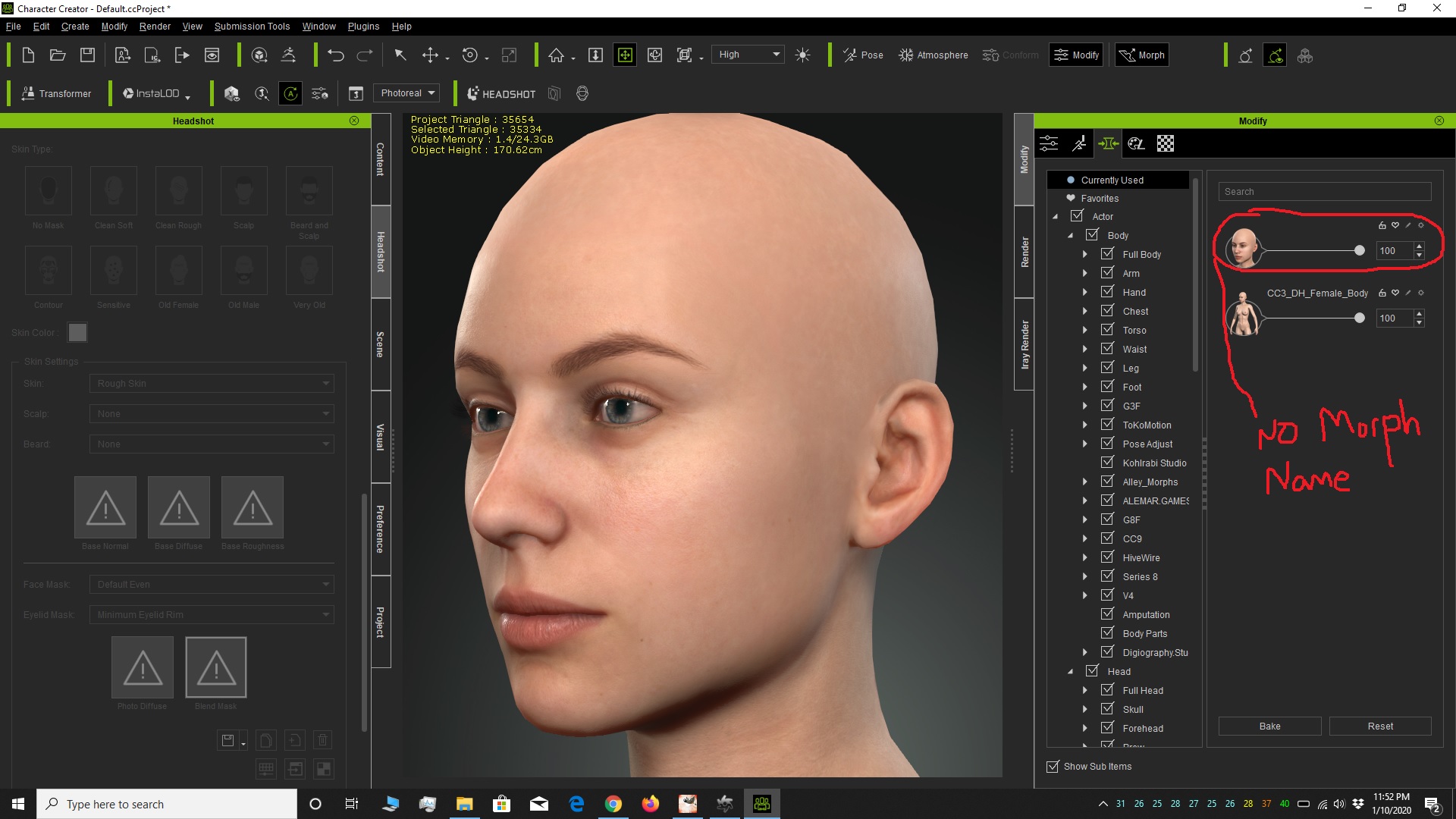
RL - don't forget this!
|
|
By Ascensi - 6 Years Ago
|
Will the auto convert to CC3+ remove custom maps? or would they just transition them into the new material layout?
Last time I converted to CC3 models it swapped my non human custom textures for default Human textures -I had to rework them all.
|
|
By Miranda (RL) - 6 Years Ago
|
Noted! Thanks for reminder. :)
TonyDPrime (3/31/2020)
RL - don't forget this!
|
|
By Miranda (RL) - 6 Years Ago
|
|
Ascensi (3/31/2020)
Will the auto convert to CC3+ remove custom maps? or would they just transition them into the new material layout?
Last time I converted to CC3 models it swapped my non human custom textures for default Human textures -I had to rework them all.
Hi Ascensi,
Did you mean resource maps?
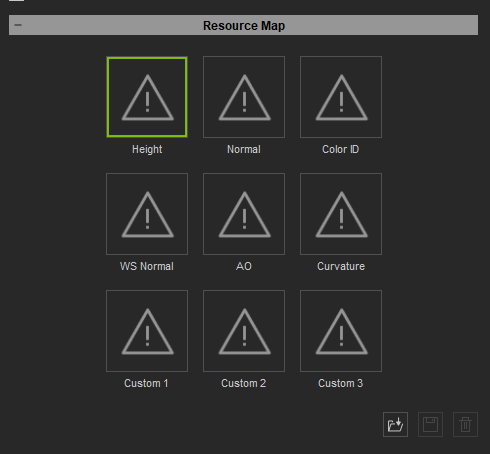
|
|
By Ascensi - 6 Years Ago
|
|
Standard & Resource
|
|
By Ascensi - 6 Years Ago
|
|
Hi Garry, there is a bit of a workaround you could do from Headshot to CC1. Export your character to obj and import as a morph for CC1.
|
|
By esemgee - 6 Years Ago
|
|
Thanks. I know now that there are workarounds; my point was, and still is, why did this happen in the first place? Why am I having to take something from the latest version and backtrack to the first version? Insane! Today I upgraded to iClone 7.3 and it is now totally unusable - my appreciation of this once fantastic program is hitting rock-bottom!
|
|
By Ascensi - 6 Years Ago
|
|
The other option is to use Reallusion Super shaders to stay with CC3. I understand your point and to have to apply other methods slow down the process than what you'd be normally used to.
|
|
By Siverse - 6 Years Ago
|
|
hi when is the new base mesh due?
|
|
By Peter (RL) - 6 Years Ago
|
|
The new CC3+ Base Mesh is due in the 3.3 update currently scheduled for Q2.
|
|
By obzerv - 6 Years Ago
|
|
anxiously awaiting for the option to send A poses to and from external programs like Zbrush (via GoZ) and Marvelous Designer. The T pose is painful to work with and the steps required to use a an A pose just as much.
|
|
By Miranda (RL) - 6 Years Ago
|
Hi obzerv,
A pose will become the bind pose from version 3.3.
There will be an option to export character with A pose or T pose. :)
obzerv (4/14/2020)
anxiously awaiting for the option to send A poses to and from external programs like Zbrush (via GoZ) and Marvelous Designer. The T pose is painful to work with and the steps required to use a an A pose just as much.
|
|
By Mikay² - 6 Years Ago
|
I am so excited about this. You are going exactly in the right direction. You seem to address most problems I can see with the model right now.
Will the jaw will be fixed too? The jaw bone is bending at the moment when animated in iclone. Will there be a skeletal bone for the jaw? I think this would fix it
|
|
By Ampologies - 6 Years Ago
|
|
When I use goZ from CC3 the brush size is super small in zbrush but when I use xchange and import into zbrush manually the size is correct. How do I fix this issue? It is very frustrating as hell. Goz in Cc3 seems to be useless. I hope that I'm just missing some here.
|
|
By denclink - 6 Years Ago
|
Simple fix
After you draw out your character (make it editable)
Go To
Preferences:
Draw:
First option under Draw menu:
Max Brush Size:
Dynamic Brush Scale:
then adjust sliders up to your preferences
This is out of memory no longer have access to zbrush so I hope that helps
|
|
By Ascensi - 6 Years Ago
|
Hi Peter, I asked this on the previous page Will the auto convert to CC3+ remove custom maps? or would they just transition them into the new material layout?
Last time I converted to CC3 models it swapped my non human custom textures for default Human textures -I had to rework them all.
|
|
By Ampologies - 6 Years Ago
|
|
Also When I goz back to CC3 the model is not working. It is as though the rig does not match at all. The model blows up.
|
|
By Ascensi - 6 Years Ago
|
You can't change UVs in anyway.. no polygrouping -not unless you intend to export your character to obj and then import it as a morph to a new the body of the same character you originally created your character that you sent to Zbrush. This way the UVs will remain and you have your shape.
Anyway, that's what I think might be happening in your case.
|
|
By TonyDPrime - 6 Years Ago
|
You know what's a thing that could be made better, the Headshot Lacrimal (That pinkish thing at the eye's inner corner).
When you start off with the CC3 default in 3.22 it has a very nice defined organic looking Lacrimal.
But then when you use Headshot it turns the Lacrimal into a low-poly box shape somehow, very undetailed.
It's just a shame because the CC3 default has a really good one, if new CC3 release could always retain that organic Lacrimal shape would be great.
|
|
By nick_lloyd - 6 Years Ago
|
The new topology for 3.3 bace+ looks very promising. I have had a lot of trouble when sculpting characters in the t pose with Zbrush as the shoulders do not deform well after applying a pose.
It would be great in my opinion if we could sculpt in a more neutral A pose. Also, some tools to help with fixing pose based deformations. I think character creator is heading in a great direction and i really look forward to seeing where it all goes.
many thanks
nick
|
|
By hattori kun - 6 Years Ago
|
With Blender 2.9 Alpha having multires sculpting, any chance CC3 will have a goz like function for blender soon?
|
|
By Power Ten Productions - 6 Years Ago
|
|
Any more details on when the Q2 release will come out? Has there been a delay because of Covid?
|
|
By Miranda (RL) - 6 Years Ago
|
|
Power Ten Productions (5/5/2020)
Any more details on when the Q2 release will come out? Has there been a delay because of Covid?
Hello!
CC 3.3 and Skin Generation function is still on our Q2 plan.
We are all in good condition. Do worry about it! :)
|
|
By Ascensi - 6 Years Ago
|
@Miranda (RL) Any news of SSS to work properly with opacity? It was said that Iray's sss doesn't work with opacity because of the current limits of the shader. Personally I need sss with opacity for fluids in CC3 and iClone using Iray.
Lastly I haven't hear back about character material/texture conversion.. I have a lot of custom textures on my models, if I upgrade the characters will the textures carry over or will they be replaced with character defaults?
Thanks, Kurt.
|
|
By TonyDPrime - 6 Years Ago
|
RL - you see the Unreal 5 promo?...with Nanite?
See, having a character option for low res, low resource, LOD, and Gamebase is only half a package now...
Besides mid-level, CC3 *needs* the High Res, super-duper resource hungry, GPU-busting 8K HD model-base too!...
4K is not enough, it's too small!
Fiber mesh brows, hair, peach fuzz...Grooms...deluxify everything!
The more poly's, the better!
|
|
By sibi_naayagam - 6 Years Ago
|
UE5 is coming out late 2021.
It's probably going to be on the 2021 Roadmap for CC3 or perhaps CC4 at that point.
|
|
By TonyDPrime - 6 Years Ago
|
|
sibi_naayagam (5/17/2020)
UE5 is coming out late 2021.
It's probably going to be on the 2021 Roadmap for CC3 or perhaps CC4 at that point.
@Sibi - you build us a time machine so we can go forward and access this CC4 software.
In the meantime...RL- DO IT NOW!
HD-ify everything. No more skimping on everything.
You know, I now understand why CC3 looks bad for so many when it goes over to Unreal and Unity. It's because they are compressing the heck out of everything, to a point where meshes look awful, so that it is optimized in-game.
It's only because RL has obscured all of the UE4 shortcomings into oblivion that it looks really good.
But, it would look like Siren if it was HD....SIREN!
Give us SIREN power! "In-game" CC3 optimization applies to 1/2 of the RL population going to Unreal. The other 1/2 would totally use unoptimized CC3 super 8K-mega-high-poly-HD meshes for film making in Unreal, ie Alembic.
Let us crash their engine with HD power...PLEASE....
|
|
By esemgee - 6 Years Ago
|
@TonyDPrime has a valid point. I am an occasional RL user who is frustrated by loads of things about iClone and CC. I won't go into them but it is a list. One of them is that my computer technically fulfils the RL requirements, that is until I actually want to make something. It grinds to a halt and crashes. Every Forum help is 'get a new machine'. Why? I fit within the so-called requirements. No, for me RL need to look at what they have got and STOP right now. Finish with iClone 7, tidy it and CC3 up so they function better, and, apart from fixes etc and some upgrades, call it a day. .
CC4 and iC8 should be renamed and marketed and seen as PRO (iCPRO1? CCPRO1?): if you want to go to town you go for these, and you'd better have the hardware to handle them. For the likes of me or those who want to add their mates face via Headshot and make silly animations, then iC7 is your man. iC7 (if set up correctly) has everything the amateur needs, encourage that market, but don't bridge into a wishy-washy version: go massive with the new stuff so the pros can really get their hands dirty and I can stay with iClone7.
|
|
By Ascensi - 6 Years Ago
|
@garry.smout as you create heavy projects you will have to increase your virtual memory. I'd recommend you set it to at least 30GB for any drive that you have iClone installed on as well as any drive you might have saved a project to outside of iClone. I've recommended to Reallusion that it should be suggested as one of the first things read in the manual for Power users to do to prevent crashes or add that as a note to users in iClone settings. Currently iClone doesn't have dynamic caching built in but I believe it's being worked on for V8 but don't work for Reallusion and don't know how accurate that info is.
Another reason for crashes could be your video driver or perhaps using SLI mode.
|
|
By animagic - 6 Years Ago
|
I disagree with the approach that iClone 8 and CC4 should became unattainable for the one-person filmmaker, whether you call it amateur, soloist, etc.
I don't make any money off my films (except for a few dimes a month on Amazon Prime for one of my movies), but I want the best possible quality without having to go through third-party applications. As of know there is no simple pipeline to go from iClone to Unreal to actually make movies (other than portraits of pretty girls). That may improve, which depends on Unreal. (Unreallusion?)
|
|
By Galfridus - 6 Years Ago
|
|
animagic (5/18/2020)
I want the best possible quality without having to go through third-party applications.
+1
Geoff.
|
|
By esemgee - 6 Years Ago
|
|
@ Ascensi: In your reply you use the term 'power users' - that is my point, if you power use you need the hardware. And I have to disagree with the incredibly informative @animagic because I never said 'unattainable' - amateur or pro, if you have the $$$$ then go for it, everyone is going to have to upgrade soon anyway. The simple point I want to make is the future buyer (not us already in the loop) should have two choices - and the cost of the software is not the issue here, in fact there possibly wouldn't be a huge difference: it's what it runs on. My current laptop, over £2,000 2 years ago, does not now cut the mustard (although RL tells me it does! Naughty!) and I have looked at desktop options that would be slightly future-proof and the cheapest is well over £3,000. The cheapest mind you! And that's the point: If I just want to make one-offs and have fun I would need iC7 and a machine (desktop) around £1.500 -£2,000. If I want a bit more poke, better X and Y, I'd want iCPRO (my name!) and a machine starting well, well over £3,500. There's two markets! By just phasing iC7 out and into 8, and the obvious need of power to run 8 properly, then a whole tribe of wanna-be animators are left in the cold with under-powered 'poots. Keep iC7 (with the correct requirements) in the marketplace as an option!
|
|
By TonyDPrime - 6 Years Ago
|
Don't look past what Garry is saying, it's brilliant actually. So brilliant, in fact, I didn't even think of it...
He is talking about being a user with a laptop who wishes he had an iClone-Lite or CC3-Lite, so he could easily and efficiently produce without the engine getting in the way.
If this were clothing, he is saying he only needs a polo and a pair of shorts with sandals because he is in a nice tropical environment. But RL is making him wear khakis, a dress-shirt, a sweater vest,and sporty dress shoes because this will work in all environments. But then you have me, and I don't want to dress casual-Friday. I want to go full-out, a full tuxedo, fancy dress shoes, an expensive designer tie, a cape, and, a top hat.
I was only thinking of opening the gate to unleash the full HD power. But what he has identified is that RL has not only gated their engine so that it muted HD in the goal of suiting all needs, it has likewise made it too filled with baggage to suit a fast lightweight job.
A lot of music applications have this, a deluxe and a Lite version within itself, all in the name of optimizing both - Lite and HD. I only use HD, but you know, if on a laptop it would be better to have the Lite. But to only have one, this hits the mid section but gimps the extremes. This gimping makes the workflow inefficient for all.
|
|
By animagic - 6 Years Ago
|
We used to have Standard and Pro versions of iClone, but the limited functionality of Standard was frustrating to users according to so many forum posts. The Standard users felt "cheated", not reading up on the limitations before they bought. RL wisely dropped the two versions idea and just left one.
Even iClone 7 requires a fairly beefy system. We have chastised RL repeatedly for keeping the mediocre minimum specifications around as they may allow you to open iClone but not much else. New users will be unaware of that and are obviously unhappy.
When iClone 6 was introduced, some users didn't upgrade, as iClone 5 was sufficient for them. iClone 5 opens much faster and has less overhead. There were a lot of complaints about the look of course, which RL has addressed. So it would be a tall order to develop something that has the requirements of iClone 5 and the looks of iClone 7.
|
|
By esemgee - 6 Years Ago
|
|
@TonyDPrime Thanks! Got it in a nutshell, but I'm more a T-shirt and jeans guy! And, as always, thanks to @animagic whose background info always fills in holes. I started with iClone 5 - it worked and was fun, iClone 6 burnt out one laptop and I very much doubt I have ever been able to use iClone 7 to its full glory. Yes, it does need a beefy system! If I ever have the funds to upgrade my hardware I will certainly reevaluate my jaded thoughts on 7, but would I pay for 8? I don't think so. Thanks to both of you to seeing my point, and to the comment that RL are getting new users who can open but not really use their product. I feel I am one of those people, a wee bit duped, therefore RL have lost my respect and certainly any continued financial input from me.
|
|
By Ascensi - 6 Years Ago
|
@garry.smout no, what I'm saying is that your crashes are a result of you trying to be a power user.. you can change the iClone render to minimal if you want and even reduce the max texture render size globally but if you are trying to add more to a scene eventually your computer will run out of memory and this will happen in any 3D engine so what I'm saying is reduce the render & texture quality and increase your virtual memory -This is not adding additional hardware, it's about giving more resources to your project that seemingly needs more resources because you're going beyond the limits of general purpose hardware into the realm of normal studio hardware needs. There are many ways to optimize iClone and projects as well as your computer.
iClone can act as a light weight program, you just need to change a few settings. Dynamic Caching hopefully comes in the next iteration.. but I'd also love to have the ability to import animated mesh caches for big projects.
|
|
By esemgee - 6 Years Ago
|
|
@Ascensi. Most of my stuff is often one character, with a prop or two, on a green screen (I build scenes in After Effects and light character here)! Power user is not what I am! I work on minimal settings but obviously want to render Max for final outcome, what's the point if you can't? I have always felt there is a gremlin with my set up but have reinstalled iC and CC3 so many times it is not true. As far as I know my video card and memory, at 4GB, is the weak link and as my machine is Alienware it can not be cheaply upgraded (if at all). Yet system requirement says: Video Memory: 2GB RAM minimum 4GB or higher recommended. It has 16GB RAM but upping that is not as easy as it seems. However, I am not sure what you mean by virtual memory. If this somehow resolves my frustrations I will happily follow you to the ends of the Earth! (er...relax ... joking!)
|
|
By Ascensi - 6 Years Ago
|
Ya the Virtual memory settings must be customized for higher memory and you can see how it's done on youtube. iClone works fine with 4GB video cards.. I have several GTX 970's I've used over the years but it could also be the driver you have installed. There is an Nvidia "studio driver and a "game driver" I don't know what your video card is but if it can take Nvidia drivers you might want to update or switch to a different driver mode (game vs studio). Also try to avoid using tessellation with smooth mesh by subdivision on the modify-attribute tab, If you had both set to max it wont warn you that the mesh resolution is super high.. think millions plus more millions if both are on max lol
I hope that helps.
|
|
By TonyDPrime - 6 Years Ago
|
|
Ascensi (5/18/2020)
Ya the Virtual memory settings must be customized for higher memory and you can see how it's done on youtube. iClone works fine with 4GB video cards.. I have several GTX 970's I've used over the years but it could also be the driver you have installed. There is an Nvidia "studio driver and a "game driver" I don't know what your video card is but if it can take Nvidia drivers you might want to update or switch to a different driver mode (game vs studio). Also try to avoid using tessellation with smooth mesh by subdivision on the modify-attribute tab, If you had both set to max it wont warn you that the mesh resolution is super high.. think millions plus more millions if both are on max lol
I hope that helps.
@Ascensi - If you are going to propose virtual memory, you have to give the details! What is that exactly in this case?
Because I see different virtual memories online - what specifically are you talking about for iClone/CC3. The Pagefile thing, the USB stick thing?....
@Animagic - Did RL have an upgrade option when they had a Lite and Pro, or you were just stuck with the version you got. Because you know, he's not talking about shopping for best value, he actually wants the engine to run it fast without the load of stuff that it has to enact to run the application. Now, I myself want everything, all the stuff and HD power it can muster. On the other hand, I have a pretty powerful system and my CC3 crashes if I throw a Daz outfit and Hair at it. So a faster Lite and a sturdier Pro would be awesome. They cold have the same app, where everyone pays the same, but then you can load a mode depending on preference. That how some music apps work it.
Like an all you can eat buffet - you can get a salad and fish and call it a day, or you can get all the breadsticks, and the pasta, and pizza, + a piece of cake and ice cream...with a Diet Soda, of Course..BUT, with a Maraschino Cherry
|
|
By Ascensi - 6 Years Ago
|
it's the page file to adjust in Windows and I already said for each drive you have projects on including the drive iClone is installed on.. set to 30 GB each, or you can experiment with a higher or lower number.. 30 is just comfortable for me. Also no one HAS to give you details lol I don't work for Reallusion, and I'm not getting paid to answer ;) I'm just offering a suggestion that has fixed everything for me from big projects not loading to crashes generating large exported render files for both Iray and Indigo etc. Reallusion has taken note realizing this works with Indigo for example and added it to their manual but it seems greatly related to other users with big projects not loading.
As for any other details, that's up to you to find, I'm just supplying the basics. Usually studios or hardcore users will know their computers inside and out and they must to get everything working the best possible -iClone is a medium to work with but your computer and operating system is the foundation - the other factor that must be optimized to allow everything else to work at its best.
|
|
By TonyDPrime - 6 Years Ago
|
|
Ascensi (5/19/2020)
it's the page file to adjust in Windows and I already said for each drive you have projects on including the drive iClone is installed on.. set to 30 GB each, or you can experiment with a higher or lower number.. 30 is just comfortable for me. Also no one HAS to give you details lol I don't work for Reallusion, and I'm not getting paid to answer ;) I'm just offering a suggestion that has fixed everything for me from big projects not loading to crashes generating large exported render files for both Iray and Indigo etc. Reallusion has taken note realizing this works with Indigo for example and added it to their manual but it seems greatly related to other users with big projects not loading.
As for any other details, that's up to you to find, I'm just supplying the basics. Usually studios or hardcore users will know their computers inside and out and they must to get everything working the best possible -iClone is a medium to work with but your computer and operating system is the foundation - the other factor that must be optimized to allow everything else to work at its best.
Wait, so you adjusting the Page file stopped crashes in iClone, like did you have a scene that was consistently crashing predictably, and then after adjusting the Page file it no longer crashed?!
|
|
By Ascensi - 6 Years Ago
|
|
Yes, if you open the taskbar you can see all resource activity of iClone. This can show you if you've made your project resource heavy. If you want to increase stability of any program, you shouldn't rely on default Windows settings.. I produce music as well and power hungry programs often provide performance tips like adjusting the paging file. iClone manual has many tips but often users find workarounds for unforeseen issues as well -everyone is constantly learning.. it's no one's fault not to have immediate answers. There are so many possibilities why programs crash, non-optimized os settings, poor graphics driver, a bug, faulty computer hardware etc
|
|
By Room101Studios - 6 Years Ago
|
|
Ascensi (5/19/2020)
Yes, if you open the taskbar you can see all resource activity of iClone. This can show you if you've made your project resource heavy. If you want to increase stability of any program, you shouldn't rely on default Windows settings.. I produce music as well and power hungry programs often provide performance tips like adjusting the paging file. iClone manual has many tips but often users find workarounds for unforeseen issues as well -everyone is constantly learning.. it's no one's fault not to have immediate answers. There are so many possibilities why programs crash, non-optimized os settings, poor graphics driver, a bug, faulty computer hardware etc
Yup. With Audio/Video Editing, I try to have at least one pagefile that's twice the ram I have installed, per SSD. My laptop, the Bucket, 'cos it's old, has a 32 GB page file, since it has 16GB of ram. The Beast has 32GB of ram, so I have two 64GB pagefiles on two SSDs. Probably overkill, but I rarely experience any kind of stutter on anything.
|
|
By Rampa - 6 Years Ago
|
I know a few people have had a go at increasing the virtual memory. It does not hurt to try it, and you can undo it really easily if you decide you don't need it. See here:
https://www.windowscentral.com/how-change-virtual-memory-size-windows-10
and here, or find other videos about it:
|
|
By TonyDPrime - 6 Years Ago
|
This is something I've come across. I can morph the Nostril shape, but not the nostril hole itself.
Some noses have more and less surface between the nostril hole itself, so would be good if we could enlarge the nostril hole without tweaking the actual nostril surface size/shape.
You can have a big nose with small nostril holes or a small nose with big nostril holes, but CC3 doesn't currently let you achieve this, even with Headshot Morphs Morph set.
Doing this with a faux black texture on the nose looks bad.
|
|
By Ascensi - 6 Years Ago
|
You can probably achieve this through the edit mode -sculpt.. another way is to use Goz if you have Zbrush or export to obj and sculpt with some other program like Blender or 3DCoat export as obj and import it as a morph in CC3. I'd say CC3 does the absolute basic of Morph editing and a lot more but if you want precision you would have to send it to external tools as do most professionals for the finer details or super fast sculpt revisions. If you don't have access to these tools or know how to use them you might want to check the store for ready made facial morphs you can apply to your character.
|
|
By justaviking - 6 Years Ago
|
My 2-cents on the performance and requirements...
First, under-specified "minimum requirements" are routinely horrible across the entire software industry. Even "minimum" should allow you to do more than launch the software and animate a single cube. There should be at least two levels of requirements, "low-end" and "high-end," and of course a person can always go above and beyond high-end if they want to. Some companies do a good job of providing useful specs, but too many do not. In the case if iClone, a brief description of what sort of scene might equate to those specs would be nice. It wouldn't be exact, but at least get you in the right zone.
Second, about performance, there are many things a person can do to help with performance, such as lowering the display quality while animating. Rendering at 1 fps might be fine, but trying to edit at less that 10 fps is nigh impossible (or extremely frustrating at the very least). So you can do turn off a lot of the load-inducing textures and lighting while editing, and then enable them again for your final render.
Third, also about performance, I continue to believe there is a lot Reallusion could do to improve the performance of the software. Of course a lot of this is guesswork on my part, but I think the native renderer is overdue for a huge overhaul. There just has to be lots of spaghetti code and inefficiencies in this code which is now quite old. We keep bolting on new capabilities (thank you), but has performance (and some quality issues) ever been a huge factor in a release? Not that they've told us. There are also things like true instancing and proxy objects that could improve performance, both while animating and also for the final rendering, by minimizing the memory footprint and the load we put on the GPU.
|
|
By TonyDPrime - 6 Years Ago
|
|
Ascensi (5/22/2020)
You can probably achieve this through the edit mode -sculpt.. another way is to use Goz if you have Zbrush or export to obj and sculpt with some other program like Blender or 3DCoat export as obj and import it as a morph in CC3. I'd say CC3 does the absolute basic of Morph editing and a lot more but if you want precision you would have to send it to external tools as do most professionals for the finer details or super fast sculpt revisions. If you don't have access to these tools or know how to use them you might want to check the store for ready made facial morphs you can apply to your character.
I think you will see upon use of a Headshot that quite a number of noses do not match the photo, not for angle, but for inability on the part of the morphs to work this area. You know what it is, Headshot really availed us quite a few shaping abilities that rival these other tools. But it happens where it places the nostril-hole texture over the nose surface. But then to match and shape, you can't, because you can't specifically alter the hole independently, just the surface part. I think it definitely represents an opportunity for improvement on CC3’s part, really for more realism.
|
|
By TonyDPrime - 6 Years Ago
|
|
justaviking (5/22/2020)
My 2-cents on the performance and requirements...
First, under-specified "minimum requirements" are routinely horrible across the entire software industry. Even "minimum" should allow you to do more than launch the software and animate a single cube. There should be at least two levels of requirements, "low-end" and "high-end," and of course a person can always go above and beyond high-end if they want to. Some companies do a good job of providing useful specs, but too many do not. In the case if iClone, a brief description of what sort of scene might equate to those specs would be nice. It wouldn't be exact, but at least get you in the right zone.
Second, about performance, there are many things a person can do to help with performance, such as lowering the display quality while animating. Rendering at 1 fps might be fine, but trying to edit at less that 10 fps is nigh impossible (or extremely frustrating at the very least). So you can do turn off a lot of the load-inducing textures and lighting while editing, and then enable them again for your final render.
Third, also about performance, I continue to believe there is a lot Reallusion could do to improve the performance of the software. Of course a lot of this is guesswork on my part, but I think the native renderer is overdue for a huge overhaul. There just has to be lots of spaghetti code and inefficiencies in this code which is now quite old. We keep bolting on new capabilities (thank you), but has performance (and some quality issues) ever been a huge factor in a release? Not that they've told us. There are also things like true instancing and proxy objects that could improve performance, both while animating and also for the final rendering, by minimizing the memory footprint and the load we put on the GPU.
I think when it comes to this it will be paced out for marketability and return, meaning several iterations spread out over time, not all at once..thus entailing a second or third chain of purchases vs 1 main purchase.
I agree with all your points, just sharing my own thoughts too. I would say, if you really really really want to get your end product, do not buy it until it is in fact the end product you want.
The problem is that then you are left with the not-most updated software. But I've done this with iPhones - I skip a few generations and buy when it is really much better of a product with the real improvements I wanted.
Theoretically if a mass block of purchasers do this it will encourage faster development.
...But who wants to use iC6 and CC2, right!?
|
|
By animagic - 6 Years Ago
|
|
TonyDPrime (5/22/2020)
I think when it comes to this it will be paced out for marketability and return, meaning several iterations spread out over time, not all at once..thus entailing a second or third chain of purchases vs 1 main purchase.
I agree with all your points, just sharing my own thoughts too. I would say, if you really really really want to get your end product, do not buy it until it is in fact the end product you want.
The problem is that then you are left with the not-most updated software. But I've done this with iPhones - I skip a few generations and buy when it is really much better of a product with the real improvements I wanted.
Theoretically if a mass block of purchasers do this it will encourage faster development.
...But who wants to use iC6 and CC2, right!?
I don't see how starving RL is going to help..:P
|
|
By TonyDPrime - 6 Years Ago
|
animagic (5/22/2020)
TonyDPrime (5/22/2020)
I think when it comes to this it will be paced out for marketability and return, meaning several iterations spread out over time, not all at once..thus entailing a second or third chain of purchases vs 1 main purchase.
I agree with all your points, just sharing my own thoughts too. I would say, if you really really really want to get your end product, do not buy it until it is in fact the end product you want.
The problem is that then you are left with the not-most updated software. But I've done this with iPhones - I skip a few generations and buy when it is really much better of a product with the real improvements I wanted.
Theoretically if a mass block of purchasers do this it will encourage faster development.
...But who wants to use iC6 and CC2, right!?I don't see how starving RL is going to help..:P
You mean because they would then have to sell the company to another, more epic, company? I guess it does seem unreal, right?...
|
|
By esemgee - 6 Years Ago
|
@justaviking made a valid point about code etc getting old and things just getting bolted on. My gripe here is minor but it is a frustrating, time-consuming one, one I feel could be easily addressed, and that is where all the bought items get stored. I purchased some hair the other month, and luckily saved the log, as it never showed in CC3 or iC7. It had been saved to Crazy Talk. In fact I have more items of hair and clothing in iClone than in CC, which is mad (see below). I also have items that I never knew I had and therefore have a link to the folder containing all the templates and, once gone through all the templates, drag the item I need down (which means the management system, as is, is not fit for purpose). Here is real evidence of things just being bolted on; there never was a coherent, logical storage path set up. Template? Why is everything in 'template' and not in, maybe, 'Wardrobe'? Why, if I only use iC7, new items end up in iC5, Crazy Talk etc. I moaned about this point when upping from 5 to 6, suggesting that it can't be rocket science to have purely clothing, head, hair, shoe, etc folders that will work for all past and future versions (nor that impossible to re-root items to these new, logical folders) and was shot down.
I would like it that CC is seen as the 'dressing room' and iClone the 'set'. And, apart from props, that is it: I should not have different hair options on set, ones not available in the dressing room! The character is finished and tested in CC, and therefore it would be nice that CC offered minimum animation possibilities, rather than static poses, to properly check constraints. I am fed up with my character's hair or clothes sagging in iClone as soon as any attempt at movement is made. NOTE: I have such problems with this, especially hair, that I do two renders, one with physics off, then blend the two together in After Effects, not that easy as the physics-on option usually has hair coming out of a chin! @TonyDPrime says 'who wants to use iC6/CC2' - I still have to! It's easier to add tattoos etc and works on my system a wee bit better. :-)
|
|
By ruscular - 6 Years Ago
|
|
|
|
By Ascensi - 6 Years Ago
|
Miranda (RL) Is the next new update that's going to be more ideal for sculpting in Zbrush also ideal for displacement? Your characters as they are right now produce holes at specific areas middle of chest & back , navel, neck artery etc example: 
I can create many new highly detailed characters if/when this is resolved. It looks like you did resolve the issue within your new topology example but I'd like to test drive any beta you have. Please delete my post below, this post generated a copy.
|
|
By kenmatthews - 6 Years Ago
|
Hello,
Given my current problems, and obvious misunderstandings(?) with my newly acquired CC3 pipeline, I'm dubious, particularly with talk of having to buy(!) more tools (so not inclusive then). I'm assuming that my pension will not be enough and I'll have to remortgage the house if I ever hope to finish my feature film...
Best regards.
Ken
|
|
By Garry_Seven_of_one - 6 Years Ago
|
|
Can anyone please point me toward the correct opening for cc3 to ZBrush, then sending holy poly to substance to breathe my own textures as all us are overlapping. I’ve looked evehywhere but can’t find anything. All I want to do is take the low poly from ZBrush from cc3 into substance and use my ZBrush high poly to take into painter to create my own maps, then use these maps in cc3 when I update my ZBrush base mesh back in. Thanks
|
|
By Power Ten Productions - 6 Years Ago
|
|
@miranda excited to get the new LiveLink and know this was delayed. Is the new CC still on track to launch by the end of the month?
|
|
By Ascensi - 6 Years Ago
|
|
Press the "R" located in the Goz area in Zbrush -this will allow you to choose what program to send to. You need to keep all your geometry you want to export "visible" Goz only exports the selected subtool and "Visible" will export all the visible ones. In your zbrush preferences there is an option to export at the lowest subdivision level.. use that for low poly export. If you change (add/delete reUV or Zremesh your character it can't be brought back into CC3 as an update to your character, it will instead make a copy as cloth or an accessory. If you just want to paint it after creating in Zbrush, you can export from Zbrush as obj or FBX if you just want to paint it... just send the model back to CC3 and either export your model in CC3 or from Zbrush. I don't know if this answers your question, it wasn't very clear to understand.
|
|
By asiejenski - 6 Years Ago
|
Hi
Facial hair in 3.4 will be free update or paid plug-in?
Regards
|
|
By TonyDPrime - 6 Years Ago
|
With 3.4 coming out in the future, here is my wish-list thinking for it:
A - Facial Hair
1) "Facial hair" - have it be part of a larger full-body paradigm, don't just limit to face
2) Have the "Facial hair" be compatible with Daz Fiber mesh strand based products (brows, hairs, beards, etc), so we could use the Dforce hairs inside CC3 and iClone
AND!.....
3) Have them transfer out to other engines (ie UE4) as EITHER a mesh hair, OR a GROOM!!!! (Alembic Cache)
B - Dynamic Wrinkle System
With the Dynamic Wrinkle system - the face used for the early WIP had so many textured wrinkles already....while it looks good, it didn't really showcase anything dynamic too well, as it was visually too busy.
Maybe let us see a texturally-flatter looking face so we could then see more the dynamic wrinkles in action forming as the facial expressions change.
What else for 3.4? MORE thoughts!:
A) Realistic Ear Morphs Presets -
Some of the characters in Headshot come out with really boring looking circle ears, while included DH Shader and 3.3+ embedded content avatars have really nice interesting ear shapes.
But there are no presets for ears for us to put on our Headshot characters. The shapes from Headshot almost look too perfect. And, you may want to retain all of the features that you get from Headshot, but tweak the ears so they look realistic....I know I can shape an ear with the Headshot morphs, but it takes a long time and one can only tweak a circle ear so far. I'm thinking of more realistic ear shape Presets, like the ear shapes found in the other recent embedded content.
B) Adjacent Eye Presets-
The tear duct and eye lacrimals looks really good in CC3.3! But, any morphable enhancements with the tear duct lacrimal curves will make it look even better
The Two parts in the past I yapped about are the (a) Plica Semilunaris and the (b) Caruncle

C) CC3 Diversity Initiative-
As many Presets for diversified ethic groups as possible, and also separate ability option to colorize palms, soles, finger nails, lips, nipples for darker skinnned characters (ie - a darker skinned character with lighter palms).
This will super-duper enhance realism and showcase RL as taking a pro-diversity initiative!!!

D) Saturation fix for Headshot-
- that whole thing with the old CC3 head and the old CC3 neck saturation imbalance, and where changing skin tone cumulatively desaturates the whole character...you know, that whole thing with the thing...
F) Centaurs-
- OK...for the LOVE of FabFilter 3, PopVideo, and CTA4...it's time!....
We need Multi-diverse, Headshot produced, Dynamic wrinkled, Fiber mesh groomed, hyper-DH-shader real, 8K Centaurs running...
excuse me....
GALLOPING... around iClone! ...And galloping in UE4 with IK-Hoof Placement.
AND - a system where another avatar can ride on the back of a Centaur. And, a Pegasus Centaur, so the centaur can fly! YESSSS.....
G) Wings-
Allow characters to have skeletal wings in CC3, that flap and morph and move. Some presets could be feathers (bird), Dragon, Gargoyle, or Insect-like....and allow the bird one to have fiber-mesh feathers....!
And have various "blink-like" presets for "wing-flap", including humming bird/insect like speed.
Because seriously dude...This will allow our characters to like get really really high, man...like totally high, like up into space way beyond.....
***PLEASE consider these!
If this will delay 3.4 to Q5 or Q6, then that is okay with everyone, including myself and me***.
|
|
By Ascensi - 6 Years Ago
|
|
A lot of good ideas in there Tony, I agree. as far as wings go there is already a tool that Reallusion sells to make this happen in iclone https://www.reallusion.com/iclone/AvatarToolkit/ It would be good to have this kit working in CC3 so you can see everything working together. Reallusion has announced Creature Creator in development.. I've explained away how they could potentially make this happen easily on the feedback tracker since they already have the CC3 foundation and by having having snap on parts like arms, fingers etc or have skeletal presets of creature types with set number of bones already on a character but dormant until activated..hopefully was one of the factors that helped make the decision.. sadly I think this should be an add-on to character creator, not a separate program that we would need to buy everything all over again like the Goz functionality.. same issue owing the Perception neuron plugin for iClone but you would have to pay another $600 to get that plugin to work in Character Creator - it causes headaches and slows down production content that Reallusion could get more money from the content store but also give the whole suit valued without straining the creators that have been investing in them over the years.
|
|
By Rampa - 6 Years Ago
|
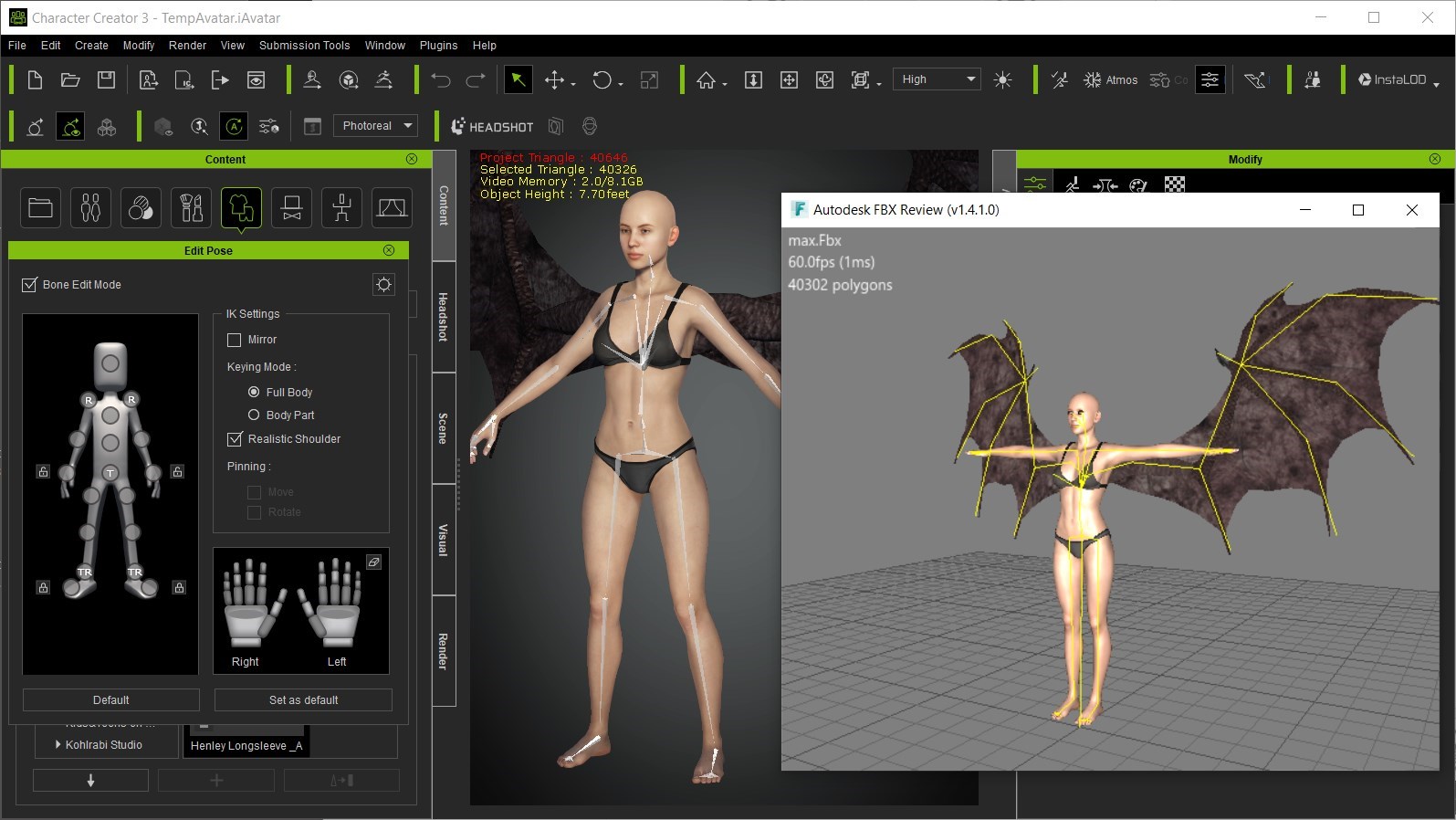
When you export an accessory with a character, it basically extends the skeleton to accommodate the accessory. Like when you attach a gun or sword to a hand. Same is true for any accessory. So you can attach the wings accessory, for instance, and that will extend the character's skeleton in the exported model.
What you cannot see in CC3 is the prop's skeleton, even though it is there. So you cannot pose the prop in CC3 (only iClone), but you can export it as part of the character. See the picture showing only the character bones in CC3, but the entire skeleton in FBX Review.
|
|
By Jfrog - 6 Years Ago
|
@TonyDPrime
Great extensive list! +1
I would love to see more options to create horror characters meaning more blood and dirty layers textures etc... It would be great to extend the deform headmorph features to be able to create holes and large extrusions in the face and body directly within CC3. :)
@Rampa
Thanks for the info and tip Rampa.
|
|
By Ascensi - 6 Years Ago
|
That's a great tip Rampa! I didn't know you can attach other "rigged/skinned"props as accessories in CC3 does this apply to only animated Props created by Reallusion?
It would be ideal to see a timeline for looped animations & procedural animated texture generation for Character creation.. the testing poses are ok but maybe some want to use CC3 for portfolios and get a particular frame from an action motion clip to create posters and comic and portfolio work. etc -this has been added to the FT.
|
|
By Rampa - 6 Years Ago
|
|
Ascensi (8/17/2020)
That's a great tip Rampa! I didn't know you can attach other "rigged/skinned"props as accessories in CC3 does this apply to only animated Props created by Reallusion?
It would be ideal to see a timeline for looped animations & procedural animated texture generation for Character creation.. the testing poses are ok but maybe some want to use CC3 for portfolios and get a particular frame from an action motion clip to create posters and comic and portfolio work. etc -this has been added to the FT.
It works for any props. It is really the same as exporting your accessorized characters from 3DXP, just without the bones showing in the tool. So save your motions as MotionPlus to include accessory animation.
|
|
By MilesV - 6 Years Ago
|
Where can I find information on this?
Ascensi (8/16/2020)
Reallusion has announced Creature Creator in development.
|
|
By Miranda (RL) - 6 Years Ago
|
I am curious about it too. Where can I find the announcement?
miles.vonschriltz (8/20/2020)
Where can I find information on this? Ascensi (8/16/2020)
Reallusion has announced Creature Creator in development.
|
|
By Ascensi - 6 Years Ago
|
That's funny Miranda, if you don't know then it probably was a slip up as to not go big on details or perhaps just something they were thinking about but never commissioned it. As far as I heard it was to be "started" I remember this was mentioned in a webinar, not an official post here on the forums, website or on Facebook. Reallusion doesn't usually make such official announcements to commit to something like that unless they've already been working/testing it for a while and know it to be plausible. I know from the past, they've announced* that iClone was going to have a Boris FX Mocha plugin but had to cancel that stating there was technical issues. Long before that Goz was announced for iClone 6 and was one of the main reasons why I bought it but that didn't work either.. so I understand why Reallusion is being extra cautious about what they say and do. So perhaps my word "announced" made it sound like it was extra special/more official and I apologize for that but I know it was being discussed.
So whether they thought about doing it and committed to doing it are two different things, maybe they scrapped it all together now I don't know. It was only a few months back when mentioned, and I will stand by it and state that I did NOT make this up.
So I've asked you questions before both in inbox and on the forum but you haven't answered me but you want me to answer you. I've asked this a (few times) looking for some feedback and maybe recognizing the issue to make a fix for it later https://forum.reallusion.com/FindPost445752.aspx I've made this a topic on the feedback tracker.. https://www.reallusion.com/FeedBackTracker/Issue/Request-to-join-Character-Creator-beta-for-Character-Development-for-the-Marketplace What I've observed the issue to be is too harsh of a UV seam area like an L/corner shape rather than being like smooth contour. I've ask if I could test out the beta of CC3 Base plus before finalizing or at least to have it resolved in sort of future update. So while I've put my unpaid time and effort in help testing and revealing issues/bugs, how to make the product better and reach more creative possibilities and products, I'd hope in Return that there is some *kind* of response, like " Hi Ascensi I've investigated this but there is nothing actually planned for a Creature creator" or "we've looked into the UV issue but at this point we'll consider optimizing the UV or the current UV structure will remain as is until further notice". Does this sound fair? Thanks.
@miles.vonschriltz
|
|
By TonyDPrime - 6 Years Ago
|
Hey Miranda - how about this crazy idea!
How about an optional Premium CC3 Rig Maker (for purchase) where you can ADD bones to a special CC3 Plus character for extra limbs, wings, tails, legs, eyes....
and MOST IMPORTANTLY -
The Tongue!!!!
A CC3 Rig Maker Package, with add on packs for each of those things.
Because a bone for a tongue, and a tail, and all that could be part of a larger bone rigging paradigm.
But RL could make and sell the presets for the Centaur, and the Wings, and the tongue, and the whatever...
A Centaur with a tail and wings...PLEASE, We NEED this.
And the morphs would be done separately from the added bones so it's not too complicated...at FIRST...but then later you can add it in....
$$$$$$$$
And also a Robot-Creator Pack!
Let us build Humanoid robots from parts, and make them transform into other robots or shapes.
And then, let us design Mechs and we can put other avatars inside the Mechs!
And rig weapons onto the robots!
All for Purchase, not free. Because I want fast presets, I don't want to do the Robot-Centaur's tongue by hand, it wil take too long.
And, make them compatible, so we can create a Centaur with a Robotic leg, and a movable animatable Rocket launcher rigged to its shoulder
With these 2 you will take UE4 by STORM.
Centaur Robots galloping, meching, and flying around in UE4, while talking and twirling their tongue????!!!! In UE4, Raytraced with the Chaos Engine!!!???.....
FOR THE LOVE OF CTA4 AND THE MILLIONS OF CTA4 TUTORIAL VIDEOS WE NEED THIS
$$$$$$$$$!!!!!!
|
|
By StyleMarshal - 6 Years Ago
|
|
TonyDPrime (8/22/2020)
Hey Miranda - how about this crazy idea!
How about an optional Premium CC3 Rig Maker (for purchase) where you can ADD bones to a special CC3 Plus character for extra limbs, wings, tails, legs, eyes....
and MOST IMPORTANTLY -
The Tongue!!!!
A CC3 Rig Maker Package, with add on packs for each of those things.
Because a bone for a tongue, and a tail, and all that could be part of a larger bone rigging paradigm.
But RL could make and sell the presets for the Centaur, and the Wings, and the tongue, and the whatever...
A Centaur with a tail and wings...PLEASE, We NEED this.
And the morphs would be done separately from the added bones so it's not too complicated...at FIRST...but then later you can add it in....
$$$$$$$$
And also a Robot-Creator Pack!
Let us build Humanoid robots from parts, and make them transform into other robots or shapes.
And then, let us design Mechs and we can put other avatars inside the Mechs!
And rig weapons onto the robots!
All for Purchase, not free. Because I want fast presets, I don't want to do the Robot-Centaur's tongue by hand, it wil take too long.
And, make them compatible, so we can create a Centaur with a Robotic leg, and a movable animatable Rocket launcher rigged to its shoulder
With these 2 you will take UE4 by STORM.
Centaur Robots galloping, meching, and flying around in UE4, while talking and twirling their tongue????!!!! In UE4, Raytraced with the Chaos Engine!!!???.....
FOR THE LOVE OF CTA4 AND THE MILLIONS OF CTA4 TUTORIAL VIDEOS WE NEED THIS
$$$$$$$$$!!!!!!
+1
And I want Creatures from Mars , Venus , Neptune , Jupiter , Saturn ...and some from the Andromeda Galaxy :-)
|
|
By nealtucker - 6 Years Ago
|
|
Great idea +1
|
|
By TonyDPrime - 6 Years Ago
|
This was another CC3 idea that came up in another thread, but is relevant to this discussion as well:
https://forum.reallusion.com/455071/More-realistic-shapes-Even-the-Human-anatomy-Set-is-not-realistic-at-all#bm455470
|
|
By Ascensi - 6 Years Ago
|
To add parts could be a simple process, add a part which would essentially be a full area morph and create volume around the bone.. if you remove it a script would undo only that part of the history. I've introduced ideas to make a simple transition to a creature creator such as skeleton presets for types, or a mega bone rig that consists of multiple limbs that are hidden until you a volume/morph. They already have the infrastructure/program base, they would mainly need to introduce a new character type and method of adding and subtracting volumes.. and finalizing/baking the rig/skin removing all bones attached to mass/mesh normals that is not visible(doesn't have any mesh volume/morph applied. I've wrote this in detail how they might easily easily transition rather than creating a program from scratch.
When I heard mention of the creature creator being started, I got really excited and I also rushed to mention for the devs to think ahead, make it future proof, make it compatible with other plugins for things like mocap - allow creators to mask out bones that wont be mocaped kind of like how 3DXchange allows retargeting so they can selectively mocap other areas. To get the topology right as well they would need to make sure the UV seams are contoured.. no hard angles... this would allow for quality displacement and just like the premium skin generator, they could have modular displacement parts that can be sized and positioned and fade at joints. https://www.reallusion.com/FeedBackTracker/Issue/Modular-Character-Builder-draggable-parts-part-builder
|
|
By Miranda (RL) - 6 Years Ago
|
Hi Ascensi, I will pay more attention in the future. Sorry about that.
Thanks Tony and others for the suggestions.
The idea of Rig Maker and Robot Creator Pack is interesting. Can't promise anything now, I am hoping we will have similar solutions in the future. :)
|
|
By TonyDPrime - 6 Years Ago
|
|
Miranda (RL) (9/1/2020)
Hi Ascensi, I will pay more attention in the future. Sorry about that.
Thanks Tony and others for the suggestions.
The idea of Rig Maker and Robot Creator Pack is interesting. Can't promise anything now, I am hoping we will have similar solutions in the future. :)
Thanks! - Because if we had a rig maker and a robot creator we could create....
A TWO-HEADED Centaur....with robot wings, 2-hind robot legs with jets for accelerated flight, and a rocket launcher....and a saddle with another avatar riding on it.
And the Two-Headed, or Three-Headed, Centaur could have dialogue with itself in iClone!...
But why stop there - you could have an eight legged spider with a robot tower with avatar heads attached to it, talking, and spinning around!
PS - iClone Recreational Motion Pack - Segway, skateboard, roller-blades, surf board, snow board, water ski, bicycle, handgliding, skydiving, zip-lining, scuba diving...and...Bungie Jumping!!....
Imagine - a FOUR-Headed Centaur...with wings....and a Robotic Scorpion Tail.....
With Rollderblades on.....But on a giant SurfBoard, rollerblading on the surfboard!!!....
PLEASE WE NEED THIS!!!!!! (in the future, of course :) )
|
|
By esemgee - 6 Years Ago
|
Love the future dreams, guys, but right now I can't find half my purchased contents so download new items the old way and save the log file. Smart Gallery is not that smart! I also have to physically reload almost everything, especially iClone characters and the new sliders, every time I power up. I can fix splitting jeans etc in easily CC3 but it is static - when it re-happens in iClone, you know, the programme that has movement, do I go back to CC, where there is now no visible fault? Or just make them bigger and not draw attention to them? The mesh mending of CC3 should also, logically, be in iClone.
Before I start making six-winged anything I would like to be able to have a character walk normally without his knees or thighs coming through his jeans. Or her long wavy hair flop into bedraggled rope once you hit play. By this stage in the game that surely must be possible for out-the-box characters and their clothes, so there is not so much frustrating, time wasting faffing around between the two progs.
|
|
By animagic - 6 Years Ago
|
|
garry.smout (9/10/2020)
Love the future dreams, guys, but right now I can't find half my purchased contents so download new items the old way and save the log file. Smart Gallery is not that smart! I also have to physically reload almost everything, especially iClone characters and the new sliders, every time I power up. I can fix splitting jeans etc in easily CC3 but it is static - when it re-happens in iClone, you know, the programme that has movement, do I go back to CC, where there is now no visible fault? Or just make them bigger and not draw attention to them? The mesh mending of CC3 should also, logically, be in iClone.
Before I start making six-winged anything I would like to be able to have a character walk normally without his knees or thighs coming through his jeans. Or her long wavy hair flop into bedraggled rope once you hit play. By this stage in the game that surely must be possible for out-the-box characters and their clothes, so there is not so much frustrating, time wasting faffing around between the two progs.
I have to agree regarding the clothing problems. Start of rant: :crazy:
I'm struggling with regular clothing as well, and it feels as if it is getting more problematic with the latest updates. It is not clear to me what the new weight mapping requirements of CC+ characters do to existing clothing. There is a conversion option, but it seems crude, as shirts, for example, that would simply work before now give problems. Checking the pose in CC is not enough, because then in iClone it is still not right and you have to go back into CC or hide underlying skin or clothing with Opacity mapping. It would be more effective to have that adjustment function available in iClone.
I also find Soft Cloth Physics finicky, Settings may work in one scene and then exactly the same settings in another scene make a dress for example fall to the floor.
I love iClone/CC, but some existing functions really need some work.
|
|
By esemgee - 6 Years Ago
|
I love/hate Clone. I don't use it enough to have become proficient and having to tinker with weight maps is possibly the reason. Having said that I deliberately used the melting effect - and hair falling out in shards as a transition shot - so it does have some uses! My gripe/hate are the upgrades when the basics are still unstable. 'Headshot' could, in this meme crazy world, be a game-changer in regards to new users, but adding physic-friendly hair etc (and for a long while tattoos) was, and is, a nightmare. Similar with 'SkinGen' - the excellent liquid adds so much realism but now the avatar can't fit into their clothes! :-).
My other worry is my £2000 computer already struggles. I set a scene in high then animate in minimum, as well as have enough fans to fly a drone blowing over the overheating machine, to get round the problem but are RL looking into this aspect? So, its love/hate for me, just wish it were love.
|
|
By charly Rama - 6 Years Ago
|
|
I really do understand you guys. But I'm may be lucky but I don't meet problems with Iclone comparing to UE. For me, everything is simple and works fine at Iclone, which is not the case with UE. So I love Iclone, I hate/love UE :)
|
|
By Ascensi - 6 Years Ago
|
|
If you're making big projects make sure your virtual memory is around 32 GB for each drive you store/load projects from and the drive Reallusion programs are installed.
|
|
By esemgee - 6 Years Ago
|
I note you did say 'big' projects. I have 16GB RAM on an Alienware laptop and as I don't do 'big' projects, this just about sees me through. Adding another 16 would be nice but being Alienware, it is pricey, and not that easy to find the right one.
However, the system requirements for iClone 7 still posted out there are, unbelievably:
Minimum Requirements: Dual core CPU., 4GB RAM, 5GB free hard disk space, Graphics Card: NVidia GeForce GTX 600 Series / AMD Radeon HD 7000 Series. Video Memory: 2GB RAM. Display Resolution: 1024 x 768. Color Depth: True Color (32-bit)
I doubt this set up would now work at all! In fact 4GB wouldn't drive anything in 2020! The fact RL are not giving the true specs is bordering on false advertising, in fact possibly illegal as it just would not function as a buyer would expect from the website's content (requirements are not listed on the site and the only reference is from the manual). I forget all my legal training now - invitation to treat? Bad RL, smacked wrists all round!
|
|
By animagic - 6 Years Ago
|
We have been fulminating about the so-called Minimum Requirements for years and they are still there :crazy:
My suspicion is that RL Sales wants to keep them there to lure in unsuspected newcomers. After that it is up to us to explain that it won't work, which is getting kind of tiresome...:doze:
|
|
By esemgee - 6 Years Ago
|
|
Exactly! I find it very worrying - RL must believe that the real requirements would put off potential buyers. They have a choice - one I have suggested elsewhere, that they, from iClone 8 on, split it into pro and intro. Intro would basically be iClone 7 minus some of the heavier software. Pro would be just that - buyers would know they will need serious hardware just to fire it up. I mean, 32 GB RAM is not normal, even for video production, but it seems that it is now entry level for iClone.
|
|
By Ascensi - 6 Years Ago
|
|
Problem is people try to load a lot with minimal requirements and then they run into problems such as crashes.. I let them know to increase virtual memory and it solves individual users whom ask for help.. others think may that its just them.. I've requested that reallusion provides something in the manual that states "if you are a power user adjust your virtual memory setting with double X ram etc or have something that automatically detects frame rate and maybe presents you with an alter and a native button that adjust virtual memory accordingly. Most of the crashes of power users I see on the FT and forums is from this issue. The more Skingen layers you add, the bigger performance hit etc.
|
|
By animagic - 6 Years Ago
|
@garry: 3D applications are just more demanding than video production, especially with textures become larger and larger.
To be fair, just for fun I looked up the Blender minimum requirements, here: https://www.blender.org/download/requirements/. You'll be shocked...:sick:
|
|
By esemgee - 6 Years Ago
|
@animagic It is because the demands are becoming larger and larger that it is imperative RL posts iClone system requirements. At least Blender (thanks for link) have the decency to not only show three configurations, but give a decent list of ideal graphic cards and a little note saying that these requirements are for basic operation - so yes, my set up will run it at recommended but I guess 'cycles rendering' is going to tax it. Full marks to Blender, I know where I stand! One presumes iClone's needs are pretty similar, but as Ascensi says, you start going mental with SkinGen, adding moles, scars etc, you need Optimum - fortunately SkinGen does warn me that my system is not up to the 15 things I want to do!
What is worse is it seems people like yourself, @Ascensi, and others have been badgering RL about this issue for quite some time which makes RL's lack of action disgraceful and rather insulting to loyal customers, like yourselves.
|
|
By esemgee - 6 Years Ago
|
|
A passing thought on the requirements issue. If Blender were not free and I was a potential buyer weighing up the pros and cons of it and iClone I would buy iClone based on the available information regarding hardware needs. It is, therefore, false advertising.
|
|
By sibi_naayagam - 6 Years Ago
|
Hi,
I was wondering if it's possible to zero out/freeze the rotation values of the CC Skeleton during export? So for example if I had a T-Pose during export then at any time if we need to characterize it in Motionbuilder/Maya, even if it has animation baked, I can zero out the rotation for the bones and it will give me a T-pose.
This would be awesome if it can be added in the future.
Thanks!
|
|
By EricGR - 6 Years Ago
|
Any word on the Facial Hair release?
Thanks!
|
|
By Miranda (RL) - 6 Years Ago
|
Hi EricGR,
The launch date my be postponed to 2021, need to wait for further update from team.
EricGR (11/5/2020)
Any word on the Facial Hair release?
Thanks!
|
|
By EricGR - 6 Years Ago
|
Dang.
Sorry to hear that. Hopefully early 2021.
Thanks
Eric
|
|
By R Ham - 6 Years Ago
|
|
Facial Hair and talking animals are the two biggest things DAZ has that RL does not. I'll wait.
|
|
By mrjessecunningham - 6 Years Ago
|
This all looks and sound amazing. I 've only had cc3 for one week. Will the upgrade be free for new users?
|
|
By Ascensi - 6 Years Ago
|
I'm asking this here because because you're feedback tracker team hasn't responded to my plea for an ETA for the CC3 Base + bug fix when trying to convert from the previous generation.
https://www.reallusion.com/FeedBackTracker/Issue/CC3-to-CC3-Base-Plus-fails-to-convert-major-distortions-on-fingers-finger-nails-toe-nails-are-fine-Morphs-aren-t-fully-respected
I have products to add to the marketplace but I can't until this is fixed. I'm sharing this here because it's critical that this is completed during this time and not prolonged for a future CC4 Release.
So I'm hoping there might be a hotfix I could receive or info on the scheduled date this will be released. Thank you.
|
|
By EricGR - 6 Years Ago
|
Can we at least get another sneak peak of Facial Hair before the end of the year?
Thanks
Eric
|
|
By Miranda (RL) - 6 Years Ago
|
|
Yes, it's possible!
|
|
By ryobg - 6 Years Ago
|
|
When we gonna see Roadmap 2021? ^^
|
|
By FrankGarrett316 - 6 Years Ago
|
Are we still getting the update to Headshot where it will allow us to input a side view of a face, to get more of an accurate result from a profile view? I vaguely remember seeing something on that, but I can't remember where, and I don't remember what the timeframe was for that. Obviously most major updates in 2020 got pushed back, I assume.
|
|
By Miranda (RL) - 6 Years Ago
|
Hello Dante,
No, as far as I know, there is no plan to support inputting a side view of photo.
dante1st (12/6/2020)
Are we still getting the update to Headshot where it will allow us to input a side view of a face, to get more of an accurate result from a profile view? I vaguely remember seeing something on that, but I can't remember where, and I don't remember what the timeframe was for that. Obviously most major updates in 2020 got pushed back, I assume.
|
|
By Miranda (RL) - 6 Years Ago
|
Hi ryobg,
Shall be in February, 2021. :)
ryobg (12/6/2020)
When we gonna see Roadmap 2021? ^^
|
|
By EricGR - 6 Years Ago
|
|
Update on Facial Hair? Come on guys nothing?
|
|
By new-own - 6 Years Ago
|
|
EricGR (12/14/2020)
Update on Facial Hair? Come on guys nothing?
Exactly, I am waiting for the facial hair update/support planned for CC3.4! it was meant to be released long ago and still nothing...
|
|
By similarly - 6 Years Ago
|
|
EricGR (12/14/2020)
Update on Facial Hair? Come on guys nothing?
I just came here to ask this. This is one of the BIG things I'm waiting for!
|
|
By Peter (RL) - 6 Years Ago
|
similarly (12/18/2020)
EricGR (12/14/2020)
Update on Facial Hair? Come on guys nothing?I just came here to ask this. This is one of the BIG things I'm waiting for!
The facial hair update has been postponed until 2021 as further work is required. Although not confirmed it is hoped to be a Q1 2021 release.
|
|
By capt.force - 6 Years Ago
|
|
Are we going to get an update on the digital human shader? or the appearance editor? Or whatever "thing" is going to let us change our character's skin tone? Been trying this "workaround" today and it takes an hour (per model test) to transmit it to a cc1 base and it still doesn't still seem to work. Can't get far with making just white European-looking people in my projects. :-)
|
|
By MilesV - 6 Years Ago
|
|
capt.force (12/28/2020)
Are we going to get an update on the digital human shader? or the appearance editor? Or whatever "thing" is going to let us change our character's skin tone? Been trying this "workaround" today and it takes an hour (per model test) to transmit it to a cc1 base and it still doesn't still seem to work. Can't get far with making just white European-looking people in my projects. :-)
Hi capt.force, one way you can accomplish this is to go under the modify materials section in CC3. Select a body part > scroll down to Texture Settings > right click on the image showing up as base color > and select adjust color. From there you can adjust softness, color levels, and color balance. It can take some playing around with the sliders to get what you want, but you can get just about any skin tone with those settings. You'll just need to copy the settings to each body part. I hope that helps and saves you some time.
Update: I just realized you can select multiple body parts and adjust the color at the same time instead of copying to each individual body part.
|
|
By animagic - 6 Years Ago
|
|
capt.force (12/28/2020)
Are we going to get an update on the digital human shader? or the appearance editor? Or whatever "thing" is going to let us change our character's skin tone? Been trying this "workaround" today and it takes an hour (per model test) to transmit it to a cc1 base and it still doesn't still seem to work. Can't get far with making just white European-looking people in my projects. :-)
You should not ask the same question all over the place. There is a thread with an answer.
|
|
By magnoliaPower - 6 Years Ago
|
I really hope 2021 will be time to get a real hair generator, as you can see for example in Blender. All the hairs sold are just unrealistic: far from the real world, or too much "fashion" (or try to be) to be usefull.
Also, it would be so great to have only one simple licence for the content: let people export the content they buy and stop the two price: it is mandatory in 2021 to get streamlined export to other software without the need to cash out every time.
|
|
By wires - 6 Years Ago
|
|
magnoliaPower (12/29/2020)
I really hope 2021 will be time to get a real hair generator, as you can see for example in Blender. All the hairs sold are just unrealistic: far from the real world, or too much "fashion" (or try to be) to be usefull.
Also, it would be so great to have only one simple licence for the content: let people export the content they buy and stop the two price: it is mandatory in 2021 to get streamlined export to other software without the need to cash out every time.
I for one would be very unhappy and angry if I was forced to pay an export price for content. :crazy::angry: I don't export anything to other software, and those making money from game production shouldn't complain about the extra costs. :Whistling:
My 2 cents worth. :)
|
|
By magnoliaPower - 6 Years Ago
|
|
Also, another add to my wishlist: let all the content (skin, hair, ...) fully compatible with Iray and avoid all the needed tweaks to do nowaday
|
|
By animagic - 6 Years Ago
|
|
magnoliaPower (12/29/2020)
Also, another add to my wishlist: let all the content (skin, hair, ...) fully compatible with Iray and avoid all the needed tweaks to do nowaday
That may not be feasible as Iray has a completely different shader system.
|
|
By merph - 5 Years Ago
|
There is this Unreal Digital Human shader parity between ue4 and cc3.
As a Unity user, I'd love to see an equivalent of it on Unity HDRP side.
|
|
By t1ber1us1 - 5 Years Ago
|
|
With January almost over, is there a Roadmap 2021 coming soon? :D
|
|
By Ascensi - 5 Years Ago
|
Character Creator 4 Roadmap Request
*Vertex based Weight painting for Softbody Character/object Physics -the ability to make skin mass/folds bouncy or have animated objects on the inside of a character stretch the skin and even break it. In iClone there should be an object that emits forces that you can animate around a character to push/pull clothing, skin other objects etc etc. An animated object placed inside could be lungs with variations of emotional states, a creature, mechanical in nature etc.
*Skin Gen Premium needs an upgrade to allow displacement masks -with the normal maps you have created you should additionally be able to generate the corresponding displacement textures.
*Not as essential but just a solution for tears:
Special physics based particle system for tears that works with a built in renderer like Iray or exportable to Alembic. The face area could generate a mesh for tears for the purpose of tears falling down. The could be a screen based effect as well and perhaps with your new compositing features in iClone could export the tears. Perhaps iClone could use video layers to stack some composites.
|
|
By TonyDPrime - 5 Years Ago
|
-Selected Polygon Morph-
I would love to see the ability in CC3 to morph between one character to another by only selected polygon area.
This would allow a direct transfer of a character's nose, ears, lips or other select features, without having to morph the entire character's head, for example.
Of course you can try to rebuild one single feature onto another by mimicking the look with say the Headshot morphing tools, but this takes long.
This could be an interesting and fast creator tool.
|
|
By MilesV - 5 Years Ago
|
Any chance we're getting a CC3 update and a 2021 roadmap this month? Excuse my lack of patience. lol I'm excited to see what Reallusion does with CC3 this year. Thanks for all the hard work!
|
|
By Mr-kanister89 - 5 Years Ago
|
|
Live Link, dynamic wrinkle system - so much exclusive CC3 content for Unreal Engine and Unity gets just updates for the import plugin. Now Epic comes with meta-humans around the corner offering all of these features and more for their engine, for free. Could this be the beginning of Unity getting a little more attention?
|
|
By @RettRona - 5 Years Ago
|
|
Epic basically payed for that live link integration to be free for indies with a megagrant. Maybe you could contact Unity and ask them to fund Reallusions development for Unit with they’re own grant.
|
|
By Mr-kanister89 - 5 Years Ago
|
|
I did not know that. Thanks for the information. :)
|
|
By HooDooPhonix - 5 Years Ago
|
|
ALSO ICLONE 7.9 PLEASE!!!!
|
|
By Miranda (RL) - 5 Years Ago
|
Hi everyone,
CC 3.4 and iClone 7.9 just released today!
For the product roadmap of the following months, we will initiate a new thread, and share it to you in April.
Reallusion Team
|
|
By Ascensi - 5 Years Ago
|
Hi Miranda, will the Skin Gen Premium receive an update for Displacement masks? This was expected to exist as part of the plugin/material slot
and was very upsetting that it wasn't there. Now Unreal comes out with what appears to be just that! This would help make real deep tissue scaring, large pores, pimples, wrinkles, circuitry, cracks, scales etc which can be rendered properly in both iRay, iClone and 3rd party renderers etc.
Personally my aim is to make content look real as possible for film, game/VR, posters and the market place. In VR especially you can't get away with just using normal maps to trick the viewer into raised surfaces - this is critical.
I have made the request on the feedback tracker and I hope others vote for this: https://www.reallusion.com/FeedBackTracker/Issue/Missing-Corresponding-Displacement-maps-of-scars-tendons-wrinkles-pores-burns-etc-Unsatisfied-Purchase
|
|
By Peter (RL) - 5 Years Ago
|
Ascensi (3/24/2021)
Hi Miranda, will the Skin Gen Premium receive an update for Displacement masks? This was expected to exist as part of the plugin/material slot and was very upsetting that it wasn't there. Now Unreal comes out with what appears to be just that! This would help make real deep tissue scaring, large pores, pimples, wrinkles, circuitry, cracks, scales etc which can be rendered properly in both iRay, iClone and 3rd party renderers etc. Personally my aim is to make content look real as possible for film, game/VR, posters and the market place. In VR especially you can't get away with just using normal maps to trick the viewer into raised surfaces - this is critical. I have made the request on the feedback tracker and I hope others vote for this: https://www.reallusion.com/FeedBackTracker/Issue/Missing-Corresponding-Displacement-maps-of-scars-tendons-wrinkles-pores-burns-etc-Unsatisfied-Purchase
Hi Ascensi
I already replied to you about this in the thread below. Please see my reply there.
https://forum.reallusion.com/458753/Skin-gen-premium?PageIndex=2
|
|
By Ascensi - 5 Years Ago
|
Hi Peter ! Thanks for letting me know, I didn't receive an email about it. Sooo you may be excited to know that It can certainly be done if you use smooth mesh by subdivision level 1.. I have assets that use displacement using more than one UV and even if there is one UV, the edges will snap tightly together. Some of my displacement models are on the Ascensi store right now your team can verify.
Doing this will add the necessary resolution. Setting tessellation to anymore than level 2 would be problematic but that could of been an incompatibility between Iray and smooth mesh by subdivision since it is not yet compatible in Iray but also RTX cards were not compatible with Iray until this most recent update. So I really hope you test this and see it work because it would be a BIG breakthrough for creatures, robots and humans. If people were careful and maybe a side note should be made in SkinGen Prem that if they don't use smooth mesh by subdivision that they would have to place the displacement mask away from UVs. Here is a full CC3 character with displacement using the exact same method I described and Rampa can verify this, he had worked with my Bear for a material work around converting the CC3 material to CC3 plus. I really wish I was getting paid for these ideas & bug fix/workarounds, think you might be able to help me out, maybe special R & D department? ;)
I'm also going to post this in skinGen thread so people interested can follow the response there.
|
|
By TonyDPrime - 5 Years Ago
|
TonyDPrime (5/17/2020)
sibi_naayagam (5/17/2020)
UE5 is coming out late 2021.
It's probably going to be on the 2021 Roadmap for CC3 or perhaps CC4 at that point.@Sibi - you build us a time machine so we can go forward and access this CC4 software. In the meantime...RL- DO IT NOW! HD-ify everything. No more skimping on everything. You know, I now understand why CC3 looks bad for so many when it goes over to Unreal and Unity. It's because they are compressing the heck out of everything, to a point where meshes look awful, so that it is optimized in-game. It's only because RL has obscured all of the UE4 shortcomings into oblivion that it looks really good. But, it would look like Siren if it was HD....SIREN! Give us SIREN power! "In-game" CC3 optimization applies to 1/2 of the RL population going to Unreal. The other 1/2 would totally use unoptimized CC3 super 8K-mega-high-poly-HD meshes for film making in Unreal, ie Alembic. Let us crash their engine with HD power...PLEASE....
Meta Human prediction by ME! This was before Meta Human.
If you build it, they will come!
And by "they" I mean "$$$$$"
|