|
By Peter (RL) - 11 Years Ago
|
Hi Everyone,
It's that time again where we need your assistance to help us track down any remaining bugs or glitches.
iClone 6.21 has been released today and with it comes a number of outstanding fixes and enhancements.
However if you do still find any bugs, issues, glitches or other general annoyances, please can you post them here.
As always, do feel free to post general feedback in your own threads, but it will help us greatly if we can keep all outstanding issues in one place. This will help the development team track and finally eradicate any nagging problems.
Please do try to provide your full system specifications and a detailed description of the problem when posting. If the issue was one previously posted in one of the older issues threads, you can just provide a link back to the issue rather than write it all out again.
Note: For Character Creator issues or bugs, please use the thread HERE.
Many Thanks. 
|
|
By mtakerkart - 11 Years Ago
|
|
Particles added in a scene doesn't display on scene manager...
|
|
By Cricky - 11 Years Ago
|
|
Confirmed.. No Particles shown in the Scene Manager. It can be seen on the Time Line, but that gets tedious doing "F3" over and over again to show and hide the Time Line.
|
|
By Rampa - 11 Years Ago
|
|
The right-click/align on a motion clip is still not working for CC avatars.Someone else should test this, to see if it's unique to my system. It does work for other avatars, even Mason and Heidi.
|
|
By 3doutlaw - 11 Years Ago
|
The preset for Daz Genesis fails in the finger rotations when importing through FBX to 3dXChange older Gen4 and Gen3 characters, see posts:
https://forum.reallusion.com/FindPost256102.aspx
https://forum.reallusion.com/FindPost256256.aspx
To fix it, I copied the Genesis auto-convert profile to the custom area, and load that instead of using the preset, and it works fine then with the finger rotations, see post:
https://forum.reallusion.com/FindPost257306.aspx
Seems the auto-convert for Daz Genensis and the preset for Daz Genesis should act the same, but they don't seem to?
(this may be 3dXChange related, not iClone, sorry)
|
|
By Agonos - 11 Years Ago
|
I think it is not worthwhile to again clarify my problem with "Glare". I despair of one day seeing this issue resolved :(
|
|
By animagic - 11 Years Ago
|
|
Agonos (10/15/2015)
I think it is not worthwhile to again clarify my problem with "Glare". I despair of one day seeing this issue resolved :(
Having the same problem, I'm with you there. I think Peter mentioned that it would be resolved in 6.3...:Whistling:
|
|
By Bellatrix - 11 Years Ago
|
Found 2 bugs...
1st one: VISEME KEY RANDOM JUMP WHEN CLICKED TO LAUNCH LIPS EDITOR
Happened with CC or non-standard chars
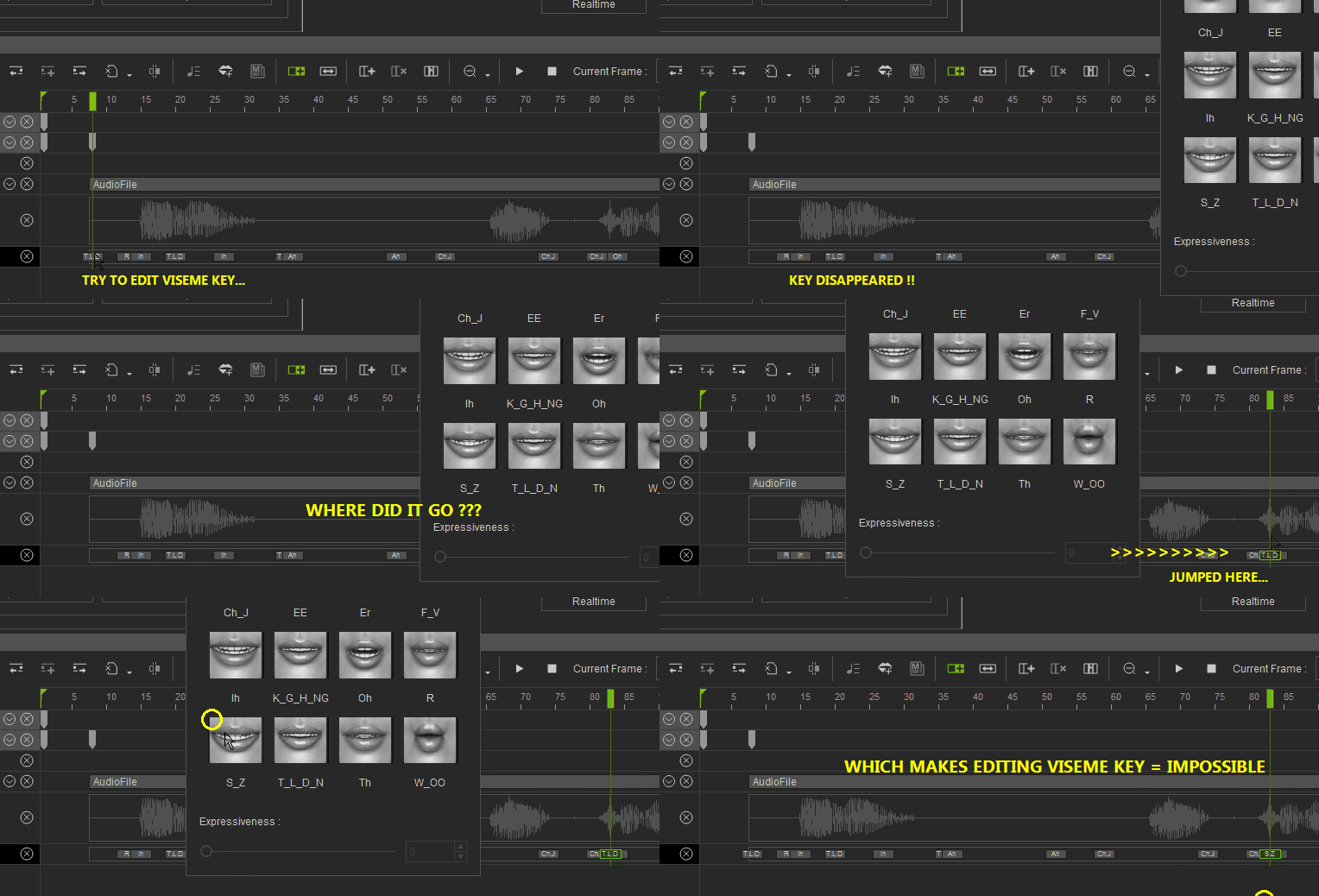
This behavior is both RANDOM, and 90% chance of happening.
Sometimes tt jumps somewhere mysterious then back to its original position.
Most of the time, click and disappear, buried in the mess of redundant viseme keys
Additionally, Lips Editor also behaves inconsistent: sometimes slider is greyed out, sometimes on
Double-clicking on chosen phoneme sometimes produce expected change, sometimes nothing
In any case, lips editing = impossible.
I have to re-emphasize:
CC or Non-standard with involved mouth rig
Current automation of lipsync result mostly redundant
It's faster to eyeball it, manually place visemes
than fixing the auto-generated mess
Lips Options is a nice touch, appreciated
but it cannot correct what is fundamentally incoherent
While Lipsync iClone6 is being fine-tuned...
Please at least allow users to do manual lips keying work
Please add AUDIO SCRUBBING
At least add a RESIZE PANE VERTICALLY option
So that we can SEE and MATCH keys to waveforms
IClone excels in body motions
Time to excel in facial expressions and talking lips
Thank you for making LIPSYNC more user-friendly.
|
|
By Bellatrix - 11 Years Ago
|
Bug no.2: WILDERNESS SKY - IBL DIFFUSE TEXTURE ODD BEHAVIOR
I experienced crashes before this update. Odd behavior still happening.
Steps
Add image texture to IBL, external no embed
Add image texture to Wilderness Sky, external no embed
Turn up IBL Softness...
Sky also goes soft and over-exposed, can't bring exposure back to normal
Attempt to change Sky texture, CRASH
However
If IBL image is embedded
No unwanted Softness slider linkage to Sky Diffuse
If change Sky diffuse, no crash
That should narrow things down...
|
|
By Agonos - 11 Years Ago
|
animagic (2015-10-16)
Agonos (10/15/2015)
I think it is not worthwhile to again clarify my problem with "Glare". I despair of one day seeing this issue resolved :(
Having the same problem, I'm with you there. I think Peter mentioned that it would be resolved in 6.3... :Whistling:
So must already wait versions 6.22 , 6.23 , 6.23.01 , 6.03.03 etc.. lol.
|
|
By Agonos - 11 Years Ago
|
It would be nice if the "preview" camera has its "near clipping plane" to "1".
I find that the shortcut "CTRL + 6" is useless. Besides reopen any tabs if the manipulation was performed by mistake.
How do I bring up the command tool "Skytool"? Furthermore, I believe that this tool alters the functioning of "undo" |
|
By animagic - 11 Years Ago
|
I don't remember if this is an existing problem, but I now notice that shadows for a directional light appear and disappear when changing the camera view (i.e., when moving the camera for pan). It's only certain shadows that are affected with the light at certain angles. I don't see any specific configuration that will reproduce this. I noticed it with the sky tool but that is just a directional light.
Before posting I actually tried using a regular directional light with similar angles and that worked OK.
|
|
By videodv - 11 Years Ago
|
I updated exchange with 6.21 without a problem
I next start to update cc but the installation stops as I have not updated iclone yet so I stop that and go and update iclone the update works ok so back to cc and the update works ok.
I try to run exchange no problem
I try to run cc it stops after showing the splash screen with windows showing an error.
I try running iclone itself and it will not even start nothing?
So whats going on here do I have to reinstall IClone and CC just because the update failed? is there no error checking going on here to makes sure CC checks IClone before it starts to update files? Is there something I can do to fix this with ease?
Regards
Videodv.
|
|
By Peter (RL) - 11 Years Ago
|
|
mtakerkart (10/15/2015)
Particles added in a scene doesn't display on scene manager...
Thank you for reporting this issue. We are aware and will try to fix this as soon as possible. Apologies for the inconvenience caused.
For now please use the Timeline to select the Particle for editing.
|
|
By Agonos - 11 Years Ago
|
|
Hi. It is normal that when we place a "particle" in a scene, it does not appear in the "scene" tab between "content" and "visual"?
|
|
By videodv - 11 Years Ago
|
I uninstalled IClone 6, 3DExchange6 and CC and tried to reinstall after 4 hours I gave up.
Not sure what is going on or why I cannot get this program to work when it was working ok before, so for the time being I will forget about IClone 6 on my laptop until some time in the future when maybe if I get a new laptop I will try to reinstall.
Regards
Videodv.
|
|
By animagic - 11 Years Ago
|
|
Agonos (10/17/2015)
Hi. It is normal that when we place a "particle" in a scene, it does not appear in the "scene" tab between "content" and "visual"?
Agonos, this is the issue Peter is talking about in the post just above yours. RL is aware of it.
|
|
By Peter (RL) - 11 Years Ago
|
|
videodv (10/17/2015)
I uninstalled IClone 6, 3DExchange6 and CC and tried to reinstall after 4 hours I gave up.
Not sure what is going on or why I cannot get this program to work when it was working ok before, so for the time being I will forget about IClone 6 on my laptop until some time in the future when maybe if I get a new laptop I will try to reinstall.
Regards
Videodv.
Hi Videodv,
Unfortunately you are not providing enough information to be able to help you.
Please contact us at Support using the link below and please provide your dxdiag.txt and a screenshot of any error messages. If you are not receiving an error message when installing or trying to launch iClone 6, please explain exactly what is happening during the process in as much detail as possible.
http://www.reallusion.com/CustomerSupport/UserEx/QForm.aspx
Thanks.
|
|
By videodv - 11 Years Ago
|
Hi Peter
After a lot of searching and deleting IClone 6 programes and content including in the registry I have managed to get all three programs working again so good to go here, but as I said previously you should make sure when updating CC to check before it doe's anything that IClone 6 is the correct version.
Regards
Videodv.
|
|
By lpatter - 11 Years Ago
|
I installed yesterday and I noticed the same things apparently and at least one more.
1. My engine/or fan seems to run and eat up my battery. This happened once before with a new IC6 update and I noticed it again since yesterday after the upgrade.
2. MY disk seems to be writing constantly. It happens even when I boot up and have not used Iclone. It may be a sign that I have a virus or totally unrelated to the upgrade but it started with the upgrade.
3. No particles in the scene manager
4. No fix for CC character, only Iclone 6 and 3DXchange
THANKS.
|
|
By Kelleytoons - 11 Years Ago
|
|
lpatter (10/20/2015)[hr
2. MY disk seems to be writing constantly. It happens even when I boot up and have not used Iclone. It may be a sign that I have a virus or totally unrelated to the upgrade but it started with the upgrade.
You should definitely check this out with the tools you have (like Task Manager and whatever AV you have installed) because that doesn't sound right. My disk is definitely NOT writing on either my desktop or laptop unless I do a save or something (right now I have iC6 running in the background and my machine is dead quiet, so nothing is happening with either the disc or CPU or even GPU).
|
|
By justaviking - 11 Years Ago
|
|
I'm resurrecting my observation (complaint) about:
"Unnecessary GPU usage when iClone is idle and scene contains a reflective object"
I posted all the details in this thread (sorry about not doing it here first):
https://forum.reallusion.com/258199/Unnecessary-GPU-usage-Scene-with-reflective-object-iClone-idle-GPU-at-70-load
UPDATE:
See recent, earth-shattering discovery in my detailed thread.
It's not only reflections.
Rather, something even more mysterious... Go check it out.
|
|
By animagic - 11 Years Ago
|
Something went wrong with the clothing of CC characters between iClone 6.2 and 6.21. The same character which was OK in 6.2 now shows all kinds of skin peek through that cannot be fixed by selecting Conform. It still is OK in existing scenes, but if I replace the character with the same character I get peek through. I would like to reverse to 6.2, because iClone is unusable like this as I don't feel like spending a lot of time fixing this.

BTW, I have Hide Mesh enabled, but that doesn't seem to hide the mesh in this case. Also, in the 6.21 version, there is an unfortunate collision between jeans and boots.
UPDATE: I found the cause of my problem: for some reason the custom terrain I was using interferes with the clothing of CC characters (Christian and Natalie show similar issues). This is just an iClone terrain in the new format using a height map and a mask. I will now check if this is true for any such terrain.
|
|
By animagic - 11 Years Ago
|
I did some further investigating, and the problems only occur with my specific terrain. I tried the iClone Butte terrain and the characters appear fine.
I'm providing a link to the terrain: http://www.virtualrealist.com/uploads/country_town.zip, so that RL (or anyone else) can use it for testing and figuring out the problem, which did not occur in iClone 6.2.
I will try to make the Pinhead character available as well through my MarketPlace store.
EDIT: I did; go here: http://city.reallusion.com/ContentPreview.aspx?i=JICc3a100862cdbaa924
|
|
By wires - 11 Years Ago
|
@ animagic,
Hi Job,
I've posted some test results here. :)
|
|
By Postfrosch - 11 Years Ago
|
@animagic
Hello AnimagiC,
I downloaded your landscape and Pinhead. Thanks for that.
Then I looked at the problem. In the first experiment the same picture as for you. On your landscape all had CC avatars with jeans holes in his pants. (See image)

When trying a different Highmap landscape there was not the problem. (See image)

For a farther attempt I've played around on Diner landscape somewhat.
I have physics enabled and changed High Scale and High Offset.
When I sat on it the same CC-avatars, they had no more holes in jeans. (see image)

Why this is so I have unfortunately not found out.
Greetings from Germany
postfrosch
|
|
By pinguintje - 11 Years Ago
|
@animagic
Hoi Job,
First thanks for the new Pinhead. A wonderful character:):):)
I also did some "investigations" on a terrain.
The terrrain you see is a prop, converted to terrain.
CC Characters (not only Pinhead) on this terrain are very strange. (A kind of bounding box around them).
Is the prop not converted to terrain,all is normal , no "bounding box" and no holes in the clothes.

Best Regards,
Arie
|
|
By animagic - 11 Years Ago
|
|
Thanks for doing the testing and confirming the "holes in the pants" and also finding some other interesting phenomena. I noticed the physics warning as well. This terrain was originally created in iClone 5, but doesn't use any physics as far as I'm aware. I may try to recreate it in iClone 6 and see what happens.
|
|
By Rampa - 11 Years Ago
|
|
I thought the physics could not be switched to PhysX at first, but someone (i've forgotten who :( ) pointed out that there is a physics check box in the texture tab for HM terrain that does enable PhysX.
|
|
By animagic - 11 Years Ago
|
|
I've found since that I can reproduce the same problem with the Hill terrain. There is a point where when the character's feet touch the ground and the knees are slightly bent, the clothes revert to their hole-less state. Regardless, I think this is a bug...:(
|
|
By Postfrosch - 11 Years Ago
|
I thought the physics could not be switched to PhysX at first, but someone (i've forgotten who  ) pointed out that there is a physics check box in the texture tab for HM terrain that does enable PhysX. ) pointed out that there is a physics check box in the texture tab for HM terrain that does enable PhysX.
Hi Rampa,
thats was I :)
Greets from Germany
Postfrosch
|
|
By Postfrosch - 11 Years Ago
|
Hy Animagic,
I think you are right. It's probably a bug. The high-Map terrains do not seem or not to be compatible with the CC-avatars.
If ICHG the high-scale and high-offset have changed to the high-Terrain Map "Hill" and then insert a CC-avatar with jeans, happens (see picture)
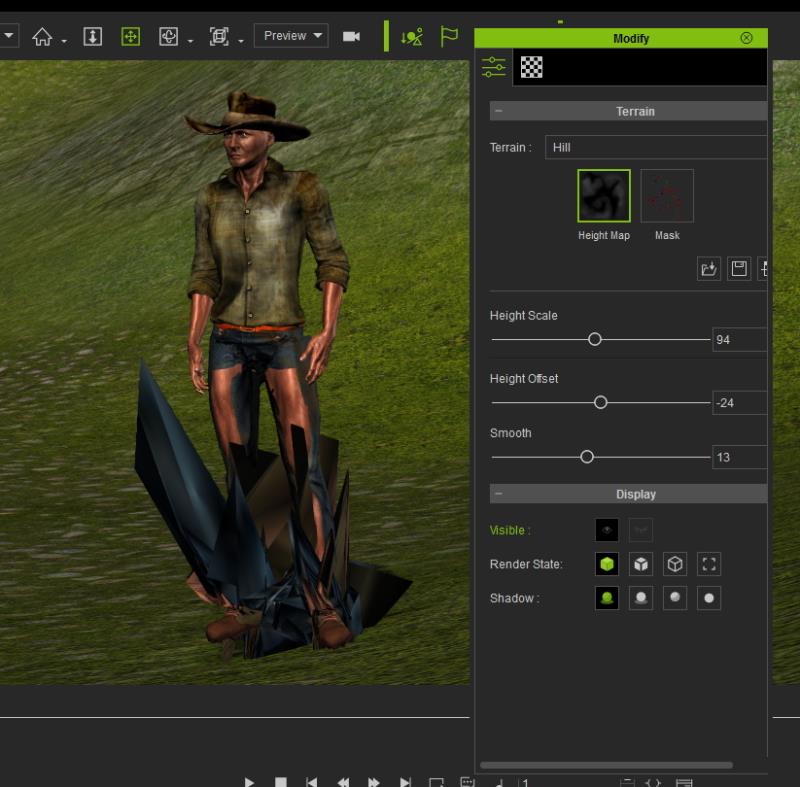
Incidentally, this is not only with oneself create CC Avatar so, but also with CC-Christian. Without the changes in the same Avatar Locher has in jeans.
Greets from Germany
postfrosch
|
|
By urbanlamb - 11 Years Ago
|
This is a bug i posted about it in the previous thread.https://forum.reallusion.com/FindPost256607.aspx
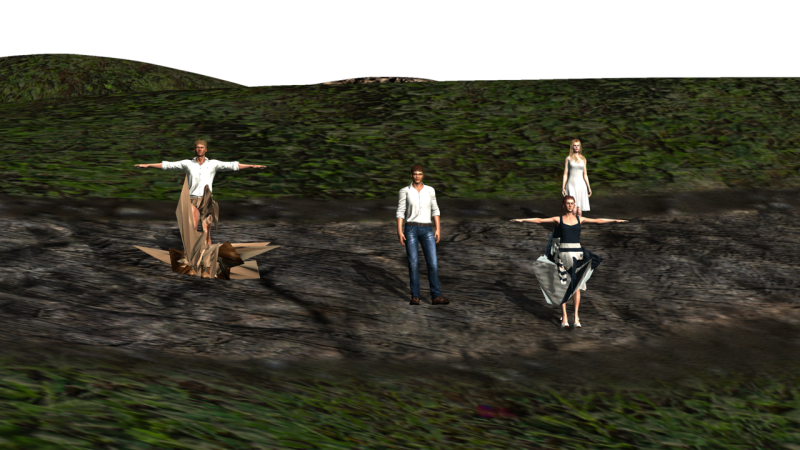
Its only CC avatars and christian and the female one are CC avatars. If you take out the two originals heidi and the male one.. there is no issue (they are not CC avatars). There is no reason why only CC avatars this happens with but it is not with any other avatar. Heightmaps are working properly. The CC avatars are not unless you bake them down. It has to do with the collission and the clothing mesh. If you put them in naked they are fine.
|
|
By mark - 11 Years Ago
|
Forgive me for dupe post and this is still iC6.2 not the newest patch. But I don't think this is addressed in iC6.21 and I guess it's still my old video card...
it does need an upgrade but why soooo much difference from iC5 to iC6 using the same card? I guess it's all the added goodies in iC6??
|
|
By animagic - 11 Years Ago
|
urbanlamb (10/23/2015)
This is a bug i posted about it in the previous thread. https://forum.reallusion.com/FindPost256607.aspx Its only CC avatars and christian and the female one are CC avatars. If you take out the two originals heidi and the male one.. there is no issue (they are not CC avatars). There is no reason why only CC avatars this happens with but it is not with any other avatar. Heightmaps are working properly. The CC avatars are not unless you bake them down. It has to do with the collission and the clothing mesh. If you put them in naked they are fine.
Sorry, I missed that, but it looks indeed like the same issue. It's just that for some reason it only occurred for me after upgrading to 6.21, I think...:unsure:
|
|
By urbanlamb - 11 Years Ago
|
|
animagic (10/23/2015)
Sorry, I missed that, but it looks indeed like the same issue. It's just that for some reason it only occurred for me after upgrading to 6.21, I think...:unsure:
It was not occuring before the 6.2 patch and then appeared at that patch so it was new to me then I had not seen this before and i was working with terrain although at the time it was mesh terrain object type deals set to the terrain layer, but I dont really see why it would be any different.
|
|
By Agonos - 11 Years Ago
|
I have a problem with "Tone Map" option. When activated, the screen goes black during playback of animation and this to the end. But this does not happen when I put "iClone 6" DirectX9 mode.
|
|
By RB3006 - 11 Years Ago
|
oh, nice that someone else also has the problem with Tone Map.
But i have the feeling, it was fixed in 6.21
|
|
By Teviniii - 11 Years Ago
|
Edit: Problem solved.
|
|
By Colonel_Klink - 11 Years Ago
|
Control Key not working to duplicate objects with constraint physics.
Duplicated this error several times this evening. While following the "Duplicating with Rigid Bodies" section of the manual.
Added a vehicle body, a ball and a wheel to create the first part of the vehicle tutorial with the hinge and spring constraints. When I attempted the 2nd part of the tutorial where I was to duplicate the wheel/spring assembly using the Control Key to duplicate, no copies were created. Tried several times and experienced several "AP has stopped working" warnings.
Duplicating normal objects appear to work ok.
|
|
By bexley - 11 Years Ago
|
Thank you for this post! I have personally experience most of these problems.
The lip-syncing experience I had seemed to have nothing to do with the tutorial, and I had to do it all by hand. Which I could live with, except that there is no audio scrubbing! :-(
I would like to second the request for AUDIO scrubbing!
|
|
By JC Weatherby - 11 Years Ago
|
|
bexley (10/27/2015)
Thank you for this post! I have personally experience most of these problems.
The lip-syncing experience I had seemed to have nothing to do with the tutorial, and I had to do it all by hand. Which I could live with, except that there is no audio scrubbing! :-(
I would like to second the request for AUDIO scrubbing!
Yes... AGAIN: TO AUDIO SCRUBBING!!!
The auto lip sync in iC6, IS improved over 5. But fine tuning IS ESSENTIAL - and it's very very very challenging to get it right without AUDIO SCRUBBING.
|
|
By JC Weatherby - 11 Years Ago
|
|
mark (10/23/2015)
Forgive me for dupe post and this is still iC6.2 not the newest patch. But I don't think this is addressed in iC6.21 and I guess it's still my old video card...
it does need an upgrade but why soooo much difference from iC5 to iC6 using the same card? I guess it's all the added goodies in iC6??
This is a hardware problem. Get a bigger GPU, preferrably one with at least 8GB of RAM, like the SAPPHIRE R9 300 SERIES (made for AMD). The more you can afford, the better.
Even so, you can expect to get bogged down in HIGH visual mode (ic6), with all your visual settings turned on. Best to do all your animation in a lower visual mode, then switch to high mode to do final checks before you render.
|
|
By JC Weatherby - 11 Years Ago
|
Bellatrix (10/16/2015)
Found 2 bugs... 1st one: VISEME KEY RANDOM JUMP WHEN CLICKED TO LAUNCH LIPS EDITOR Happened with CC or non-standard chars This behavior is both RANDOM, and 90% chance of happening. Sometimes tt jumps somewhere mysterious then back to its original position. Most of the time, click and disappear, buried in the mess of redundant viseme keys Additionally, Lips Editor also behaves inconsistent: sometimes slider is greyed out, sometimes on Double-clicking on chosen phoneme sometimes produce expected change, sometimes nothing In any case, lips editing = impossible. I have to re-emphasize: CC or Non-standard with involved mouth rig Current automation of lipsync result mostly redundant It's faster to eyeball it, manually place visemes than fixing the auto-generated mess Lips Options is a nice touch, appreciated but it cannot correct what is fundamentally incoherent While Lipsync iClone6 is being fine-tuned... Please at least allow users to do manual lips keying work Please add AUDIO SCRUBBING At least add a RESIZE PANE VERTICALLY option So that we can SEE and MATCH keys to waveforms IClone excels in body motions Time to excel in facial expressions and talking lips Thank you for making LIPSYNC more user-friendly.
YES! I've had to deal with this in doing the latest episodes of Evocronik.
|
|
By JC Weatherby - 11 Years Ago
|
|
Agonos (10/25/2015)
I have a problem with "Tone Map" option. When activated, the screen goes black during playback of animation and this to the end. But this does not happen when I put "iClone 6" DirectX9 mode.
I've experienced this as well.
|
|
By JC Weatherby - 11 Years Ago
|
Peter, I don' know if you saw this in the original thread, but I had an issue recently with DOF and a camera moving on a track:
|
|
By russell_20121204101026908 - 11 Years Ago
|
I know this has been talked about on the 6.1 issues thread, but I've just purchased and installed the Indigo plug-in and have the mysterious "no PlugIn menu" problem. I've tried uninstalling it all, then installing iClone 6.2 - updating to latest, ensuring it isn't running, rebooting, and everything prior to installing the iClone Indigo Render plug-in (v1.2), and finally Indigo RT (for iClone) - it appears to install fine, the DLL is visible in the Plugins folder under iClone's Bin64 folder - and everything seems fine EXCEPT that there is no "PlugIn" menu in iClone. Any ideas what could be causing this? In particular, is there any start-up log which iClone produces which might give me a clue?
For reference, it's Windows 7 Ultimate 64 bit / 16Gb memory, DirectX 11, GeForce GTX 750Ti card (4Gb) - and I also have CrazyTalk 7.1 and Crazy Talk Animator 2 installed on the same computer. Dxdiag checks out without error.
Any help greatly appreciated - I'm sure it's something really simple I'm missing!
|
|
By Alien Maniac - 11 Years Ago
|
The last IC6P update has caused any sphere object to deform to an egg shape when moved off center. Did not do that before the update. AND yes, the particles do not appear in the scene manager either.
|
|
By Alien Maniac - 11 Years Ago
|
|
russell_20121204101026908 (10/28/2015)
I know this has been talked about on the 6.1 issues thread, but I've just purchased and installed the Indigo plug-in and have the mysterious "no PlugIn menu" problem. I've tried uninstalling it all, then installing iClone 6.2 - updating to latest, ensuring it isn't running, rebooting, and everything prior to installing the iClone Indigo Render plug-in (v1.2), and finally Indigo RT (for iClone) - it appears to install fine, the DLL is visible in the Plugins folder under iClone's Bin64 folder - and everything seems fine EXCEPT that there is no "PlugIn" menu in iClone. Any ideas what could be causing this? In particular, is there any start-up log which iClone produces which might give me a clue?
For reference, it's Windows 7 Ultimate 64 bit / 16Gb memory, DirectX 11, GeForce GTX 750Ti card (4Gb) - and I also have CrazyTalk 7.1 and Crazy Talk Animator 2 installed on the same computer. Dxdiag checks out without error.
Any help greatly appreciated - I'm sure it's something really simple I'm missing!
Ahhhhh yes I had that problem too and I put in a support ticket and they got it fixed.. Try that, they will help you fix it quickly.
|
|
By bud_20121023184423262 - 11 Years Ago
|
Hi Peter,
I'm just getting around to trying iClone 6 now after buying it last year. I installed all the latest updates for iClone and for Character Creator. Unfortunately, right out of the gate, both programs are crashing regularly. Even more-so than iClone 5.x did. I've been playing with each for a little over an hour now, and both have crashed about 3 times apiece. Wish I could say I see a pattern to the crashes, but I don't yet. If that changes, I'll let you know.
I did re-boot after the initial crashes.
Figured I'd just pipe in. Got my system specs in my signature in case anything stands out for you (or anybody else reading this!). If you need me to add any info, please let me know.
Any initial thoughts?
UPDATE -- After I typed the above, I realized I was still in a two monitor setup (though the 2nd monitor was off at the moment). I disabled the 2nd monitor in my graphics card, and then played around for another solid hour or more with NO crashes. So, the 2-monitor setup is the issue. For now, I'm happy to be working (uninterrupted) in the new iClone. I'm not even sure if iClone6 supports two monitors. Haven't checked that yet. I do remember asking about it in iClone5 and seem to remember it was not then supported. But it's been awhile. Even that memory's hazy . . .
Would still like to hear your thoughts.
Thank you,
Bud
|
|
By Cricky - 11 Years Ago
|
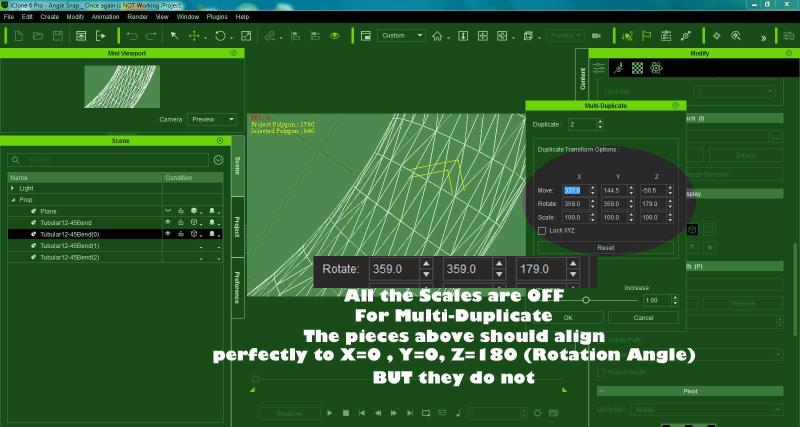
This is yet another issue using MULTi-Duplicate:
The Rotation angles are not working properly: I know because I created a specific piece to test this. If you rotate it by using typed in angles, the ending over-shoots.
If you use the ONE incorrect angle that works for the 1st piece, in the beginning, it leaves an OPENING at the end.
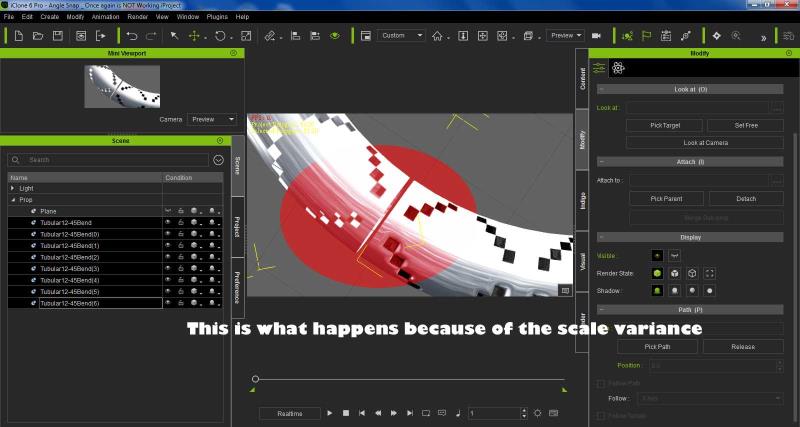
|
|
By Bellatrix - 11 Years Ago
|
JC Weatherby (10/27/2015)
Bellatrix (10/16/2015)
Found 2 bugs... 1st one: VISEME KEY RANDOM JUMP WHEN CLICKED TO LAUNCH LIPS EDITOR Happened with CC or non-standard chars This behavior is both RANDOM, and 90% chance of happening. Sometimes tt jumps somewhere mysterious then back to its original position. Most of the time, click and disappear, buried in the mess of redundant viseme keys Additionally, Lips Editor also behaves inconsistent: sometimes slider is greyed out, sometimes on Double-clicking on chosen phoneme sometimes produce expected change, sometimes nothing In any case, lips editing = impossible. I have to re-emphasize: CC or Non-standard with involved mouth rig Current automation of lipsync result mostly redundant It's faster to eyeball it, manually place visemes than fixing the auto-generated mess Lips Options is a nice touch, appreciated but it cannot correct what is fundamentally incoherent While Lipsync iClone6 is being fine-tuned... Please at least allow users to do manual lips keying work Please add AUDIO SCRUBBING At least add a RESIZE PANE VERTICALLY option So that we can SEE and MATCH keys to waveforms IClone excels in body motions Time to excel in facial expressions and talking lips Thank you for making LIPSYNC more user-friendly. YES! I've had to deal with this in doing the latest episodes of Evocronik.
Good to see this mega bug being confirmed
Also glad that I'm not the rare species that uses lips editor :)
Meanwhile I had to resort to using the Expression Editor precious limited 24 3DX_Custom morphs as a manual workaround.
I was actually really looking forward to adopting iClone's otherwise wonderful Timeline...
|
|
By Bellatrix - 11 Years Ago
|
Minor bug identified... mere Display issue
I was playing around with swapping characters
with existing char selected, double click on content manager character to direct load
The Viewport selected polygon count does not update
But the Project Polygon count does
No big deal but a bug nonetheless
Also, dear RL dev, while you're at it...
Please add more meaningful viewport performance guide options
Total Draw Calls - per object, per project to the viewport
At the least, use Point Counts.
Thank you.
|
|
By Anibox - 11 Years Ago
|
If this has been mentioned before, sorry!
I made a simple animated prop to simulate a water splash.
When I use the Collect Clip function, and click on the props newly created Perform option, it adds 2100 to all of the size settings?
Has anyone else noticed this?
|
|
By bud_20121023184423262 - 11 Years Ago
|
Well, another update . . . I guess the two monitor setup was not the problem after all. iClone6 randomly crashes several times in succession. Has happened 3 more times (4-6 crashes in a row, even trying different files or starting new ones) since I posted this. Sometimes takes a couple reboots to get stable.
Can't see any rhyme or reason to it. Not happening with any other programs or I'd suspect a memory problem.
Thoughts?
|
|
By jmusa - 11 Years Ago
|
Hi i also had this problem and i found the solution
Step 1 - update your graphic card drivers...
even if it is crash.
Step 2 - update iclone
:):):):):):):):):):):):):)
|
|
By Alien Maniac - 11 Years Ago
|
Have you set up your GPU for IC? Updated all of your drivers? What GPU card/ram? Ram? What OS?
|
|
By Lawsuit Pending Records - 11 Years Ago
|
Glad this was raised I thought I was going mad
Forgot the issue which would be handy to point out. Particles in the scene giving me some grief
Thanks
|
|
By Anibox - 11 Years Ago
|
|
I used to have a lot of random crashes. I found that if I right click on the iclone icon and start it as administrator it is much more stable.
|
|
By Agonos - 11 Years Ago
|
Hello
Good news. Do not ask me why and if there is a link but since yesterday and after the last MAJ (driver) of my graphics card, my problem with the "Glare" option has disappeared.
Proof of this video :
|
|
By Agonos - 11 Years Ago
|
|
RB3006 (10/25/2015)
oh, nice that someone else also has the problem with Tone Map.
But i have the feeling, it was fixed in 6.21
I believe this problem happens when the active camera in the animation touches too close an object of decoration. I managed to divert this bug by increasing somewhat the camera height.
|
|
By animagic - 11 Years Ago
|
Now for some good news; read on...:w00t:
For quite some time there has been a problem with HDR. It only seems to occur with certain NVidia cards. I have a GTX 980 and the issue has also been reported with other 900 series cards I believe.
A fix has been promised for iClone 6.3 (and had been for 6.2 as well...:P).
Anyway, tonight a most peculiar thing happened. I had problems with iClone, where a project that opened before could no longer be opened, nor could any other project after that. So I rebooted. That didn't actually help, but after some more attempts I could finally open my project, which I needed as start for a new scene.
In the course of that, I was playing with some HDR settings and noticed that suddenly the spectral cross was displaying correctly, where before it wouldn't. I couldn't believe this, so I opened the test project I had created to illustrate the bug. Again, the spectral cross appeared correctly as did any of the other settings. The image below shows the bug on the left, and the correct image on the right.
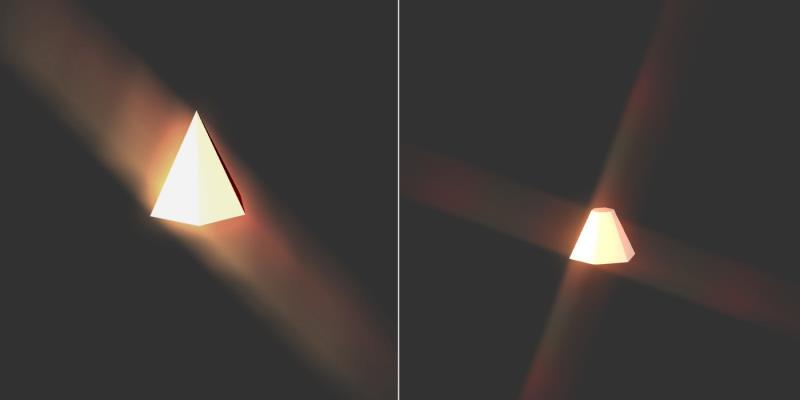
The only explanation I have is that I had just updated my NVidia display driver to version 358.87. Rebooting in addition may have helped too.
So I'm curious to know if the new driver solves the problem for others as well. It would free RL to concentrate on other outstanding issues...:crazy:
|
|
By pinguintje - 11 Years Ago
|
@animagic
Job, this is good news:):):)
I also tried the HDR settings. The result of Spectral Sunny you see in the picture below.
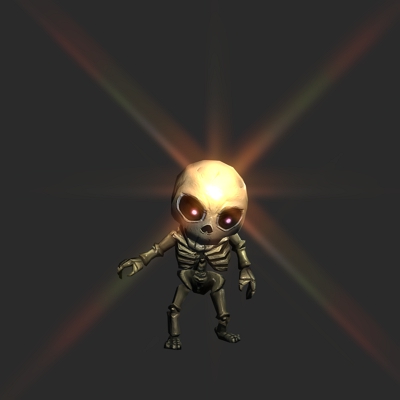
I have a NVIDIA GTX970 with driver 358.87 on Windows10.
Last week the HDR settings worked as shown in your "bug picture"
I also think it is the updated driver.
Best Regards,
Arie
|
|
By Agonos - 11 Years Ago
|
|
animagic (11/8/2015)
Now for some good news; read on...:w00t:
This is what I wrote on page 5. lol. But I do not know if the problem was solved by the driver update my graphics card or a discreet update Reallusion. Anyway I would like to know. However the problem with "tone map" is still not resolved contrary to what I thought :(. This problem appears and disappears at random.
|
|
By Alien Maniac - 11 Years Ago
|
OK Guys NICE
on my old MSI GT683DX Win 10 home Nvidia GTX570M 1.5 2.2-3.2GHZ
I was having many problems loading any saved project (None would load) and loading iclone 6p at times and crashing.....wo
NOW I did get the new Nvidia updated driver above and guess what.....
I can now load any and all of my saved project files and no crashes...... but I will be doing more testing.....lol
SWEEEEEET
So indeed perhaps RL will be happy to hear that news. It was the driver from NVIDIA that was causing the problems.
Thanks for the heads up guys....I am one happy iCloner again..
Whew
YOU have made my DAY and Millennium!
|
|
By Dragonskunk - 11 Years Ago
|
This is minor but really annoying.
The face key map lacks accuracy.
The mouse pointer is where I clicked and this is the part that was selected.
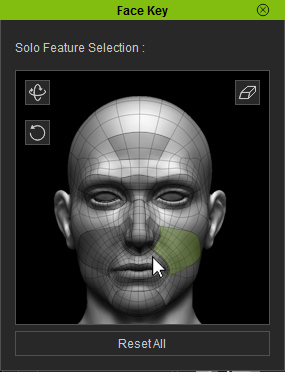
|
|
By animagic - 11 Years Ago
|
Agonos (11/8/2015)
animagic (11/8/2015)
Now for some good news; read on...:w00t:
This is what I wrote on page 5. lol. But I do not know if the problem was solved by the driver update my graphics card or a discreet update Reallusion. Anyway I would like to know. However the problem with "tone map" is still not resolved contrary to what I thought :(. This problem appears and disappears at random.
Agonos, it may be my eyes, but all I can find is that you still had the "glare" problem and were in despair. I KNOW it was not solved initially in 6.21, because I checked.
|
|
By lpatter - 11 Years Ago
|
TERRAIN PROBLEMS.
SUMMARY - I used to be able to do make props out of terrains in Iclone 5
1. Cannot change terrain to a prop anymore so that you can adjust it and then ADD to terrain again.
2. Different developer or Iclone terrains show different abilities to adjust height for the menus in the Modify panel. Need it because there is no focus to adjust the position.
Parts of terrains disappear based on the angle so it used to be nice to set the terrain correctly from various angles then add the characters and fix those whose feet are above their heads (the terrain is seen as above their foot contact).
3. Turning off foot contact to help with those terrains that have some function worked fine for Mason and Iclone 5 characters but messes up CC Characters lower body. For all it does not seem to recognize the terrain boundaries
4. "Terrains of the World" are the best behaved in terms of foot contact and visibility. Others seem to be total bad while others have foot contact recognition problems.
Developers need to fix their terrains, default motion paths which affects their "perform" functions and clobbering other stuff when their items are installed - especially Motions!!!!
5. My engine/fan keeps racing with this new 6.21 upgrade.
I thought I could at least set my scene and environment, lighting and cameras and wait on characters but
I have been broken for one reason or another since January but I really do appreciate your work with so little staff and you really are a God-send.
My PC specs are perfect for Iclone 6 - can't seem to find the list.
PREVIOUS DESCRIPTION
I installed the latest version with the missing particles so I do not know if this is related.
I tried to load my Terrains from Dicho and I could not see them at all even though they were in the scene manager.
It had an error about the PhysX engine so I changed it to bullet and still could not find it.
Then I added a Terrain of the world and deleted it then my missing terrain appears.
I had others with the PhysX message appear but these seem to be gone into the twilight zone.
There seems to be a combination of things that makes them appear but. it may be a waste of time until the disappearing particles are fixed.
My problem may be that Dicho has these terrains in different sections to be stitched together but I cannot click on the object and then select the focus on it so that I can see it. It just may be there and lost.
Thanks
|
|
By bud_20121023184423262 - 11 Years Ago
|
Thanks Maj, Bray, Newbie & All,
My first order of business was to update my graphics driver, however this has turned into an issue all unto itself. Still working that out with NVIDIA. I was hoping to eliminate it from the list of possibilities, or --- better yet --- have it be the fix!
I never thought of running iClone as Admin. I will try that, too.
Also, I didn't know about setting iClone for my GPU so I'll try that next, too.
It's so weird. It will run for hours when it shouldn't -- when I have tons of programs open, logging in via remote desktop, etc -- when you'd *expect* to crash it. Then, on another day, it will crash three or more times in a row on a clean boot when it's the only thing running and I'm working on a brand new, clean file. No pattern to it at all . . .
|
|
By Alien Maniac - 11 Years Ago
|
|
RL > WE need our PARTICLES to work properly in the Scene Manager
Many users have brought this up since the last update and we are still waiting. How are we supposed to work in iclone on our projects with bugs like no control of the Particles (in the Scene Manager)?
We just have to wait and wait and wait? RL can not do a quick update? WHY? This is an important function of iclone that just disappeared with the last update. I personally think we have waited way toooooooooo long for it to get fixed. Ever since the last update Particles has been totally not appearing at all in our scene manager.
I have tried every way possible to deal with this problem struggling and wasted so many hours trying that it is beyond ridiculous. FRUSTRATED? Me Oh yea! Do I have a right to be? Oh Yea! Does anyone else?
Come on RL lets get this fixed quickly. Some of us really need it to work again as well as the other bugs fixed.
SOMEBODY CALL the BUG BUSTERS, LOL
Q>>>>>>>> so when can we expect this to be fixed?
|
|
By Kelleytoons - 11 Years Ago
|
I'm going to report this as a bug because apparently IC5 didn't work this way and it really should.
A billboard should be able to cast shadows (and respect opacity, natch). It does not.
|
|
By animagic - 11 Years Ago
|
|
Kelleytoons (11/14/2015)
I'm going to report this as a bug because apparently IC5 didn't work this way and it really should.
A billboard should be able to cast shadows (and respect opacity, natch). It does not.
Billboards only gave a shadow with the Drop Shadow setting, which is no longer supported in iClone 6. The reason for that is not clear and requests have been made to get it back.
I did a test and I do get Opacity with the Billboard. I'm using a Billboard Facecam instance and when using the Diffuse map as Opacity I can see through it where the text is.
|
|
By Kelleytoons - 11 Years Ago
|
No, opacity works fine for the billboard -- I mean the *shadows* should respect opacity (IOW, not just the billboard itself casting a rectangular shadow).
So drop shadows was a setting outside of billboards? Or are you saying it was just an option in billboards that was dropped (no pun intended :>)? If the former then I guess it's something due to a major change in iClone that couldn't support this, but if the latter then it's a very curious omission. It certainly makes billboards much less useful (almost useless, in fact).
|
|
By animagic - 11 Years Ago
|
|
Kelleytoons (11/15/2015)
No, opacity works fine for the billboard -- I mean the *shadows* should respect opacity (IOW, not just the billboard itself casting a rectangular shadow).
I agree that shadows should respect opacity. For objects other than billboards they do when Opacity = 0, but there should be a gradation, such as when you have something semi-transparent. This is a problem when using the Sky Tool for example, the shadows of the clouds are just big black blobs and not useable.
So drop shadows was a setting outside of billboards?
That is correct. In iClone 5 there was a choice between Drop shadows, which cast when there is no surface and Self-cast shadows, which cast when there is a surface. iClone 6 has only the latter.
|
|
By animagic - 11 Years Ago
|
|
This is not a show stopper, but I often get a crash notice after I close iClone. It always concerns Qt5Core.dll as far as I can tell.
|
|
By duchess110 - 11 Years Ago
|
|
animagic (11/15/2015)
This is not a show stopper, but I often get a crash notice after I close iClone. It always concerns Qt5Core.dll as far as I can tell.
+1 I can confirm this I quite often get the same after closing iClone the same Qt5Core.dll
|
|
By Lord Ashes - 11 Years Ago
|
There is a problem with applying new UV settings to CC characters in 3DXChange.
I first noticed this when I used the Replace Mesh function on a CC characters and deselected the "original UV" check box (to apply new UV mappings). The replaced CC mesh imported all distorted. When I used the Replace Mesh without deselecting the "original UV" check box (i.e. not applying new UV mapping) then the CC mesh imports without any issues.
To further study the issue, I imported an unmodified CC character and applied UV changes using the 3DXChange UV settings tab. For testing purposes, I changed the UV Type setting. Immediately after applying the change, the CC mesh gets distorted (similar to the distortion seen using the Replace Mesh function). Since this was done on an unmodified CC mesh, it must be either an issue with the CC meshes or with 3DXchange (i.e. since no mesh modification was done, it cannot be the fault of a 3rd party software).
Next I tested the same with G6 and G5 characters. It seems that the issue does not appear on G6 or G5 characters...it seems to only affect CC characters but it affects both the CC meshes (e.g. clothing) and the RL meshes (e.g. body).
Below is an example of CC mesh distortion that occurs when UV settings are changed on CC characters. In the example, a UV setting change was applied to the CC Base Shirt...

This issue is fairly significant since it is preventing the Replace Mesh function from being fully utilized to make new CC bases which seems to be the only way for users to make custom CC Bases prior to the release of CC PIPELINE. It should be noted that the Replace Mesh function does actually work but in most cases, when using it to create a new CC Base, it will be necessary to also adjust the UV mappings which cannot be done because of this issue.
How To Reproduce Issue:
1. Load CC character into 3DXchange
2. Change some UV settings (e.g. UV Type) for some part of the CC character (such as the clothing). Apply.
Or
1. Load CC character into 3DXchange
2. Use the Replace Mesh | Export Mesh option to export some mesh of the CC character (such as a piece of clothing)
3. Modify the UV mappings on the exported mesh using 3rd party software
4. Use the Replace Mesh | Replace Mesh option to import the exported mesh back into 3DXChange
5. When the Replace Mesh dialog pops up deselect the check box related to original UV mapping (so that 3DXchange tried to load the new UV mapping)
EDIT: Corrected "applying settings" to "applying UV settings". Added last statement about how this issue is limiting the ability to make custom CC Bases. Added steps to reproduce.
|
|
By Alien Maniac - 11 Years Ago
|
Anyone having a problem with the RL Downloader updates now?
I just updated the CC and RL Downloader via the RL downloader update icon.
Then I went to the MKT place and made a few purchases and tried to download them via RLD.
Com 1.... Will not even load up
Com 2.... RLD ....Disappeared completely and not found on com, hu? Whaaaat??????
I searched on RL site for the RLD to re-download it but searches say NOT FOUND.....hummm
Wo. Anyone else having a problem with this update?
NOW I can not even get what I purchased because only the RLD is offered to install them.
Any ideas or suggestions so I can get my purchased items? I need them today. Doh!
|
|
By Alien Maniac - 11 Years Ago
|
OK, Here is the error message for com 1 When I try to download my products from the MKT place.
FAILED to initialize content install module of iclone 6.0
On com 2.....Nothing happens when I click download, then on install with RLD
humm seems the new RLD update has a bug. ??????
|
|
By animagic - 11 Years Ago
|
|
Bray, I just tried this and I could download and install alright. I have had problems in the past with Downloader but not lately.
|
|
By Kelleytoons - 11 Years Ago
|
I have to believe this has been reported before, but I'll do it just in case.
Final output to PNG does not respect opacity settings. It will either make an object completely transparent, or completely opaque, with nothing in between.
Here is glass with opacity (of the material) set at 0:

And then with it set just at 1 (so a TINY notch up):

This is also true even if you use a map for opacity but adjust the strength of the map -- can only be either on or off.
The same scene rendered in BMP *does* work properly, so it's a definite bug.
|
|
By CaseClosed - 11 Years Ago
|
png has an alpha channel. what does the alpha channel look like?
i suspect that is the color of your window, and the alpha channel will show 99% black (1% opacity) for the window.
|
|
By Kelleytoons - 11 Years Ago
|
|
Whether the alpha is split or not, the baseline PNG should show everything, right? I mean, if I have a PNG in Photoshop with an alpha map it still shows correctly when I view in, say, Windows viewer (it shows the transparency). That's true of almost every other image type I know (only when an image is split into distinct parts, like an alpha image and the base image, do you not see the transparency).
|
|
By CaseClosed - 11 Years Ago
|
|
yea, i think you are right. did u open the file in photoshop?
|
|
By Kelleytoons - 11 Years Ago
|
I hadn't but I did just now -- it doesn't have a separate alpha channel.
What's wrong is that the area of transparency is COMPLETELY transparent -- cut out of the image -- so nothing actually shows through (it looks white because that's the default). IOW, rendering to a PNG it doesn't render anything on the other side of that transparency. It's definitely a bug.
|
|
By animagic - 11 Years Ago
|
I've made use of the Black Friday offer and found a problem with the Dune Buggy and Segway props. They load fine and of course require the Bullet physics engine enabled. I do that and when I then try to do something with them, iClone crashes. It's the same story for the sample projects.
Now I thought we were supposed to be able to run Bullet physics props, just not create new ones. I just checked and the buggy in the Physics Toolbox bonus project works OK.
|
|
By RobertoColombo - 11 Years Ago
|
Hi RL,
I found this bug.
1. I have modified the opacity of a material from 100 to 0 (frame 38 to frame 39)
2. the prop (actually an avatar accessory) correctly disappears at frame 39
3. BUT... the timeline shows NO key!!!
Refer to the figures below.


Cheers,
Roberto
|
|
By mark - 11 Years Ago
|
|
animagic (12/6/2015)
I've made use of the Black Friday offer and found a problem with the Dune Buggy and Segway props. They load fine and of course require the Bullet physics engine enabled. I do that and when I then try to do something with them, iClone crashes. It's the same story for the sample projects.
Now I thought we were supposed to be able to run Bullet physics props, just not create new ones. I just checked and the buggy in the Physics Toolbox bonus project works OK.
I was trying to confirm your problem Job but seems to be working for me... at least the Dune Buggy is working fine. I'm in 6.2.21 though.
|
|
By animagic - 11 Years Ago
|
|
Thanks for checking, Mark. I have the latest version (v6.21.2208.1) installed.
|
|
By Peter (RL) - 11 Years Ago
|
RobertoColombo (12/10/2015)
Hi RL, I found this bug. 1. I have modified the opacity of a material from 100 to 0 (frame 38 to frame 39) 2. the prop (actually an avatar accessory) correctly disappears at frame 39 3. BUT... the timeline shows NO key!!! Refer to the figures below. Cheers, Roberto I have tested this and can't reproduce the problem. To help us isolate the problem, can you confirm if the issue is only occurring in that one custom project or does the issue occur in all projects? As an example, please try starting a new project and then just add the character/accessory that has the issue. Now try again to set a material keyframe for the opacity. Does this now work?
|
|
By Peter (RL) - 11 Years Ago
|
|
animagic (12/6/2015)
I've made use of the Black Friday offer and found a problem with the Dune Buggy and Segway props. They load fine and of course require the Bullet physics engine enabled. I do that and when I then try to do something with them, iClone crashes. It's the same story for the sample projects.
Now I thought we were supposed to be able to run Bullet physics props, just not create new ones. I just checked and the buggy in the Physics Toolbox bonus project works OK.
Hi Animagic,
We can reproduce this problem and it is being investigated by the iClone team. Thanks for the feedback.
|
|
By RobertoColombo - 11 Years Ago
|
Peter (RL) (12/11/2015)
I have tested this and can't reproduce the problem. To help us isolate the problem, can you confirm if the issue is only occurring in that one custom project or does the issue occur in all projects? As an example, please try starting a new project and then just add the character/accessory that has the issue. Now try again to set a material keyframe for the opacity. Does this now work?
Hi Peter,
thanks for the prompt answer.
Unfortunately the problem is not easy to reproduce: when I reloaded the project, the key frame was there!
If it happen again, i will try to narrow down the sequence of operation, so that we can derive a test case.
Regards
Roberto
|