|
Author
|
Message
|
|
justaviking
|
justaviking
Posted 10 Years Ago
|
|
Group: Forum Members
Last Active: Last Year
Posts: 8.2K,
Visits: 26.5K
|
I've reported this before, but it's been a few releases now and I think it's time to refresh this topic. When you load a project with a reflective object in it, and let iClone sit idle in the foreground, it puts a big load on the GPU for no reason. If you make a different application active (but still leave iClone visible, non-minimized), the GPU load will drop back down to zero. It makes me wonder how much this "phantom load" could be slowing down rendering, both during real time preview and during final export rendering. To duplicate: - Use a tool such as GPU-Z to monitor GPU load
- Open the DEFAULT PROJECT in iClone (see image below).
- Observe the GPU load.
- Anytime iClone is the foreground application the GPU load is very high.
- 72% when stopped
- 90% when I press Play
- 72% again when I press Stop
- Anytime another application is active, only then does the GPU load drop way down.
This makes no logical sense to me, and points to some fundamental problem that needs to be fixed.CPU = Intel 3770K (with onboard graphics) GPU = AMD Radeon 6850 In this picture, I loaded the default project, but NEVER PRESSED "PLAY." Look that the GPU load. You can see where I switched between having iClone or other applications (like GPU-Z or this forum) in the foreground. 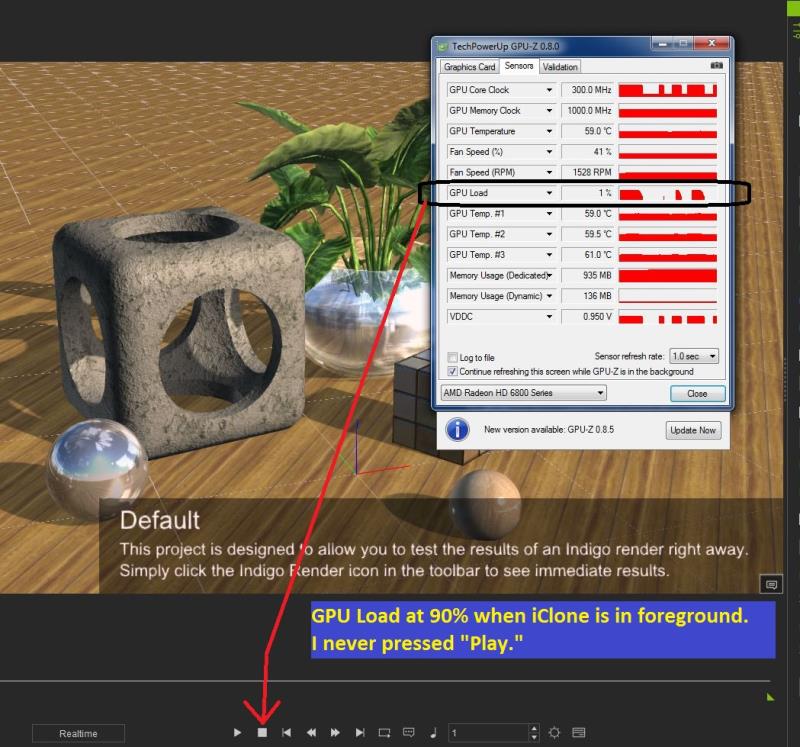
iClone 7... Character Creator... Substance Designer/Painter... Blender... Audacity...
Desktop (homebuilt) - Windows 10, Ryzen 9 3900x CPU, GTX 1080 GPU (8GB), 32GB RAM, Asus X570 Pro motherboard, 2TB SSD, terabytes of disk space, dual monitors.
Laptop - Windows 10, MSI GS63VR STEALTH-252, 16GB RAM, GTX 1060 (6GB), 256GB SSD and 1TB HDD
|
|
|
|
|
justaviking
|
justaviking
Posted 10 Years Ago
|
|
Group: Forum Members
Last Active: Last Year
Posts: 8.2K,
Visits: 26.5K
|
D'oh!
I meant to put this in the 6.21 "Issues" thread.
I'll cross-reference it.
A few minutes later... Okay, I posted a short version in the 6.2.1 "Issues" thread now. https://forum.reallusion.com/FindPost258150.aspxThe two posts cross-reference each other now.
iClone 7... Character Creator... Substance Designer/Painter... Blender... Audacity...
Desktop (homebuilt) - Windows 10, Ryzen 9 3900x CPU, GTX 1080 GPU (8GB), 32GB RAM, Asus X570 Pro motherboard, 2TB SSD, terabytes of disk space, dual monitors.
Laptop - Windows 10, MSI GS63VR STEALTH-252, 16GB RAM, GTX 1060 (6GB), 256GB SSD and 1TB HDD
|
|
|
|
|
justaviking
|
justaviking
Posted 10 Years Ago
|
|
Group: Forum Members
Last Active: Last Year
Posts: 8.2K,
Visits: 26.5K
|
Whoa!!! Amazing new discovery...It's not the reflective item. (Actually, they may still cause problems, but that's not the only way to do this.) Turning shadows off did not help. - Open the "Light Stage" project
- Observe high GPU load (while iClone it idle)
- Select the Omni-bounce A prop
- Pick the "Bulb" material
- Delete the "Glow" texture
- GPU load drops from 70-ish % to zero!!!!!
The Omni-bounce B also has a glow map (more gray than white), but deleting that glow map is neither helpful nor necessary. Deleting just the glow map on just the "Omni-bounce A" prop will drop my GPU usage to zero. Can anyone reproduce this? Would anyone care to explain this to me??? 
iClone 7... Character Creator... Substance Designer/Painter... Blender... Audacity...
Desktop (homebuilt) - Windows 10, Ryzen 9 3900x CPU, GTX 1080 GPU (8GB), 32GB RAM, Asus X570 Pro motherboard, 2TB SSD, terabytes of disk space, dual monitors.
Laptop - Windows 10, MSI GS63VR STEALTH-252, 16GB RAM, GTX 1060 (6GB), 256GB SSD and 1TB HDD
|
|
|
|
|
justaviking
|
justaviking
Posted 10 Years Ago
|
|
Group: Forum Members
Last Active: Last Year
Posts: 8.2K,
Visits: 26.5K
|
I have a headache now.
I called my son over to show him the stupidity.
I started turning the Glow Maps off on the "Light Stage" project... and the GPU load did not drop to zero.
What??? Not even if I deleted both glow maps.
But I did it repeatedly 15 minutes ago!
Arrrgh!!!
No matter, I'll let the iClone developers work on this.
It is 100% repeatable that the default project (and others) will cause a large GPU load even when iClone it idle.
Putting iClone in the background will then drop the GPU load to zero.
Bringing iClone back to the foreground (but not pressing Play) will load up the GPU once again.
The core problem should be easy to duplicate.
Is this only for AMD cards, maybe?
I'm going to go rest for a while.
iClone 7... Character Creator... Substance Designer/Painter... Blender... Audacity...
Desktop (homebuilt) - Windows 10, Ryzen 9 3900x CPU, GTX 1080 GPU (8GB), 32GB RAM, Asus X570 Pro motherboard, 2TB SSD, terabytes of disk space, dual monitors.
Laptop - Windows 10, MSI GS63VR STEALTH-252, 16GB RAM, GTX 1060 (6GB), 256GB SSD and 1TB HDD
|
|
|
|
|
Rampa
|
Rampa
Posted 10 Years Ago
|
|
Group: Forum Members
Last Active: 2 Weeks Ago
Posts: 8.2K,
Visits: 62.6K
|
I not sure iClone is ever "idle" when it's in the foreground. Any reasonable scene has that effect for me, reflection or not.
|
|
|
|
|
justaviking
|
justaviking
Posted 10 Years Ago
|
|
Group: Forum Members
Last Active: Last Year
Posts: 8.2K,
Visits: 26.5K
|
rampa (10/20/2015)
I not sure iClone is ever "idle" when it's in the foreground. Any reasonable scene has that effect for me, reflection or not.But it should be idle, if you don't press "Play." No other application I've ever seen does this. Something is messed up.
Okay, I'm not totally insane. I was able to reproduce this, sort of, and my son witnessed it over and over again. Rampa, I can get my GPU to drop to zero, with iClone active, and even with lights on, shadows on, and the statue visible on the Light Stage set. As Alice (in Wonderland) would say, "Curiouser and curiouser." I went back to the Light Stage project... - I got drop my GPU usage to "zero" by zooming out (so I see the entire background prop), and then deleting both glow maps.
- But if I scroll in again, GPU usage goes up.
- Sometimes deleting one Glow Map will be sufficient.
- It seems nearly random in a way.
- I thought maybe it was a Level Of Detail issue on the statue, but deleting the statue doesn't really have an affect on it.
Very, very, very strange. I'm tempted to do a screen recording and make a video of it. It's too "random" to document all the things I've tried and how something works one time but not the other. But if minor changes in the "zoom" even make a difference, no wonder it's hard to be consistent.
Clicking on another application (even while leaving iClone fully visible) always drops my GPU load to zero.
Bottom line: If I do not press play, there is zero reason for my GPU to be doing anything at all, even if iClone is the "active" (foreground) application.
I've said this before; I really wonder if this unnecessary GPU load also affects our rendering performance.
That's my primary concern. That, and the simple stupidity of the situation.
I think I'll quit now, unless anyone has any specific requests.
ESPECIALLY SOMEONE FROM REALLUSION... IF YOU WANT ME TO TRY SOMETHING FOR YOU, I AM AT YOUR SERVICE.
iClone 7... Character Creator... Substance Designer/Painter... Blender... Audacity...
Desktop (homebuilt) - Windows 10, Ryzen 9 3900x CPU, GTX 1080 GPU (8GB), 32GB RAM, Asus X570 Pro motherboard, 2TB SSD, terabytes of disk space, dual monitors.
Laptop - Windows 10, MSI GS63VR STEALTH-252, 16GB RAM, GTX 1060 (6GB), 256GB SSD and 1TB HDD
|
|
|
|