|
Author
|
Message
|
|
Shaky
|
Shaky
Posted 15 Years Ago
|
|
Group: Forum Members
Last Active: 5 Months Ago
Posts: 490,
Visits: 9.2K
|
Alley (10/15/2011)
Reallusion supply 5 of them for you. They can be found in the folder called "Textures" and subfolder called "Blend". Try them all and experiment. c:/Users/Public/Public Documents/Reallusion/Template/Iclone 5 Template/Iclone Template/Textures/Blend or Iclone 4 if you are using 4. Yes, thank you. I looked at all of them. The image from my last post show the difference (although very subtle). Are there other blends to buy or make? Do you know how to make one?
|
|
|
|
|
Alley
|
Alley
Posted 15 Years Ago
|
|
Group: Forum Members
Last Active: 2 Months Ago
Posts: 3.7K,
Visits: 12.8K
|
Reallusion supply 5 of them for you. They can be found in the folder called "Textures" and subfolder called "Blend". Try them all and experiment. c:/Users/Public/Public Documents/Reallusion/Template/Iclone 5 Template/Iclone Template/Textures/Blend or Iclone 4 if you are using 4.
Alley
|
|
|
|
|
Shaky
|
Shaky
Posted 15 Years Ago
|
|
Group: Forum Members
Last Active: 5 Months Ago
Posts: 490,
Visits: 9.2K
|
Wow! That was cool. The one on the left is with a blend and the other is without. 
How do you make a blend image? Thank you! Shaky
|
|
|
|
|
Alley
|
Alley
Posted 15 Years Ago
|
|
Group: Forum Members
Last Active: 2 Months Ago
Posts: 3.7K,
Visits: 12.8K
|
Nice work Shaky - now you might want to add a Blend to that, then use the slider to turn it down - it will just give a little more realism to the colour depths - play with overlay-multiply-addition and the sliders until it looks right. You can also use the tiling or flip them - just some experimentation. :)
Alley
|
|
|
|
|
Shaky
|
Shaky
Posted 15 Years Ago
|
|
Group: Forum Members
Last Active: 5 Months Ago
Posts: 490,
Visits: 9.2K
|
Well, here is the results of learning how to use Bump maps. 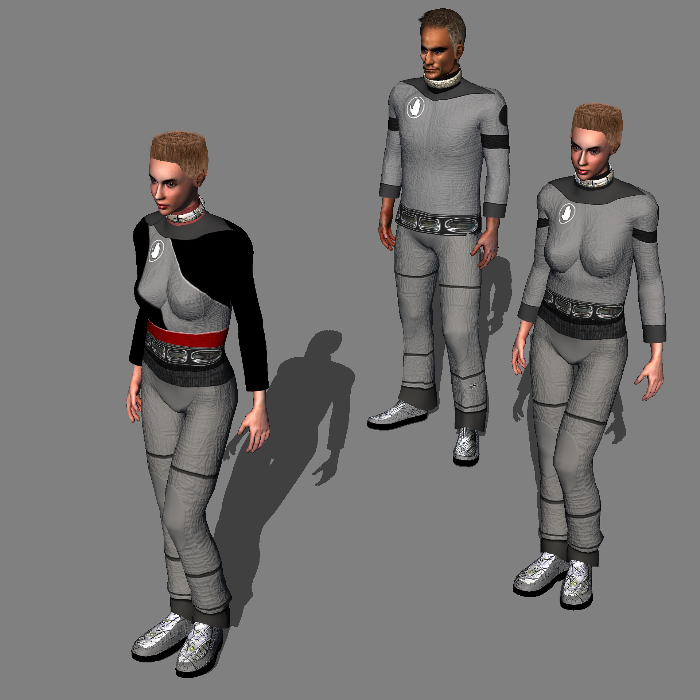
|
|
|
|
|
Shaky
|
Shaky
Posted 15 Years Ago
|
|
Group: Forum Members
Last Active: 5 Months Ago
Posts: 490,
Visits: 9.2K
|
Thanks Everyone, I got it to work. 
This is my first uniform (anything) on iclone. As you can see by the shoes, I am not done. Again, thanks. :)
|
|
|
|
|
WarLord
|
WarLord
Posted 15 Years Ago
|
|
Group: Forum Members
Last Active: Last Year
Posts: 487,
Visits: 3.7K
|
|
|
|
|
|
Alley
|
Alley
Posted 15 Years Ago
|
|
Group: Forum Members
Last Active: 2 Months Ago
Posts: 3.7K,
Visits: 12.8K
|
So are the wires part of the diffuse image, and the idea is to make the bump map make them appear to be almost embedded into the suit? Another way to try and achieve this would be to place the wires on the character. Then cut a shape out rough around the wires where the chest would be open. (shot 1) Then on the shape behind, apply an inner bevel, play with the settings. Shot 2. Lastly, take your existing bump map, in this instance because Dylan come with one, and put the bevelled shape on top of the bump map. Then Select "Match Colour" and match the colour to the existing bump map. You can apply another inner bevel now to the coloured shape. This as your bump map will further help to give the look of being embedded. Of course lighting is also very helpful to further give the look. 


Alley
|
|
|
|
|
Shaky
|
Shaky
Posted 15 Years Ago
|
|
Group: Forum Members
Last Active: 5 Months Ago
Posts: 490,
Visits: 9.2K
|
Thanks! I will put that advice to work :) and post my results.:D
|
|
|
|
|
namunger
|
namunger
Posted 15 Years Ago
|
|
Group: Forum Members
Last Active: 2 Years Ago
Posts: 233,
Visits: 1.1K
|
Yep, what he said! Here's a pic of a character i was working on a while back - Man-At-Arms from the old He-Man toys. I used a picture of a printed circuit board, turned it into a normal map, then applied to various primitives, which I embedded into the character to look like armor. Sounds like it may be along the lines you're going for.
----
|
|
|
|