|
Author
|
Message
|
|
Lord Ashes
|
Lord Ashes
Posted 3 Years Ago
|
|
Group: Forum Members
Last Active: Last Year
Posts: 1.3K,
Visits: 1.6K
|
3DXChange 7 has had import issues since iClone 7 (and possibly earlier). This video shows how the import function fails to import relatively simple meshes properly and shows how this functionality still has not been fixed in iClone 8. There are also a slew of export issues which have not been fixed since 3DXChange 7i / Clone 7 but this video will focus on demonstrating the import issue with a sample asset. It should be noted that the asset was created in Blender software which is a common, free, and powerful software used by a large portion of the 3D content development community (i.e. it was not made with some small obscure software).
As can be seen the import function does not render geometry correctly. The video shows both shape issues (such as the pin being distorted) and face issues (such as the pin hole and the cutout being covered).
"We often compare ourselves to the U.S. and often they come out the best, but they only have the right to bear arms while we have the right to bare breasts"
Bowser and Blue, Busting The Breast
|
|
|
|
|
Peter (RL)
|
Peter (RL)
Posted 3 Years Ago
|
|
Group: Administrators
Last Active: Last Year
Posts: 23.1K,
Visits: 36.6K
|
Hi Lord Ashes If you believe there are import issues with either iClone 8 and/or CC4 then please report them in the Feedback Tracker. This is the best way to get issues logged and looked into. Thanks. http://www.reallusion.com/FeedBackTracker/
Peter
Forum Administrator www.reallusion.com
|
|
|
|
|
Rampa
|
|
|
Group: Forum Members
Last Active: 2 days ago
Posts: 8.2K,
Visits: 62.6K
|
Try applying a "triangulate mesh" modifier to your Blender model. I have seen cutouts go missing like that a couple times.
|
|
|
|
|
ckalan1
|
ckalan1
Posted 3 Years Ago
|
|
Group: Forum Members
Last Active: Last Year
Posts: 276,
Visits: 10.7K
|
Triangles and QuadranglesThis article is pretty good at explaining how meshes work. I have found that I can import nearly every mesh from Blender if I convert it to triangles before I export it and then import it into iClone. Hope this helps. Craig
|
|
|
|
|
4u2ges
|
4u2ges
Posted 3 Years Ago
|
|
Group: Forum Members
Last Active: Last Month
Posts: 5.3K,
Visits: 16.8K
|
As others said, you have to triangulate before export. Reason this is happening, is because you have n-gones (faces created with more that 4 vertices). Any app you import such a mesh to, would look the same as in iClone. 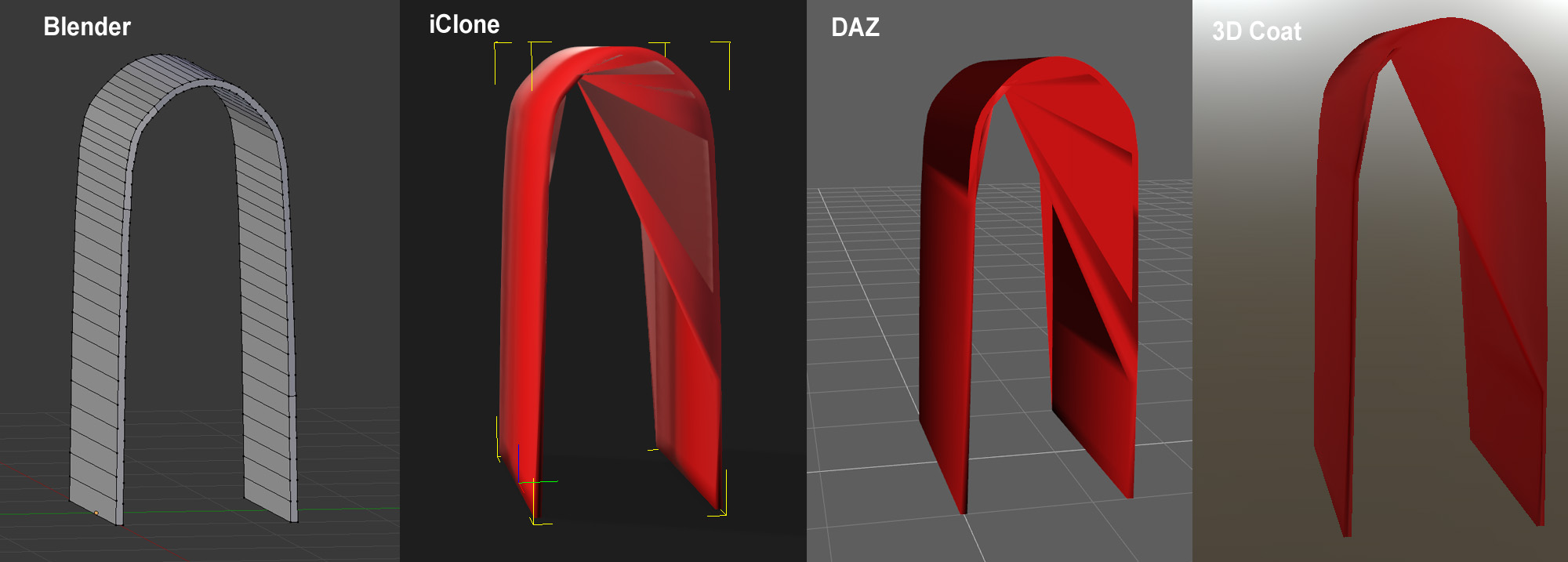 If you wish to retain quad faces, then after triangulating hit Alt+J while all faces are selected. That would reinstate quad mesh where it is possible. Otherwise you have to make sure not to have any n-gones in the first place.
|
|
|
|
|
jeff.davies
|
jeff.davies
Posted 3 Years Ago
|
|
Group: Forum Members
Last Active: 2 Years Ago
Posts: 300,
Visits: 1.5K
|
Triangulate for the Win with Blender exports! Try it and let us know if theat does or doesn't fix the issue. I had all sorts of problems with my Blender meshes before I learned to triangulate before export/import to iClone. Alot of gaming platforms also want triangulated meshes. Blender seems to have a deep love of quads in its native format, most other platforms want tris.
- Jeff
The Adventures of Capt Sanchez
Cybernautic Studios
|
|
|
|
|
4u2ges
|
4u2ges
Posted 3 Years Ago
|
|
Group: Forum Members
Last Active: Last Month
Posts: 5.3K,
Visits: 16.8K
|
I prefer quads for the simple reason. It is heck of a lot easier to work with quad mesh as oppose to tris when you return the model BACK from CC/IC to Blender for customization. But not CC nor IC have any issues with quad mesh. It is a problem when you have a face created with 5+ vertices. If I accidentally (or sometimes on purpose - being lazy) create such faces, I make sure I either use knife tool to slice it. Or use another lazy routine: Ctrl+T and then Alt+J
|
|
|
|
|
4u2ges
|
4u2ges
Posted 3 Years Ago
|
|
Group: Forum Members
Last Active: Last Month
Posts: 5.3K,
Visits: 16.8K
|
|
|
|
|
|
Lord Ashes
|
Lord Ashes
Posted 3 Years Ago
|
|
Group: Forum Members
Last Active: Last Year
Posts: 1.3K,
Visits: 1.6K
|
Peter (RL) (7/7/2022)
Hi Lord Ashes If you believe there are import issues with either iClone 8 and/or CC4 then please report them in the Feedback Tracker. This is the best way to get issues logged and looked into. Thanks. http://www.reallusion.com/FeedBackTracker/ I am not sure it is worth my time. As you may recall from our previous conversation about the Export function, I reported bugs against it and they are still there. No resolution on them for over a year and it looks like they won't be resolved now that RL migrated to iClone 8. The CC4 import doesn't seem to be backwards compatible since it won't load my CC3 Avatar and the FBX import just throws a generic FBX error. Not a great track record.
"We often compare ourselves to the U.S. and often they come out the best, but they only have the right to bear arms while we have the right to bare breasts"
Bowser and Blue, Busting The Breast
|
|
|
|
|
Lord Ashes
|
Lord Ashes
Posted 3 Years Ago
|
|
Group: Forum Members
Last Active: Last Year
Posts: 1.3K,
Visits: 1.6K
|
Thanks for the triangulation suggestion. It seems to have resolved the issues in this particular asset. However, if iClone can't handle non-triangulated meshes properly it should include a check for non-triangulated meshes and provide a meaningful error indicating this. As can be seen from the enclosed ranking, today's software is quite capable of handling n-gon meshes without issue. I did a check, using some of the 3D software that I had access to, and ranked it based on two criteria: if it can handle n-gons and at what price. Ranked highest are Blender and Unity who both handle n-gons without issue. I rated Blender higher because I find it easier to create materials in Blender than in Unity. The rest of the tested software did not render n-gon meshes correctly so I ranked on on price and size. Yes, this is not a truly fair ranking since the price of these software typically are for all of the other features that the software has. But I ranked Anim8or next because it is an ancient blast from the past (originally written in 1995 and updated in 1997) but it rendered the triangulated version of the asset (faster than most of the other software) and it did this with a 4MB footprint. The whole software, including a 3D editing functions, armature functions, scene layout functions and animation function, takes up less than 4MB (yes...four megabytes). Yes the GUI is totally dated by todays standards and it does not have anywhere near the features of Blender but it is amazing what could be put into a 4MB file. The iClone twins came in around the same rank, and last was DAZ Studio because its import completely screwed up the locations of mesh components.  "We often compare ourselves to the U.S. and often they come out the best, but they only have the right to bear arms while we have the right to bare breasts"
Bowser and Blue, Busting The Breast
|
|
|
|