|
Author
|
Message
|
|
Marty3DGuru
|
Marty3DGuru
Posted 4 Years Ago
|
|
Group: Forum Members
Last Active: 2 Years Ago
Posts: 73,
Visits: 89
|
Thanks for your help Peter.
I have discovered the cause of it and I'll explain what I did.
I installed all my packs through the content library, including the new CC4 characters. They could be loaded into scene and used but i found issues as explained with morphs.
I went into item rather than pack for content library in the CC embed morphs hierarchy. Inside the CC Embed Morphs/CC4 Characters folder was a bunch of stuff not installed for some reason? I clicked to download camilla head morph and everything else was updated as well.
Now all appears fine at my end. I'm unsure why this wasn't installed with the pack itself. Anyway all good. :D
My apologies to the earlier poster who was helping, I must have missed the detailed help about not installed content. I was looking through smart phone and must have missed a page when tracking my issues. Thanks all.
|
|
|
|
|
aaron_vfx
|
aaron_vfx
Posted 4 Years Ago
|
|
Group: Forum Members
Last Active: 2 Years Ago
Posts: 39,
Visits: 114
|
My CC4 is CONSTANTLY and randomly crashing, its pretty unusable for meReinstalling windows is not a option for me, and should that really be part of an install process anyway?. I have had NO problems with any other software on my PC.Unreal, MD, Maya, Max, Blender, Adobe Suite, Zbrush, Cubase, Reaper, Davinci Resolve. None of them have a problem, only CC4 and iClone 8.Below is an example, this particlur crash is what happens every time I try import a rig.32% of original size (was 1606x954) - Click to enlarge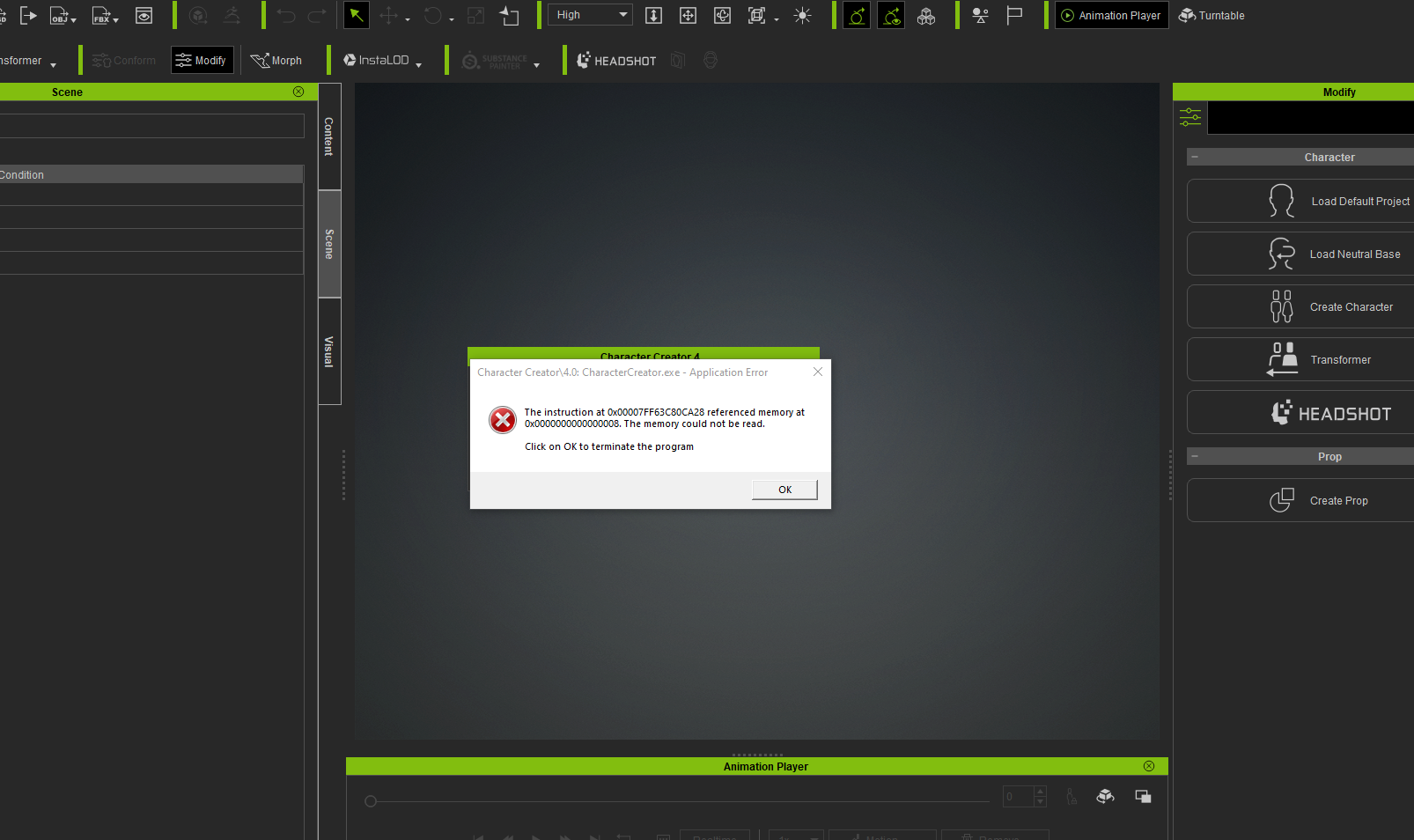 And then when I try to restart I get this over and over again:32% of original size (was 1606x954) - Click to enlarge And then when I try to restart I get this over and over again:32% of original size (was 1606x954) - Click to enlarge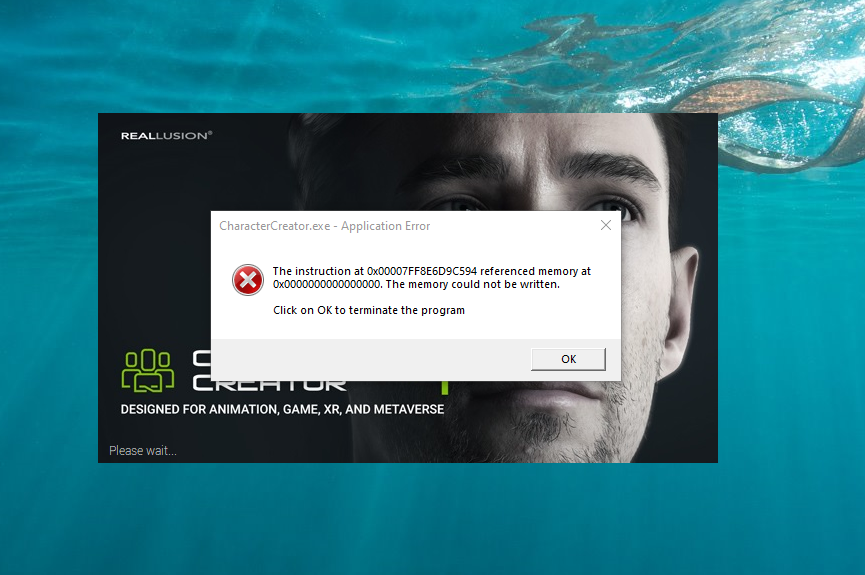 Support have a ticket but this has been going on since I installed CC4 last week, I've not heard anything back yet, so it sounds like it could be complicated, but it worries me, iClone 8 is more usuable but CC4 just has issue all over the place for right now, making it totally untrustworthy that I cannot use it. Support have a ticket but this has been going on since I installed CC4 last week, I've not heard anything back yet, so it sounds like it could be complicated, but it worries me, iClone 8 is more usuable but CC4 just has issue all over the place for right now, making it totally untrustworthy that I cannot use it.
https://dev.epicgames.com/community/profile/Kp0v/AaronVFX
|
|
|
|
|
nachout
|
nachout
Posted 4 Years Ago
|
|
Group: Forum Members
Last Active: Last Year
Posts: 2,
Visits: 40
|
@ aaron_vfx I have the same issue as you.
|
|
|
|
|
wsessoms
|
wsessoms
Posted 4 Years Ago
|
|
Group: Forum Members
Last Active: 3 Years Ago
Posts: 117,
Visits: 508
|
Hi Everyone , I installed CC4and none of the content template files loaded during the installation. I get the 'Not found any content in "Update" filter' message when I click on any of the items in the template list. Please Advice. Thank you See attached    Dell Precision T5500; Windows 10 Pro; Dual Xeon 5687 3.60GHz Processors; 72GB Ram; NVIDIA GeForce RTX 3080; Samsung 1TB SSD; Seagate 2TB 7200RPM HDD; Wacom Intuos Tablet; ASUS Dual Monitors
|
|
|
|
|
sungod
|
sungod
Posted 4 Years Ago
|
|
Group: Forum Members
Last Active: Last Year
Posts: 249,
Visits: 3.7K
|
nachout (5/17/2022)
@ aaron_vfx I have the same issue as you. Can you guys try some professional uninstaller like Revo uninstaller pro and run advanced mode in Medium mode. I usually clean all installations with it. I use the Portable Pro version . Many times it could be issue in some checksum etc. All the best.
|
|
|
|
|
wires
|
|
|
Group: Forum Members
Last Active: Last Month
Posts: 5.7K,
Visits: 26.5K
|
wsessoms (5/18/2022)
Hi Everyone
,
I installed CC4and none of the content template files loaded during the installation. I get the 'Not found any content in "Update" filter' message when I click on any of the items in the template list.
Please Advice.
Thank you
See attached
You need to select "All" and Pack, or "Installed" and Pack to see just what is installed. You can do the same for single items after checking if your Packs are present.
Gerry
System: Win 10 Pro (21H2), Asus X99-E WS, CPU i7-5930K -3,5 GHz, 32 GB DDR4 2666-16 RAM, NVidia GTX 1080 Ti GPU - 11 GB VRAM(Driver Studio-536.99), Samsung 850 Pro 512 GB SSD, 6 TB HD storage.
|
|
|
|
|
MilesV
|
MilesV
Posted 4 Years Ago
|
|
Group: Forum Members
Last Active: Last Year
Posts: 133,
Visits: 2.2K
|
Viewport morphing isn't working correctly for either the morph gizmo or the headshot sculpt morph tools. Moving the mouse horizontally adjusts the length instead of width/thickness.
|
|
|
|
|
virtualfilmer
|
virtualfilmer
Posted 4 Years Ago
|
|
Group: Forum Members
Last Active: 2 Years Ago
Posts: 27,
Visits: 79
|
Not sure where to post this issue… :) One of the new official videos about CC4 on the main Reallusion channel has the wrong title and also wrong graphic. The video is called “Characterizing Humanoid Characters” - but watch it, and you’ll see it’s about NON-Humanoid characters. https://youtu.be/oqZJyGSf1zMATTENTION: @RLpeter :)
|
|
|
|
|
yepkoo
|
yepkoo
Posted 4 Years Ago
|
|
Group: Forum Members
Last Active: Last Year
Posts: 1.2K,
Visits: 1.9K
|
I think he means the skeletal system here, not the shape of the character. In other words, animation can be applied in a human-like way.You can apply existing animations to this character.The non-humanoid characters are different.For example, a completely different skeletal system that you use to regenerate a plant.
----------------------------------------------------------------
https://www.youtube.com/yepkoo
https://dev.epicgames.com/community/profile/bxvo/Yepkoo#learning
|
|
|
|
|
wsessoms
|
wsessoms
Posted 4 Years Ago
|
|
Group: Forum Members
Last Active: 3 Years Ago
Posts: 117,
Visits: 508
|
wires (5/18/2022)
wsessoms (5/18/2022)
Hi Everyone
,
I installed CC4and none of the content template files loaded during the installation. I get the 'Not found any content in "Update" filter' message when I click on any of the items in the template list.
Please Advice.
Thank you
See attached
You need to select "All" and Pack, or "Installed" and Pack to see just what is installed. You can do the same for single items after checking if your Packs are present. Thanks Gerry for your reply I have looked in All in Pack and Item and the same message appears "Not found any content in "Update" filter. I installed CC4 on my other computer and it installed correctly but I really want to use it on the same computer that I am running iClone 8. iClone 8 installed correctly so I am thinking that somewhere a the configuration file I may need to correct the path to the content directory but I am not sure how to do that. Anyone have any idea where to view that information? Your help is appreciated and thanks in advance
Dell Precision T5500; Windows 10 Pro; Dual Xeon 5687 3.60GHz Processors; 72GB Ram; NVIDIA GeForce RTX 3080; Samsung 1TB SSD; Seagate 2TB 7200RPM HDD; Wacom Intuos Tablet; ASUS Dual Monitors
|
|
|
|