Profile Picture

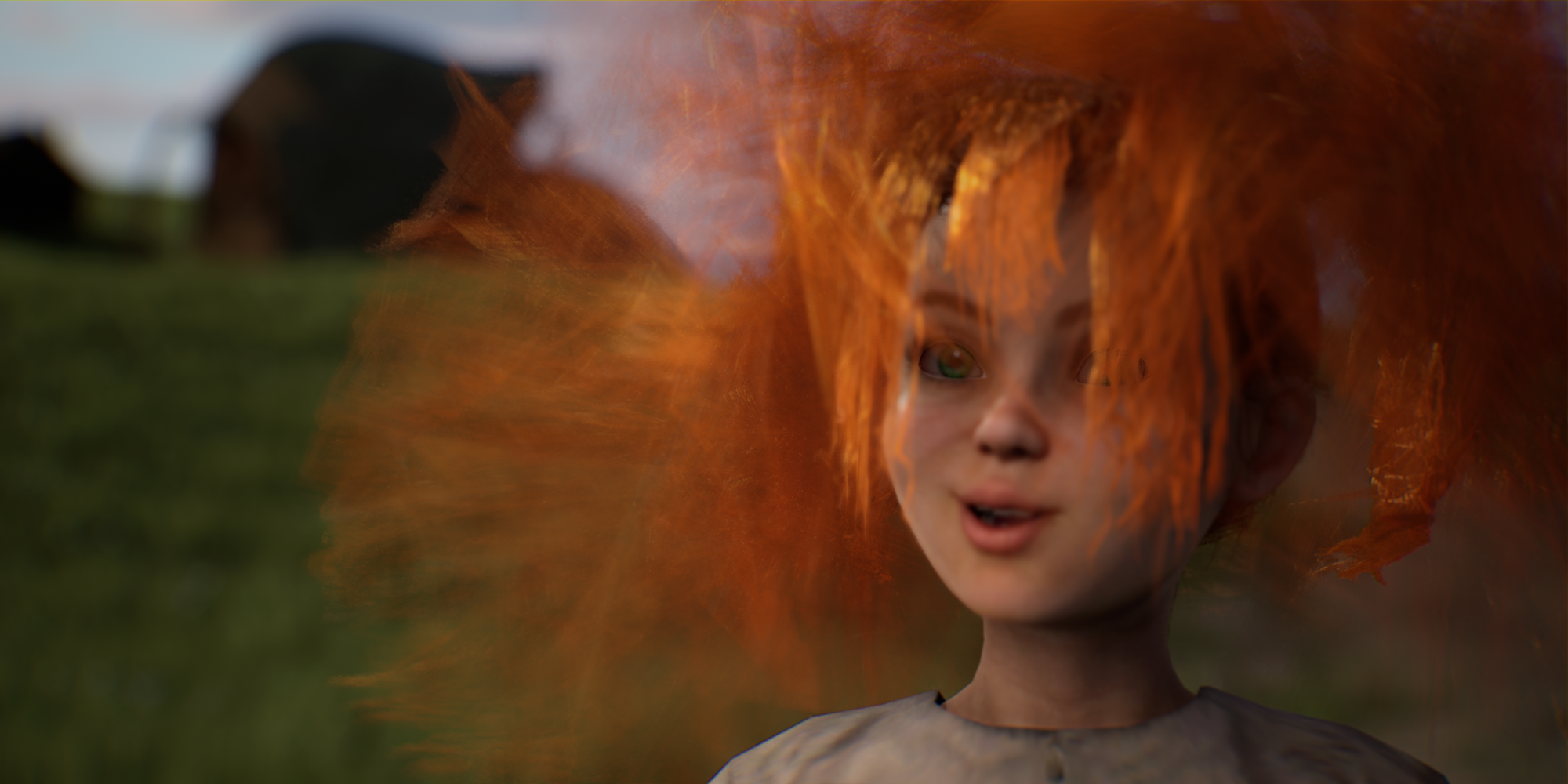
Exploding Hair in UE 4.27

Posted By MTMorrow_ 3 Years Ago
You don't have permission to rate!
1
2

Author
Message
4413Media
4413Media
Posted 3 Years Ago
View Quick Profile
Distinguished Member

Distinguished Member (4.3K reputation)Distinguished Member (4.3K reputation)Distinguished Member (4.3K reputation)Distinguished Member (4.3K reputation)Distinguished Member (4.3K reputation)Distinguished Member (4.3K reputation)Distinguished Member (4.3K reputation)Distinguished Member (4.3K reputation)Distinguished Member (4.3K reputation)

Group: Forum Members
Last Active: 8 Months Ago
Posts: 394, Visits: 7.4K
MTMorrow_ (4/5/2022)
Thanks 4413,
I've set the hair physics in iClone in the - modify window/physics tab - hair presets.
Do you recommend using the cloth presets instead? I'll give it a whirl and send to 4.27


Won’t do much, you have to do it in Unreal.

Sorry on the lack of videos, been busy with work and working with Unreal 5. Will have it soon.

EDIT:  

iClone Certified Director and makes miserable Westerns.
MTMorrow_
MTMorrow_
Posted 3 Years Ago
View Quick Profile
Senior Member

Senior Member (343 reputation)Senior Member (343 reputation)Senior Member (343 reputation)Senior Member (343 reputation)Senior Member (343 reputation)Senior Member (343 reputation)Senior Member (343 reputation)Senior Member (343 reputation)Senior Member (343 reputation)

Group: Forum Members
Last Active: 2 Years Ago
Posts: 21, Visits: 272
Thanks 4413,
I've set the hair physics in iClone in the - modify window/physics tab - hair presets.
Do you recommend using the cloth presets instead? I'll give it a whirl and send to 4.27

4413Media
4413Media
Posted 3 Years Ago
View Quick Profile
Distinguished Member

Distinguished Member (4.3K reputation)Distinguished Member (4.3K reputation)Distinguished Member (4.3K reputation)Distinguished Member (4.3K reputation)Distinguished Member (4.3K reputation)Distinguished Member (4.3K reputation)Distinguished Member (4.3K reputation)Distinguished Member (4.3K reputation)Distinguished Member (4.3K reputation)

Group: Forum Members
Last Active: 8 Months Ago
Posts: 394, Visits: 7.4K
You’ll have to create the soft cloth settings for your character’s hair. It never usually works right initially. You will have to adjust the self collision primarily and create a mask. It takes some trial and error.


The one in the video… yeah no physics settings at all with that hairstyle . I’ll have to make a video on fixing hair for characters with the soft cloth setting built in.

iClone Certified Director and makes miserable Westerns.
MTMorrow_
MTMorrow_
Posted 3 Years Ago
View Quick Profile
Senior Member

Senior Member (343 reputation)Senior Member (343 reputation)Senior Member (343 reputation)Senior Member (343 reputation)Senior Member (343 reputation)Senior Member (343 reputation)Senior Member (343 reputation)Senior Member (343 reputation)Senior Member (343 reputation)

Group: Forum Members
Last Active: 2 Years Ago
Posts: 21, Visits: 272
Thanks 4431,
Your video was quite informative but did not help solve my problem.
I'm using a Smarthair asset. I'm having a tough time finding useful information on how to get this to work properly in Unreal 427.
I see nothing in the manuals and the support videos I've found don't address the physics issue.

Sigh.
4413Media
4413Media
Posted 3 Years Ago
View Quick Profile
Distinguished Member

Distinguished Member (4.3K reputation)Distinguished Member (4.3K reputation)Distinguished Member (4.3K reputation)Distinguished Member (4.3K reputation)Distinguished Member (4.3K reputation)Distinguished Member (4.3K reputation)Distinguished Member (4.3K reputation)Distinguished Member (4.3K reputation)Distinguished Member (4.3K reputation)

Group: Forum Members
Last Active: 8 Months Ago
Posts: 394, Visits: 7.4K
Unless I'm in a rush, 99% of the time is FBX import.


I'll have to make a new video covering a better job with the hair physics, but the basics are there. This was one of those files where there was no data to mess with. 

iClone Certified Director and makes miserable Westerns.
MTMorrow_
MTMorrow_
Posted 3 Years Ago
View Quick Profile
Senior Member

Senior Member (343 reputation)Senior Member (343 reputation)Senior Member (343 reputation)Senior Member (343 reputation)Senior Member (343 reputation)Senior Member (343 reputation)Senior Member (343 reputation)Senior Member (343 reputation)Senior Member (343 reputation)

Group: Forum Members
Last Active: 2 Years Ago
Posts: 21, Visits: 272
@4413Media Thank you for the insights.
What do you recommend as best practices for
1-Importing characters from iClone to Unreal - FBX, or Using Linvelink Transfer?
2-Best Practices for transferring animation from iClone to Unreal, FBX or Livelink?
Appreciate your thoughts, I would love to check out your step-by-step video.

4413Media
4413Media
Posted 3 Years Ago
View Quick Profile
Distinguished Member

Distinguished Member (4.3K reputation)Distinguished Member (4.3K reputation)Distinguished Member (4.3K reputation)Distinguished Member (4.3K reputation)Distinguished Member (4.3K reputation)Distinguished Member (4.3K reputation)Distinguished Member (4.3K reputation)Distinguished Member (4.3K reputation)Distinguished Member (4.3K reputation)

Group: Forum Members
Last Active: 8 Months Ago
Posts: 394, Visits: 7.4K
MTMorrow_ (3/30/2022)
Thank you both for the replies.
AutoSetUp is great, but can someone please put together a definitive "To-Do list" we need to do on top of the auto setup?
Consistently updated pipeline-specific workflows in the manuals would be most appreciated.

If anyone else reading this agrees, please weigh in.


I offered a course for importing a character into the Unreal Engine properly, but nobody was interested I’m afraid. So I discarded the idea. A manual would work, but one time I made a video explaining the process step by step… it was over a few hours long. It might be a lengthy article.

I might open up meetings to get an insight on how I bring in characters and work with the unreal engine, but I don’t know how it will work out.


iClone Certified Director and makes miserable Westerns.
MTMorrow_
MTMorrow_
Posted 3 Years Ago
View Quick Profile
Senior Member

Senior Member (343 reputation)Senior Member (343 reputation)Senior Member (343 reputation)Senior Member (343 reputation)Senior Member (343 reputation)Senior Member (343 reputation)Senior Member (343 reputation)Senior Member (343 reputation)Senior Member (343 reputation)

Group: Forum Members
Last Active: 2 Years Ago
Posts: 21, Visits: 272
Thank you both for the replies.
AutoSetUp is great, but can someone please put together a definitive "To-Do list" we need to do on top of the auto setup?
Consistently updated pipeline-specific workflows in the manuals would be most appreciated.

If anyone else reading this agrees, please weigh in.

4413Media
4413Media
Posted 3 Years Ago
View Quick Profile
Distinguished Member

Distinguished Member (4.3K reputation)Distinguished Member (4.3K reputation)Distinguished Member (4.3K reputation)Distinguished Member (4.3K reputation)Distinguished Member (4.3K reputation)Distinguished Member (4.3K reputation)Distinguished Member (4.3K reputation)Distinguished Member (4.3K reputation)Distinguished Member (4.3K reputation)

Group: Forum Members
Last Active: 8 Months Ago
Posts: 394, Visits: 7.4K
Disregard the post but make sure the physics is properly set and anti aliasing settings are correct.

iClone Certified Director and makes miserable Westerns.
StyleMarshal
StyleMarshal
Posted 3 Years Ago
View Quick Profile
Distinguished Member

Distinguished Member (14.4K reputation)Distinguished Member (14.4K reputation)Distinguished Member (14.4K reputation)Distinguished Member (14.4K reputation)Distinguished Member (14.4K reputation)Distinguished Member (14.4K reputation)Distinguished Member (14.4K reputation)Distinguished Member (14.4K reputation)Distinguished Member (14.4K reputation)

Group: Forum Members
Last Active: Last Year
Posts: 5.8K, Visits: 14.3K
https://forum.reallusion.com/509187/Export-hair-to-UE4-issue

1
2


Reading This Topic