|
Author
|
Message
|
|
cepheistudios
|
cepheistudios
Posted 3 Years Ago
|
|
Group: Forum Members
Last Active: 8 Months Ago
Posts: 80,
Visits: 410
|
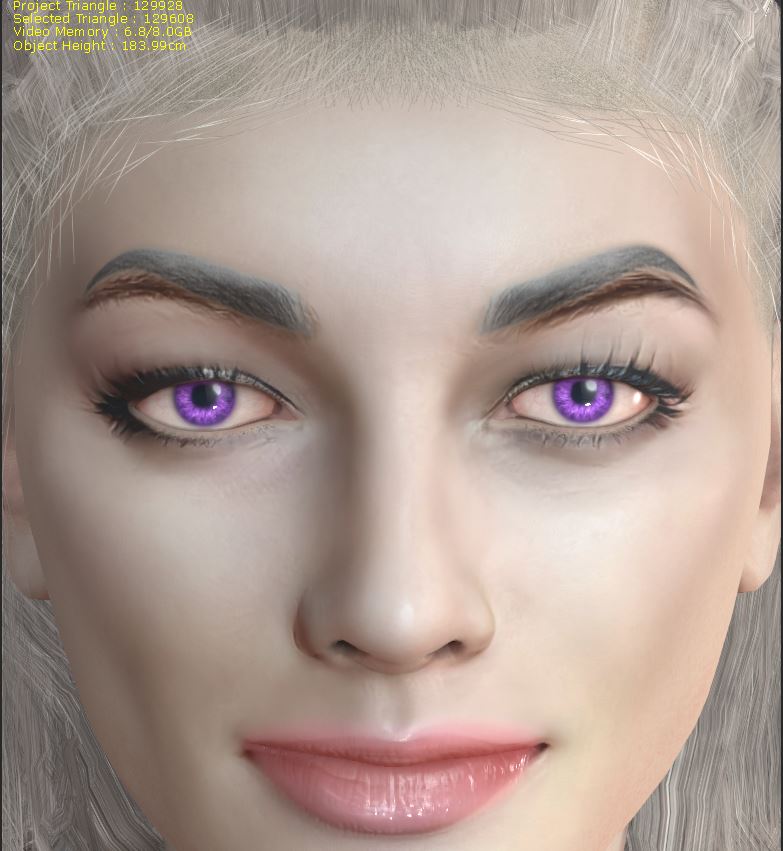 If you look at the image above you will see 2 sets of eyebrows. The dark brown eyebrows were done as a part of Headshot and I no longer want them. The gray eyebrows are the eyebrows I actually WANT. So is there a way to remove the Headshot eyebrows without redoing the entire face? Because if I have to redo her entire face then I'll just leave the Headshot eyebrows. The Headshot eyebrows are terrific - I just don't know how to change the color of those eyebrows because I think they're a part of her face due to the way Headshot works. Any and all advice is appreciated.
|
|
|
|
|
MilesV
|
MilesV
Posted 3 Years Ago
|
|
Group: Forum Members
Last Active: 3 Months Ago
Posts: 133,
Visits: 2.2K
|
If you have SkinGen Premium, you could do this by adding a layer to cover just the eyebrows you want gone. Then with some tweaking and maybe some additional layers, you can try to match the surrounding skin. Otherwise, you'll need to use a third-party photo editor. You could get someone on websites like upwork or fiverr to edit the texture for you.
|
|
|
|
|
3Aliens
|
3Aliens
Posted 3 Years Ago
|
|
Group: Forum Members
Last Active: 3 Years Ago
Posts: 377,
Visits: 734
|
Search the Image for the Headshot, open it in Paint, and Brush it away.
|
|
|
|
|
cepheistudios
|
cepheistudios
Posted 3 Years Ago
|
|
Group: Forum Members
Last Active: 8 Months Ago
Posts: 80,
Visits: 410
|
I need to just purchase Substance Painter. I don't have that. I do WISH Headshot had a few more tools that would allow for minor adjustments - but maybe that's coming in CC4. Who knows? One can only hope.
|
|
|
|
|
Wacky-Wabbit
|
Wacky-Wabbit
Posted 3 Years Ago
|
|
Group: Forum Members
Last Active: Last Year
Posts: 148,
Visits: 636
|
You can also reposition the grey eyebrows over the darker ones via using the offset "X" and "Y" offset under "Transform," in your Eyebrow "Makeup" in CC.
In addition to the offsets, you can use the "rotate" to tweak the grey eyebrows into the position perfectly over the darker ones.
If you want to keep the grey eyebrows where they are. You can launch the texture editor, after you're done with the makeup, and just paint over them.
Typically, when I am doing something similar I like to use the "clone" option in my editor. I am still Photoshop Elements 15 as my editor.
|
|
|
|
|
Wacky-Wabbit
|
Wacky-Wabbit
Posted 3 Years Ago
|
|
Group: Forum Members
Last Active: Last Year
Posts: 148,
Visits: 636
|
I did this using my Photoshop Elements 15 editor, obviously just from the photo that you posted. But you can do this with your character's actual "Diffuse" file. 
|
|
|
|
|
cepheistudios
|
cepheistudios
Posted 3 Years Ago
|
|
Group: Forum Members
Last Active: 8 Months Ago
Posts: 80,
Visits: 410
|
Okay, that looks absolutely stunning!!!
|
|
|
|
|
animagic
|
animagic
Posted 3 Years Ago
|
|
Group: Forum Members
Last Active: Last Month
Posts: 15.8K,
Visits: 31.4K
|
cepheistudios (1/31/2022)
I need to just purchase Substance Painter. I don't have that. I do WISH Headshot had a few more tools that would allow for minor adjustments - but maybe that's coming in CC4. Who knows? One can only hope.You don't need Substance Painter. Just a regular graphics editor as Earl-1 explains.
|
|
|
|
|
Wacky-Wabbit
|
Wacky-Wabbit
Posted 3 Years Ago
|
|
Group: Forum Members
Last Active: Last Year
Posts: 148,
Visits: 636
|
Thanks. Only took me a few minutes.
|
|
|
|