|
General Picture Animation
|
General Picture Animation
Posted 4 Years Ago
|
|
Group: Forum Members
Last Active: Last Year
Posts: 335,
Visits: 6.6K
|
I had to do a Google site search on the Reallusion forum to find out how Character Creator reports character scale. 3 years ago Animagic explained that Ctrl-F causes Character Creator to give the height in centimeters. This is very valuable information; I couldn't find it by using a search through the online manual. My recommendations: (1) Document this in a prominent way. (2) For those of us unfortunately stuck with imperial measures, repeat the information in feet and inches. (3) Make the info also available with a right-click on the character.
Animating now to life itself --Walt Whitman
|
|
General Picture Animation
|
General Picture Animation
Posted 4 Years Ago
|
|
Group: Forum Members
Last Active: Last Year
Posts: 335,
Visits: 6.6K
|
If character scale info is available automatically in the current version CC, I guess I never saw it, because that misguided and obscuring warning, PHYSX: CPU, overlays it.
PLEASE SKIP DISPLAYING THE PHYSX: CPU error message on our viewport!
Animating now to life itself --Walt Whitman
|
|
animagic
|
animagic
Posted 4 Years Ago
|
|
Group: Forum Members
Last Active: 2 Months Ago
Posts: 15.8K,
Visits: 31.4K
|
I'll come to the rescue again...:P In the Nvidia Control Panel, select 3D Settings from the menu bar and make sure that "Show PhysX Visual Indicator" is not selected. 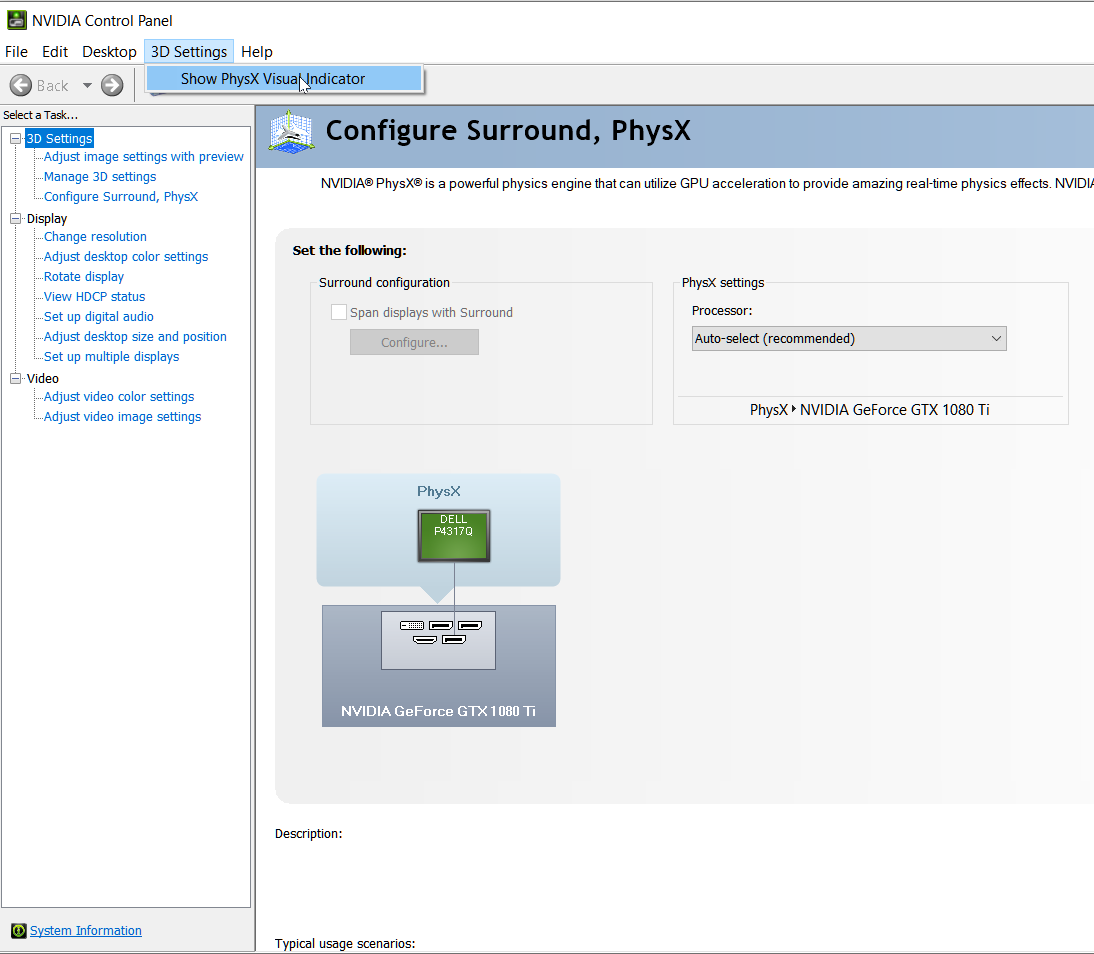
|
|
Peter (RL)
|
Peter (RL)
Posted 4 Years Ago
|
|
Group: Administrators
Last Active: 2 Years Ago
Posts: 23.1K,
Visits: 36.6K
|
General Picture Animation (1/24/2022)
My recommendations:
(1) Document this in a prominent way.
(2) For those of us unfortunately stuck with imperial measures, repeat the information in feet and inches.
You can already choose imperial or metric so feet and inches can be displayed if preferred. Again all detailed in the manual.
(4) Add a user control for setting the character height directly, while keeping proportions the same.
You can adjust the "Height" morph slider while watching the Info panel to set the Height of the character precisely. Not perfect but works well for me.
Peter
Forum Administrator www.reallusion.com
|
|
General Picture Animation
|
General Picture Animation
Posted 4 Years Ago
|
|
Group: Forum Members
Last Active: Last Year
Posts: 335,
Visits: 6.6K
|
If all that is true, why doesn't it surface in a search of the manual? I'm not ashamed of my commitment to learning the program at all. i'm not responsible if the website search function is defective.
Animating now to life itself --Walt Whitman
|