|
Author
|
Message
|
|
woody173
|
 woody173
Posted 5 Years Ago
woody173
Posted 5 Years Ago
|
|
Group: Forum Members
Last Active: 3 Years Ago
Posts: 177,
Visits: 571
|
I am trying to morph a character into a bear or maybe a gorilla if its easier (mmmmm). The problem I have is when i morph the character I needed it to morph to make him bigger (roughly the same height as a bear or gorilla).
I have noticed i can use morph sliders to create a gorilla but i cant tfigure out how to create a morph slider to take it from man to beast in iclone. The mesh just goes everywhere. I have tried it in blender using the new CC3 Blender tool and im even trying to learn maya to see if that can help but im at a loss. IF ONLY YOU COULD SCALE A BLOODY CHARACTER USING THE SCALE TOOL IN ICLONE i could get around it that way. I almost had it working using a test file in Maya but the scale was way off so I thought if I could scale the character it would help.
I*m assuming that both blender and maya only sculpt the mesh and dont interfere with the skeleton hence some really wierd results.
Any Ideas would really help.
Any Ideas?
Thanks
|
|
|
|
|
MilesV
|
MilesV
Posted 5 Years Ago
|
|
Group: Forum Members
Last Active: Last Year
Posts: 133,
Visits: 2.2K
|
Do you have Character Creator 3? If so, the below tutorial shows a way to accomplish what you want (if you have the necessary morphs): iClone 7 Tutorial - Flexing Character's Muscles with Morphing Animation - Reallusion Courses (Screenshot taken from CC3) (Screenshot taken from CC3)
|
|
|
|
|
4u2ges
|
4u2ges
Posted 5 Years Ago
|
|
Group: Forum Members
Last Active: Last Week
Posts: 5.3K,
Visits: 16.8K
|
Not sure how you have created an animal morph, but to succeed, you should not scale bones in any way while making an animal morph. Otherwise do not check "Adjust bones to fit Morph" while importing a morph into CC. Or if making morph in CC using some sliders in a way, do not use those which scale bones (length/scale morphs...). CC would scale bones for a static morph, but iClone Morphs Creator would not. So if the animal have substantially larger skeleton, you will still get the transition morph between human and animal as in tutorial, but the animal after transform would retain a human skeleton and would most likely look puny/ugly, or badly deformed while animated. Blender is a different story. I am not a Blender animation guru, but at least in Blender you can scale bones on a timeline. In combination with mesh morph you can get a full character transform from *any* to *any* I suppose.
|
|
|
|
|
woody173
|
woody173
Posted 5 Years Ago
|
|
Group: Forum Members
Last Active: 3 Years Ago
Posts: 177,
Visits: 571
|
Hi thanks for the help. Ive already looked at the tutorial shown which is what gave me the idea in the first place but because i need an animated morph this it seems is the problem. If you look at the pics it might give you an idea what im trying to achieve. But i honestly think it is out of the scope of iclone, which is a shame. The one at the bottom is the result from morph sliders. Exactly what you said the morph didnt work at all. If I could just get the morph from A_B I could remap the skin into fur and create my own motions just as the gorilla has. But it doesnt look possible. Oh well yet another disapointment from reallusion. On another note still cant understand why iclone wont let you scale characters within iclone. It allows you to move and rotate them. One of the fundermental things in any computer program is the ability to move, rotate and scale anything. Will just have to rewrite my story to fit what I can do im afraid 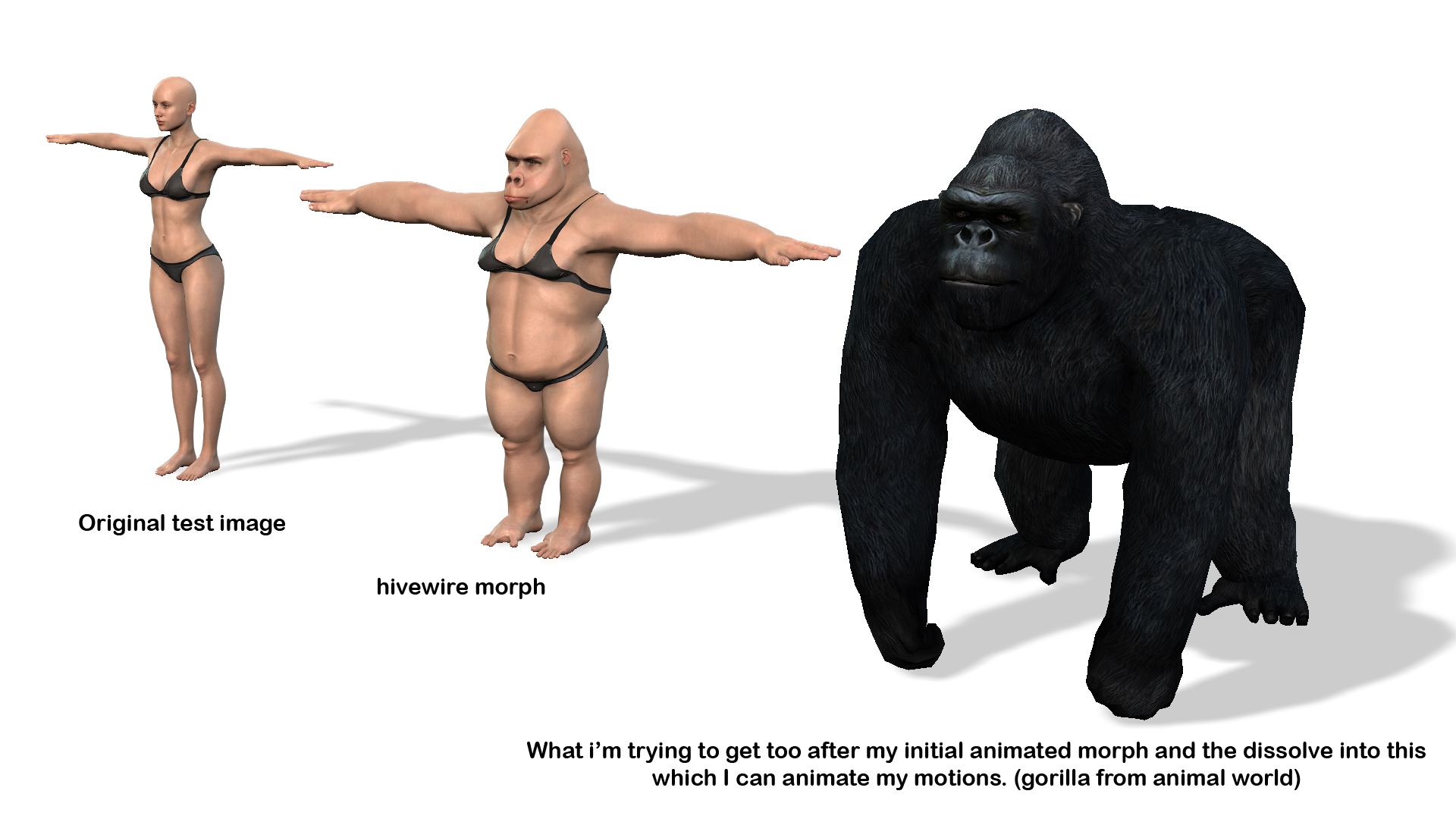 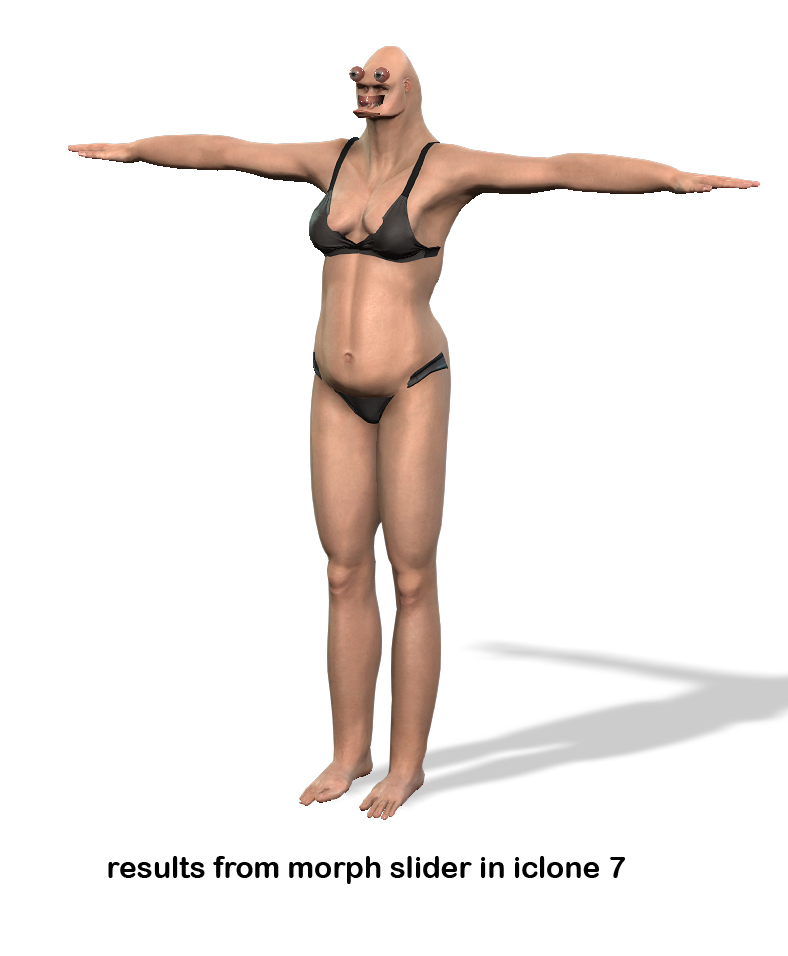
|
|
|
|
|
wires
|
|
|
Group: Forum Members
Last Active: Last Month
Posts: 5.7K,
Visits: 26.5K
|
You can scale a CC character in iClone by using the Modify panel settings: 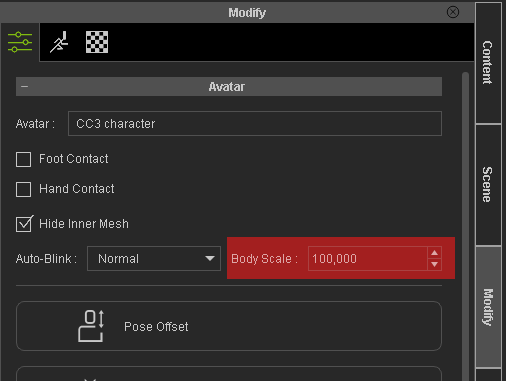 Gerry
Gerry
System: Win 10 Pro (21H2), Asus X99-E WS, CPU i7-5930K -3,5 GHz, 32 GB DDR4 2666-16 RAM, NVidia GTX 1080 Ti GPU - 11 GB VRAM(Driver Studio-536.99), Samsung 850 Pro 512 GB SSD, 6 TB HD storage.
|
|
|
|
|
woody173
|
woody173
Posted 5 Years Ago
|
|
Group: Forum Members
Last Active: 3 Years Ago
Posts: 177,
Visits: 571
|
Thanks Gerry
I didnt know that. But is it animatable so i can start my character off normal size and increase over time
But still need to figure out why my mesh goes haywire when using the sliders in CC3 to create my morphs in morph editor and animater
But thanks for the heads up will check it out
|
|
|
|
|
facr73
|
facr73
Posted 5 Years Ago
|
|
Group: Forum Members
Last Active: 3 Weeks Ago
Posts: 215,
Visits: 23.8K
|
No it's not animatable.
|
|
|
|
|
yepkoo
|
yepkoo
Posted 5 Years Ago
|
|
Group: Forum Members
Last Active: Last Year
Posts: 1.2K,
Visits: 1.9K
|
I don't know if it will work for you, but maybe some methods used for UE can offer an idea. Anything could be done if iClone had morph sliders.
I think it only works in external programs https://www.youtube.com/watch?v=MsdQ2-Q_8Kw
----------------------------------------------------------------
https://www.youtube.com/yepkoo
https://dev.epicgames.com/community/profile/bxvo/Yepkoo#learning
|
|
|
|
|
Amper Sand
|
Amper Sand
Posted 5 Years Ago
|
|
Group: Forum Members
Last Active: 3 Years Ago
Posts: 731,
Visits: 5.2K
|
yepkoo (11/17/2021)
Anything could be done if iClone had morph sliders.iClone has morphing sliders and are working nicely (see Miles' tutorial above) - the problem/limitation is you cannot morph bones.
______________________________________________________________________________
Software developer. iClone hobbyist since January 11, 2020. Best work so far: Robots among us: The Lab and The sad end of a legend
In progress: Black Mamba
AMD Ryzen 3950X 16C/32T 4.2 GHz, 64GB RAM, RTX2080 11GB, 2TB Samsung 970 Pro SSD, 8TB Seagate BarraCuda HDD, Win11 64-bit, iClone 8.12
|
|
|
|
|
Amper Sand
|
Amper Sand
Posted 5 Years Ago
|
|
Group: Forum Members
Last Active: 3 Years Ago
Posts: 731,
Visits: 5.2K
|
@woody I haven't tried, but it could work (I'm thinking) the following trick in case you don't want the transition to apply during a motion, then for the morphing scene I would convert the girl and gorilla from characters to props - props are timeline-scalable. And combining this with a fade-in-fade-out opacity, you could grow the obj-girl to the size of obj-gorilla while adjusting at the same time the opacity for both. Once the morphing scene ends, next one will have not the obj-gorilla, but the character-gorilla.
______________________________________________________________________________
Software developer. iClone hobbyist since January 11, 2020. Best work so far: Robots among us: The Lab and The sad end of a legend
In progress: Black Mamba
AMD Ryzen 3950X 16C/32T 4.2 GHz, 64GB RAM, RTX2080 11GB, 2TB Samsung 970 Pro SSD, 8TB Seagate BarraCuda HDD, Win11 64-bit, iClone 8.12
|
|
|
|