|
By woody173 - 5 Years Ago
|
I am trying to morph a character into a bear or maybe a gorilla if its easier (mmmmm). The problem I have is when i morph the character I needed it to morph to make him bigger (roughly the same height as a bear or gorilla).
I have noticed i can use morph sliders to create a gorilla but i cant tfigure out how to create a morph slider to take it from man to beast in iclone. The mesh just goes everywhere. I have tried it in blender using the new CC3 Blender tool and im even trying to learn maya to see if that can help but im at a loss. IF ONLY YOU COULD SCALE A BLOODY CHARACTER USING THE SCALE TOOL IN ICLONE i could get around it that way. I almost had it working using a test file in Maya but the scale was way off so I thought if I could scale the character it would help.
I*m assuming that both blender and maya only sculpt the mesh and dont interfere with the skeleton hence some really wierd results.
Any Ideas would really help.
Any Ideas?
Thanks
|
|
By MilesV - 5 Years Ago
|
Do you have Character Creator 3? If so, the below tutorial shows a way to accomplish what you want (if you have the necessary morphs):
iClone 7 Tutorial - Flexing Character's Muscles with Morphing Animation - Reallusion Courses

(Screenshot taken from CC3)
|
|
By 4u2ges - 5 Years Ago
|
Not sure how you have created an animal morph, but to succeed, you should not scale bones in any way while making an animal morph.
Otherwise do not check "Adjust bones to fit Morph" while importing a morph into CC. Or if making morph in CC using some sliders in a way, do not use those which scale bones (length/scale morphs...).
CC would scale bones for a static morph, but iClone Morphs Creator would not.
So if the animal have substantially larger skeleton, you will still get the transition morph between human and animal as in tutorial,
but the animal after transform would retain a human skeleton and would most likely look puny/ugly, or badly deformed while animated.
Blender is a different story. I am not a Blender animation guru, but at least in Blender you can scale bones on a timeline.
In combination with mesh morph you can get a full character transform from *any* to *any* I suppose.
|
|
By woody173 - 5 Years Ago
|
Hi thanks for the help. Ive already looked at the tutorial shown which is what gave me the idea in the first place but because i need an animated morph this it seems is the problem.
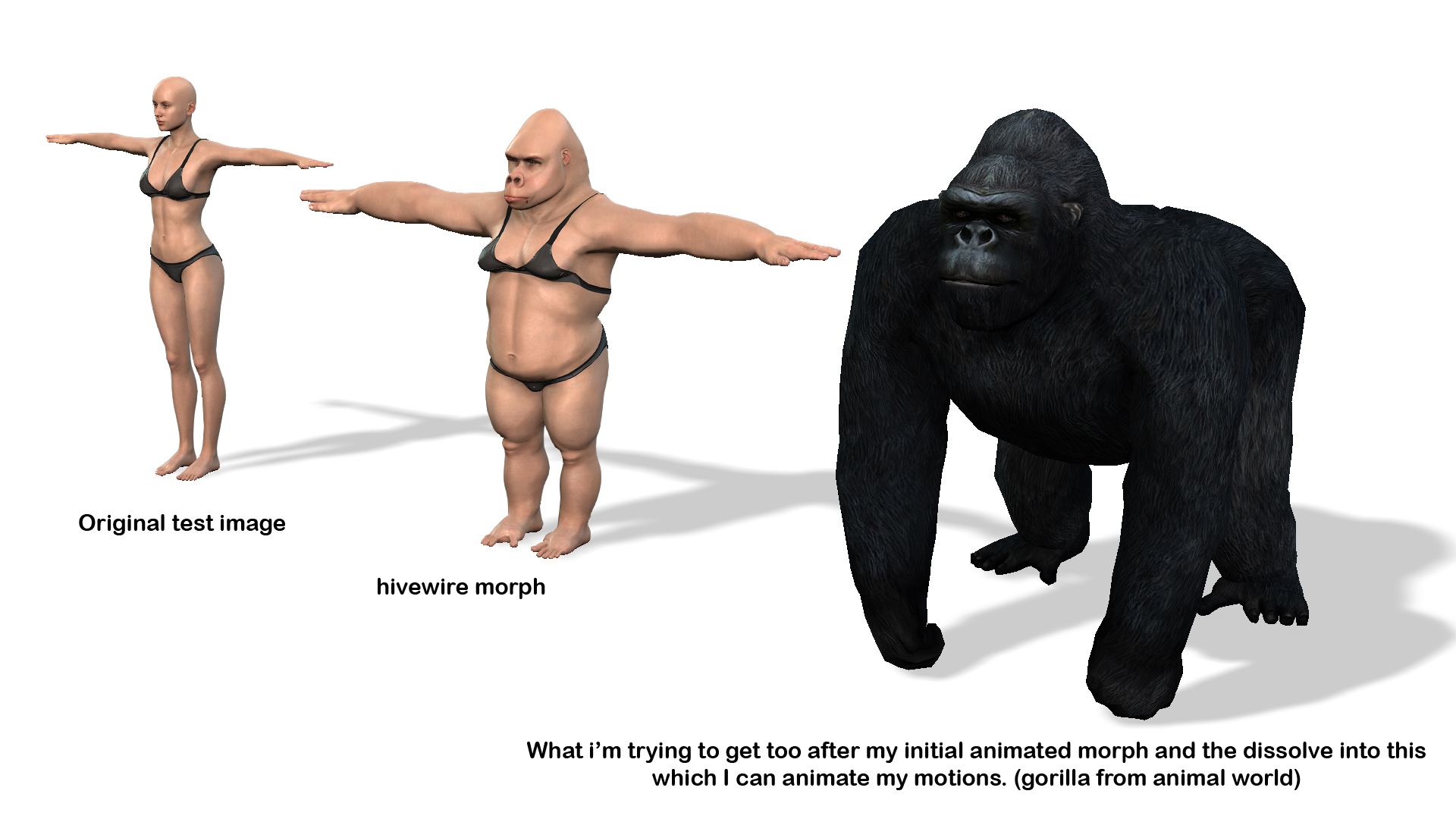
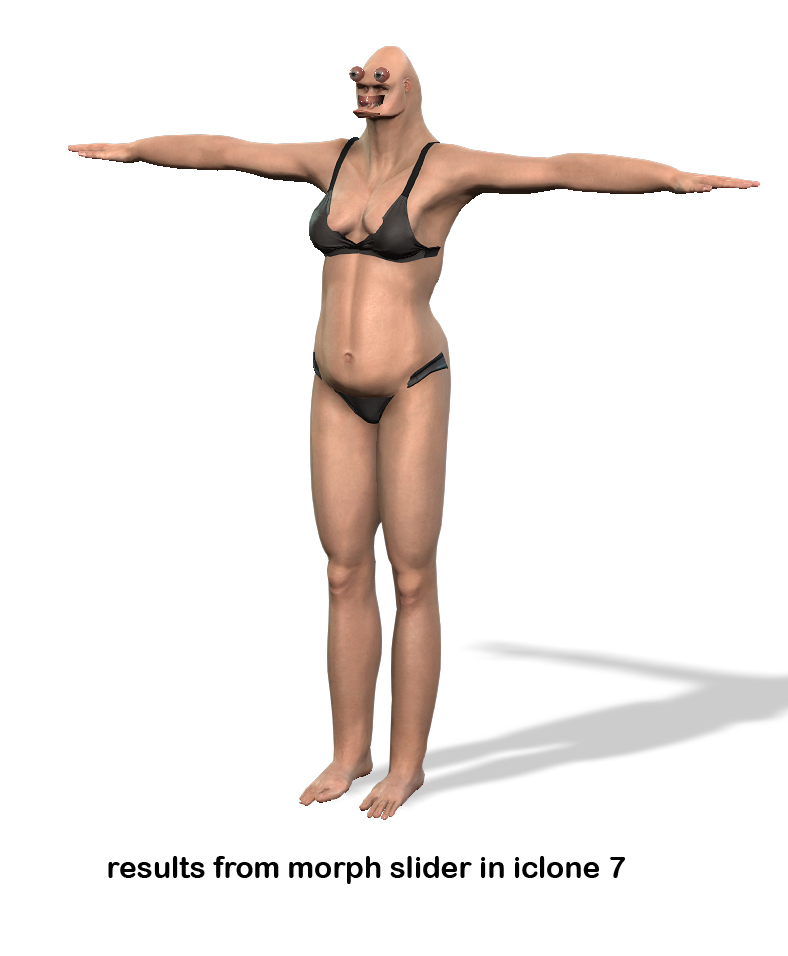
If you look at the pics it might give you an idea what im trying to achieve. But i honestly think it is out of the scope of iclone, which is a shame. The one at the bottom is the result from morph sliders.
Exactly what you said the morph didnt work at all.
If I could just get the morph from A_B I could remap the skin into fur and create my own motions just as the gorilla has. But it doesnt look possible.
Oh well yet another disapointment from reallusion. On another note still cant understand why iclone wont let you scale characters within iclone. It allows you to move and rotate them.
One of the fundermental things in any computer program is the ability to move, rotate and scale anything.
Will just have to rewrite my story to fit what I can do im afraid
|
|
By wires - 5 Years Ago
|
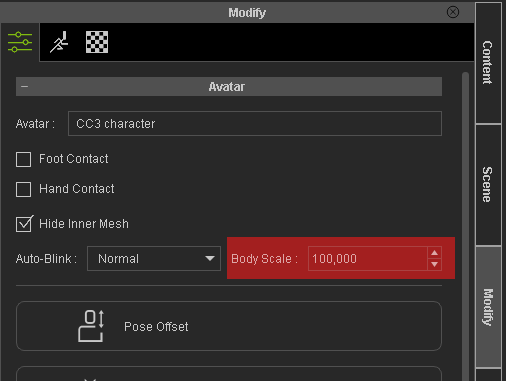
You can scale a CC character in iClone by using the Modify panel settings:
|
|
By woody173 - 5 Years Ago
|
Thanks Gerry
I didnt know that. But is it animatable so i can start my character off normal size and increase over time
But still need to figure out why my mesh goes haywire when using the sliders in CC3 to create my morphs in morph editor and animater
But thanks for the heads up will check it out
|
|
By facr73 - 5 Years Ago
|
|
No it's not animatable.
|
|
By yepkoo - 5 Years Ago
|
I don't know if it will work for you, but maybe some methods used for UE can offer an idea.
Anything could be done if iClone had morph sliders.
I think it only works in external programs
https://www.youtube.com/watch?v=MsdQ2-Q_8Kw
|
|
By Amper Sand - 5 Years Ago
|
|
yepkoo (11/17/2021)
Anything could be done if iClone had morph sliders.
iClone has morphing sliders and are working nicely (see Miles' tutorial above) - the problem/limitation is you cannot morph bones.
|
|
By Amper Sand - 5 Years Ago
|
@woody
I haven't tried, but it could work (I'm thinking) the following trick
in case you don't want the transition to apply during a motion, then for the morphing scene I would convert the girl and gorilla from characters to props - props are timeline-scalable. And combining this with a fade-in-fade-out opacity, you could grow the obj-girl to the size of obj-gorilla while adjusting at the same time the opacity for both. Once the morphing scene ends, next one will have not the obj-gorilla, but the character-gorilla.
|
|
By woody173 - 5 Years Ago
|
That seems like a great idea ampertox. Never thought of it that way. I might have to rethink my motion while it was morphing from character to gorilla, but to be honest im thinking of just giving up on the idea.
It seems a lot of hard work just for a five or ten second animation. Although it would have made a fantastic end to my story. IM not brilliant with most things in iclone and CC3 but I do love a challenge.
But some things are just out of my reach.
I have found an After effects tutorial which means I could animate three different shots on blue screen with iclone and piece them together in after effects to create a Harry Potter effect where Professor Magonagle transforms from a cat.
Its not ideal and potentially lethal but its just a shame that a simple transform in iClone would have done the trick within minutes.
I have already spent two weeks researching this problem and have a few good ideas from other iClone users.
Just wished I could solve the problem all in one program.
Ce La vie
Nick
|
|
By yepkoo - 5 Years Ago
|
ampertox (11/17/2021)
yepkoo (11/17/2021)
Anything could be done if iClone had morph sliders.iClone has morphing sliders and are working nicely (see Miles' tutorial above) - the problem/limitation is you cannot morph bones.
Thanks, I reviewed the tutorial as you said and it is quite useful.
I am not a professional iClone user yet, although only the morphs we applied are transferred, that's good to know.
|
|
By 4u2ges - 5 Years Ago
|
Great Idea ampertox. Going further you can actually do the full transform for a static prop from the girl to gorilla. Very easy done in Blender with Mesh data Transfer add-on and even without.
And then applied as slider to iClone. Once static is morphed it can be replaced with actual character with visibility. Some work to be done for smooth transition - Merging character materials and mesh to static prop..etc.
I will try it this weekend.
|
|
By CtrlZ - 5 Years Ago
|
|
With a static camera take small increment (static) pictures (png.) and put them in sequence of at least 15 frames per second in your editor. In other words old school it lol
|
|
By 4u2ges - 5 Years Ago
|
So I made one - Kevin to Orc transition. All was done in CC, iClone and Morphs Creator (no Blender). Still It was kind of PITA to make.
This is how I made it:
Both characters have to have exact same vertex count. Orc had custom DAZ teeth and eyes. Had to replace them with CC3+ and customize to resemble the original look.
Converted both characters to game base - single texture (to have less work with texture transition).
Sent one by one to iClone and applied the same clip
Broke both clips at some point and spread apart to have ~4 seconds transformation between 2 parts of the broken clips.
At the end of the first part recorded single frame as motion (with collect clip).
Sent both characters to 3DX one after another, applied that 1 frame pose and exported both as OBJ.
Brought both OBJs to iClone as props (did not split). Fixed materials with paint bucket for Kevin (from original character to the prop).
Sent Orc prop to Morphs Creator and exported as OBJ.
Sent Kevin prop to Morphs Creator and applied newly made Orc OBJ.
Now I have 4 slider on Kevin to morph it to Orc. Baked sliders into one and Updated Morph to iClone for Kevin prop. Deleted Orc prop in iClone (there is no need for it anymore).
Now, using visibility for Kevin and Orc characters and Kevin prop arranged them to have Kevin character be visible only during first part of the clip, Kevin prop in between 2 part of the broken clip and Orc character at the last part of the clip.
Applied Morph for Kevin prop in between 2 clips.
For texture, applied Orc body Diffuse into Kevin prop Blend channel for body material, checked "use sRGB" for it and set as Multiply. Then had Kevin prop Diffuse go from 100% to 0 and Blend from 0 to 100% during transition.
And for normal map I made a video in HitFilm for transition from Kevin Normal to Orc normal maps for exact same duration as a transition in iClone. Applied video to Kevin prop Normal channel aligning it with transition at the timeline.
If you have a cloth, both characters must have the same. Optionally you may want to rip/deform cloth on the prop and "Last Standing" character with custom morphs (whole different story).
|
|
By woody173 - 5 Years Ago
|
Thanks for everyones thoughts but Ive tried everything I can think of to do this morph. I GIVE UP.
I even went to davinci ressolve and after effects to see if i could morph the videos and it still looks terrible
Im just going to have to admit defeat and rewrite my ending (My wonderful ending) that I had planned.
Its just a shame that some one in their wildest wisdom could think of a way of morphing and changing the bone system in iclone so someone like me coul do it all in one program
Never mind waste of a couple of weeks thats all.
Need to rethink and try something that is possible in iclone just so I can fiinish my saga before i die of old age.......whoops to late! (im already in old age LOL)
Thanks again guys
|
|
By woody173 - 5 Years Ago
|
4u2ges
Brilliant way of doimg my morph
Tried it and it worked great. Thank you so much
I am having a slight problem because I couldnt follow your instructions on the texture morph.
I am trying out substance painter (Very much a novice) but i am trying to create a gorilla looking skin texture. that I could morph along with my character.
I have put a link up to all my files in a winrar file so anyone can take a look at it but you may be able to see my problems. (Lines where the uv's connect).
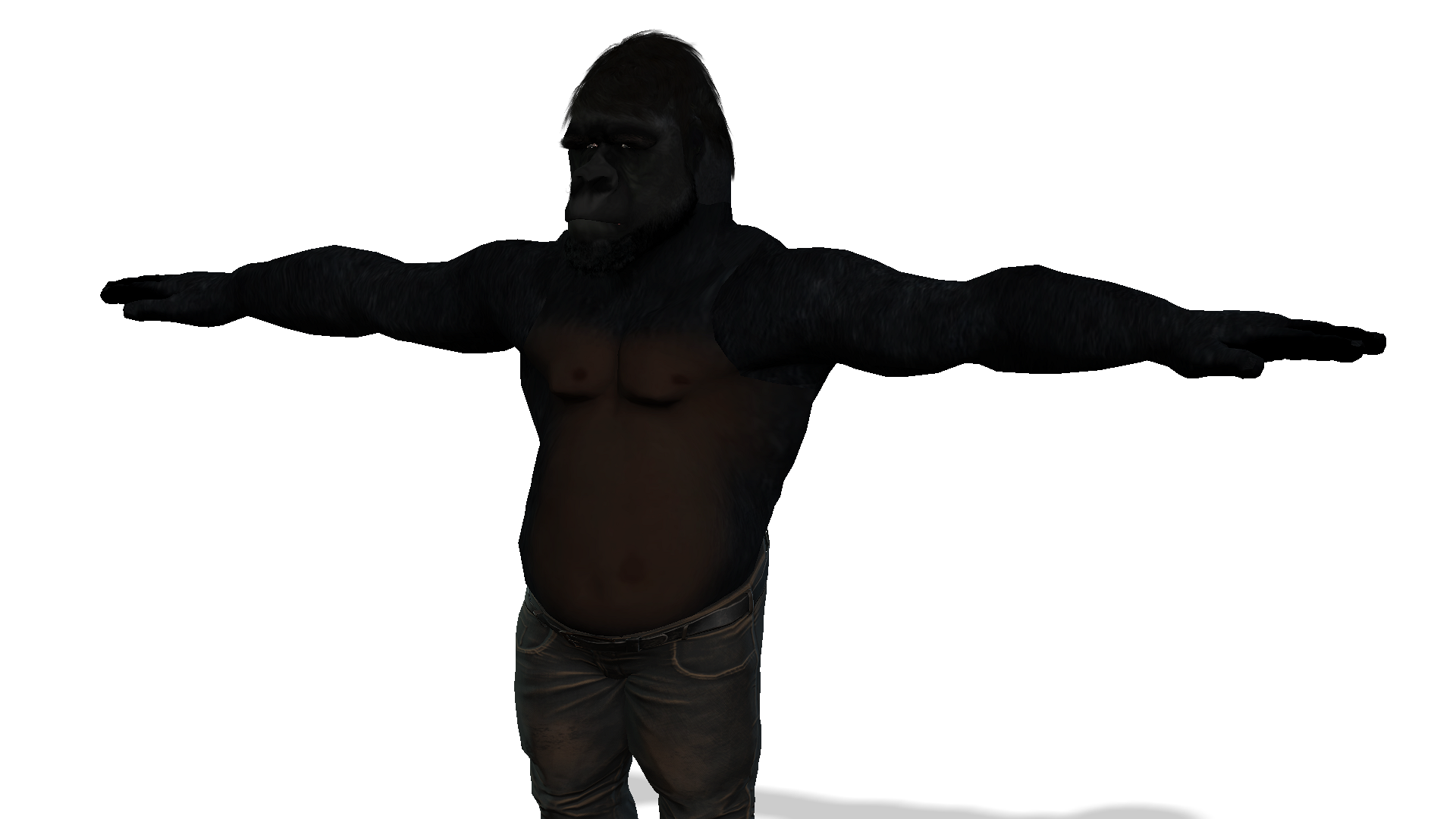
Ive also put my character of my final gorilla so you take a look at where I mght have gone wrong.
For the hell of it i cant seem to figure it out. It also seems really dark and in substabce painter its not that bad.
By the way for my characters dignity and red faces from my prospective audience I had to leave the shoes and jeans on LOL
But I hope you can see where im having my problems.
When i have done the morph animation completely Ill show you a little snippit of it, but dont want to give away my ending to my story....its a long way off yet.
Hope you can help.
Many thanks again
https://drive.google.com/file/d/1XrlR1vCawnMr1YJPnxRzrQ2Vyix9pKYy/view?usp=sharing
|
|
By 4u2ges - 5 Years Ago
|
Glad it's working out some ways :)
But you have to share with everyone that link in Google drive (otherwise it cannot be downloaded without special request). Though I can tell you, I have Substance Painter, but I almost never used it and I think license expired.
Nonetheless, I'll try to see what you have there.
|
|
By woody173 - 5 Years Ago
|
sorry 4u2ges
dont use onedrive very often
heres the link so anyone can look at it (i think)
https://drive.google.com/file/d/1XrlR1vCawnMr1YJPnxRzrQ2Vyix9pKYy/view?usp=sharing
|
|
By 4u2ges - 5 Years Ago
|
I could not open SP file as my version of SP is older.
But anyway you got those seams because you were probably painting across UV islands, while you should be painting the model itself. So cannot help there.
There are plenty of fur brushes (free or cheap). You could get one and paint the gorilla directly all over to avoid seams. And then do the face and chest over it.
Regarding existed material and shading. It should be converted to PBR. It should have higher resolution. The diffuse color was gray (that is why it was so dark).
Anyhow, this best I could do with existed one (converted to 4k with Topaz, made normal and added a touch of displacement).
https://drive.google.com/file/d/1ZAq76j4nEwtbivV67llLcPyxIhIFgRzh/view?usp=sharing
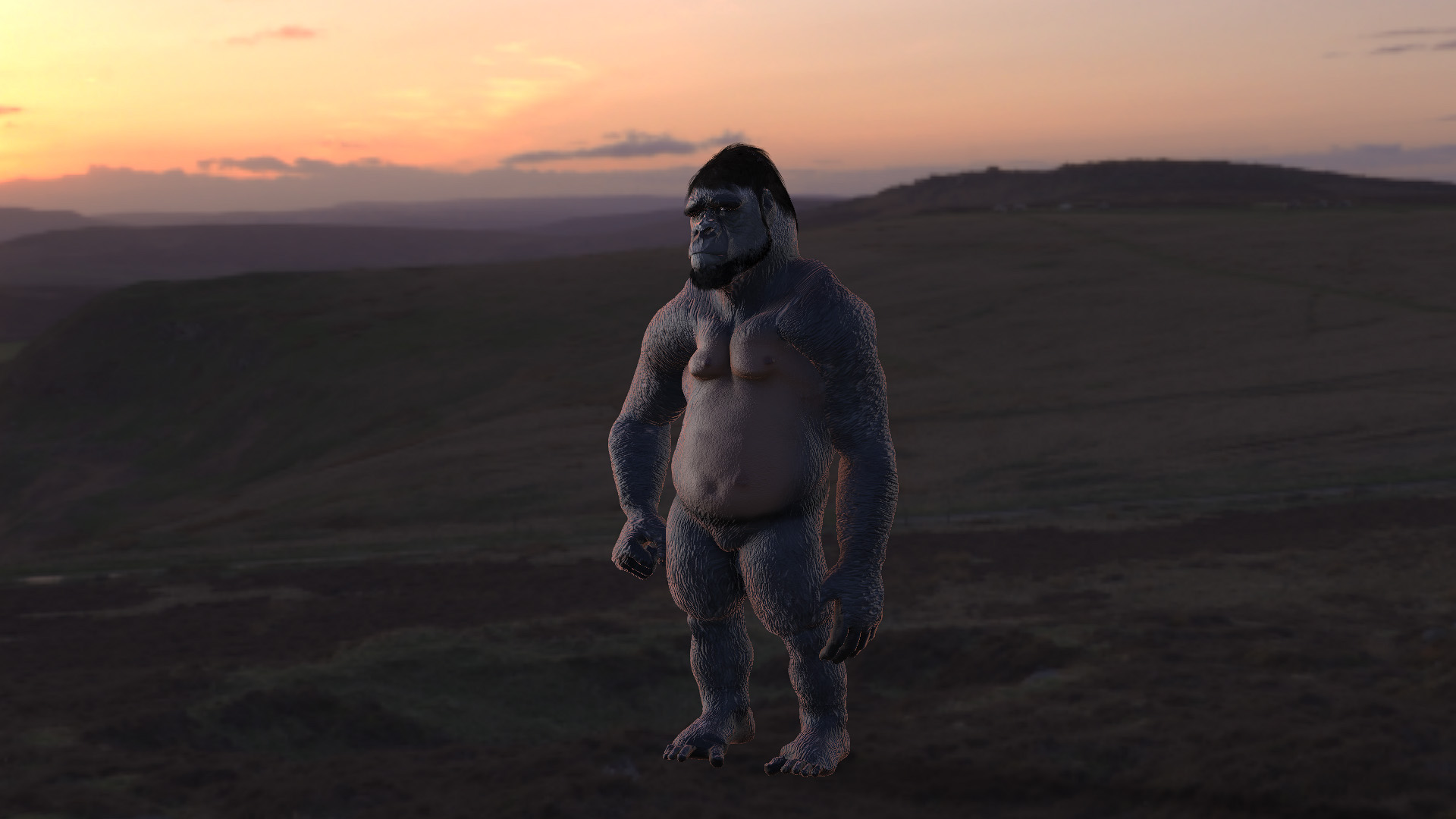
|
|
By 4u2ges - 5 Years Ago
|
BTW, if you do not want to redo your work and want to get rid of the seams, you can do that easy in 3Dcoat (I think you have it).
I like it because for a lot of part it works like photoshop only in 3D space.
So using a simple clone tool can get rid of seams across UV islands:


|
|
By woody173 - 5 Years Ago
|
That is absolutely amazing. All i need to do is learn how to use 3dCoat. LOL
I want to learn to do it becasue I dont want to keep asking dumb questions to all you guys all the time.
And I suppose im a sucker for punishment.
Once I have done it by pretty much starting from scratch I am supposing I will be able to put the same skin on my morph prop?
Ill try and keep you informed of my progress, but thank you so much for taking the time to help an old duffer like me out.
All the best
And have a great christmas
|
|
By 4u2ges - 5 Years Ago
|
|
That is absolutely amazing. All i need to do is learn how to use 3dCoat. LOL
You bet. Not sure how you painted it in Substance painter and why you had seams, but 3D Coat has a few good Hair Brushes by default.
And painting color and height it super easy... well, the interface is a bit odd, but pretty much easy to learn with maybe couple of online tutorials.
This took 10 min to paint just hair with a single brush over the gorilla from scratch. No need for external texture. Brush can jitter hue, color, saturation, etc... on the fly for real looking hair.
(I did not work out bare skin details)

As to translating the material to prop, yes, I just used a Paint Bucket to copy material from character to prop.
They should be absolutely identical geometry wise.
|