|
Author
|
Message
|
|
Victor.Soupday
|
Victor.Soupday
Posted 4 Years Ago
|
|
Group: Forum Members
Last Active: 2 Months Ago
Posts: 569,
Visits: 9.0K
|
Unity Auto-setup Release 1.2.0Built-in (Unity 3D): https://github.com/soupday/cc3_unity_tools_3D/releasesURP: https://github.com/soupday/cc3_unity_tools_URP/releasesHDRP: https://github.com/soupday/cc3_unity_tools_HDRP/releasesChangelog: v 1.2.0- Blender Tools to Unity pipeline implemented.
- Uses compute shaders for baking Unity packed textures from base Blender textures.
- Eye Occlusion and Tearline shaders updated for Blender model space.
- Diffuse Color modifier correctly converted from linear to sRGB color space
In this release I have implemented a pipeline from the Blender autosetup to Unity: A pipeline suggested by aoakalin on Github. By using a .blend file as the character model source rather than an fbx, it means a very fast edit & modification pipeline for characters between Blender and Unity, which can be sent back to CC3. This pipeline is a work-in-progress at the moment. There are a few differences between the Unity Fbx export from CC3 and the Blender export in a blend file, namely the internal transform scale and orientations and the feet position, for some reason. Which meant updating some of the occlusion and tearline shaders to cope with different vertex displacement directions. Also the roughness to smoothness conversion is not a straightforward inversion of the roughness, but there is a gamma correction curve applied also. So there could be more little differences lurking under the surface that need addressing. Blender thread post: https://forum.reallusion.com/FindPost508564.aspx
|
|
|
|
|
FabricioAlencar
|
FabricioAlencar
Posted 4 Years Ago
|
|
Group: Forum Members
Last Active: 2 Years Ago
Posts: 7,
Visits: 239
|
Hi Victor, what an amazing job.
Is it possible to use this CC3 workflow in conjunction with Blender to create or add CC3 blendshapes to the character and then send the character with the blendshapes to Unity?
And is there any way to apply Tesselation to the corners of the character, just like in LitTesselation material shader with Phong ?
|
|
|
|
|
jerome.dipietro
|
jerome.dipietro
Posted 4 Years Ago
|
|
Group: Forum Members
Last Active: Last Year
Posts: 91,
Visits: 1.1K
|
In the past I've used FaceIt (Blender Add-On) to add the missing ARKit blendshapes to CC3 GameBase characters: https://youtu.be/s4ajwepbZgAIt's not perfect but it works. Would love to know if @Victor.Soupday has a better alternative :)
Unity Virtual Reality Developer
|
|
|
|
|
FabricioAlencar
|
FabricioAlencar
Posted 4 Years Ago
|
|
Group: Forum Members
Last Active: 2 Years Ago
Posts: 7,
Visits: 239
|
This Face It tool is very interesting. It would be amazing to be able to export the model with the body blendshapes to blender and then to Unity or straight to Unity without having to take the character to the Morph Creator in iClone to bake the blendshapes. this would bring CC3 unlimited possibilities of creation and detailing in unity with CC3
|
|
|
|
|
syver.lauritzsen
|
syver.lauritzsen
Posted 4 Years Ago
|
|
Group: Forum Members
Last Active: 4 Years Ago
Posts: 2,
Visits: 26
|
Hi. I'm locked to Unity 2019.4.11f1's built-in pipeline which this particular plug-in doesn't support, so I had to resort to the old Auto Setup which can be found here: https://forum.reallusion.com/489608/Open-Source-Auto-Setup-for-UnityThat thread seems to be dead however, so I thought I'd ask here: for the most part it manages to import the character correctly, but with a big caveat: nearly all the materials are set to use the Transparent rendering mode, which presents a ton of culling issues. Does anyone know of a fix? I understand why the hair shader gets set to transparent (which still doesn't look good), but why is it also the case for clothes? Apologies if this isn't the right place to ask. Thanks!
|
|
|
|
|
Victor.Soupday
|
Victor.Soupday
Posted 4 Years Ago
|
|
Group: Forum Members
Last Active: 2 Months Ago
Posts: 569,
Visits: 9.0K
|
syver.lauritzsen (3/28/2022)
Hi. I'm locked to Unity 2019.4.11f1's built-in pipeline...
nearly all the materials are set to use the Transparent rendering mode, which presents a ton of culling issues. Does anyone know of a fix?I think it's something Unity does automatically, when there's an alpha channel in the diffuse texture it assumes the material should be transparent. But before you struggle on with that: The HDRP and URP versions are very resistant to being loaded into 2019 because of the shader graph version differences. But, the built-in pipeline doesn't use it so... Try this: - Download the the latest Unity 3D version: https://github.com/soupday/cc3_unity_tools_3D
- Unzip it somewhere safe.
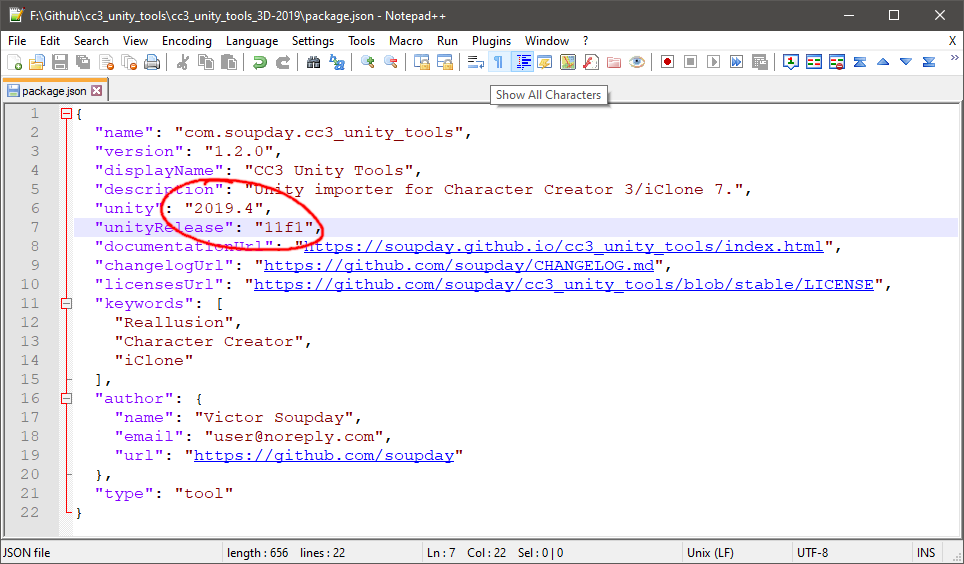
- Edit the package.json inside the unzipped folder and change the "unity" and "unityRelase" values to "2019.4" and "11f1"
- e.g.
I haven't tried this in 2019.4.11f1, but I've just tried it in 2019.4.26f1 and it works quite well: (this is with the post processing stack 3.1.1 installed too. The preview scene will use it if it's installed but it's not a requirement.) 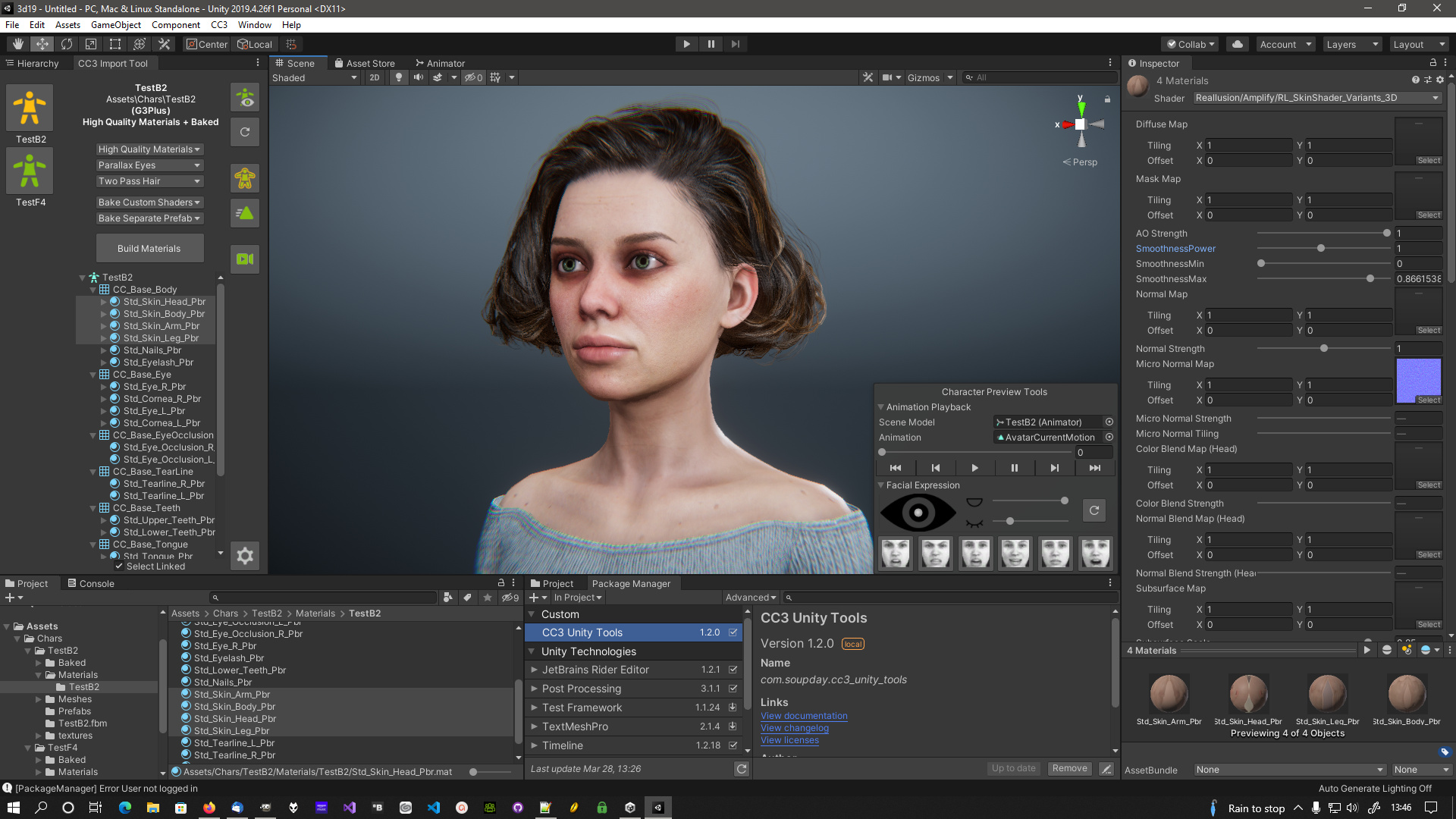
|
|
|
|
|
Makumba666
|
Makumba666
Posted 4 Years Ago
|
|
Group: Forum Members
Last Active: 4 Years Ago
Posts: 80,
Visits: 930
|
I have strange problem: when I import model in unity it has strange lines on them. And it happens when I use URP or HDRP. At first I thought it was unity renderer problem, causing some seams between colors, but at close examination it turned out to be some elevations. Of course I checked normals, but they are smooth. Then I exported default CC avatar. This is the result: 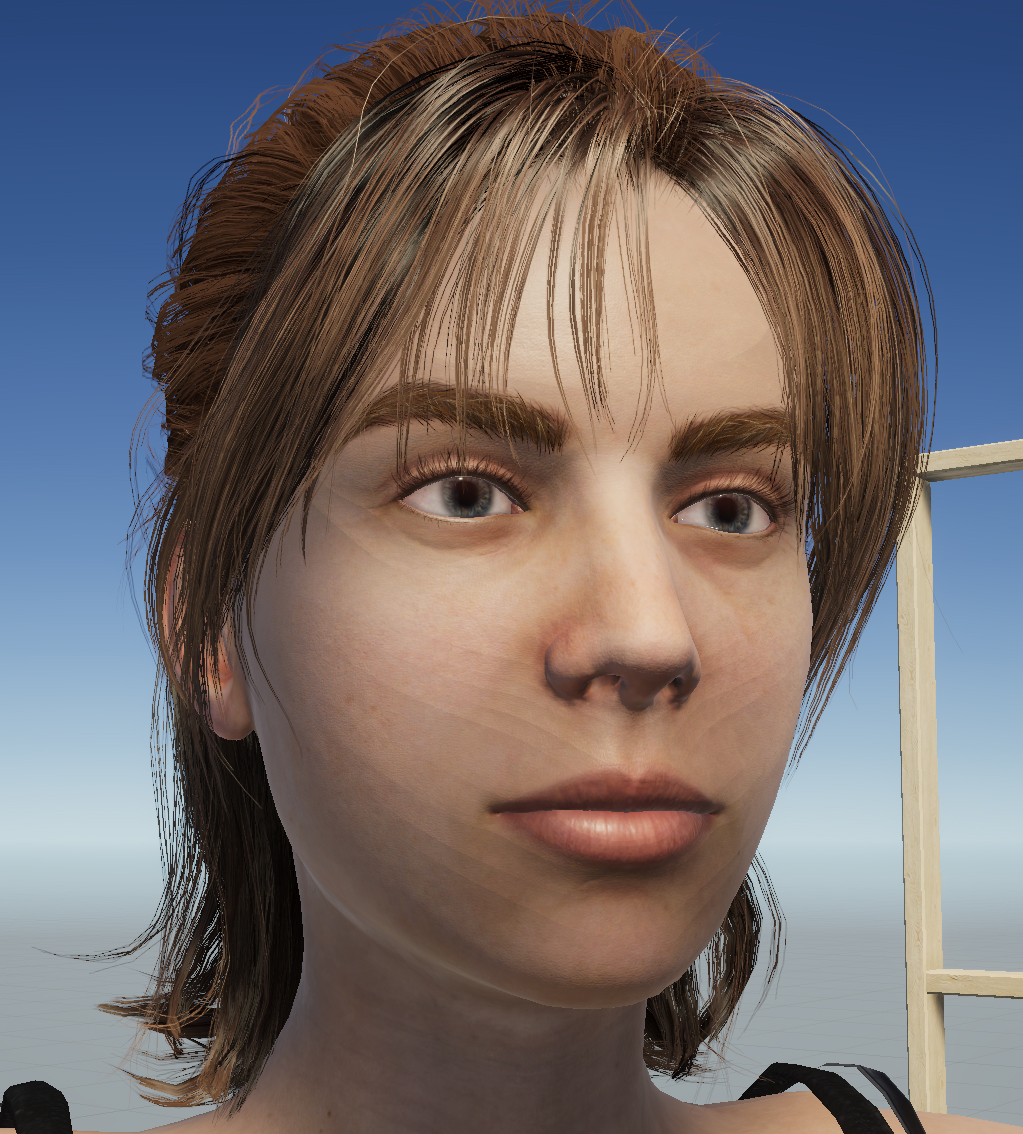 Any advice?
|
|
|
|
|
Sekker2k4
|
Sekker2k4
Posted 4 Years Ago
|
|
Group: Forum Members
Last Active: 4 Years Ago
Posts: 13,
Visits: 26
|
Great Work!
I am not a Blender user.
But it will be amazing if there are an autosetup as Blender has for 3ds max and Unity.
Then CC3+ > Zbursh > 3DS Max > CC3+ > Unity
it will be amazing.
|
|
|
|
|
Victor.Soupday
|
Victor.Soupday
Posted 4 Years Ago
|
|
Group: Forum Members
Last Active: 2 Months Ago
Posts: 569,
Visits: 9.0K
|
Makumba666 (3/31/2022)
I have strange problem: when I import model in unity it has strange lines on them. And it happens when I use URP or HDRP. At first I thought it was unity renderer problem, causing some seams between colors, but at close examination it turned out to be some elevations. Of course I checked normals, but they are smooth. Then I exported default CC avatar. This is the result: Any advice? It's banding in the soft shadow cascades. In this case the first (Cascade split 0). It's most noticeable when there's only one direct light source. The built-in pipeline does this the most. URP and HDRP handle it better. You can try adjusting the cascade splits, shadow distance and shadow resolution in the Quality settings, but you can never really get rid of it completely. Increasing the shadow bias on the lights themselves will stop it, at a cost of less detail in the close up shadowing. But if that shadow detail has noticeable banding then it's probably worth it. Edit: I should add, before you rush to fix this, make sure you're seeing this problem in the Game window (i.e. what it will look like at run time) and not the Scene editor viewport. The Scene viewport is not rendered at the same quality as the Game window and this may be a non issue. Edit 2: Reducing the far clipping plane in the Camera settings also helps (but only for the Game window)
|
|
|
|
|
Makumba666
|
Makumba666
Posted 4 Years Ago
|
|
Group: Forum Members
Last Active: 4 Years Ago
Posts: 80,
Visits: 930
|
Victor.Soupday,
Thanks for tips, they work.
|
|
|
|