|
Author
|
Message
|
|
codyvbrown
|
codyvbrown
Posted 5 Years Ago
|
|
Group: Forum Members
Last Active: 5 Years Ago
Posts: 9,
Visits: 61
|
Hello everyone! am brand new here. I just bought the character creator package last night that includes 1,000s of morphs. Does anyone have any tips on making a beer belly effect? or someone slightly chubby? I've tried many times and I'm unable to remove the ab line on the model. Am trying to get a body type like the photo bellow. 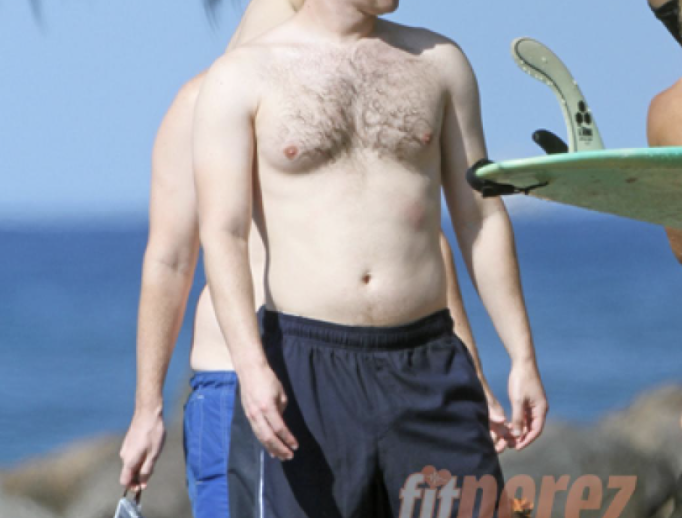
Would much appreciate any help. thank you.
|
|
|
|
|
codyvbrown
|
codyvbrown
Posted 5 Years Ago
|
|
Group: Forum Members
Last Active: 5 Years Ago
Posts: 9,
Visits: 61
|
for further clarification. this is the ab line that I'm talking about. I can't get it to go any further and it screws up the effect. 
|
|
|
|
|
Kelleytoons
|
Kelleytoons
Posted 5 Years Ago
|
|
Group: Forum Members
Last Active: 2 Years Ago
Posts: 9.2K,
Visits: 22.1K
|
The only thing I would mention is you can "bake" any morph into the character and then apply it again. So there is no limit to the amount of any particular morph. I would play with this myself but I'm a bit too inebriated. But I suspect you can get what you want by careful adjustments (don't forget using the "pregnant" morph).
Alienware Aurora R16, Win 11, i9-149000KF, 3.20GHz CPU, 64GB RAM, RTX 4090 (24GB), Samsung 870 Pro 8TB, Gen3 MVNe M-2 SSD, 4TBx2, 39" Alienware Widescreen Monitor
Mike "ex-genius" Kelley
|
|
|
|
|
codyvbrown
|
codyvbrown
Posted 5 Years Ago
|
|
Group: Forum Members
Last Active: 5 Years Ago
Posts: 9,
Visits: 61
|
Kelleytoons (5/10/2021)
The only thing I would mention is you can "bake" any morph into the character and then apply it again. So there is no limit to the amount of any particular morph.
I would play with this myself but I'm a bit too inebriated. But I suspect you can get what you want by careful adjustments (don't forget using the "pregnant" morph).thanks Kellytoons! I tried this, and I could be doing something wrong here, but that setting is already set at 0. so I've been unable to re bake it when it's there. the default 0 on the ab line seems to be already sunken so can't flatten it. but maybe I'm missing something? thx again for help.
|
|
|
|
|
4u2ges
|
4u2ges
Posted 5 Years Ago
|
|
Group: Forum Members
Last Active: Last Month
Posts: 5.3K,
Visits: 16.8K
|
You can always *type* a negative value in the value box to go down from 0... or use sculpt brushes (inflate first and then smooth) to flatten it in Edit Mesh mode.
|
|
|
|
|
codyvbrown
|
codyvbrown
Posted 5 Years Ago
|
|
Group: Forum Members
Last Active: 5 Years Ago
Posts: 9,
Visits: 61
|
4u2ges (5/10/2021)
You can always *type* a negative value in the value box to go down from 0... or use sculpt brushes (inflate first and then smooth) to flatten it in Edit Mesh mode.
thanks, I tried that but even when I put in a ridiculous number (like -200) and rebake the material still shows the line. do you know how I can get rid of the line? 
|
|
|
|
|
4u2ges
|
4u2ges
Posted 5 Years Ago
|
|
Group: Forum Members
Last Active: Last Month
Posts: 5.3K,
Visits: 16.8K
|
That is a texture confusing you. Just apply a smooth brush over the center line and then if you have a "Realistic Human Skin" load Male Heavy skin profile. If still not satisfied, Photoshop the texture, smoothing/blending center abs outline with the rest of the belly. 
|
|
|
|
|
Kelleytoons
|
Kelleytoons
Posted 5 Years Ago
|
|
Group: Forum Members
Last Active: 2 Years Ago
Posts: 9.2K,
Visits: 22.1K
|
Mr. G has you well taken care of (but I have to comment and ask - "Just how did you get a picture of me?" :>).
Alienware Aurora R16, Win 11, i9-149000KF, 3.20GHz CPU, 64GB RAM, RTX 4090 (24GB), Samsung 870 Pro 8TB, Gen3 MVNe M-2 SSD, 4TBx2, 39" Alienware Widescreen Monitor
Mike "ex-genius" Kelley
|
|
|
|
|
michaelrbarton
|
michaelrbarton
Posted 5 Years Ago
|
|
Group: Forum Members
Last Active: 2 Years Ago
Posts: 974,
Visits: 11.2K
|
You have to activate skin editor and go to strength panel for body and turn it down to 0. Then you can use the heavy body type and further adjust the stomach. This is the best I could do. You can also go to edit mesh mode and pull the crease out of the stomach.   
|
|
|
|
|
michaelrbarton
|
michaelrbarton
Posted 5 Years Ago
|
|
Group: Forum Members
Last Active: 2 Years Ago
Posts: 974,
Visits: 11.2K
|
I used edit mesh on the stomach. My settings were radius 9 and falloff 25.00.  
|
|
|
|