|
Author
|
Message
|
|
Eric C (RL)
|
Eric C (RL)
Posted 4 Years Ago
|
|
Group: Administrators
Last Active: 2 Months Ago
Posts: 552,
Visits: 6.0K
|
Hi @Data Juggler,
Congrats on your first plugin products on Reallusion Marketplace!
https://marketplace.reallusion.com/building-creator
|
|
|
|
|
Data Juggler
|
Data Juggler
Posted 4 Years Ago
|
|
Group: Forum Members
Last Active: 9 Months Ago
Posts: 1.8K,
Visits: 5.6K
|
I am done with work. I just had to fix a bug, and now I am off for the weekend except for a server update tomorrow night, so chat away! I am sure it is pretty simple what I need to learn how to do. A couple of months ago I knew nothing about Python, so baby steps.
Creator of the free website:
PixelDatabase.Net
A Free Online Text Based Image Editor

|
|
|
|
|
wires
|
|
|
Group: Forum Members
Last Active: 4 Months Ago
Posts: 5.7K,
Visits: 26.5K
|
I was so enjoying our little chat. :) Have a pleasant day. :cool:
Gerry
System: Win 10 Pro (21H2), Asus X99-E WS, CPU i7-5930K -3,5 GHz, 32 GB DDR4 2666-16 RAM, NVidia GTX 1080 Ti GPU - 11 GB VRAM(Driver Studio-536.99), Samsung 850 Pro 512 GB SSD, 6 TB HD storage.
|
|
|
|
|
Data Juggler
|
Data Juggler
Posted 4 Years Ago
|
|
Group: Forum Members
Last Active: 9 Months Ago
Posts: 1.8K,
Visits: 5.6K
|
Somewhere I thought I read instructions that said you have to place the .pyd in the Bin64 folder. Thanks for your help, but this is not a high priority for me, I just wanted to learn it. Putting it on Git Hub and letting the user do what they want with it is easier at this point.
Creator of the free website:
PixelDatabase.Net
A Free Online Text Based Image Editor
|
|
|
|
|
wires
|
|
|
Group: Forum Members
Last Active: 4 Months Ago
Posts: 5.7K,
Visits: 26.5K
|
The following PYD files are in C:\Program Files\Reallusion\iClone 7\Bin64\DLLs 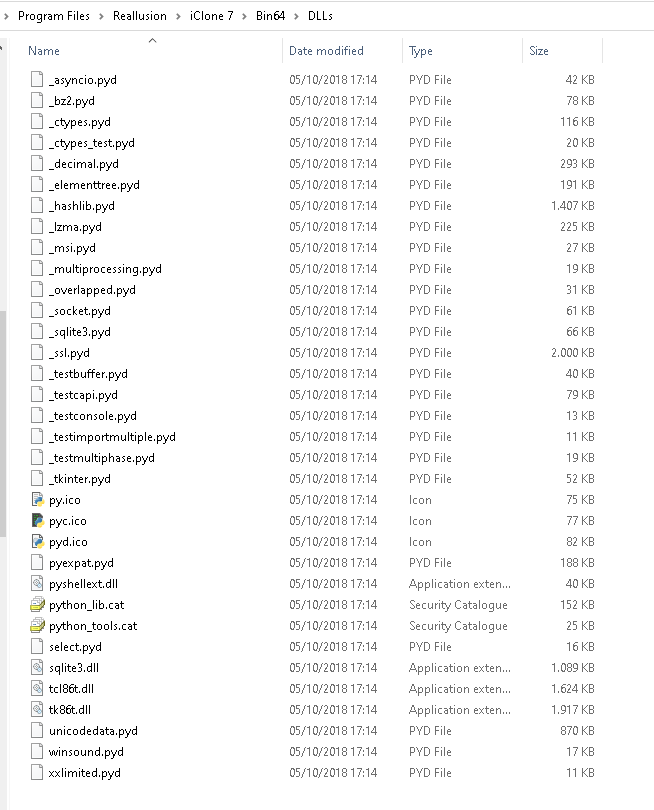 In C:\Program Files\Reallusion\iClone 7\Bin64\OpenPlugin only one plugin folder contains several PYD files: 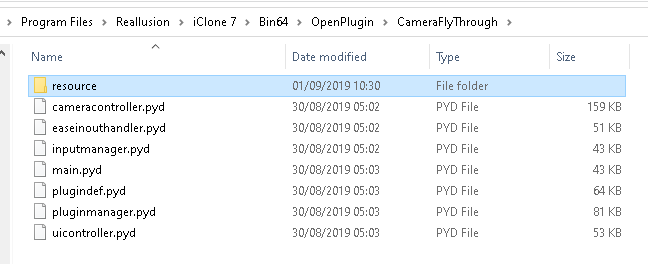 Every other python plugin that I have only contain .PY files in their folders. Since none of the plugins are installed as such, they only require that the user copy the file folder to C:\Program Files\Reallusion\iClone 7\Bin64\OpenPlugin, there's never been a requirement to place anything in the DLL folder. Everything in there is added during the main installation of iClone and never gets touched again by the user.
Gerry
System: Win 10 Pro (21H2), Asus X99-E WS, CPU i7-5930K -3,5 GHz, 32 GB DDR4 2666-16 RAM, NVidia GTX 1080 Ti GPU - 11 GB VRAM(Driver Studio-536.99), Samsung 850 Pro 512 GB SSD, 6 TB HD storage.
|
|
|
|
|
Data Juggler
|
Data Juggler
Posted 4 Years Ago
|
|
Group: Forum Members
Last Active: 9 Months Ago
Posts: 1.8K,
Visits: 5.6K
|
Search for *.pyd in the search box.
Creator of the free website:
PixelDatabase.Net
A Free Online Text Based Image Editor
|
|
|
|
|
wires
|
|
|
Group: Forum Members
Last Active: 4 Months Ago
Posts: 5.7K,
Visits: 26.5K
|
Here's what I have in C:\Program Files\Reallusion\iClone 7\Bin64\OpenPlugin  This is what one of the folders contains:  The rest of the folders a similar.
Gerry
System: Win 10 Pro (21H2), Asus X99-E WS, CPU i7-5930K -3,5 GHz, 32 GB DDR4 2666-16 RAM, NVidia GTX 1080 Ti GPU - 11 GB VRAM(Driver Studio-536.99), Samsung 850 Pro 512 GB SSD, 6 TB HD storage.
|
|
|
|
|
Data Juggler
|
Data Juggler
Posted 4 Years Ago
|
|
Group: Forum Members
Last Active: 9 Months Ago
Posts: 1.8K,
Visits: 5.6K
|
Search the IClone install directory, and they are in: c:\Program Files\Reallusion\IClone 7\Bin64\OpenPlugin Someone else I asked a question if the python files came with it, not the same one you responded to, and they responded that no it is a .pyd binary. I forgot where that answer is who that was. 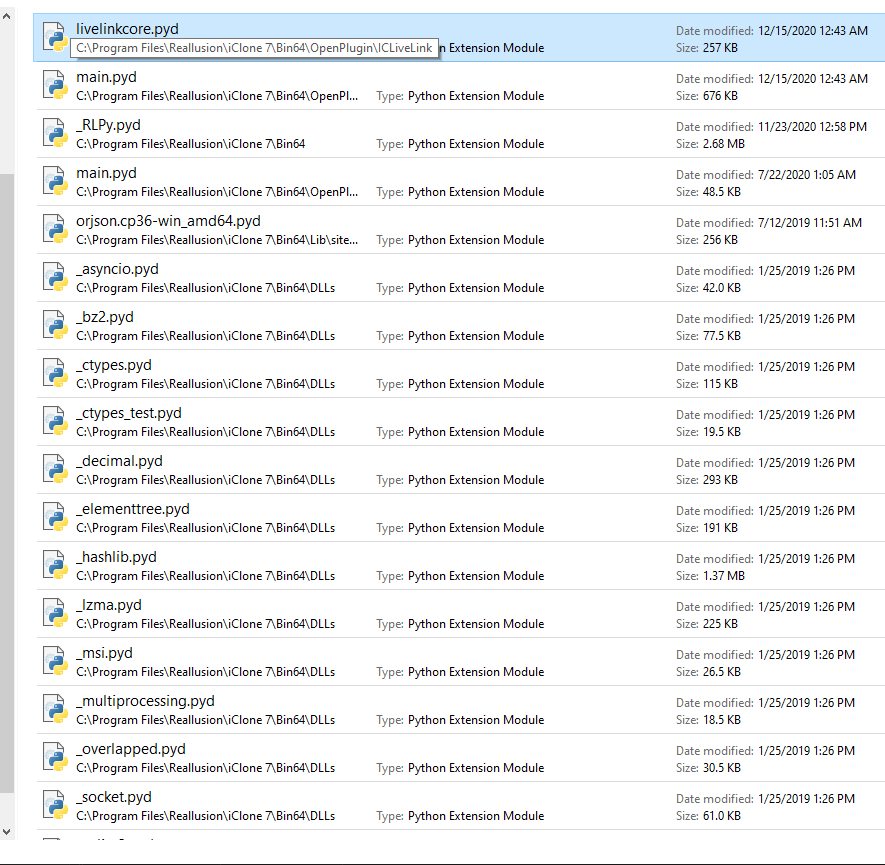 Creator of the free website:
PixelDatabase.Net
A Free Online Text Based Image Editor
|
|
|
|
|
wires
|
|
|
Group: Forum Members
Last Active: 4 Months Ago
Posts: 5.7K,
Visits: 26.5K
|
I have a selection of Python Plugins in iClone and looking inside the various Folders in C:\Program Files\Reallusion\iClone 7\Bin64\OpenPlugin I haven't seen any .pyd files, the only ones showing are all .py files.
Gerry
System: Win 10 Pro (21H2), Asus X99-E WS, CPU i7-5930K -3,5 GHz, 32 GB DDR4 2666-16 RAM, NVidia GTX 1080 Ti GPU - 11 GB VRAM(Driver Studio-536.99), Samsung 850 Pro 512 GB SSD, 6 TB HD storage.
|
|
|
|
|
Data Juggler
|
Data Juggler
Posted 4 Years Ago
|
|
Group: Forum Members
Last Active: 9 Months Ago
Posts: 1.8K,
Visits: 5.6K
|
I think I have my plug-in code all in the Plug-in format now. You told me to compile a Python .pyd I will need a unique folder, but I don't know what software compiles python into .pyd format. Thanks
Creator of the free website:
PixelDatabase.Net
A Free Online Text Based Image Editor
|
|
|
|