|
By Data Juggler - 4 Years Ago
|
How do you compile a .pyd? I use Visual Studio, but Python publishing is new to me.
I have my first python plug-in ready for the marketplace, but I don't know how to publish it.
Are there any guides on how to do this?
I would rather not just put this on Git Hub, but if I can't figure out how to publish I don't know what else to do.
Thank you
|
|
By gordryd - 4 Years Ago
|
Here you go...
https://developer.reallusion.com/plugin/certifieddeveloper.html
|
|
By Eric C (RL) - 4 Years Ago
|
Hi Data Juggler,
To compile a.pyd, please take notice that we will need you to add an unique folder and named it with your product name.
For example "Smooth Camera Follow". This will avoid replacing all the pyd (because other people may also use the same naming method, at avoid other users lost their files when using your plugin)
Below is the example of how we arrange the file name.

And yes I will be glad to help you on placing your products on Marketplace.
In face, please check our plugin developer page, and all the instructions that you needed is here
https://developer.reallusion.com/plugin/certifieddeveloper.html
If you need any further assistance or being stuck among the procedure, feel free to send me a private message, I will be happy to help.
Thanks!
|
|
By Data Juggler - 4 Years Ago
|
Thanks for all the information.
I made a video for this 3D Speller and now I have to get some sleep.
I will read your instructions in the morning.
|
|
By wires - 4 Years Ago
|
Interesting solution. :)
I do all my 3D text in Sketchup and just import it to iClone as a prop, this lets me use every font installed on my system. :cool:
|
|
By Data Juggler - 4 Years Ago
|
I never tried Sketch Up for Text, but every prop I tried to bring in to IClone from Sketch Up looked flat or fake 3D. Text characters are smaller so maybe this is less noticeable?
I think with a little work a 3D Font Projection system could probably be built, or if you have other 3D Fonts sets use a mapping file that maps A = File Name A instead of expecting specific file names (IClone Path + File Name) like I have it now.
|
|
By Data Juggler - 4 Years Ago
|
I didn't have to work today, so I made a lot of progress,
but I don't know how to convert my Plug-in to your Plug-in window sample.
I added a Scale, and an option to also add the Texture to the Glow Channel and a strength for the Glow Channel.

The plug-in sample uses a dialog, and I don't have a dialog.
My UI code looks like this: (as images, since I can't post code here that I know of).


Your sample is confusing with the style sheets and some pre-state stuff that I don't think I need.
Does the UI code have to have the global variable? I don't care if the script runs in the Python menu also, in fact I would prefer it run in the Python menu also so I don't have to maintain a dev version and a release version.
If it were my Python API, there would be a tool that converts the Python script to the Plug-in format for the user.
Convince me this shouldn't just go to Git Hub, because if I get stuck that is where it is going.
50% of $2 of no 50% of $2.
I can't waste any more time on this plug-in since I only wrote it to place 12 characters on the screen and that has been done for 3 days.
Thanks, sorry I give up on things but I have 75 other projects on hold between programming and animation and writing.
|
|
By Data Juggler - 4 Years Ago
|
I think I have my plug-in code all in the Plug-in format now.
You told me to compile a Python .pyd I will need a unique folder, but I don't know what software compiles python into .pyd format.
Thanks
|
|
By wires - 4 Years Ago
|
|
I have a selection of Python Plugins in iClone and looking inside the various Folders in C:\Program Files\Reallusion\iClone 7\Bin64\OpenPlugin I haven't seen any .pyd files, the only ones showing are all .py files.
|
|
By Data Juggler - 4 Years Ago
|
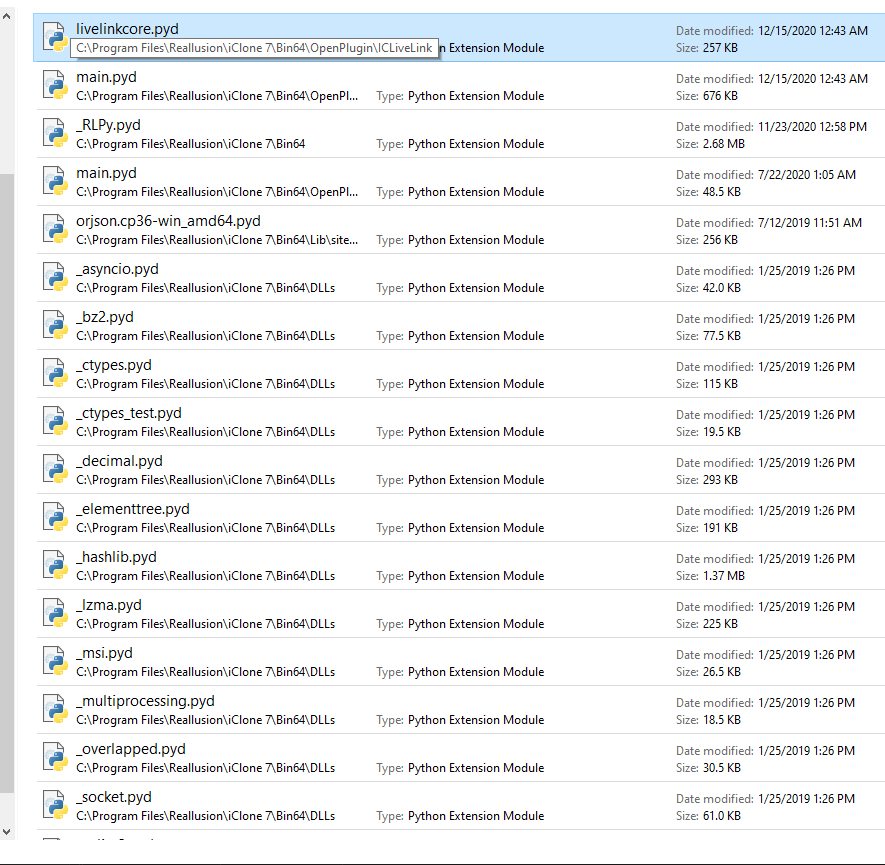
Search the IClone install directory, and they are in: c:\Program Files\Reallusion\IClone 7\Bin64\OpenPlugin
Someone else I asked a question if the python files came with it, not the same one you responded to, and they responded that no it is a .pyd binary.
I forgot where that answer is who that was.
|
|
By wires - 4 Years Ago
|
Here's what I have in C:\Program Files\Reallusion\iClone 7\Bin64\OpenPlugin

This is what one of the folders contains:

The rest of the folders a similar.
|
|
By Data Juggler - 4 Years Ago
|
Search for *.pyd in the search box.
|
|
By wires - 4 Years Ago
|
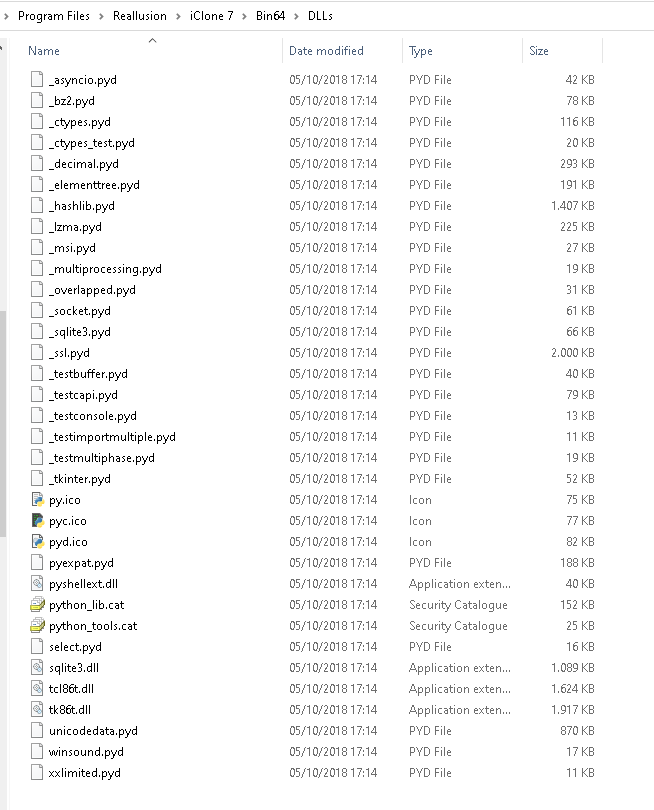
The following PYD files are in C:\Program Files\Reallusion\iClone 7\Bin64\DLLs
In C:\Program Files\Reallusion\iClone 7\Bin64\OpenPlugin only one plugin folder contains several PYD files:
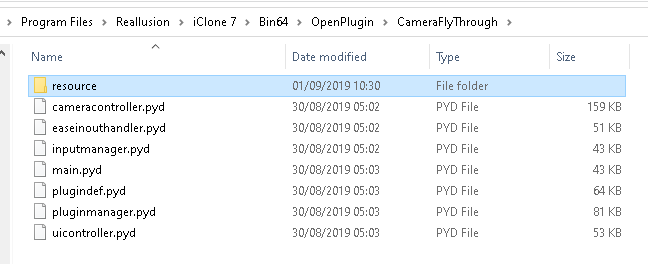
Every other python plugin that I have only contain .PY files in their folders. Since none of the plugins are installed as such, they only require that the user copy the file folder to C:\Program Files\Reallusion\iClone 7\Bin64\OpenPlugin, there's never been a requirement to place anything in the DLL folder. Everything in there is added during the main installation of iClone and never gets touched again by the user.
|
|
By Data Juggler - 4 Years Ago
|
Somewhere I thought I read instructions that said you have to place the .pyd in the Bin64 folder.
Thanks for your help, but this is not a high priority for me, I just wanted to learn it.
Putting it on Git Hub and letting the user do what they want with it is easier at this point.
|
|
By wires - 4 Years Ago
|
|
I was so enjoying our little chat. :) Have a pleasant day. :cool:
|
|
By Data Juggler - 4 Years Ago
|
I am done with work. I just had to fix a bug, and now I am off for the weekend except for a server update tomorrow night, so chat away!
I am sure it is pretty simple what I need to learn how to do. A couple of months ago I knew nothing about Python, so baby steps.
|
|
By Eric C (RL) - 4 Years Ago
|
Hi @Data Juggler,
Congrats on your first plugin products on Reallusion Marketplace!
https://marketplace.reallusion.com/building-creator
|