Profile Picture

Help! How do I get Cartoon Character Character Creator/Headshots to work with plugin?

Posted By mrjeffrivera 5 Years Ago
You don't have permission to rate!

Help! How do I get Cartoon Character Character Creator/Headshots to...

Author
Message
mrjeffrivera
mrjeffrivera
Posted 5 Years Ago
View Quick Profile
Veteran Member

Veteran Member (723 reputation)Veteran Member (723 reputation)Veteran Member (723 reputation)Veteran Member (723 reputation)Veteran Member (723 reputation)Veteran Member (723 reputation)Veteran Member (723 reputation)Veteran Member (723 reputation)Veteran Member (723 reputation)

Group: Forum Members
Last Active: 3 Years Ago
Posts: 16, Visits: 81
Besides needing to have the artist remove the hair and headband, what do I need to do to make it work. The biggest problem, as you can see is the eyes. It puts eyes over the eyes and I have no idea how to get the eyes to the same scale as the original. If I have the artist remove the eyes of the headshot, I don't think the eyes will show up using the headshot plugin, right?  

FYI -- I have Character Creator 3.31, SkinGen Premium, Headshot Plugin, Cartoon Character Designer Toon, Kids and Teens on Campus <-- is there a way to use those to help fix it? Please, tell me what to do step by step (I'm a beginner)
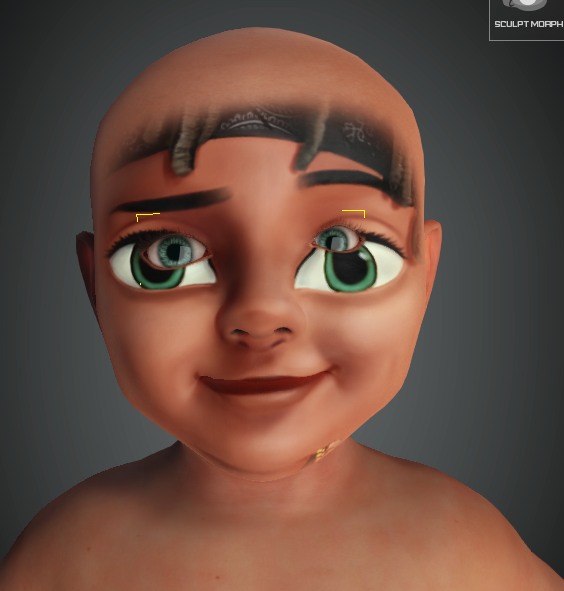
https://forum.reallusion.com/uploads/images/a47ba1d7-6673-44d2-9fcb-cb12.png

This is the original artist rendition below. 
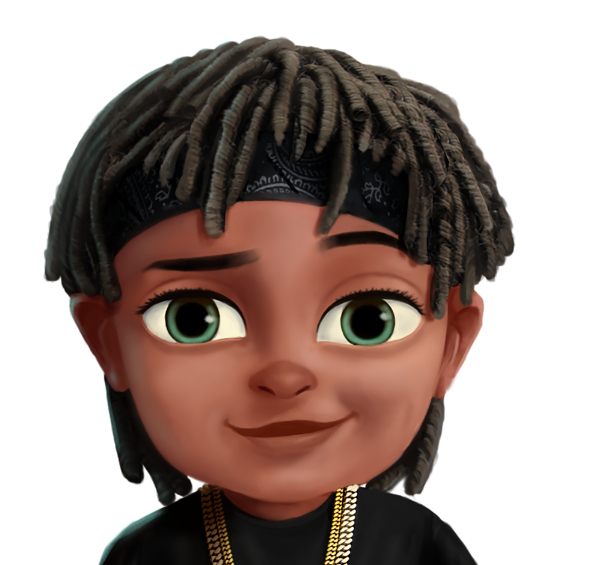
https://forum.reallusion.com/uploads/images/1cabb299-fc53-43ea-aff2-ca54.png


Reading This Topic