Hi.
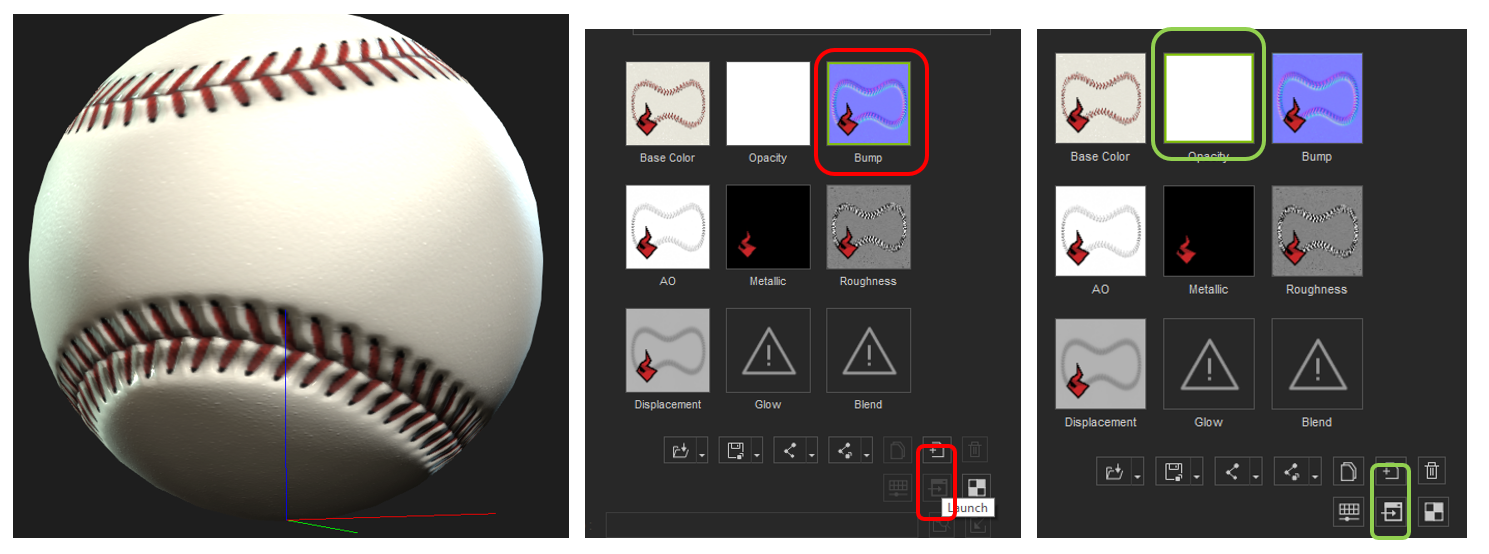
For this baseball, I’m exporting the BaseColor (diffuse) from Filter Forge and generating the rest of the maps withiCLone’s B2M from Substance Super Tools. As you can see, the bump map isinverted in the lower stitching, (or is that the Displacement, I’m not sure).It’s creating a crease instead of a bump. Usually when I select one of themaps, I can click on the “Launch” button to edit the map in Photoshop orAffinity, but now the button’s greyed out. If I select the Opacity map, thebutton is not greyed out anymore. I tried saving all the maps (Save AllMaterial Textures), but it just gives me solid colors. Also, I can’t see any“Find File” option for any of the maps, as I get when right-clicking a prop. Isthere a way I can locate the map in explorer, or open it in a photo editor inany way?
So , if I can get a way to open or save themaps, which ones do I need to invert? Bump? Displacement? Both?
Thanks.