|
Author
|
Message
|
|
esemgee
|
esemgee
Posted 5 Years Ago
|
|
Group: Forum Members
Last Active: 2 Years Ago
Posts: 168,
Visits: 469
|
Have read the manual and, for the life of me, I cannot find the Pivot header in Modify to ..er..modify its position. There is a nine-point map somewhere in iClone 7, maybe it has suddenly gone into self-isolation? :-) BTW, stay well!
|
|
|
|
|
wires
|
|
|
Group: Forum Members
Last Active: 4 Months Ago
Posts: 5.7K,
Visits: 26.5K
|
You may have the visibility turned off. It can be turned on in the Preferences menu, or by clicking Ctrl+Q. 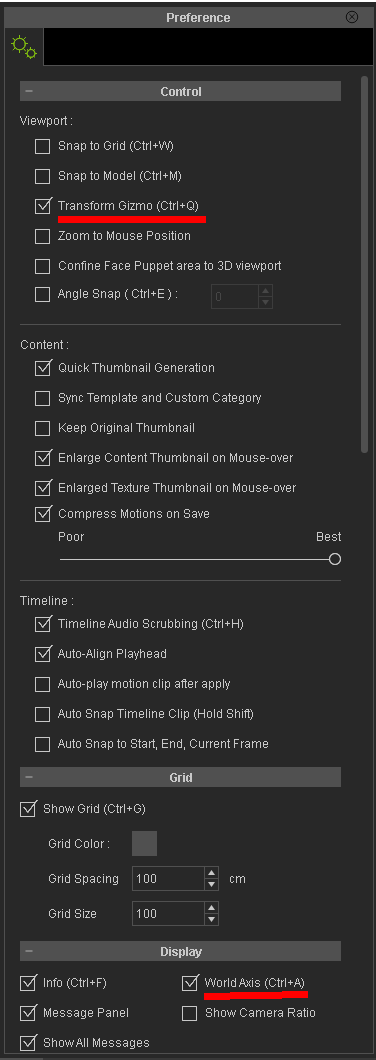 Gerry
Gerry
System: Win 10 Pro (21H2), Asus X99-E WS, CPU i7-5930K -3,5 GHz, 32 GB DDR4 2666-16 RAM, NVidia GTX 1080 Ti GPU - 11 GB VRAM(Driver Studio-536.99), Samsung 850 Pro 512 GB SSD, 6 TB HD storage.
|
|
|
|
|
Galfridus
|
Galfridus
Posted 5 Years Ago
|
|
Group: Forum Members
Last Active: Last Year
Posts: 727,
Visits: 2.2K
|
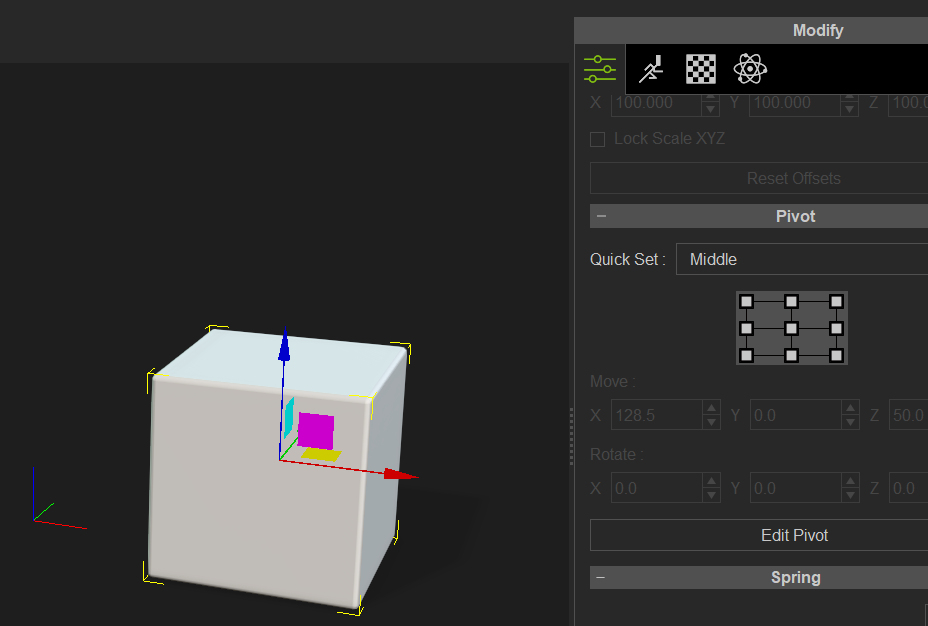 I find I have to select an object first before scrolling quite a way down the modify attributes panel. If nothing is selected the pivot panel is hidden. Geoff.
|
|
|
|
|
esemgee
|
esemgee
Posted 5 Years Ago
|
|
Group: Forum Members
Last Active: 2 Years Ago
Posts: 168,
Visits: 469
|
Thanks guys but still no luck! As you can see Gizmo active, avatar active and no Pivot heading! 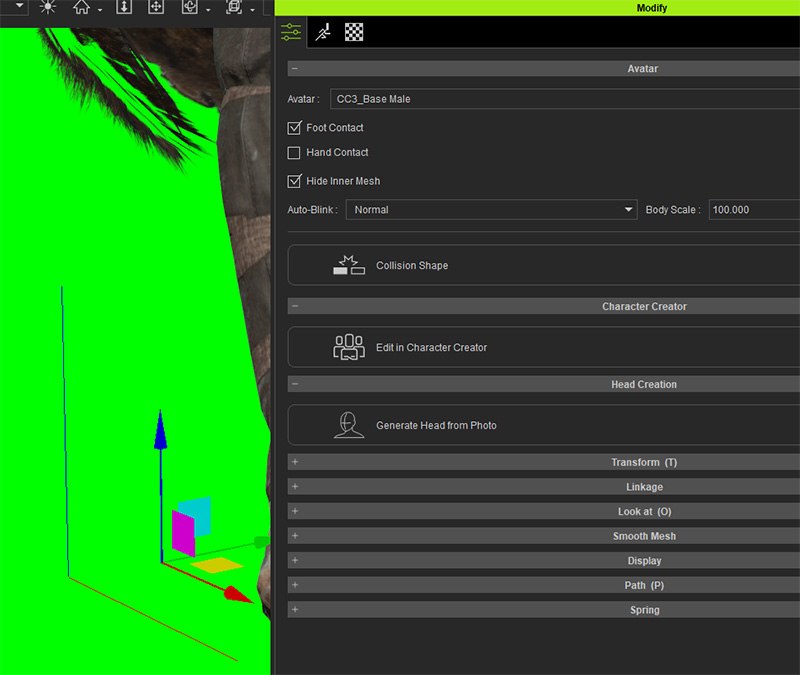
|
|
|
|
|
smallWstudio
|
smallWstudio
Posted 5 Years Ago
|
|
Group: Forum Members
Last Active: Last Year
Posts: 15,
Visits: 237
|
"Pivot" is not available for an avatar as far as I know.
|
|
|
|
|
Galfridus
|
Galfridus
Posted 5 Years Ago
|
|
Group: Forum Members
Last Active: Last Year
Posts: 727,
Visits: 2.2K
|
smallWstudio (3/16/2020)
"Pivot" is not available for an avatar as far as I know.
I think you`re correct. I can only make the Pivot panel appear with an object/prop highlighted. Geoff.
|
|
|
|
|
esemgee
|
esemgee
Posted 5 Years Ago
|
|
Group: Forum Members
Last Active: 2 Years Ago
Posts: 168,
Visits: 469
|
Again thanks for responses. I am often aghast at RL's odd decisions! An Avatar is usually quite tall and the pivot is always at the feet, and of course works no problem, so why can't it be positioned? If I am focusing on a head and shoulders setting I don't want to keep going to the unimportant feet to correct positioning! This, the lack of ability of adding decals to a CC3 base and the horrors of hair and physics are beginning to make me very wary of RL.
|
|
|
|
|
wires
|
|
|
Group: Forum Members
Last Active: 4 Months Ago
Posts: 5.7K,
Visits: 26.5K
|
You don't need to keep going to the "unimportant feet" to move, rotate or scale a character if you use the keyboard shortcuts shown below: 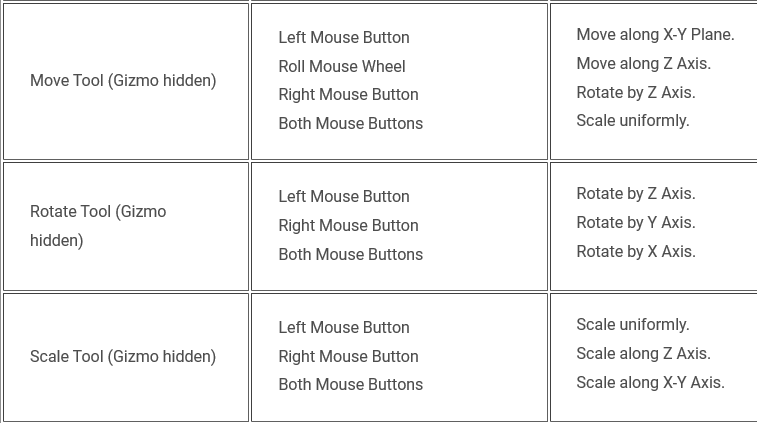 A full list of the keyboard shortcuts for iClone can be viewed here . Just make sure that the full character is selected before making any adjustments, otherwise only the selected part will be affected.
Gerry
System: Win 10 Pro (21H2), Asus X99-E WS, CPU i7-5930K -3,5 GHz, 32 GB DDR4 2666-16 RAM, NVidia GTX 1080 Ti GPU - 11 GB VRAM(Driver Studio-536.99), Samsung 850 Pro 512 GB SSD, 6 TB HD storage.
|
|
|
|
|
animagic
|
animagic
Posted 5 Years Ago
|
|
Group: Forum Members
Last Active: Last Month
Posts: 15.8K,
Visits: 31.4K
|
garry.smout (3/16/2020)
Again thanks for responses. I am often aghast at RL's odd decisions! An Avatar is usually quite tall and the pivot is always at the feet, and of course works no problem, so why can't it be positioned? If I am focusing on a head and shoulders setting I don't want to keep going to the unimportant feet to correct positioning! This, the lack of ability of adding decals to a CC3 base and the horrors of hair and physics are beginning to make me very wary of RL. The pivot of the character has to be stationary, because otherwise you would get very strange effects if you were to apply a motion clip for example. So that is NOT an odd decision. For your other problems: there are a lot of helpful people here.
|
|
|
|
|
esemgee
|
esemgee
Posted 5 Years Ago
|
|
Group: Forum Members
Last Active: 2 Years Ago
Posts: 168,
Visits: 469
|
Thanks, but I still think it odd! I can move the whole avatar with the gizmo at its feet but I can't move the same gizmo up to shoulder level to do the same movement? This is to set the scene, before any other motion is added, and, if there were no alternative keyboard controls, this would have to be done at full distance. It would be impossible to then tweak a close-up without having to zoom out again to get to the gizmo at the feet. Sorry, but to me that is beyond odd!
The only people who can be helpful with the other problems are RL themselves as it is them who lost functions (no tattoos or scars for CC3 bases) in a so-called upgrade and have taken years to still not return this once easy ability.There is meant to be the fix in Q2, too late for me!
|
|
|
|