|
By esemgee - 6 Years Ago
|
|
Have read the manual and, for the life of me, I cannot find the Pivot header in Modify to ..er..modify its position. There is a nine-point map somewhere in iClone 7, maybe it has suddenly gone into self-isolation? :-) BTW, stay well!
|
|
By wires - 6 Years Ago
|
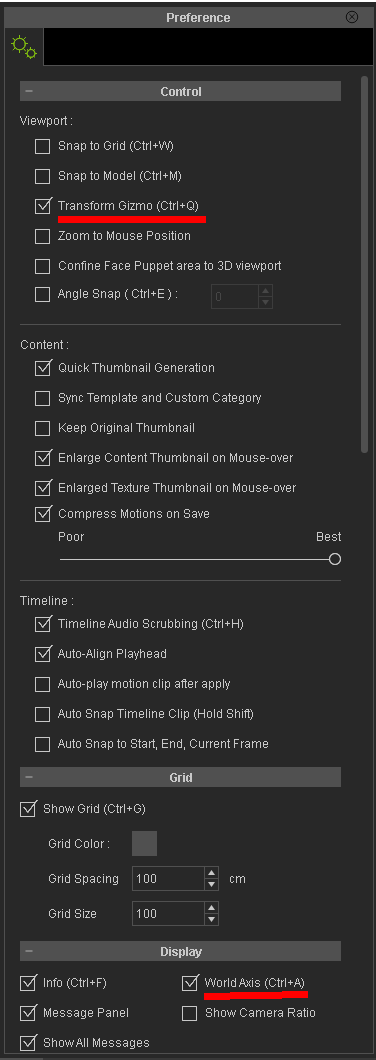
You may have the visibility turned off. It can be turned on in the Preferences menu, or by clicking Ctrl+Q.
|
|
By Galfridus - 6 Years Ago
|
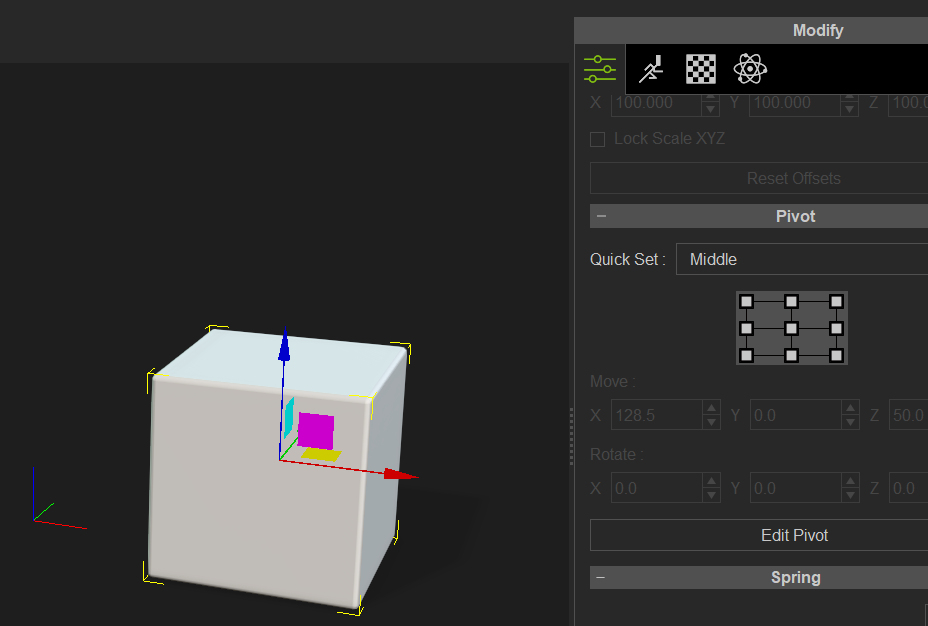
I find I have to select an object first before scrolling quite a way down the modify attributes panel.
If nothing is selected the pivot panel is hidden.
Geoff.
|
|
By esemgee - 6 Years Ago
|
Thanks guys but still no luck! As you can see Gizmo active, avatar active and no Pivot heading!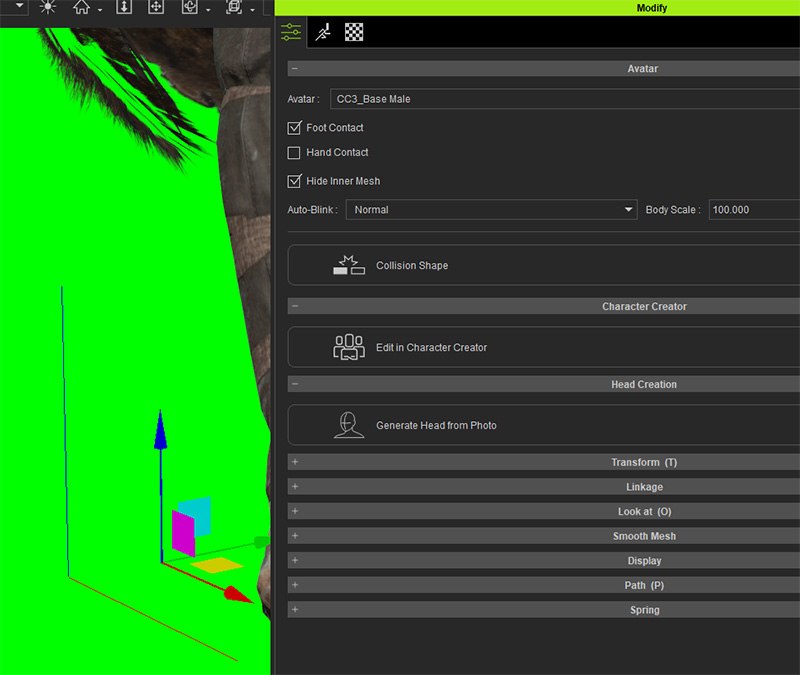
|
|
By smallWstudio - 6 Years Ago
|
"Pivot" is not available for an avatar as far as I know.
|
|
By Galfridus - 6 Years Ago
|
|
smallWstudio (3/16/2020)
"Pivot" is not available for an avatar as far as I know.
I think you`re correct.
I can only make the Pivot panel appear with an object/prop highlighted.
Geoff.
|
|
By esemgee - 6 Years Ago
|
|
Again thanks for responses. I am often aghast at RL's odd decisions! An Avatar is usually quite tall and the pivot is always at the feet, and of course works no problem, so why can't it be positioned? If I am focusing on a head and shoulders setting I don't want to keep going to the unimportant feet to correct positioning! This, the lack of ability of adding decals to a CC3 base and the horrors of hair and physics are beginning to make me very wary of RL.
|
|
By wires - 6 Years Ago
|
You don't need to keep going to the "unimportant feet" to move, rotate or scale a character if you use the keyboard shortcuts shown below:
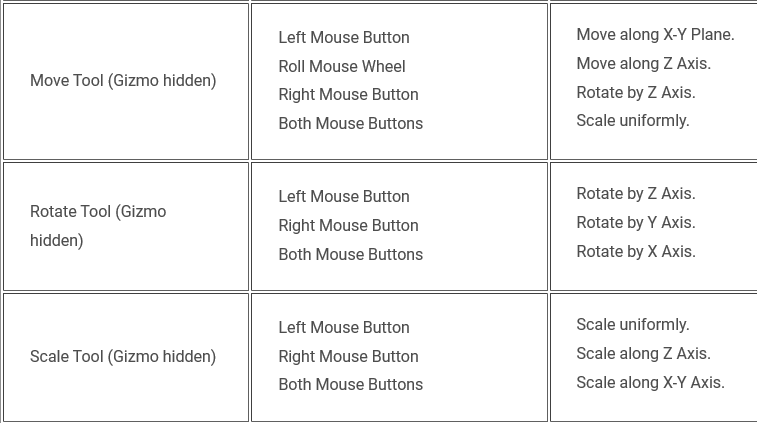
A full list of the keyboard shortcuts for iClone can be viewed here .
Just make sure that the full character is selected before making any adjustments, otherwise only the selected part will be affected.
|
|
By animagic - 6 Years Ago
|
|
garry.smout (3/16/2020)
Again thanks for responses. I am often aghast at RL's odd decisions! An Avatar is usually quite tall and the pivot is always at the feet, and of course works no problem, so why can't it be positioned? If I am focusing on a head and shoulders setting I don't want to keep going to the unimportant feet to correct positioning! This, the lack of ability of adding decals to a CC3 base and the horrors of hair and physics are beginning to make me very wary of RL.
The pivot of the character has to be stationary, because otherwise you would get very strange effects if you were to apply a motion clip for example. So that is NOT an odd decision. For your other problems: there are a lot of helpful people here.
|
|
By esemgee - 6 Years Ago
|
Thanks, but I still think it odd! I can move the whole avatar with the gizmo at its feet but I can't move the same gizmo up to shoulder level to do the same movement? This is to set the scene, before any other motion is added, and, if there were no alternative keyboard controls, this would have to be done at full distance. It would be impossible to then tweak a close-up without having to zoom out again to get to the gizmo at the feet. Sorry, but to me that is beyond odd!
The only people who can be helpful with the other problems are RL themselves as it is them who lost functions (no tattoos or scars for CC3 bases) in a so-called upgrade and have taken years to still not return this once easy ability.There is meant to be the fix in Q2, too late for me!
|
|
By wires - 6 Years Ago
|
You don't have to make adjustments at full distance, they can all be made closeup if required. See the quick clip below.
|
|
By animagic - 6 Years Ago
|
I usually use the Preview camera to position the character. You can also press Ctrl+Q to toggle the gizmo. You can then move the character even if the feet are not visible. I would also like to point out that this is not a sudden change in iClone. It has been like that during previous versions as well.
As far as scars and tattoos are concerned the can be added in other ways; for example by using the Blend channel. We did have tattoos before the Appearance Editor even existed.
|
|
By esemgee - 6 Years Ago
|
|
Many thanks! As an irregular user of RL I, and no doubt countless others, are confronted with the default gizmo which can be positioned to function on everything except the Avatar. I find this baffling! OK, it can be done with the mouse, good to know, but...
|
|
By esemgee - 6 Years Ago
|
|
@animagic Thanks for feedback. I am unsure how you use preview camera to position the avatar - if you bring it in from CC3 it arrives in a pose, from then you have to turn it to suit the set, put it behind a table etc, surely the camera turns everything? And as for my gripe about tattoos etc the point is that RL removed the simple ability to add such normal, usual things. That to me is not an upgrade, it is going backwards. Yes, it can be done, but why was it ever stopped?
|
|
By wires - 6 Years Ago
|
The Preview camera does not create key frames, or any other control points, on the Timeline in iClone. When making a movie one needs to add a camera from the "Create" menu that will be used to record the scene. It is also possible, and very helpful, to create a number of cameras to record the scene from different angles. When using a new camera the user can select settings such as Focal length, Depth of Field, motion etc.. Any motion such as zooming in and out, rotating etc. while a camera is selected will be recorded and added as key frames on the Timeline.
To make position adjustments to any and all assets in a scene it is best to always just use the Preview camera and any rotating, zooming etc. will not be recorded, it is then possible to return to the "Main" camera to continue recording the scene.
|
|
By wires - 6 Years Ago
|
An addition to my post above.
When using the Preview camera to position any asset in a scene it helps if the main/recording camera is selected in the Mini Viewport and that this is open to ensure proper adjustment for the final scene.
|
|
By esemgee - 6 Years Ago
|
Thanks again. I am fully aware of using the preview camera to 'position' the asset in a frame but as I said, I am concerned on the difficulties of positioning the asset within a set, so to get him to go behind a table, slightly more to the left of the sofa etc. This is done with the pivot move gizmos and they can only be at the feet of the asset and not elsewhere. I now know about switching them off and using the mouse but I find it extraordinary that the gizmo itself can not be moved chest high. If my asset were a tree - no problem!!!
|
|
By animagic - 6 Years Ago
|
But it is the same for props. You would not normally move the pivot to place the prop. So if it is a large prop you will need to use other measures. The reason why you would leave pivots alone is that there may be dependencies, for example with sub-props.
The existing Appearance Editor is not compatible with CC3 characters, which is how tattoos etc. are applied to the skin. The choice at the the time was to either delay the introduction of CC3 characters and dispense with the improved quality or delay a compatible AE. I don't work for RL, but they must have had ideas for improved skin, etc. a while ago, which asked for a different approach to the AE, which could not be further developed without the new digital human shader actually being there. So it is not a matter of "taking away functionality" in this case, it was a matter of applying development resources efficiently.
|
|
By justaviking - 6 Years Ago
|
It sounds like you're looking for some functionality I requested nearly 4 years ago (April 2016).
https://www.reallusion.com/FeedBackTracker/Issue/Option-for-a-Floating-Gizmo-to-be-in-center-of-viewport
That request has comments with links to a couple other related Feedback Tracker issues.
|
|
By esemgee - 6 Years Ago
|
|
@justaviking Thanks for that! I feel like I am going mad explaining this small but pertinent issue. Love the screwdriver analogy someone posted!
|
|
By esemgee - 6 Years Ago
|
|
animagic (3/18/2020)
But it is the same for props. You would not normally move the pivot to place the prop. So if it is a large prop you will need to use other measures. The reason why you would leave pivots alone is that there may be dependencies, for example with sub-props.
The existing Appearance Editor is not compatible with CC3 characters, which is how tattoos etc. are applied to the skin. The choice at the the time was to either delay the introduction of CC3 characters and dispense with the improved quality or delay a compatible AE. I don't work for RL, but they must have had ideas for improved skin, etc. a while ago, which asked for a different approach to the AE, which could not be further developed without the new digital human shader actually being there. So it is not a matter of "taking away functionality" in this case, it was a matter of applying development resources efficiently.
Thanks but as this confuses me more I feel I need to yet again repeat myself! The only way I know to move something is with the 'pivot' gizmos. If I build a set and import a CC3 avatar it is standing at x and looking at y, I want to change both these so I use move and rotate. Both these gizmos are stuck at the feet so this needs to be done at a distance as I can't move the gizmo higher (an issue that now seems to have an unresolved history). I am told 'no problem use the mouse' - sorry??? Using the mouse gets rid of any dependency problems? Can you see why I said from the very start that I find this odd?
Thanks for the info on the Appearance Editor and it is this very way of going about things that has made me reconsider using RL. It is pushing for skin shading before building a really powerful base. Headshot has possibly attracted hundreds of new users, many just wanting to do fun memes of friends, but once they find they can't add the very tatts their friends have or the long hair they have paid for and downloaded goes mental from the very start then they will walk. RL needs to think of an out-the-box edition and a pro-edition because until I can get hair and clothes to quickly work on a character I am not interested in showing every sweaty pore. What is the point? How much will the hardware cost to do all this?
|
|
By Rampa - 6 Years Ago
|
Everything evolves in steps. Here is a simple method to use the AE and then convert to DH shaders.
You can then apply Headshot to the existing character.
|
|
By esemgee - 6 Years Ago
|
|
Thank you, that was most informative and useful!
|
|
By Postfrosch - 6 Years Ago
|
|
but once they find they can't add the very tatts their friends have or the long hair they have paid for and downloaded
Hi Gerry
Which hair you can NOT use in CC 3. Please example.
All hair that I have from RL works in CC 3 with every Avatar C1 - C3 (also with headshot or CT8 heads)
I can even use hair created for G 4 / Gr avatars (renamed from iHair to ccHair). I can't find any problems here.
All types of clothing can also be used in the CC 3 (better than with CC 1 or 2)

About the tatts: be patient until the end of April / mid May. Then the promised appearance editor (skin editor) for CC 3 avatars will come (finally after a waiting period of 2 years). However, a new essential skin morph package will (probably) be necessary. One is announced at least at the same time. We will see that later.
For export to IC. You don't have to pose the avatar in CC 3 yet. Send him in the T-pose to Iclone or move him to the location where you want him and then give him the pose he should take. You don't have to have the Gyzmo at chest height either. All it takes is a close camera shot and the mouse
greeting from Germany
Postfrosch
Sorry for this bad englisch. It's only a Google-Translation
|