Profile Picture

Mesh Medium

Posted By Kimmie777 6 Years Ago
You don't have permission to rate!
1
2

Author
Message
Kimmie777
Kimmie777
Posted 6 Years Ago
View Quick Profile
Distinguished Member

Distinguished Member (4.5K reputation)Distinguished Member (4.5K reputation)Distinguished Member (4.5K reputation)Distinguished Member (4.5K reputation)Distinguished Member (4.5K reputation)Distinguished Member (4.5K reputation)Distinguished Member (4.5K reputation)Distinguished Member (4.5K reputation)Distinguished Member (4.5K reputation)

Group: Forum Members
Last Active: 2 Years Ago
Posts: 569, Visits: 1.1K
Thank you, Wires!  Yes, and thankfully I learned how to do those last year by a very good teacher.  I will for sure watch this video today to see if I can glean anything else from it. 

And I agree with you about Warlord's videos... He does beautiful work!  We have learned a menagerie of things from his videos... And they are easy on the eyes to watch because he creates pleasant looking scenes. :-) 

The video you posted for me of the height map tutorial by Warlord is a familiar one that we will almost certainly watch again... I hope to also find one on mesh medium terrains from him... That would be perfect, because we will be using both! :-) 

~ Kimmie


www.TrackingJESUS.net 

--> More Information On This Bible Film Production Can Be Found At: 
www.TrackingJESUS.net/Productions 


--> Become An Early Subscriber To The 'Tracking JESUS' YouTube Channel At: 
https://www.youtube.com/channel/UCEMx91AySc3QuF-SS_3mGQQ

wires
wires
Posted 6 Years Ago
View Quick Profile
Distinguished Member

Distinguished Member (15.4K reputation)Distinguished Member (15.4K reputation)Distinguished Member (15.4K reputation)Distinguished Member (15.4K reputation)Distinguished Member (15.4K reputation)Distinguished Member (15.4K reputation)Distinguished Member (15.4K reputation)Distinguished Member (15.4K reputation)Distinguished Member (15.4K reputation)

Group: Forum Members
Last Active: 3 Months Ago
Posts: 5.7K, Visits: 26.5K
Aside from your large terrains you are going to need, sooner or later, crowds in your scenes. The tutorial below by Adolf Navarro should help you see how to reduce an overload on your system resources when the crowds are required.


Gerry


System: Win 10 Pro (21H2), Asus X99-E WS, CPU i7-5930K -3,5 GHz, 32 GB DDR4 2666-16 RAM, NVidia GTX 1080 Ti GPU - 11 GB VRAM(Driver Studio-536.99), Samsung 850 Pro 512 GB SSD, 6 TB HD storage.


Delerna
Delerna
Posted 6 Years Ago
View Quick Profile
Distinguished Member

Distinguished Member (8.5K reputation)Distinguished Member (8.5K reputation)Distinguished Member (8.5K reputation)Distinguished Member (8.5K reputation)Distinguished Member (8.5K reputation)Distinguished Member (8.5K reputation)Distinguished Member (8.5K reputation)Distinguished Member (8.5K reputation)Distinguished Member (8.5K reputation)

Group: Forum Members
Last Active: 4 Years Ago
Posts: 1.5K, Visits: 14.8K
All looking good Kimmie and done very well by someone who is pretty new to using iClone. Although you are getting along with it I see.
Like I said all I can show is how I do things according to my own preferences. And as we progress things can get better and better and methods get easier.
We just need to keep working on things in our methods and watch how other people do things and use things we see what they do that looks good to us in a way that suits how we work.
And again I can only say things how I see them for myself.


i7-3770 3.4GHz CPU 16 GB Ram   
GeForce GTX1080 TI 11GB
Windows 10 Pro 64bit
Kimmie777
Kimmie777
Posted 6 Years Ago
View Quick Profile
Distinguished Member

Distinguished Member (4.5K reputation)Distinguished Member (4.5K reputation)Distinguished Member (4.5K reputation)Distinguished Member (4.5K reputation)Distinguished Member (4.5K reputation)Distinguished Member (4.5K reputation)Distinguished Member (4.5K reputation)Distinguished Member (4.5K reputation)Distinguished Member (4.5K reputation)

Group: Forum Members
Last Active: 2 Years Ago
Posts: 569, Visits: 1.1K
VERY COOL!! 

I LOVE working with my own photographs for textures too, Delerna! :-) 

This is the very first house I made last year (complete with my own creation of lattice windows). 

All of the earth textures (including the planters) in this scene came from my favorite park. 

The very unique color of wood in the lattice came from a colorful tree stump. 

All of the fabrics for the clothing pieces I have been making myself from scratch. 

Sp everything in the way of textures in this film set - from stone to wood to the clothing - will be one of a kind. :-)  


https://forum.reallusion.com/uploads/images/699e4077-4d68-47a6-9452-4224.jpg

In this picture below, you will recognize the outfit on the left.  (Very high quality work as always!)

Do you like how pretties I made it with my fabric creations? :-) 

On the other textures: The wall is a very up-close photograph I took of a very large stone. 

The courtyard floor is from a virtually unknown gravel beach (so no footprints in it - excellent for photographs!). 

The wood for the table I made comes from an old bridge that my husband & I have taken many walks on. 

And the stone-ware dishes are from up-close photographs of stones straight out of Israel, for it's authentic touch. :-) 

The dishes themselves are just a stand-in until we can find more authentic looking dishes.  I just made those from the shapes that come with iClone. 

* These are not official scenes, but just some of what I created for visuals. :-)

https://forum.reallusion.com/uploads/images/69254f2b-0f89-4ea5-8ef2-e92e.jpg


www.TrackingJESUS.net 

--> More Information On This Bible Film Production Can Be Found At: 
www.TrackingJESUS.net/Productions 


--> Become An Early Subscriber To The 'Tracking JESUS' YouTube Channel At: 
https://www.youtube.com/channel/UCEMx91AySc3QuF-SS_3mGQQ

Delerna
Delerna
Posted 6 Years Ago
View Quick Profile
Distinguished Member

Distinguished Member (8.5K reputation)Distinguished Member (8.5K reputation)Distinguished Member (8.5K reputation)Distinguished Member (8.5K reputation)Distinguished Member (8.5K reputation)Distinguished Member (8.5K reputation)Distinguished Member (8.5K reputation)Distinguished Member (8.5K reputation)Distinguished Member (8.5K reputation)

Group: Forum Members
Last Active: 4 Years Ago
Posts: 1.5K, Visits: 14.8K
Thought I might as well add this one too just to highlight some more things to do to make whatever we want without having to be modellers.
Oh Shure there are things that need to be modelled but there are still lots of things that can be made like this and its easy. Just need to learn how to do things in iClone alone and iClone gives us lots of abilities.
https://forum.reallusion.com/uploads/images/413b6511-0853-4d22-9c8a-f0df.png


i7-3770 3.4GHz CPU 16 GB Ram   
GeForce GTX1080 TI 11GB
Windows 10 Pro 64bit
Delerna
Delerna
Posted 6 Years Ago
View Quick Profile
Distinguished Member

Distinguished Member (8.5K reputation)Distinguished Member (8.5K reputation)Distinguished Member (8.5K reputation)Distinguished Member (8.5K reputation)Distinguished Member (8.5K reputation)Distinguished Member (8.5K reputation)Distinguished Member (8.5K reputation)Distinguished Member (8.5K reputation)Distinguished Member (8.5K reputation)

Group: Forum Members
Last Active: 4 Years Ago
Posts: 1.5K, Visits: 14.8K
Kimmie777 (3/8/2020)
Delerna, I am very interested in what you did here.  Your creations in this are absolutely fantastic!  (You are quite the gifted items and clothing creator, man.)  Did you make all of those from scratch? 

~ Kimmie


Yes I made everything in that scene, even the houses but I didn't model any of them. Its all done by just using the models that come by default with iClone in the 3D surface.
The houses are mostly made from just using planes also and I had photo's of the houses that I cut up and used to texture the planes to look like houses.
This is all pretty easy stuff to do for anyone. Actually pretty much everything in iClone is really easy to do. it just takes time to learn about everything.....LOL I am still trying to learn everything it can do.

Anyway thought I might as well show this. Maybe you already know how to do this stuff but showing it.
Here is one of the houses in the scene. It was very easy to make just using basic models that come with iClone by default.
By the way, making the grounds etc are all done just like this too. Just need to positions and shape them so they look like what were trying to make.
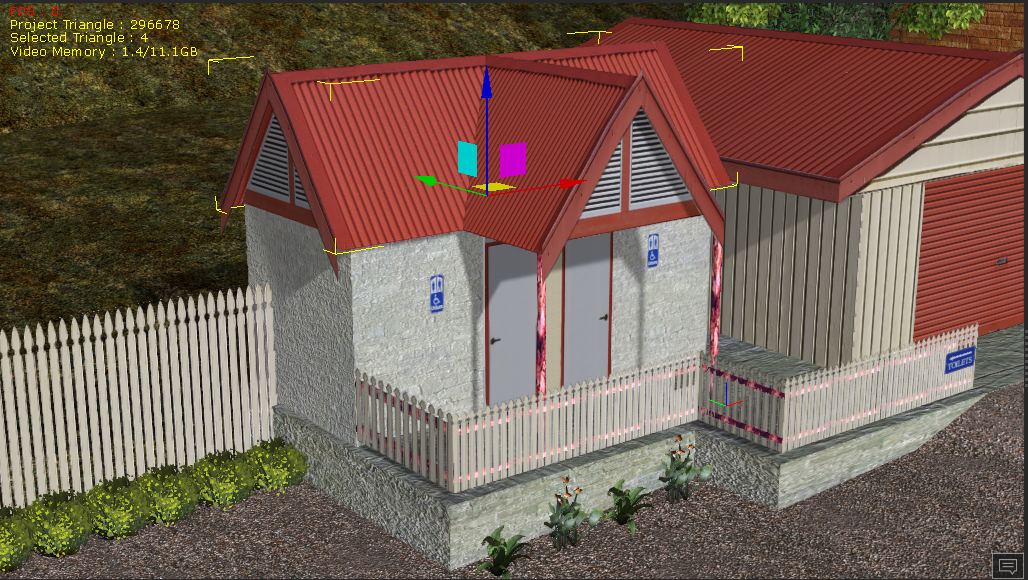
https://forum.reallusion.com/uploads/images/fb744274-7034-4927-8d0e-453c.png
 
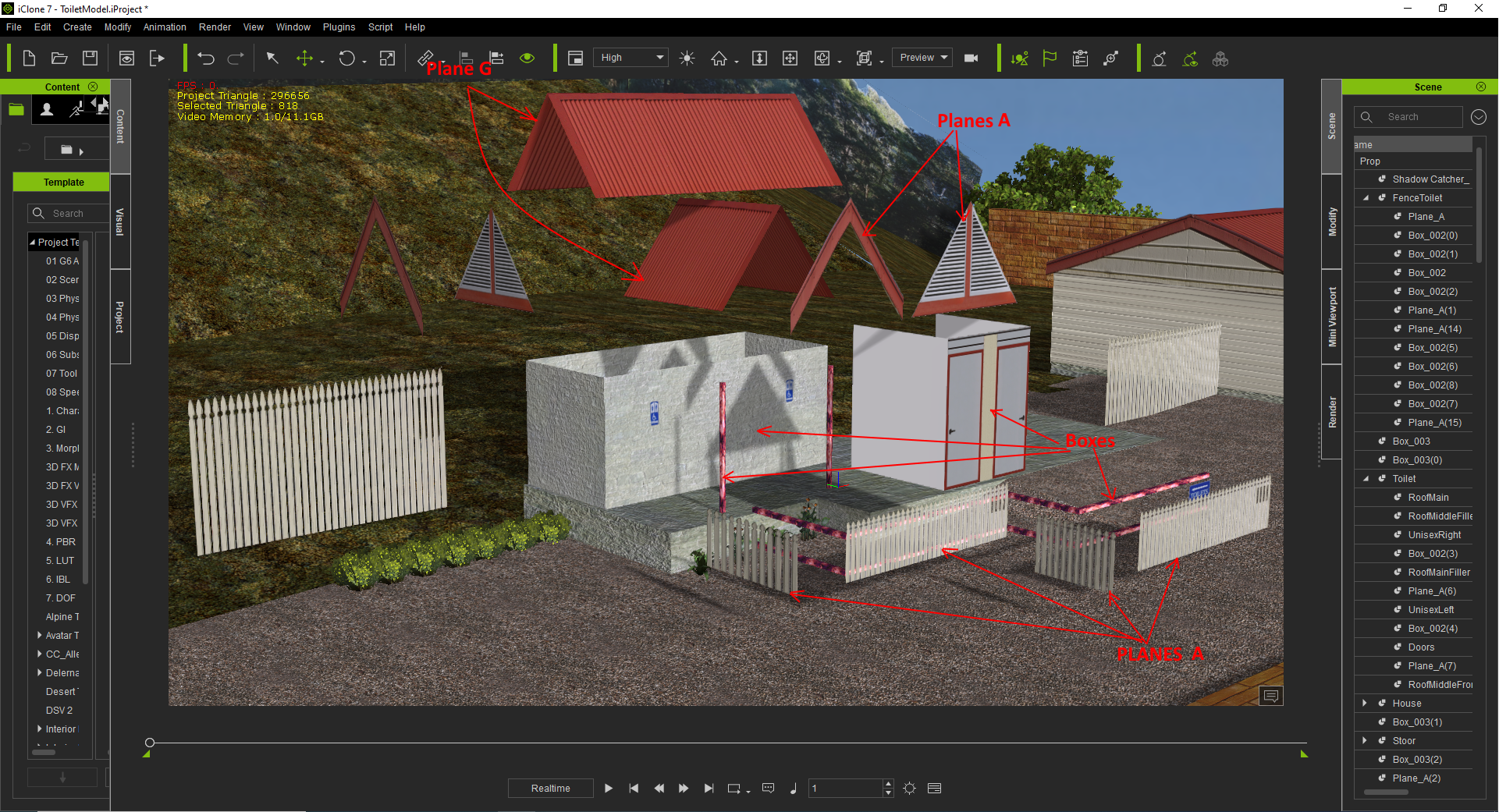
Here I separated all the model parts that made that toilet so you can see what I am saying how easy it is to make pretty much whatever you want. Oh, by the way, once something is made like this toilet you link all the parts together and then it can be saved as a model so it can be used in any project we want to make. Can even change some parts and images to make it look proper for whatever project were working on and that helps to save time because we don't need to remake the whole thing again. Again, any changes we make so it looks a bit different we can save it again as another model that can be reloaded over and over any time in any project
https://forum.reallusion.com/uploads/images/5247948c-569c-4270-bdf2-9457.png


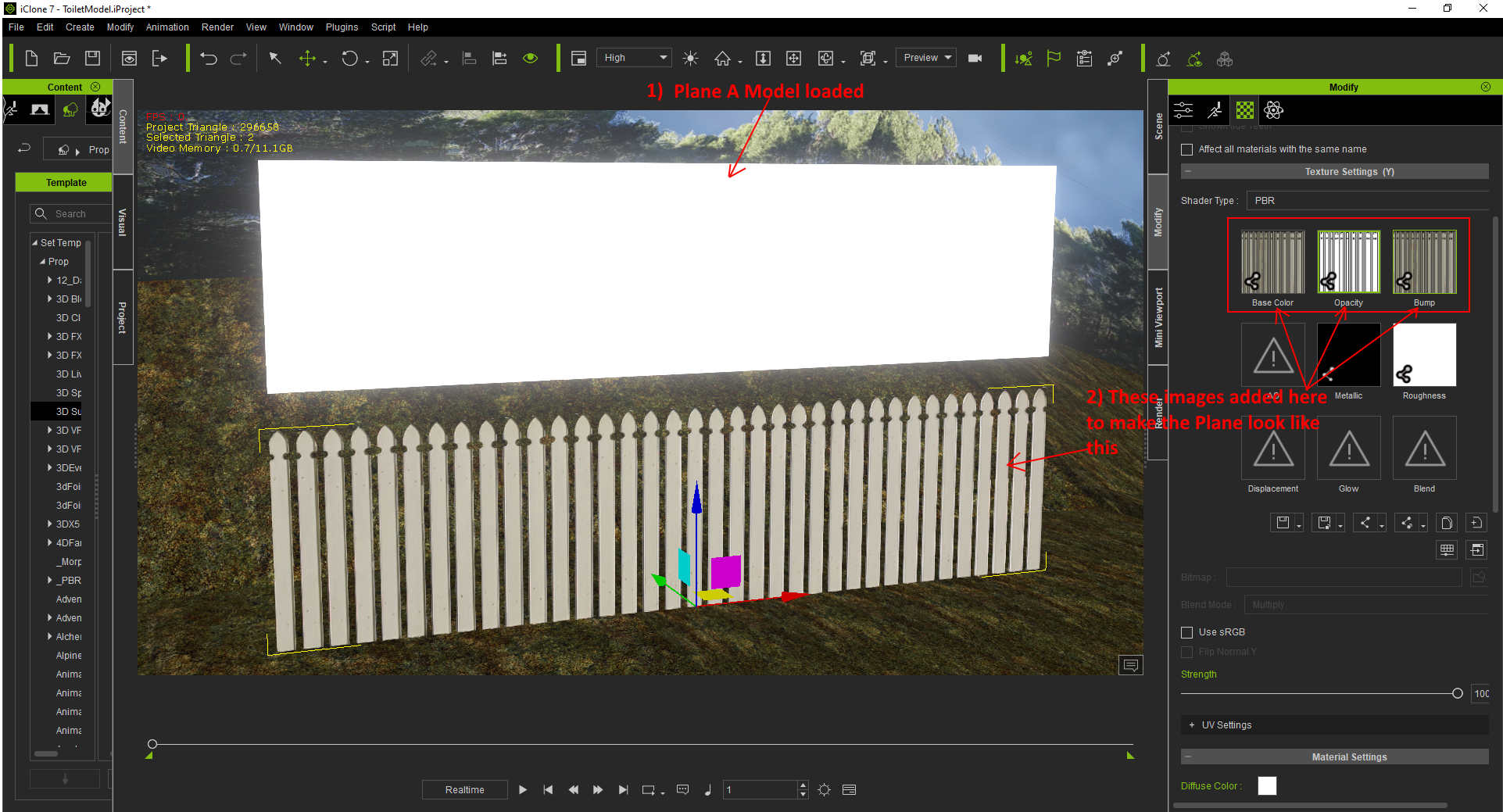
Here I am just showing what I mean by adding images to the Base color, opacity and Bump maps. You can also add images to the Metallic and Roughness so it can be made to look like metals or not (There are other points to this too) There are 4 other things where you can add images to do certain things with what were working on. Wont get into those here but I will say you can add colors to the Glow so the model looks like it has lightings on it.
https://forum.reallusion.com/uploads/images/26b7bb72-68e1-48e4-9fda-ac03.png


Anyway, I am still needing to finish the house where people go to look down at the town in this project. I need to make it so people will be able go inside it and get meals to sit outside eat and watch the scene.
The only thing I didn't work on making in this project was the characters, trees and the car. The key point is I didn't make any of these models. I just used the models that already exist in iClone and sized, rotated, scaled them to make things and then added images so they look OK.


i7-3770 3.4GHz CPU 16 GB Ram   
GeForce GTX1080 TI 11GB
Windows 10 Pro 64bit
Kimmie777
Kimmie777
Posted 6 Years Ago
View Quick Profile
Distinguished Member

Distinguished Member (4.5K reputation)Distinguished Member (4.5K reputation)Distinguished Member (4.5K reputation)Distinguished Member (4.5K reputation)Distinguished Member (4.5K reputation)Distinguished Member (4.5K reputation)Distinguished Member (4.5K reputation)Distinguished Member (4.5K reputation)Distinguished Member (4.5K reputation)

Group: Forum Members
Last Active: 2 Years Ago
Posts: 569, Visits: 1.1K
Delerna, I am very interested in what you did here.  Your creations in this are absolutely fantastic!  (You are quite the gifted items and clothing creator, man.)  Did you make all of those from scratch? 

~ Kimmie


www.TrackingJESUS.net 

--> More Information On This Bible Film Production Can Be Found At: 
www.TrackingJESUS.net/Productions 


--> Become An Early Subscriber To The 'Tracking JESUS' YouTube Channel At: 
https://www.youtube.com/channel/UCEMx91AySc3QuF-SS_3mGQQ

Kimmie777
Kimmie777
Posted 6 Years Ago
View Quick Profile
Distinguished Member

Distinguished Member (4.5K reputation)Distinguished Member (4.5K reputation)Distinguished Member (4.5K reputation)Distinguished Member (4.5K reputation)Distinguished Member (4.5K reputation)Distinguished Member (4.5K reputation)Distinguished Member (4.5K reputation)Distinguished Member (4.5K reputation)Distinguished Member (4.5K reputation)

Group: Forum Members
Last Active: 2 Years Ago
Posts: 569, Visits: 1.1K
Perfect, Rampa!  Thank you! :-)  My animation computer is all fired up to try it.  But I thought I would ask first before spending a bunch of time creating and then trying something that didn't turn out to work for some reason I could not foresee. :-D 

~ Kimmie  


www.TrackingJESUS.net 

--> More Information On This Bible Film Production Can Be Found At: 
www.TrackingJESUS.net/Productions 


--> Become An Early Subscriber To The 'Tracking JESUS' YouTube Channel At: 
https://www.youtube.com/channel/UCEMx91AySc3QuF-SS_3mGQQ

Rampa
Rampa
Posted 6 Years Ago
View Quick Profile
Distinguished Member

Distinguished Member (37.5K reputation)Distinguished Member (37.5K reputation)Distinguished Member (37.5K reputation)Distinguished Member (37.5K reputation)Distinguished Member (37.5K reputation)Distinguished Member (37.5K reputation)Distinguished Member (37.5K reputation)Distinguished Member (37.5K reputation)Distinguished Member (37.5K reputation)

Group: Forum Members
Last Active: 5 days ago
Posts: 8.2K, Visits: 62.6K
The mesh-medium terrains are just props added to the terrain layer. So you can import any OBJ or FBX prop and then right-click on it and select "Convert To Terrain". You can also go the other way. Select the mesh-medium terrain in the Scene Manager (because you cannot select it directly in the scene), and then right-click and convert to prop.

Whereas the heightmap terrain is using a grayscale image to distort the built-in terrain mesh. You can also do the 4 layrs of materials with masking , and tile the texture vertically on cliffs. 

Using props to build your terrain can have great results, and you can use as many as you want. This allows you to set scale and such, then convert them to terrain.
Kimmie777
Kimmie777
Posted 6 Years Ago
View Quick Profile
Distinguished Member

Distinguished Member (4.5K reputation)Distinguished Member (4.5K reputation)Distinguished Member (4.5K reputation)Distinguished Member (4.5K reputation)Distinguished Member (4.5K reputation)Distinguished Member (4.5K reputation)Distinguished Member (4.5K reputation)Distinguished Member (4.5K reputation)Distinguished Member (4.5K reputation)

Group: Forum Members
Last Active: 2 Years Ago
Posts: 569, Visits: 1.1K
Wait a minute... Can I create a bunch of mesh medium maps and then save them as props... And then pull up one of my scenes that I created with a height map and add in those mesh medium props around it... And then turn the mesh medium props back into terrain again?  Would that work, you guys?  I could then extend my scenes out with using a height map as my center base of terrains... Thoughts, please, on that? 

~ Kimmie


www.TrackingJESUS.net 

--> More Information On This Bible Film Production Can Be Found At: 
www.TrackingJESUS.net/Productions 


--> Become An Early Subscriber To The 'Tracking JESUS' YouTube Channel At: 
https://www.youtube.com/channel/UCEMx91AySc3QuF-SS_3mGQQ


1
2


Reading This Topic