|
umarb8
|
umarb8
Posted 5 Years Ago
|
|
Group: Forum Members
Last Active: 4 Years Ago
Posts: 2,
Visits: 32
|
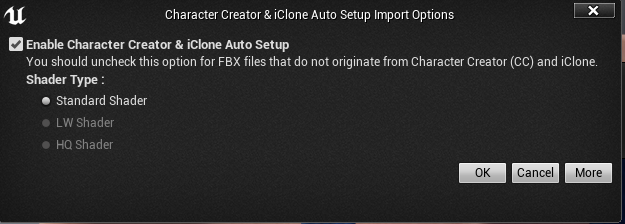
Can no longer select any other Shader besides "Standard Shader" on Auto Setup Import options. This is the case for me with all FBX models exported from CC3. I even reimported older characters that I was able to use the HQ shader on before, but the option is no longer available. How do I "re-enable" the ability to use the HQ Shader.UE4 23.1CC 3.21Auto_Setup_1.02 and tried with 1.03
|
|
unit23
|
unit23
Posted 5 Years Ago
|
|
Group: Forum Members
Last Active: 3 Years Ago
Posts: 115,
Visits: 380
|
umarb8 (1/13/2020) Can no longer select any other Shader besides "Standard Shader" on Auto Setup Import options. This is the case for me with all FBX models exported from CC3. ..Auto_Setup_1.02 and tried with 1.031.03 was released January 15th I believe, so it is unclear what other version you tested. So perhaps give the new 1.03 AutoSetup version another pitch? Make sure that the folders are copied to your Unreal project as outlined in the documentation https://manual.reallusion.com/CC_and_IC_Auto_Setup_Plugin/ENU/CC_and_iC_Auto_Setup/1.0/02_for_Unreal/Installing_CC_Auto_Setup_to_Unreal_v4.htm
|
|
Miranda (RL)
|
Miranda (RL)
Posted 5 Years Ago
|
|
Group: Administrators
Last Active: 3 Years Ago
Posts: 1.8K,
Visits: 11.2K
|
Hello,
Do you put the CC_Shaders folder under the Unreal Content folder? The options of other shader types will be unavailable if you didn't do so.
|