|
Author
|
Message
|
|
Peter (RL)
|
Peter (RL)
Posted 4 Years Ago
|
|
Group: Administrators
Last Active: 2 Years Ago
Posts: 23.1K,
Visits: 36.6K
|
grapelemonswirl (7/25/2022)
Go into the screen settings and get your "zoom" setting to 100% or lower, resolution doesn't help.
Also, who the hell oversaw this? Like, make the windows resizable ffs.This issue only occurs in CC3 when you are using a screen resolution below the recommended 1920 x 1080. However, in CC4 the Export Panel is scrollable so the issue no longer occurs.
Peter
Forum Administrator www.reallusion.com
|
|
|
|
|
grapelemonswirl
|
grapelemonswirl
Posted 4 Years Ago
|
|
Group: Forum Members
Last Active: Last Year
Posts: 1,
Visits: 54
|
Go into the screen settings and get your "zoom" setting to 100% or lower, resolution doesn't help.
Also, who the hell oversaw this? Like, make the windows resizable ffs.
|
|
|
|
|
Anonymous
|
Anonymous
Posted 5 Years Ago
|
|
Group: Forum Members
Last Active: 5 Years Ago
Posts: 1,
Visits: 22
|
I ran into the same issue.
My workaround in windows 10 is:
prepare all your settings in the export window
go display settings (right click on desktop)
scroll down to screen orientation, and chose portrait
tilt your head to the left (or right)
press export
^^
|
|
|
|
|
backalleytoonz
|
backalleytoonz
Posted 6 Years Ago
|
|
Group: Forum Members
Last Active: Last Year
Posts: 2,
Visits: 8
|
Please go to window, and check the workspaces options. I set mine to standard and it fixed the problem. the low res does too. it was set on 1920 x1080 which made the export window too long on my laptop. Glad i finally found it too lol.
|
|
|
|
|
backalleytoonz
|
backalleytoonz
Posted 6 Years Ago
|
|
Group: Forum Members
Last Active: Last Year
Posts: 2,
Visits: 8
|
Please go to window, and check the workspaces options. I set mine to standard and it fixed the problem. the low res does too. it was set on 1920 x1080 which made the export window too long on my laptop. Glad i finally found it too lol.
|
|
|
|
|
meiteisingh0
|
meiteisingh0
Posted 7 Years Ago
|
|
Group: Forum Members
Last Active: 7 Years Ago
Posts: 3,
Visits: 6
|
Thank you guys for giving me an advice...anyways now its working..i just change the screen resolution, atleast i can export fbx..as i followed this video tutorial.. https://www.youtube.com/watch?v=6iDtcGpG3_w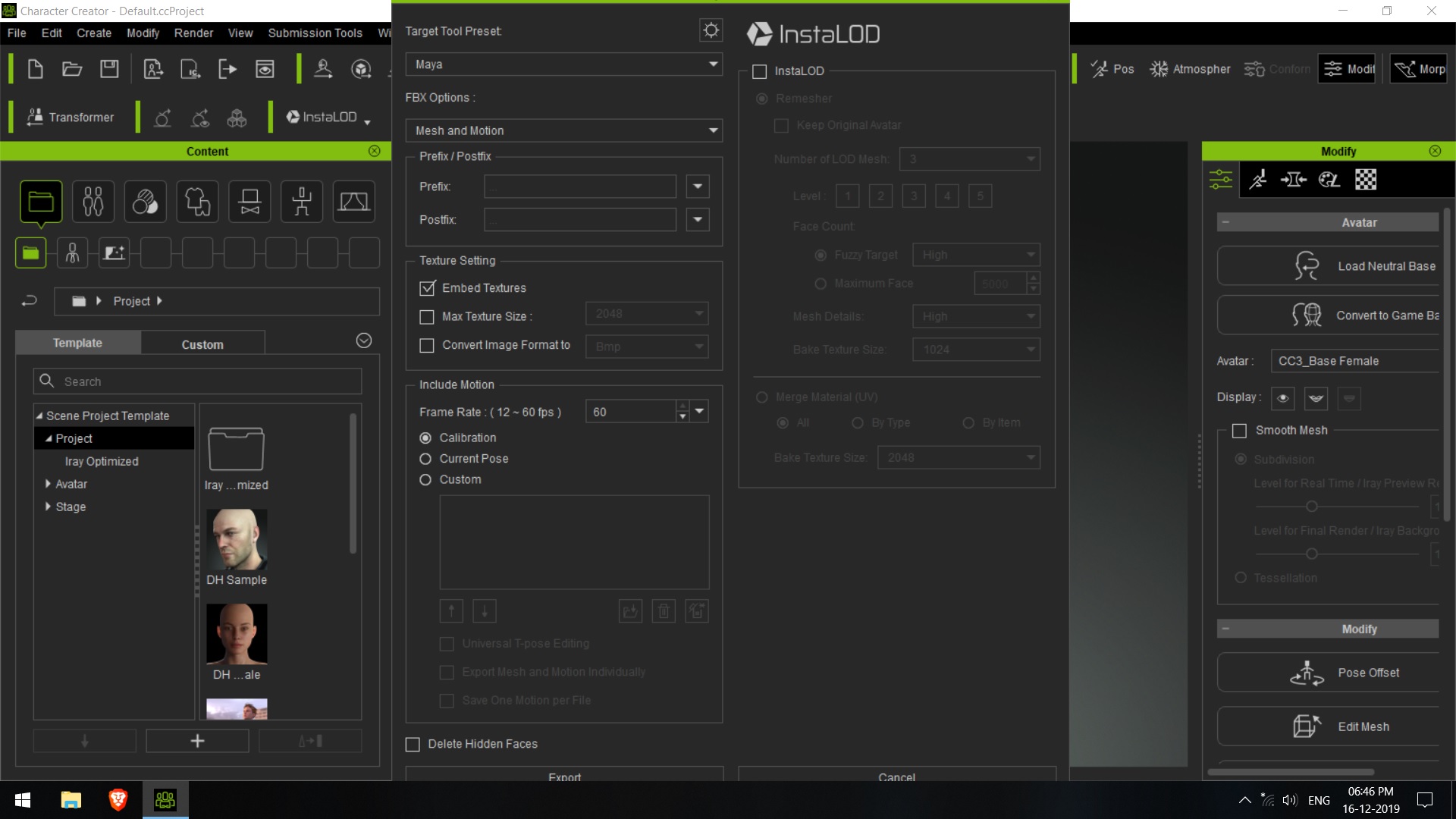
|
|
|
|
|
Peter (RL)
|
Peter (RL)
Posted 7 Years Ago
|
|
Group: Administrators
Last Active: 2 Years Ago
Posts: 23.1K,
Visits: 36.6K
|
@charles_samuel2000, @meiteisingh0 This issue occurs when your screen resolution is too low. Please share your system specifications including graphics card. If you have a compatible graphics card it will certainly allow you to choose a suitable resolution like 1920 x 1080. If you don't have this option you may be using an incompatible graphics card.
Peter
Forum Administrator www.reallusion.com
|
|
|
|
|
Kelleytoons
|
Kelleytoons
Posted 7 Years Ago
|
|
Group: Forum Members
Last Active: 2 Years Ago
Posts: 9.2K,
Visits: 22.1K
|
What the heck kind of card are you running? You need to be using at least an NVidia 1060 (1070 or 1080 would be better). CC3/iClone *will* run on lesser cards, but not well. Might be time to upgrade your card (I've honestly never had a card that couldn't do 1920x1080, at least in this century).
Alienware Aurora R16, Win 11, i9-149000KF, 3.20GHz CPU, 64GB RAM, RTX 4090 (24GB), Samsung 870 Pro 8TB, Gen3 MVNe M-2 SSD, 4TBx2, 39" Alienware Widescreen Monitor
Mike "ex-genius" Kelley
|
|
|
|
|
meiteisingh0
|
meiteisingh0
Posted 7 Years Ago
|
|
Group: Forum Members
Last Active: 7 Years Ago
Posts: 3,
Visits: 6
|
|
|
|
|
|
Kelleytoons
|
Kelleytoons
Posted 7 Years Ago
|
|
Group: Forum Members
Last Active: 2 Years Ago
Posts: 9.2K,
Visits: 22.1K
|
What screen resolution are you running? Try 1920x1080.
Alienware Aurora R16, Win 11, i9-149000KF, 3.20GHz CPU, 64GB RAM, RTX 4090 (24GB), Samsung 870 Pro 8TB, Gen3 MVNe M-2 SSD, 4TBx2, 39" Alienware Widescreen Monitor
Mike "ex-genius" Kelley
|
|
|
|