|
Author
|
Message
|
|
JSFILMZ
|
JSFILMZ
Posted 5 Years Ago
|
|
Group: Forum Members
Last Active: Last Year
Posts: 113,
Visits: 1.0K
|
Finally someone making a livelink face bluepring. You are about to make some serious money my friend. Hey I just watched your video on spring controller. How do you fix the clothing issue? I tried it on my cc character and her clothes rip when her bajoongas bounce. Thanks man
|
|
|
|
|
StyleMarshal
|
StyleMarshal
Posted 5 Years Ago
|
|
Group: Forum Members
Last Active: Last Year
Posts: 5.8K,
Visits: 14.3K
|
haha Tony , you see everything , how do you say in the US , its a pain in the A** ? Yes this BP is ;-)
The problem with CC3 Characters for LLF is that the CC3 Characters have no mouth closed morphs , this you need to close the mouth when the jaw is open (for Ohh a.s.o),
Also CC3's Eyes and Jaw are bone driven and ARkit is morph driven , so you have to build a bridge in the BP from bone driven Jaw & Eyes to morph driven , that makes it so complicated.
When your Character has only Morphs for the ARkit it would be much easier.
|
|
|
|
|
rosuckmedia
|
rosuckmedia
Posted 5 Years Ago
|
|
Group: Forum Members
Last Active: 7 Months Ago
Posts: 3.2K,
Visits: 4.8K
|
Sorry wrong Post.
Best regards rosuckmedia:
|
|
|
|
|
TonyDPrime
|
TonyDPrime
Posted 5 Years Ago
|
|
Group: Forum Members
Last Active: Last Year
Posts: 3.4K,
Visits: 12.4K
|
rosuckmedia (10/8/2020)
Bassline303 (10/8/2020)
Sorry folks , totally busy right now , but here I show you an Update of the Live Link Face BP for CC3+ Characters , still not finished and take a look at my well organized BP :D
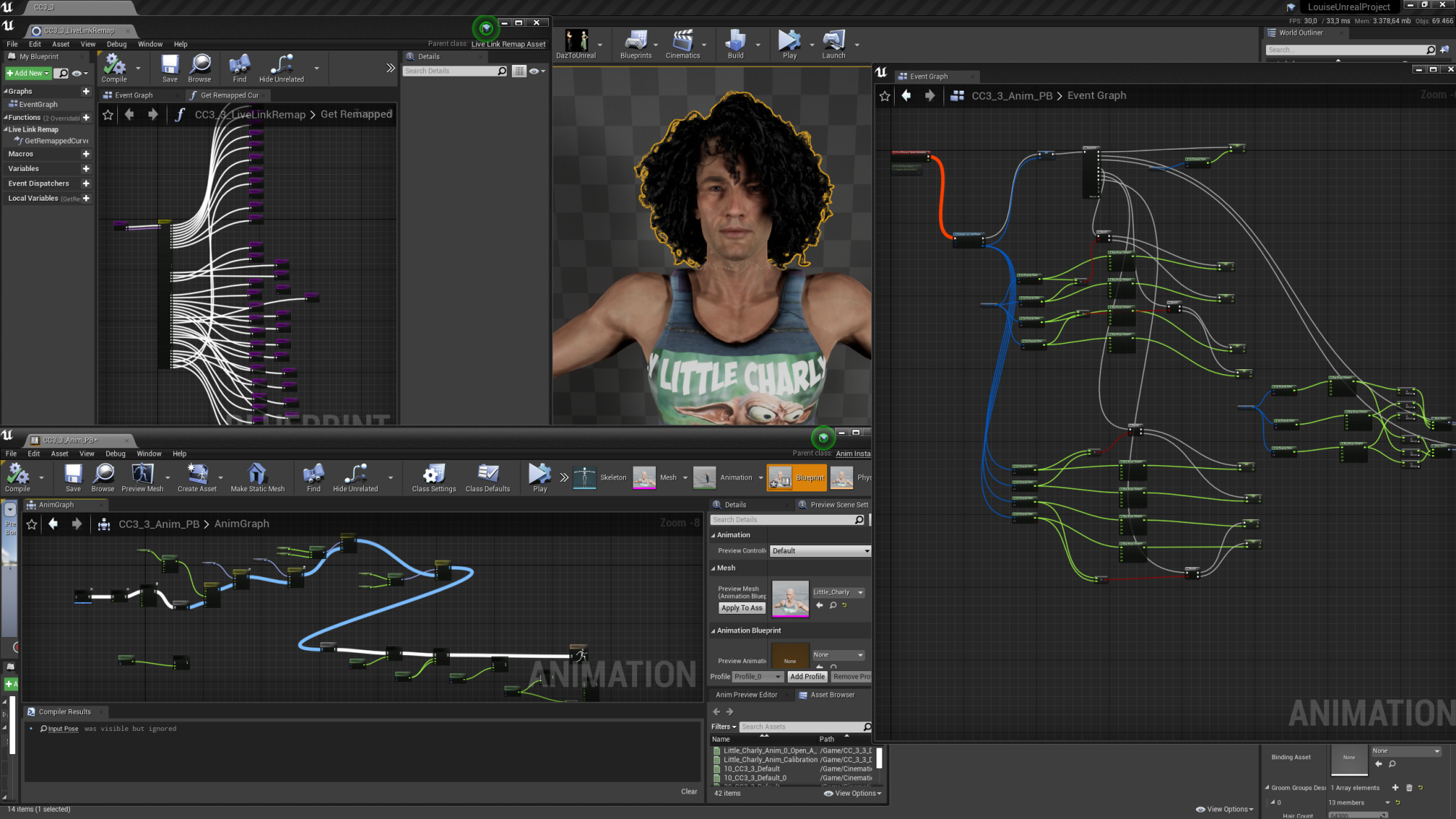 Hi bassline, You are back.. :)Your video is great, hahaha Little Charly is cool. :)
Best regards Robert:) :w00t:
Look at the right side of the AnimGraph window, on the lower left of the screen, where it says "Preview Mesh Animation Blueprint" :laugh:Is that using your UE4-direct iPhone Blueprint? NICE!
|
|
|
|
|
toystorylab
|
toystorylab
Posted 5 Years Ago
|
|
Group: Forum Members
Last Active: 3 Months Ago
Posts: 4.6K,
Visits: 29.9K
|
Bassline303 (10/8/2020)
and take a look at my well organized BP :D Cool, thanx for continueing your work on this! And your blueprint is a piece of art! ;)
Toystorylab on Vimeo :  Crassitudes (my "Alter Ego") on Youtube: Crassitudes (my "Alter Ego") on Youtube: 
|
|
|
|
|
rosuckmedia
|
rosuckmedia
Posted 5 Years Ago
|
|
Group: Forum Members
Last Active: 7 Months Ago
Posts: 3.2K,
Visits: 4.8K
|
Bassline303 (10/8/2020)
Sorry folks , totally busy right now , but here I show you an Update of the Live Link Face BP for CC3+ Characters , still not finished and take a look at my well organized BP :D
Hi bassline, You are back.. :)Your video is great, hahaha Little Charly is cool. :)
Best regards Robert:)
|
|
|
|
|
StyleMarshal
|
StyleMarshal
Posted 5 Years Ago
|
|
Group: Forum Members
Last Active: Last Year
Posts: 5.8K,
Visits: 14.3K
|
Sorry folks , totally busy right now , but here I show you an Update of the Live Link Face BP for CC3+ Characters , still not finished and take a look at my well organized BP :D
|
|
|
|
|
TonyDPrime
|
TonyDPrime
Posted 5 Years Ago
|
|
Group: Forum Members
Last Active: Last Year
Posts: 3.4K,
Visits: 12.4K
|
I will say this of Blueprints - F%$#!!!!!!!
So, UE4 is very very very unforgiving with hierarchy of folders. Meaning, move one thing out of place from what it was expecting, and BOOM, you can cascade issues across a whole entire project.
But, this not only goes for materials and shaders, but for Blueprints themselves! If you change something from where it was placed on a graph previously, or delete and reinsert something someplace else, BOOM.
Do yourself a favor and copy the entire project periodically, you never know when catastrophe may hit. And, I would say get the skeleton of a project first in working order before you start importing in stuff and/or adding stuff in.
On the flip side, do some blueprint projects along with a Youtube video, you won't regret it.
An hour may look like a long time of plodding through, but just compare that hour of learning vs 2 days from now where you spend a whole-day wishing you had some understanding. It gets easier.
So now you know, and knowing is half the Battle....GI JOE!!!!!!!!!
|
|
|
|
|
Warped Reality VFX
|
Warped Reality VFX
Posted 5 Years Ago
|
|
Group: Forum Members
Last Active: 2 Months Ago
Posts: 386,
Visits: 8.4K
|
Thanks, everyone for your input I will keep trying your suggestions.
Warped Reality VFX.
|
|
|
|
|
TonyDPrime
|
TonyDPrime
Posted 5 Years Ago
|
|
Group: Forum Members
Last Active: Last Year
Posts: 3.4K,
Visits: 12.4K
|
For NOOBS:
Comment Bubble – highlight node and press “C” on keyboard
Keyboard Commands for Link-Lines on Blueprint Graph: • Alt+LMB Click on the spline to break the connection (delete the specific link) • Ctrl+LMB Click on the spline to move the connection to a different pin • Hover over the spline to highlight it or see the tooltip • Double-click to insert a reroute node (Blueprint graphs only) - this is a 'midway-dot' that only re-routes for neatness sake.
|
|
|
|