Hi Job ..... sorry for the confusion:
● Yes, I can access the *online* manual that you mentioned.
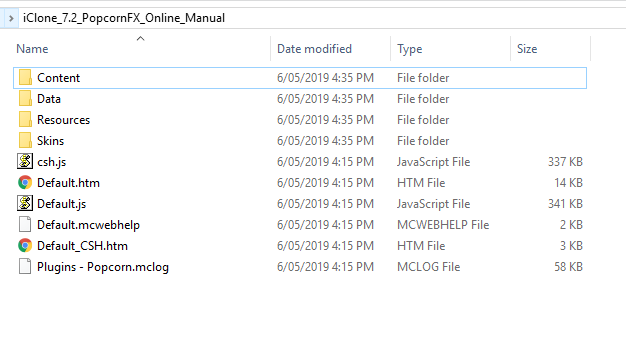
● But for *offline* purposes I have a download version (a folder called " iClone_7.2_PopcornFX_Online_Manual ") - it's a "self contained" version with internal structure (see pic). Clicking on either "Default.htm" or "Default_CHS.htm" will evoke the user manual into life complete with a
▪working menu, ▪dynamic page links & ▪animated gif imagery.● Ideally I'm wanting this offline version to be *evoked* when clicking on Popcorn's 'Online Manual' tab from within iClone - that's all.
It 'sort of' works - *if* Internet Explorer (the 'default' browser called upon), happens to have a 'stored instance' of the Manual that's recently been opened (and not closed down)...
I *could* also open it up totally manually of course. I have another (non Reallusion) program that will point to an offline version of it's manual, though I think it's a 'PDF' version. (It just uses Chrome as the PDF 'reader'). Anyway, - It's just a 'convenience' thing, so no big deal ......
 --------------------------------------------------------------------------------------------------------------------------------------------------------
Please be patient with me ..... I don't always 'get it' the first time 'round - not even the 2nd time! :( - yikes! ...
● MSI GT72VR Laptop, i7 7700HQ 4-Core 3.8 GHz 16GB RAM; Nvidia 1070, 8GB Vram ● iClone-7.93 ● 3DXChange Pipeline 7.81 ● CC-3 Pipeline 3.44 ● Live Face ● HeadShot ● Brekel Pro-Body ● Popcorn FX ● iRAY ● Kinect V2 ● DaVinci Resolve17 ● Mixcraft 8.1