|
Author
|
Message
|
|
Stolpi
|
Stolpi
Posted 7 Years Ago
|
|
Group: Forum Members
Last Active: 2 Years Ago
Posts: 34,
Visits: 97
|
As I said, I did so:  And that is the result: 
|
|
|
|
|
Stolpi
|
Stolpi
Posted 7 Years Ago
|
|
Group: Forum Members
Last Active: 2 Years Ago
Posts: 34,
Visits: 97
|
Hooray, PIP is now installed. I wasn't aware that I'd have to run iClone after the extraction.
The-any-Key, thank you very much! You probably helped to save me months of my life. :)
|
|
|
|
|
The-any-Key
|
The-any-Key
Posted 7 Years Ago
|
|
Group: Forum Members
Last Active: 2 Years Ago
Posts: 356,
Visits: 1.9K
|
Changed the instructions so that part is bold now :-)
"This will install PIP in iclone 7. After downloading the exe. Install the plugin in your open plugin folder in iClone.
(Make sure you right click the exe and "run as admin". )
ex: "C:\Program Files\Reallusion\iClone 7\Bin64\OpenPlugin"
Or if you want to install PIP in the developer version:
"C:\Program Files\Reallusion\iClone 7 Dev\Python_API_073_for_iClone_741\Bin64\OpenPlugin"
(If "OpenPlugin" folder is missing just create a new folder and name it "OpenPlugin")
(If you update just replace all old files) Then start iClone in admin mode. After the first run you can start it as usual."
iClone 7, 3DXchange 7 Pipeline, CC3 Pipeline, CT8 Pipeline, Iray, Live Face, iPhone Xr, Win 10, i9 9900K ~5GHz, Nvidia RTX 2080 8GB, 16GB Ram, M.2 SSD
|
|
|
|
|
firefighter1531
|
firefighter1531
Posted 7 Years Ago
|
|
Group: Forum Members
Last Active: 4 Years Ago
Posts: 46,
Visits: 521
|
hey mike i was wondering if you could help me i get this error when trying to install pip with cmd admin rights D:\Program Files\Reallusion\iClone 7\Bin64\scripts\Python>get-pip.py Unable to create process using 'C:\Users\Kaise\AppData\Local\Microsoft\WindowsApps\python.exe "D:\Program Files\Reallusion\iClone 7\Bin64\scripts\Python\get-pip.py" ' My iclone is not installed on C: because it is a small m2 ssd i have iclone installed on the D: drive which is a 1 tb ssd.i have tried the auto install from the person in this thread however after i followed the instruction completely everytime i would start i clone it would say installing pip but then i would go to cmd admin and type in my drive D: (also Tried C: even though that is not my install path) iclonepy - m install numpy i would get this D:\Program Files\Reallusion\iClone 7\Bin64\iClonepy.exe: No module named install (i have my enviroment var. setup as you did then i tried 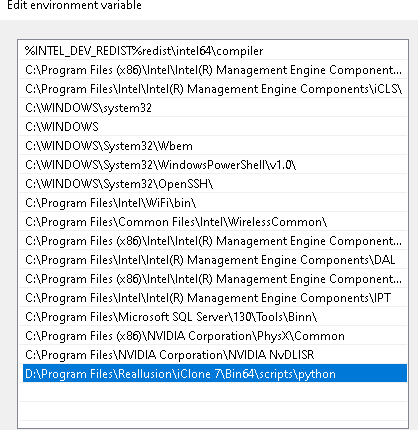 (Still no luck any help would be grateful.
|
|
|
|
|
firefighter1531
|
firefighter1531
Posted 7 Years Ago
|
|
Group: Forum Members
Last Active: 4 Years Ago
Posts: 46,
Visits: 521
|
hey mike i was wondering if you could help me i get this error when trying to install pip with cmd admin rights D:\Program Files\Reallusion\iClone 7\Bin64\scripts\Python>get-pip.py Unable to create process using 'C:\Users\Kaise\AppData\Local\Microsoft\WindowsApps\python.exe "D:\Program Files\Reallusion\iClone 7\Bin64\scripts\Python\get-pip.py" ' My iclone is not installed on C: because it is a small m2 ssd i have iclone installed on the D: drive which is a 1 tb ssd.i have tried the auto install from the person in this thread however after i followed the instruction completely everytime i would start i clone it would say installing pip but then i would go to cmd admin and type in my drive D: (also Tried C: even though that is not my install path) iclonepy - m install numpy i would get this D:\Program Files\Reallusion\iClone 7\Bin64\iClonepy.exe: No module named install (i have my enviroment var. setup as you did then i tried (Still no luck any help would be grateful.
|
|
|
|
|
Kelleytoons
|
Kelleytoons
Posted 7 Years Ago
|
|
Group: Forum Members
Last Active: 2 Years Ago
Posts: 9.2K,
Visits: 22.1K
|
Did you follow my video tutorial? That's the best advice I can give you (while I use C: as my example, as long as you follow what I say exactly it will work no matter your paths).
Alienware Aurora R16, Win 11, i9-149000KF, 3.20GHz CPU, 64GB RAM, RTX 4090 (24GB), Samsung 870 Pro 8TB, Gen3 MVNe M-2 SSD, 4TBx2, 39" Alienware Widescreen Monitor
Mike "ex-genius" Kelley
|
|
|
|
|
firefighter1531
|
firefighter1531
Posted 7 Years Ago
|
|
Group: Forum Members
Last Active: 4 Years Ago
Posts: 46,
Visits: 521
|
Yes I was following the tutorial I used d instead the first part I got python to show up and it shows the version same as yours when I type in to get pip same as yours I get error when I try install it says no module named install. Note i am trying to use iclone 7 normal version am i supposed to be using dev version
|
|
|
|
|
iamdollabomb
|
iamdollabomb
Posted 6 Years Ago
|
|
Group: Forum Members
Last Active: Last Year
Posts: 1,
Visits: 73
|
How did you do it? https://www.youtube.com/watch?v=phqjDAkfib4 This is the only thing ive found related to my particular issue. the message i get when i try to run "iclonepy.exe from the CMD I get a message that says "this app can not be run on this pc, find a version for this pc"i dont know what to do.
|
|
|
|
|
The-any-Key
|
The-any-Key
Posted 6 Years Ago
|
|
Group: Forum Members
Last Active: 2 Years Ago
Posts: 356,
Visits: 1.9K
|
Python is tricky to get working correctly. Each Python module need a version that is compatible with other Python modules. And sometimes the path is wrong or Windows block Python to access some folders in iClone. Tips is to install one of my trial plugins: https://marketplace.reallusion.com/move-that-camera_249451
 My plugins use Numpy and Scipy so after you install it you should get Audio Driven working too. Here are some tutorials how to install and how to troubleshot some of the common issues: https://youtube.com/playlist?list=PLfMGRgz7yTw8g8W4yBd7zKwzAItguyOEF
iClone 7, 3DXchange 7 Pipeline, CC3 Pipeline, CT8 Pipeline, Iray, Live Face, iPhone Xr, Win 10, i9 9900K ~5GHz, Nvidia RTX 2080 8GB, 16GB Ram, M.2 SSD
|
|
|
|