|
Author
|
Message
|
|
Peter (RL)
|
Peter (RL)
Posted 7 Years Ago
|
|
Group: Administrators
Last Active: 2 Years Ago
Posts: 23.1K,
Visits: 36.6K
|
Dear iClone Users, It's that time again when we have another new iClone 7 update and need your continued assistance to help us track down any remaining bugs, glitches or other annoying issues. iClone 7.4 brought the exciting Python Open API and now 7.41 bring Iray Plug-in support to iClone.Important: If you do find any new bugs, issues or glitches in the 7.41 update, please can you report them first in the Feedback Tracker. Then feel free to discuss the issues in this thread. However, do make use of the Feedback Tracker first to log the issue.
As always it will help us greatly if we can keep all outstanding issue discussion in the one place (this thread). This will help the development team keep track of any problems.Please do try to provide your full system specifications and a detailed description of the problem when reporting issues. If you can provide steps so we can try and reproduce the problem this will be even better. If the issue has been previously reported, please post a link to the original report.Many Thanks as always. 
Peter
Forum Administrator www.reallusion.com
|
|
|
|
|
dogged2003
|
dogged2003
Posted 7 Years Ago
|
|
Group: Forum Members
Last Active: 3 Years Ago
Posts: 418,
Visits: 4.5K
|
With all the great improvements in iClone 6 7, one feature is still glaringly missing: a working mirror surface. This is probably one of the oldest requests and dates back from iClone 5, which had an experimental mirror that was never fully developed.
The most flexible solution would probably be a reflective material that could be added to any surface, but a simple flat mirror object for starters would already make me happy.
P.S. Carthage must be destroyed :cool:
My YouTube channel.
|
|
|
|
|
Dragonskunk
|
Dragonskunk
Posted 7 Years Ago
|
|
Group: Forum Members
Last Active: 3 Years Ago
Posts: 368,
Visits: 1.4K
|
What does this error mean? This occurred when I clicked on Render to make an AVI uncompressed video, them BOOM! Crash! Blamo! I tried to render this simple scene. It's just a space ship a sky and a sphere. Tried 3 times. If I need to give details what should I include besides my machine details and steps to reproduce it? 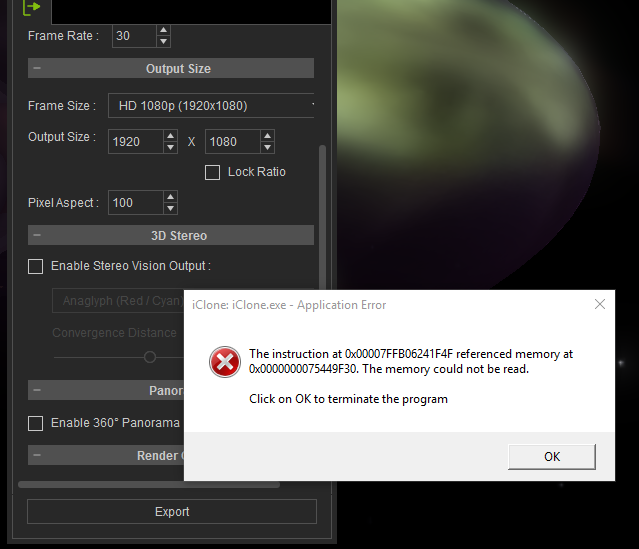
|
|
|
|
|
Dragonskunk
|
Dragonskunk
Posted 7 Years Ago
|
|
Group: Forum Members
Last Active: 3 Years Ago
Posts: 368,
Visits: 1.4K
|
While I'm at it I'll add to Feedback Tracker that [ Merge Clips ] Doesn't work. When you disable [ Clip Auto Extend ] That is no problem there. But when you need to merge the clips it adds keyframes, it adds unwanted animations, it also includes invisible keyframes (pose from avatar changes but nothing visual on the timeline), it basically does not reproduce the existing animation into one clip. It's a mess.
|
|
|
|
|
Peter (RL)
|
Peter (RL)
Posted 7 Years Ago
|
|
Group: Administrators
Last Active: 2 Years Ago
Posts: 23.1K,
Visits: 36.6K
|
Dragonskunk (1/21/2019)
What does this error mean? This occurred when I clicked on Render to make an AVI uncompressed video, them BOOM! Crash! Blamo! I tried to render this simple scene. It's just a space ship a sky and a sphere. Tried 3 times. If I need to give details what should I include besides my machine details and steps to reproduce it? Can you render the same scene to other formats such as MP4, WMV or AVI using a codec? Also, try rendering the scene to uncompressed AVI but reduce the output resolution to a minimum. Does it still crash with the same error message?
Peter
Forum Administrator www.reallusion.com
|
|
|
|
|
Peter (RL)
|
Peter (RL)
Posted 7 Years Ago
|
|
Group: Administrators
Last Active: 2 Years Ago
Posts: 23.1K,
Visits: 36.6K
|
Dragonskunk (1/21/2019)
While I'm at it I'll add to Feedback Tracker that
[ Merge Clips ]
Doesn't work.
When you disable
[ Clip Auto Extend ]
That is no problem there.
But when you need to merge the clips it adds keyframes, it adds unwanted animations, it also includes invisible keyframes (pose from avatar changes but nothing visual on the timeline), it basically does not reproduce the existing animation into one clip.
It's a mess. Apologies but we are not clear on the part below. Can you explain in a bit more detail so we can fully understand the problem? [ Merge Clips ] Doesn't work. When you disable [ Clip Auto Extend ] That is no problem there.
Peter
Forum Administrator www.reallusion.com
|
|
|
|
|
Dragonskunk
|
Dragonskunk
Posted 7 Years Ago
|
|
Group: Forum Members
Last Active: 3 Years Ago
Posts: 368,
Visits: 1.4K
|
Peter (RL) (1/21/2019)
Dragonskunk (1/21/2019)
While I'm at it I'll add to Feedback Tracker that
[ Merge Clips ]
Doesn't work.
When you disable
[ Clip Auto Extend ]
That is no problem there.
But when you need to merge the clips it adds keyframes, it adds unwanted animations, it also includes invisible keyframes (pose from avatar changes but nothing visual on the timeline), it basically does not reproduce the existing animation into one clip.
It's a mess. Apologies but we are not clear on the part below. Can you explain in a bit more detail so we can fully understand the problem? [ Merge Clips ] Doesn't work. When you disable [ Clip Auto Extend ] That is no problem there. Simply, merge clip doesn't work properly, it changes the animation into something else than what it was before you merged.
|
|
|
|
|
Dragonskunk
|
Dragonskunk
Posted 7 Years Ago
|
|
Group: Forum Members
Last Active: 3 Years Ago
Posts: 368,
Visits: 1.4K
|
Peter (RL) (1/21/2019)
Dragonskunk (1/21/2019)
What does this error mean? This occurred when I clicked on Render to make an AVI uncompressed video, them BOOM! Crash! Blamo! I tried to render this simple scene. It's just a space ship a sky and a sphere. Tried 3 times. If I need to give details what should I include besides my machine details and steps to reproduce it? Can you render the same scene to other formats such as MP4, WMV or AVI using a codec? Also, try rendering the scene to uncompressed AVI but reduce the output resolution to a minimum. Does it still crash with the same error message? I used AVI Uncompressed but it never showed the AVI dialog as it crashes as soon as you hit Render. [UPDATE] Thinking the file was corrupt, I recreated the same scene and got exactly the same error. So I started making tests. In my project I used a video clip for a Diffuse texture .MOV clip. I deleted the clip, it was rendering the scene. I load the diffuse with the video clip... then it goes back to crashing again. So I used an .MP4 instead of .MOV it was rendering the scene. So iClone doesn't like .MOV files for diffuse textures, I guess?
|
|
|
|
|
m_koshi
|
m_koshi
Posted 7 Years Ago
|
|
Group: Forum Members
Last Active: Last Year
Posts: 10,
Visits: 371
|
Alpha has big square noise 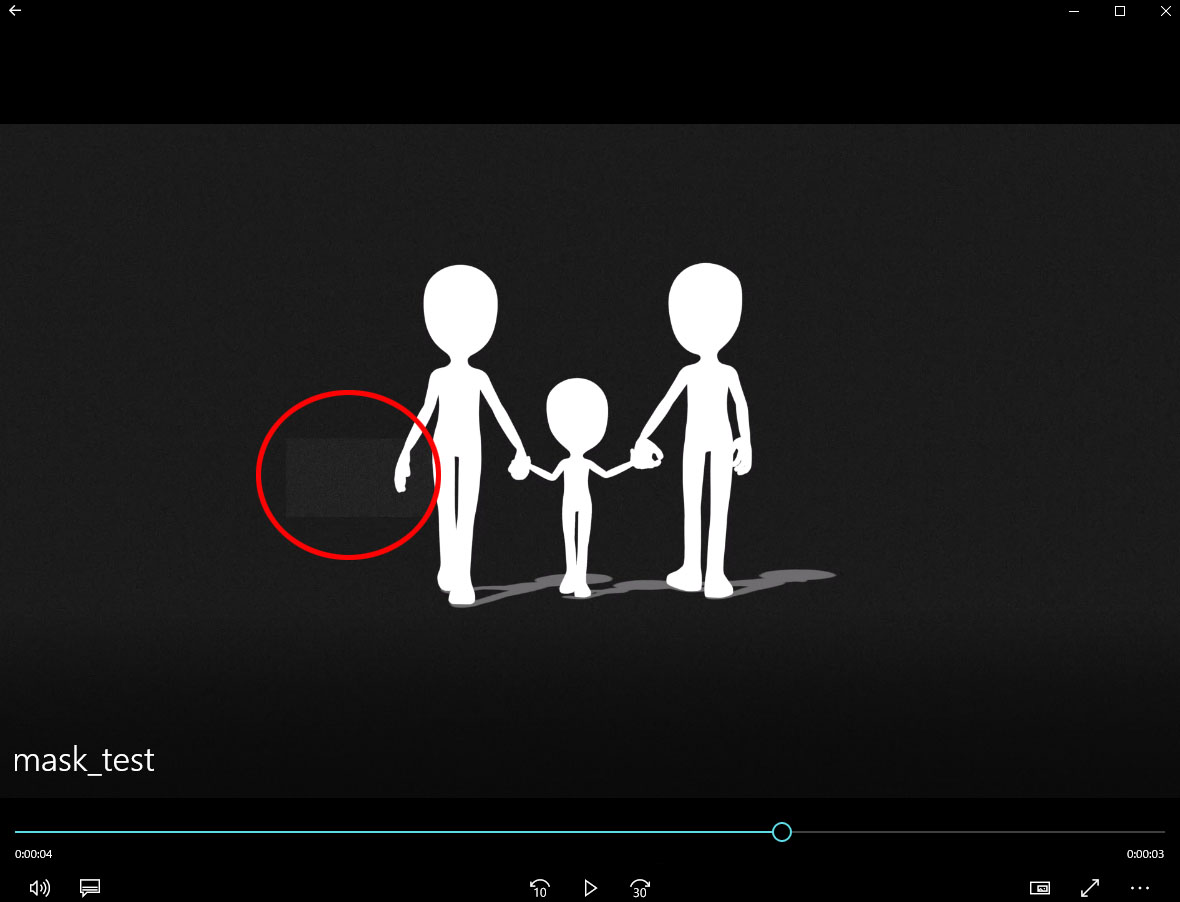 In animation rendering, a large square noise is placed on the mask alpha. I tried various tests such as TGA sequence, PNG sequence, Alpha only MPG, but all the same phenomena occur. This large square noise is about 100 x 100 pixels, which is a little bit thinner than black 100% and occurs at random positions, and this condition occurs randomly every ten-several frames. so it may not be noticeable.
|
|
|
|
|
Dragonskunk
|
Dragonskunk
Posted 7 Years Ago
|
|
Group: Forum Members
Last Active: 3 Years Ago
Posts: 368,
Visits: 1.4K
|
m_koshi (1/22/2019)
Alpha has big square noise In animation rendering, a large square noise is placed on the mask alpha. I tried various tests such as TGA sequence, PNG sequence, Alpha only MPG, but all the same phenomena occur. This large square noise is about 100 x 100 pixels, which is a little bit thinner than black 100% and occurs at random positions, and this condition occurs randomly every ten-several frames. so it may not be noticeable. I was told to render with the 3D view full in screen mode to improve rendering imperfections, maybe that will work with that as well?
|
|
|
|