|
By Peter (RL) - 7 Years Ago
|
Dear iClone Users,
It's that time again when we have another new iClone 7 update and need your continued assistance to help us track down any remaining bugs, glitches or other annoying issues.
iClone 7.4 brought the exciting Python Open API and now 7.41 bring Iray Plug-in support to iClone.
Important: If you do find any new bugs, issues or glitches in the 7.41 update, please can you report them first in the Feedback Tracker. Then feel free to discuss the issues in this thread. However, do make use of the Feedback Tracker first to log the issue.
As always it will help us greatly if we can keep all outstanding issue discussion in the one place (this thread). This will help the development team keep track of any problems.
Please do try to provide your full system specifications and a detailed description of the problem when reporting issues. If you can provide steps so we can try and reproduce the problem this will be even better. If the issue has been previously reported, please post a link to the original report.
Many Thanks as always. 
|
|
By dogged2003 - 7 Years Ago
|
|
With all the great improvements in iClone 6 7, one feature is still glaringly missing: a working mirror surface. This is probably one of the oldest requests and dates back from iClone 5, which had an experimental mirror that was never fully developed.
The most flexible solution would probably be a reflective material that could be added to any surface, but a simple flat mirror object for starters would already make me happy.
P.S. Carthage must be destroyed :cool:
|
|
By Dragonskunk - 7 Years Ago
|
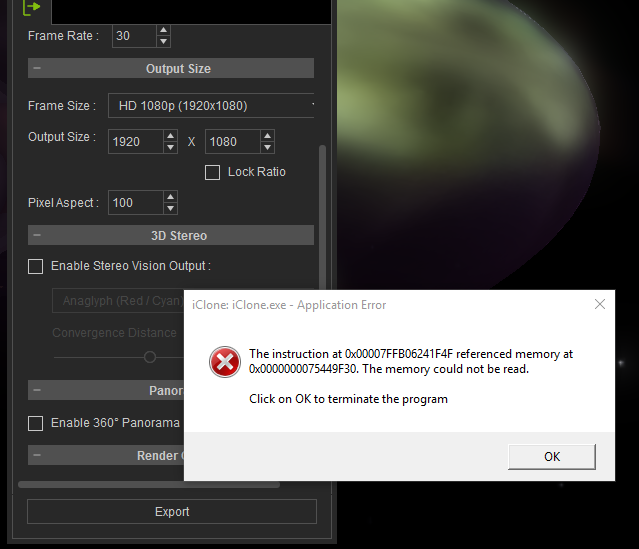
What does this error mean?
This occurred when I clicked on Render to make an AVI uncompressed video, them BOOM! Crash! Blamo!
I tried to render this simple scene. It's just a space ship a sky and a sphere.
Tried 3 times.
If I need to give details what should I include besides my machine details and steps to reproduce it?
|
|
By Dragonskunk - 7 Years Ago
|
While I'm at it I'll add to Feedback Tracker that
[ Merge Clips ]
Doesn't work.
When you disable
[ Clip Auto Extend ]
That is no problem there.
But when you need to merge the clips it adds keyframes, it adds unwanted animations, it also includes invisible keyframes (pose from avatar changes but nothing visual on the timeline), it basically does not reproduce the existing animation into one clip.
It's a mess.
|
|
By Peter (RL) - 7 Years Ago
|
Dragonskunk (1/21/2019)
What does this error mean? This occurred when I clicked on Render to make an AVI uncompressed video, them BOOM! Crash! Blamo! I tried to render this simple scene. It's just a space ship a sky and a sphere. Tried 3 times. If I need to give details what should I include besides my machine details and steps to reproduce it?
Can you render the same scene to other formats such as MP4, WMV or AVI using a codec?
Also, try rendering the scene to uncompressed AVI but reduce the output resolution to a minimum. Does it still crash with the same error message?
|
|
By Peter (RL) - 7 Years Ago
|
|
Dragonskunk (1/21/2019)
While I'm at it I'll add to Feedback Tracker that
[ Merge Clips ]
Doesn't work.
When you disable
[ Clip Auto Extend ]
That is no problem there.
But when you need to merge the clips it adds keyframes, it adds unwanted animations, it also includes invisible keyframes (pose from avatar changes but nothing visual on the timeline), it basically does not reproduce the existing animation into one clip.
It's a mess.
Apologies but we are not clear on the part below. Can you explain in a bit more detail so we can fully understand the problem?
[ Merge Clips ]
Doesn't work.
When you disable
[ Clip Auto Extend ]
That is no problem there.
|
|
By Dragonskunk - 7 Years Ago
|
Peter (RL) (1/21/2019)
Dragonskunk (1/21/2019)
While I'm at it I'll add to Feedback Tracker that
[ Merge Clips ]
Doesn't work.
When you disable
[ Clip Auto Extend ]
That is no problem there.
But when you need to merge the clips it adds keyframes, it adds unwanted animations, it also includes invisible keyframes (pose from avatar changes but nothing visual on the timeline), it basically does not reproduce the existing animation into one clip.
It's a mess. Apologies but we are not clear on the part below. Can you explain in a bit more detail so we can fully understand the problem? [ Merge Clips ] Doesn't work. When you disable [ Clip Auto Extend ] That is no problem there.
Simply, merge clip doesn't work properly, it changes the animation into something else than what it was before you merged.
|
|
By Dragonskunk - 7 Years Ago
|
Peter (RL) (1/21/2019)
Dragonskunk (1/21/2019)
What does this error mean? This occurred when I clicked on Render to make an AVI uncompressed video, them BOOM! Crash! Blamo! I tried to render this simple scene. It's just a space ship a sky and a sphere. Tried 3 times. If I need to give details what should I include besides my machine details and steps to reproduce it? Can you render the same scene to other formats such as MP4, WMV or AVI using a codec? Also, try rendering the scene to uncompressed AVI but reduce the output resolution to a minimum. Does it still crash with the same error message?
I used AVI Uncompressed but it never showed the AVI dialog as it crashes as soon as you hit Render.
[UPDATE]
Thinking the file was corrupt, I recreated the same scene and got exactly the same error.
So I started making tests.
In my project I used a video clip for a Diffuse texture .MOV clip.
I deleted the clip, it was rendering the scene.
I load the diffuse with the video clip... then it goes back to crashing again.
So I used an .MP4 instead of .MOV it was rendering the scene.
So iClone doesn't like .MOV files for diffuse textures, I guess?
|
|
By m_koshi - 7 Years Ago
|
Alpha has big square noise 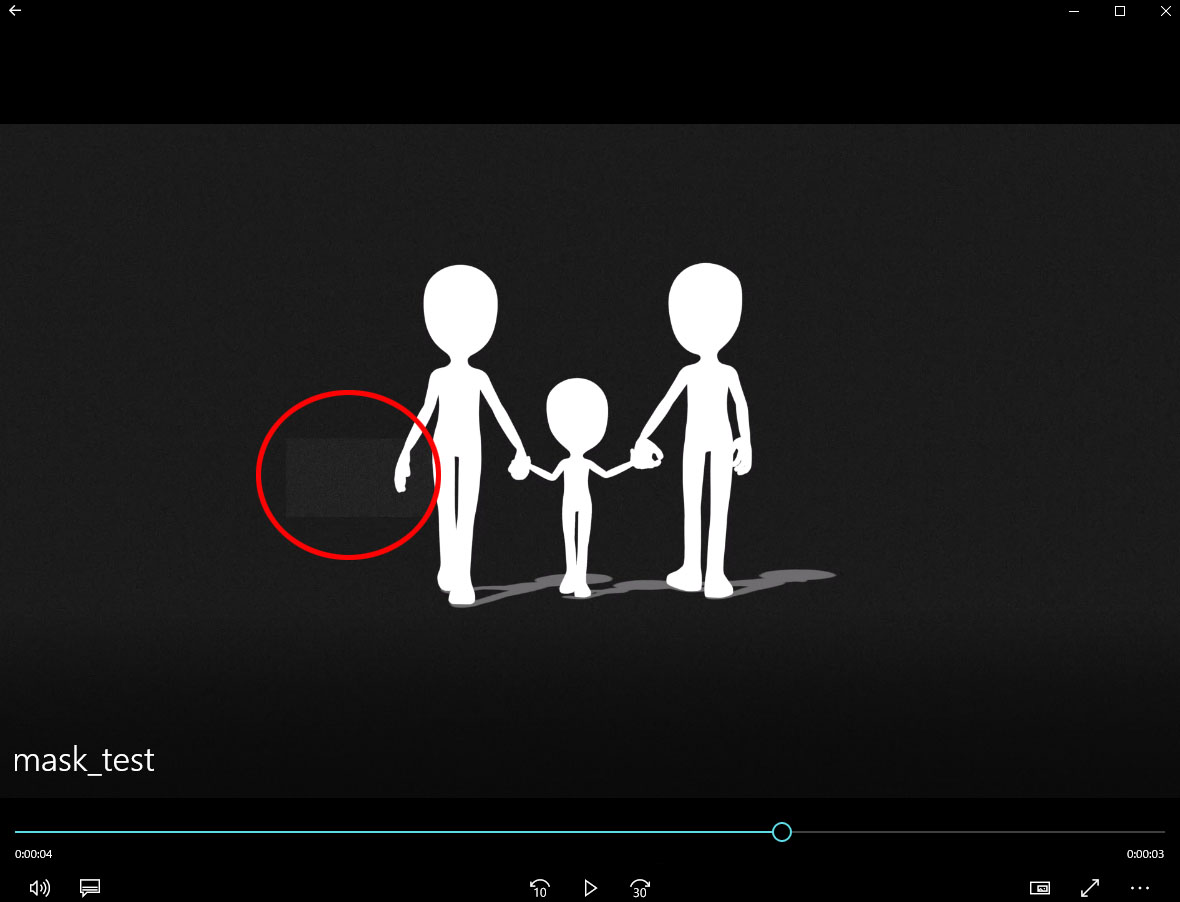 In animation rendering, a large square noise is placed on the mask alpha. I tried various tests such as TGA sequence, PNG sequence, Alpha only MPG, but all the same phenomena occur. This large square noise is about 100 x 100 pixels, which is a little bit thinner than black 100% and occurs at random positions, and this condition occurs randomly every ten-several frames. so it may not be noticeable.
|
|
By Dragonskunk - 7 Years Ago
|
m_koshi (1/22/2019)
Alpha has big square noise In animation rendering, a large square noise is placed on the mask alpha. I tried various tests such as TGA sequence, PNG sequence, Alpha only MPG, but all the same phenomena occur. This large square noise is about 100 x 100 pixels, which is a little bit thinner than black 100% and occurs at random positions, and this condition occurs randomly every ten-several frames. so it may not be noticeable.
I was told to render with the 3D view full in screen mode to improve rendering imperfections, maybe that will work with that as well?
|
|
By Dragonskunk - 7 Years Ago
|
Lots of little bugs I thought would be fixed by now.
Avatar scaling doesn't stay locked.
When you check Lock:XYZ they don't stay proportional.
Example:
if you have all 3 axis at a 100% and you change just one value to 101, anyone will do.
If you add 1 from 100 on one axis you'll get 101 for all 3, but if you then immediately go down one from the same it will go back to 100 but the rest will stay at 101.
If you keep going up and down with just one axis it will keep doing this over and over till you are way off on the other 2.
Other bug: Color correcting loses focus.
If you adjust the color of a material as soon as I stop the slider the material unselects and you have to reselect it to make any further corrections each time.
|
|
By Dragonskunk - 7 Years Ago
|
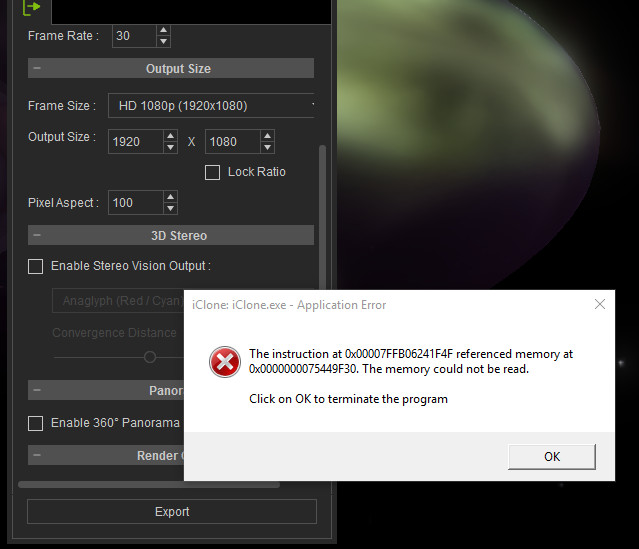
v7.4 Anything with a video texture I get this when I hit the Export button.
Installed 7.4 and try image sequence? I know 7.3 didn't work for that.
So I open my iProject that uses mp4 as a texture can't get it to work now yet it did yesterday. Can't render with anything except 1 way...
Save as image sequence... NO!
This piece of... How about I pull out what's left of my hair!
Now it doesn't render an avatar that is suppose to appear at frame 340. Everything work correctly in the 3D viewport everything show up at it should.
I can't render AVI, MP4, MOV, or image sequence.
I dunno what to do anymore... OK! image sequence from 340 on and it's done.
Now I'm going to find out why I am bleeding from my ears.
|
|
By Kelleytoons - 7 Years Ago
|
Try AVI for your video texture -- that's what I had to do (using MP4 made iClone crash in much the same way).
But it stinks.
|
|
By Dragonskunk - 7 Years Ago
|
|
Kelleytoons (1/25/2019)
Try AVI for your video texture -- that's what I had to do (using MP4 made iClone crash in much the same way).
But it stinks.
AVI? Uncompressed AVI?
I'll try it.
|
|
By Dragonskunk - 7 Years Ago
|
Create script with audio crashes upon loading.
I loaded an audio file from when I was using 7.3 with the same iProject I created using 7.3 but with 7.4 it just crashes and crashes every time 100%.
|
|
By Peter (RL) - 7 Years Ago
|
m_koshi (1/22/2019)
Alpha has big square noise In animation rendering, a large square noise is placed on the mask alpha. I tried various tests such as TGA sequence, PNG sequence, Alpha only MPG, but all the same phenomena occur. This large square noise is about 100 x 100 pixels, which is a little bit thinner than black 100% and occurs at random positions, and this condition occurs randomly every ten-several frames. so it may not be noticeable.
Unfortunately, I can't reproduce this issue. Do ensure you have added this to the Feedback Tracker and please provide a link for your project so the team can test to see what the problem is. Thanks.
|
|
By Peter (RL) - 7 Years Ago
|
|
Dragonskunk (1/28/2019)
Create script with audio crashes upon loading.
I loaded an audio file from when I was using 7.3 with the same iProject I created using 7.3 but with 7.4 it just crashes and crashes every time 100%.
Hi Dragonskunk
You have reported a few issues that relate to video or audio codecs. It may be you have an issue on your computer with regards to codecs. This could be because you have recently installed some audio or video software that has made changes to your codecs.
So we can check if there is an issue with iClone, please ensure you have added these issues to the Feedback Tracker or contact Technical Support direct and supply the projects/audio/video files you are using so we can test them. We will then be able to advise you further. Thanks.
|
|
By Dragonskunk - 7 Years Ago
|
Hi Dragonskunk You have reported a few issues that relate to video or audio codecs. It may be you have an issue on your computer with regards to codecs. This could be because you have recently installed some audio or video software that has made changes to your codecs. So we can check if there is an issue with iClone, please ensure you have added these issues to the Feedback Tracker or contact Technical Support direct and supply the projects/audio/video files you are using so we can test them. We will then be able to advise you further. Thanks.
I always put my issues here first in case someone can say that it's just me or others say me too. Then I head for the Feedback Tracker which I did for this.
The codec issue sounds plausible, I did add software that edits audio and video.
|
|
By Dragonskunk - 7 Years Ago
|
I'm going to update my K-Lite codec pack first see if that works.
[UPDATE]
Yup! That's it, the codecs I had may still have been OK but while installing K-Lite I got a message saying:
The installed "vorbis codec" causes crashes and is unstable do you want to uninstall it?
I said OK and so far iClone is behaving. That codec was from old software called Fruity Loops.
Thank you Peter, you saved me and tech support a lot of head scratching.
|
|
By Peter (RL) - 7 Years Ago
|
|
Thanks for letting us know you were able to track down the culprit. That is good news. :)
|
|
By Peter (RL) - 7 Years Ago
|
|
iClone 7.41 has now been released. Please see the first post in this thread for instructions on how to report any bugs or issues you may find in the new update.
|
|
By animagic - 7 Years Ago
|
m_koshi (1/22/2019)
Alpha has big square noise In animation rendering, a large square noise is placed on the mask alpha. I tried various tests such as TGA sequence, PNG sequence, Alpha only MPG, but all the same phenomena occur. This large square noise is about 100 x 100 pixels, which is a little bit thinner than black 100% and occurs at random positions, and this condition occurs randomly every ten-several frames. so it may not be noticeable.
This was due to a noise effect being added by default to suppress color banding. Check Effects under Visual, where it can be disabled. This will solve your problem.
BTW, in iClone 7.41 this is no longer the default but added as a rendering option.
|
|
By justaviking - 7 Years Ago
|
Does anyone remember where iClone and Iray put TEMP files on the C: Drive?
a) My sky suddenly turned white for no apparent reason.
b) My C: drive only has about 65MB free... yesterday it had several GB free
I think the "In-session" Iray render has filled my C: drive.
I have an urgent non-computer errand to do, gotta run.
|
|
By animagic - 7 Years Ago
|
|
The default I believe is %APPDATA%\Local\Temp\iClone7Temp. I have my iClone temp directory on a different drive as my system drive is "only" a 512 GB SSD.
|
|
By TonyDPrime - 7 Years Ago
|
|
This is a FBT I made today regarding the 2D Video Image Layer. Basically in 7.3x and before, you were able to render the 2D Video Image Layer video as part of the timeline, as in each frame that passed on the timeline would mean the next frame in the video would be rendered. But in 7.41, it only renders the first frame of the video in the 2D Image Layer perpetually on the timeline.
Ie, frame 1 on timeline = frame 1 of video on the 2D Image Layer, and frame 20 on timeline = frame 20 of video on the 2D Image Layer. (correct)
But in 7.41, it only renders the first frame of the video in the 2D Image Layer perpetually on the timeline. Ie, frame 1 on timeline = frame 1 of video on the 2D Image Layer, and frame 20 on timeline = frame 1 of video on the 2D Image Layer. (incorrect)
|
|
By Peter (RL) - 7 Years Ago
|
|
Dragonskunk (1/21/2019)
While I'm at it I'll add to Feedback Tracker that
[ Merge Clips ]
Doesn't work.
When you disable
[ Clip Auto Extend ]
That is no problem there.
But when you need to merge the clips it adds keyframes, it adds unwanted animations, it also includes invisible keyframes (pose from avatar changes but nothing visual on the timeline), it basically does not reproduce the existing animation into one clip.
It's a mess.
Hi Dragonskunk
Just to let you know this has been confirmed as a bug and we plan to fix it hopefully in the next update.
|