|
Author
|
Message
|
|
Kelleytoons
|
Kelleytoons
Posted 6 Years Ago
|
|
Group: Forum Members
Last Active: Last Year
Posts: 9.2K,
Visits: 22.1K
|
Yes, I reported that at the start of this thread -- somehow iClone just "loses" sound from time to time, and you *can* reset it by loading older projects (sometimes). It's buggy but apparently nothing that's easy to reproduce (and thus not easy to fix). The good news is by and large we don't really need sound.
Alienware Aurora R16, Win 11, i9-149000KF, 3.20GHz CPU, 64GB RAM, RTX 4090 (24GB), Samsung 870 Pro 8TB, Gen3 MVNe M-2 SSD, 4TBx2, 39" Alienware Widescreen Monitor
Mike "ex-genius" Kelley
|
|
|
|
|
toystorylab
|
toystorylab
Posted 6 Years Ago
|
|
Group: Forum Members
Last Active: 3 Months Ago
Posts: 4.6K,
Visits: 29.9K
|
Hm, i dropped an old IC6 project with a lot of voices and sounds and all of a sudden sound works again :D
The new project i am working on also works (for the moment) after that ...
SO, iClone definitely has kinda sound bug which occurs randomly :sick:
Toystorylab on Vimeo :  Crassitudes (my "Alter Ego") on Youtube: Crassitudes (my "Alter Ego") on Youtube: 
|
|
|
|
|
toystorylab
|
toystorylab
Posted 6 Years Ago
|
|
Group: Forum Members
Last Active: 3 Months Ago
Posts: 4.6K,
Visits: 29.9K
|
rosuckmedia (2/22/2019)
Hallo toystorylab
In the menu of Cubase "Devices -> Configure Devices" you can on the right in "Disable ASIO driver when program is running in the background" take the hook out / put.I got it like this: 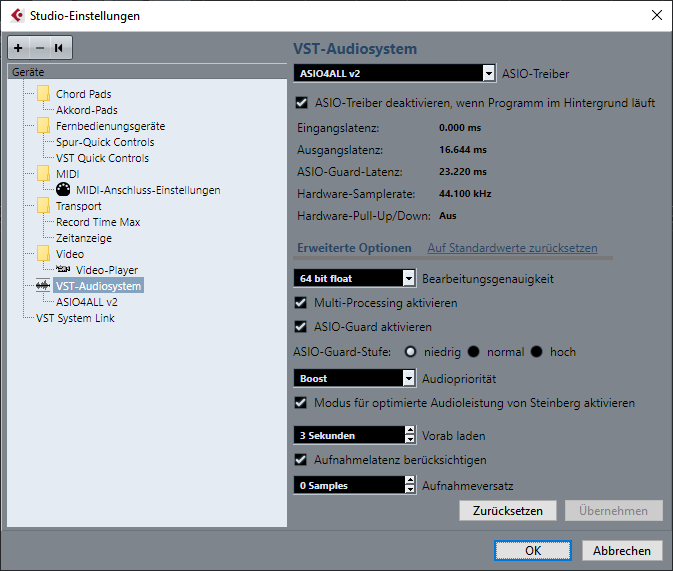 If i don't have "ASIO disabled when running in background" i have no audio in Firefox. For iClone it makes no difference if i put a hook or not...
Toystorylab on Vimeo : Crassitudes (my "Alter Ego") on Youtube:
|
|
|
|
|
rosuckmedia
|
rosuckmedia
Posted 6 Years Ago
|
|
Group: Forum Members
Last Active: 7 Months Ago
Posts: 3.2K,
Visits: 4.8K
|
Hallo toystorylab
In the menu of Cubase "Devices -> Configure Devices" you can on the right in "Disable ASIO driver when program is running in the background" take the hook out / put.
Greetings Robert
|
|
|
|
|
toystorylab
|
toystorylab
Posted 6 Years Ago
|
|
Group: Forum Members
Last Active: 3 Months Ago
Posts: 4.6K,
Visits: 29.9K
|
Well, i mostly use mp3, but i have no sound at all, even in projects that worked fine. I can hear the sound of videos but not of the viseme nor the regular sound in timeline and i can't hear the blast of popcorn FX... No matter if i use wav or mp3, i hear nothing. Also text to speech i can't hear.
Toystorylab on Vimeo : Crassitudes (my "Alter Ego") on Youtube:
|
|
|
|
|
animagic
|
animagic
Posted 6 Years Ago
|
|
Group: Forum Members
Last Active: Last Month
Posts: 15.8K,
Visits: 31.4K
|
@toystorylab: do you use WAV or MP3? MP3 has sometimes given problems. Also for WAV, iClone would not be able to handle over 48 kHz sample rate.
|
|
|
|
|
toystorylab
|
toystorylab
Posted 6 Years Ago
|
|
Group: Forum Members
Last Active: 3 Months Ago
Posts: 4.6K,
Visits: 29.9K
|
Damned... NO AUDIO anymore :sick:
When i render it is there, but when i play the project; niente...
Tried Mikes workaround with a video (mp4) as plane.
I can hear the sound of the video but not the voice of my character...
Also all sliders (windows volume mixer + project setting iClone) are up.
I did some changes in Cubase (installed ASIO4ALL) last week, before the problem occured,
but the problem did occur days later (today)...
So, yesterday everything worked fine.
Any ideas?
Toystorylab on Vimeo : Crassitudes (my "Alter Ego") on Youtube:
|
|
|
|
|
Kelleytoons
|
Kelleytoons
Posted 7 Years Ago
|
|
Group: Forum Members
Last Active: Last Year
Posts: 9.2K,
Visits: 22.1K
|
It was the FP audio and I haven't yet tried to see if it will break iClone again (the holidays have kept me busy). Your workflow is similar to mine but I don't bother exporting audio from iClone. I only use it as a visual reference (I don't do lip sync with it -- that's handled by Face Live). Once I'm done I export the sequences at 24fps and bring into Premiere. During the process all my audio starts at the starting frame, so it's easy to line up the associated .wav tracks (although, truthfully, it's not hard to visually align almost audio track -- I even have a thread somewhere on the forums where I talk about moving the lip sync audio forward because Face Live tends to have a tiny delay in it). So I don't really care if the audio "works" in iClone per se, except I just want to hear it as I animate. Lots of folks have issues with audio at times but if you aren't experiencing problems I wouldn't worry... yet. And the Python API exposes the audio tracks so there may be ways to program around any problems now. Sometimes we overthink these things so let's just assume I had a very weird problem and don't change your workflow just because it *might* get you into trouble. And thanks for the kind words -- the FP thing was fun to do, although I'll refine my Robby for next time (I belong to an FP Facebook group and they enjoy stuff like that enough to make me want to keep doing it, just for them).
Alienware Aurora R16, Win 11, i9-149000KF, 3.20GHz CPU, 64GB RAM, RTX 4090 (24GB), Samsung 870 Pro 8TB, Gen3 MVNe M-2 SSD, 4TBx2, 39" Alienware Widescreen Monitor
Mike "ex-genius" Kelley
|
|
|
|
|
bexley
|
bexley
Posted 7 Years Ago
|
|
Group: Forum Members
Last Active: Last Month
Posts: 114,
Visits: 374
|
Mike, if this was your Forbidden Planet Christmas audio? Maybe Iclone is making aesthetic choices now? ;-) In all seriousness, what is your audio/animation pipeline? I'd like to know because I DO use the iclone sound output and while I haven't experienced your issues (yet) I'm dreading the day... My process is as follows: 1 - use Premiere (or an NLE) to separate dialog tracks into character files; 2 - import the WAV file for each character and do the lip-sync; 3 - export my shots as a mp4 at 30fps and PNG sequence at 24 fps; 4 - import mp4 and PNG sequence into After Effects for final shot compositing and audio syncing (mp4 audio matched to PNG sequence); render out as a QT Jpg MOV for editing. Do you have another way that retains audio quality? Cheers! --Bex. Loved Forbidden Planet, BTW :-)
|
|
|
|
|
Kelleytoons
|
Kelleytoons
Posted 7 Years Ago
|
|
Group: Forum Members
Last Active: Last Year
Posts: 9.2K,
Visits: 22.1K
|
Since I only render to images I never did try rendering to see if the audio was there -- doesn't matter one way or the other if it was, since I was (am) only trying to use it as a place market for timing purposes. As soon as I'm done with this holiday project (most likely tomorrow) I'll have a go at reloading that audio file again and see if I can break it. In the meantime things (fingers crossed) are working acceptably.
Alienware Aurora R16, Win 11, i9-149000KF, 3.20GHz CPU, 64GB RAM, RTX 4090 (24GB), Samsung 870 Pro 8TB, Gen3 MVNe M-2 SSD, 4TBx2, 39" Alienware Widescreen Monitor
Mike "ex-genius" Kelley
|
|
|
|