|
Author
|
Message
|
|
RobertoColombo
|
RobertoColombo
Posted 8 Years Ago
|
|
Group: Forum Members
Last Active: 5 Years Ago
Posts: 1.6K,
Visits: 3.0K
|
Hi Tony,
not being at home for the next 2 days I can't check the 7.4 out.
Therefore, I am just reading the doc...
Hereafter are some questions.
1. Can iClone start with some Python file already pre-loaded?
2. In the doc, page "Your first iClone plus in" there are 2 methods to run a Python file.
Are they exactly equivalent or is there any subtle difference?
It seems that Method 1 is to pre-install GUI widgets directly in iClone window, and so to run code at the launch. Correct?
3. Is "print()" used to write text into the Python console window? Probably it is, but pls confirm.
4. I feel the description about how to add other Python modules is not really clear. For example, how to read/write a simple text-based file? Shall we use QT libs?
5. Is it possible to grab the infos about the vertex if the mesh of a prop? Because being able to control the root of an asset is not very useful if we can't determine whether the asset is penetrating an object or the terrain it is placed over...
7. It would be useful to have some clarification on Qt licensing system vs. IClone plug-in devlopment. I just read a bit, not thoroughly, and perhaps you already have some clear guidelines...
Thanks
Roberto
My PC:
OS: Windows 10 Pro English 64-bit / CPU: Intel i7-9700 3.6GHz / MB: ASUS ROG Strix Z390 RAM: 32GB DDR4 2.6GHz / HD: 2TB+3TB / SSD: 2x512GB Samsung 860 EVO + 1x2TB Samsung
VB: Palit GTX2080 TI GamingPro 11GB / AB: embedded in the MB and VB (audio from the MOTU M4 I/F) / DirectX: 12
|
|
|
|
|
wires
|
|
|
Group: Forum Members
Last Active: Last Month
Posts: 5.7K,
Visits: 26.5K
|
After updating iClone using the patch, not the Hub, I'm having the same crash after the Splash screen. Looks like RL have screwed up again. :crazy::pinch:
Going to go for an uninstall/reinstall, as if we don't have enough to do at this time of year - Oh, and I won't be installing 7.4 until this get cleared up.
Gerry
System: Win 10 Pro (21H2), Asus X99-E WS, CPU i7-5930K -3,5 GHz, 32 GB DDR4 2666-16 RAM, NVidia GTX 1080 Ti GPU - 11 GB VRAM(Driver Studio-536.99), Samsung 850 Pro 512 GB SSD, 6 TB HD storage.
|
|
|
|
|
sonic7
|
sonic7
Posted 8 Years Ago
|
|
Group: Forum Members
Last Active: 3 Years Ago
Posts: 1.7K,
Visits: 19.4K
|
Yes, well now that I've 'updated', my version 7.4 'launches' the splash screen (intending to start), but just disappears after 8 seconds - then nothing (and yes, I re-booted after updating) .... So I'll be re-installing 7.3 Edit: Having uninstalled 7.4 using "RevoUninstaller" - I can say that Mike was right - the Reallusion Content Folders are all still there intact .... Edit: And yes, back on version 7.3 - the 'recent projects list' is there - and opens previous projects ..... but the 'plugins tab' is missing (so there's no curve editor). Guess that's to be re-installed as a separate exercise. OK - Curve Editor reinstalled. (Never though I'd *love* 7.3 as much as I do atm - lol). *** Resource pack needs re-installing (but will prompt you).
--------------------------------------------------------------------------------------------------------------------------------------------------------
Please be patient with me ..... I don't always 'get it' the first time 'round - not even the 2nd time! :( - yikes! ... ● MSI GT72VR Laptop, i7 7700HQ 4-Core 3.8 GHz 16GB RAM; Nvidia 1070, 8GB Vram ● iClone-7.93 ● 3DXChange Pipeline 7.81 ● CC-3 Pipeline 3.44 ● Live Face ● HeadShot ● Brekel Pro-Body ● Popcorn FX ● iRAY ● Kinect V2 ● DaVinci Resolve17 ● Mixcraft 8.1
|
|
|
|
|
Kelleytoons
|
Kelleytoons
Posted 8 Years Ago
|
|
Group: Forum Members
Last Active: 2 Years Ago
Posts: 9.2K,
Visits: 22.1K
|
Val, Reinstalling iClone is almost never an issue -- not only will it know where all your content is, it even remembers your preferences (i.e. your default project). I just reinstalled and it was like it was never removed (but that was before this update). It even knows your last opened projects. Having said that -- it's ALWAYS a good idea to back up your content folders (Custom and Template). I do this all the time, have them backed up at least in three separate places (one of which is my backup machine). You can just copy the contents out, and if you ever need to "reinstall" the content you just copy it back. As to the unstability of this release: I'm not having any issues with very complicated projects loaded in but I will say it would not surprise me if there are issues with this. I will leave my comments at that (except to say that no one should be using a brand new build like this for anything critical).
Alienware Aurora R16, Win 11, i9-149000KF, 3.20GHz CPU, 64GB RAM, RTX 4090 (24GB), Samsung 870 Pro 8TB, Gen3 MVNe M-2 SSD, 4TBx2, 39" Alienware Widescreen Monitor
Mike "ex-genius" Kelley
|
|
|
|
|
Rogue Anime
|
Rogue Anime
Posted 8 Years Ago
|
|
Group: Forum Members
Last Active: 3 Years Ago
Posts: 548,
Visits: 3.4K
|
Here's what I get when i try to open the program ~V~ 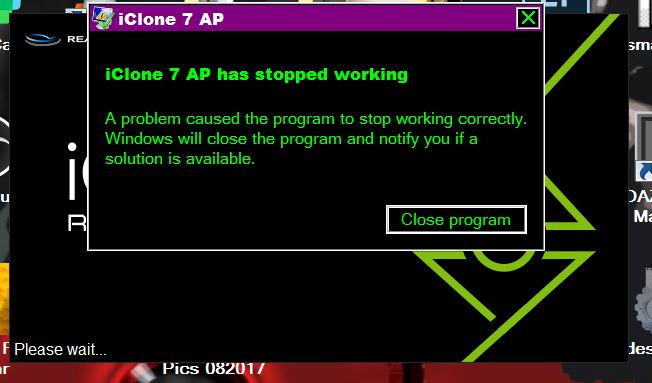
Val RogueAnanda
|
|
|
|
|
Rottadamic
|
Rottadamic
Posted 8 Years Ago
|
|
Group: Forum Members
Last Active: 2 Years Ago
Posts: 237,
Visits: 982
|
man this is the most unstable version ever, it chracht when I wanted to move a character, and now it chacht when I wanted to render, I normally almost never have chraches
|
|
|
|
|
sonic7
|
sonic7
Posted 8 Years Ago
|
|
Group: Forum Members
Last Active: 3 Years Ago
Posts: 1.7K,
Visits: 19.4K
|
".... When I re-install the program, will it remember where my additional and custom folders & content remain in place? ... "Maybe someone with the anwser to this question from Val?
--------------------------------------------------------------------------------------------------------------------------------------------------------
Please be patient with me ..... I don't always 'get it' the first time 'round - not even the 2nd time! :( - yikes! ... ● MSI GT72VR Laptop, i7 7700HQ 4-Core 3.8 GHz 16GB RAM; Nvidia 1070, 8GB Vram ● iClone-7.93 ● 3DXChange Pipeline 7.81 ● CC-3 Pipeline 3.44 ● Live Face ● HeadShot ● Brekel Pro-Body ● Popcorn FX ● iRAY ● Kinect V2 ● DaVinci Resolve17 ● Mixcraft 8.1
|
|
|
|
|
Rogue Anime
|
Rogue Anime
Posted 8 Years Ago
|
|
Group: Forum Members
Last Active: 3 Years Ago
Posts: 548,
Visits: 3.4K
|
Well, Mike - It seems after Sonic was kind enough to show me all the other ways to get this done, and it SAYS my update was 'successful', it was NOT! QUESTION: When I re-install the program, will it remember where my additional and custom folders & content remain in place? Aslo, will I need to install updates again?
Thanks for the responses, Mike & Steve ~V~
Val RogueAnanda
|
|
|
|
|
Rogue Anime
|
Rogue Anime
Posted 8 Years Ago
|
|
Group: Forum Members
Last Active: 3 Years Ago
Posts: 548,
Visits: 3.4K
|
Thanks Mike! Steve is trying to help me out, I'll keep everyone posted if we can solve it. Very kind of you and Sonic to reply so quickly. ~V~
Val RogueAnanda
|
|
|
|
|
Kelleytoons
|
Kelleytoons
Posted 8 Years Ago
|
|
Group: Forum Members
Last Active: 2 Years Ago
Posts: 9.2K,
Visits: 22.1K
|
Hmmm, all installed and runs just fine on my end (and I *have* had issues in the past with Hub updates). If no one else replies to you I'd suggest uninstalling everything, start with the hub first and go again (I had to do this about a month ago and then everything was "healed").
Alienware Aurora R16, Win 11, i9-149000KF, 3.20GHz CPU, 64GB RAM, RTX 4090 (24GB), Samsung 870 Pro 8TB, Gen3 MVNe M-2 SSD, 4TBx2, 39" Alienware Widescreen Monitor
Mike "ex-genius" Kelley
|
|
|
|