|
Author
|
Message
|
|
sonic7
|
sonic7
Posted 8 Years Ago
|
|
Group: Forum Members
Last Active: 3 Years Ago
Posts: 1.7K,
Visits: 19.4K
|
Greetings all ....
The following video explains an issue I'm having ....
If anyone's able to explain a way to overcome this, it would be very much appreciated - there's most likely a 'method' I'm missing here, a method that could apply to many other 'similar' situations - so it would be well worth knowing.
--------------------------------------------------------------------------------------------------------------------------------------------------------
Please be patient with me ..... I don't always 'get it' the first time 'round - not even the 2nd time! :( - yikes! ... ● MSI GT72VR Laptop, i7 7700HQ 4-Core 3.8 GHz 16GB RAM; Nvidia 1070, 8GB Vram ● iClone-7.93 ● 3DXChange Pipeline 7.81 ● CC-3 Pipeline 3.44 ● Live Face ● HeadShot ● Brekel Pro-Body ● Popcorn FX ● iRAY ● Kinect V2 ● DaVinci Resolve17 ● Mixcraft 8.1
|
|
|
|
|
Rampa
|
|
|
Group: Forum Members
Last Active: 2 Months Ago
Posts: 8.2K,
Visits: 62.6K
|
Try just deleting all the left arm keys between 40 and 80.
|
|
|
|
|
Walvince
|
Walvince
Posted 8 Years Ago
|
|
Group: Forum Members
Last Active: Last Month
Posts: 99,
Visits: 981
|
Sorry if you said this in your video, as I'm not a native english speaker I may have missed some parts^^ But did you try changing the last key transition for the hand ? Sometimes the "auto" transition is doing weird things for me and switching to "linear" works better in most of cases.
|
|
|
|
|
sonic7
|
sonic7
Posted 8 Years Ago
|
|
Group: Forum Members
Last Active: 3 Years Ago
Posts: 1.7K,
Visits: 19.4K
|
Hi Rampa .... OK - I had tried that before, but just now gave it another go ... If I delete all the key frames (for the left arm) - "between 40 and 80" (ie: leaving 40 & 80 in-place), there IS an 'improvement' (somewhat of a 'tamed' version of the original wild movement). If I delete all including key frames 40 & 80 - it's a tad better again - but certainly not a 'direct' - 'as the crow flies' path between 40 & 80 - it still is 'offset' to a degree. (actually, frame 80 no longer has the landing pose like before) To be fair - it IS an improvement - but would still require a fair amount of key-framing to fix ....
--------------------------------------------------------------------------------------------------------------------------------------------------------
Please be patient with me ..... I don't always 'get it' the first time 'round - not even the 2nd time! :( - yikes! ... ● MSI GT72VR Laptop, i7 7700HQ 4-Core 3.8 GHz 16GB RAM; Nvidia 1070, 8GB Vram ● iClone-7.93 ● 3DXChange Pipeline 7.81 ● CC-3 Pipeline 3.44 ● Live Face ● HeadShot ● Brekel Pro-Body ● Popcorn FX ● iRAY ● Kinect V2 ● DaVinci Resolve17 ● Mixcraft 8.1
|
|
|
|
|
sonic7
|
sonic7
Posted 8 Years Ago
|
|
Group: Forum Members
Last Active: 3 Years Ago
Posts: 1.7K,
Visits: 19.4K
|
@ Walvince - do you mean the "Transition Curve Preset"? ---
--------------------------------------------------------------------------------------------------------------------------------------------------------
Please be patient with me ..... I don't always 'get it' the first time 'round - not even the 2nd time! :( - yikes! ... ● MSI GT72VR Laptop, i7 7700HQ 4-Core 3.8 GHz 16GB RAM; Nvidia 1070, 8GB Vram ● iClone-7.93 ● 3DXChange Pipeline 7.81 ● CC-3 Pipeline 3.44 ● Live Face ● HeadShot ● Brekel Pro-Body ● Popcorn FX ● iRAY ● Kinect V2 ● DaVinci Resolve17 ● Mixcraft 8.1
|
|
|
|
|
Walvince
|
Walvince
Posted 8 Years Ago
|
|
Group: Forum Members
Last Active: Last Month
Posts: 99,
Visits: 981
|
Yes this is what I was referring to.
In the curve editor you should also see a strange curve for the left arm that you should be able to edit to avoid this big movement.
|
|
|
|
|
sonic7
|
sonic7
Posted 8 Years Ago
|
|
Group: Forum Members
Last Active: 3 Years Ago
Posts: 1.7K,
Visits: 19.4K
|
@Walvince .... this is what I may not be understanding .... I've only just now "discovered" these curves (see picture) in the "Layer Keys" tab in the curve Editor - usually I have it set to "Transformation" - (which shows no graph data) ..... 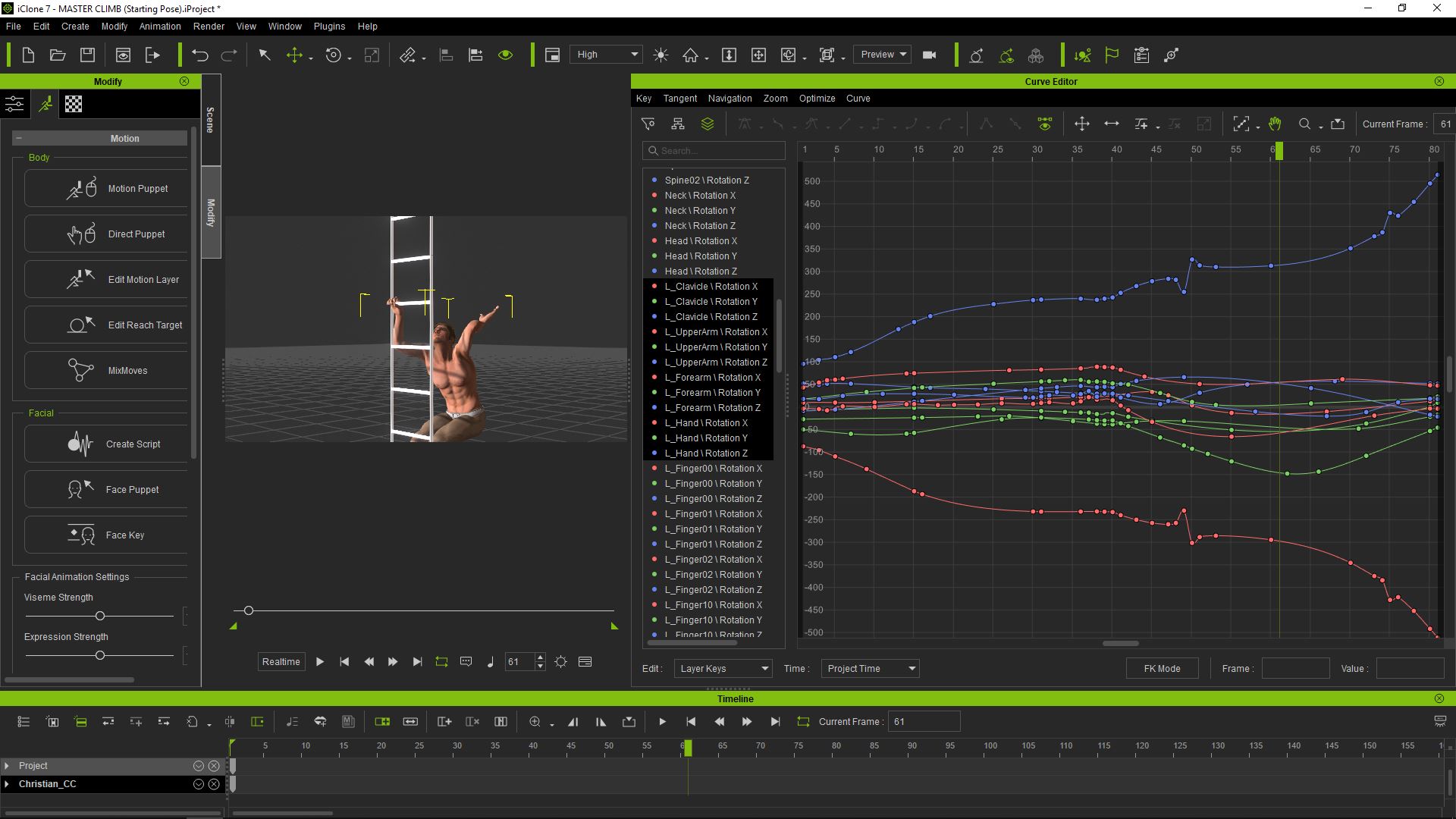 I must confess .... I'm uncertain of what to do next to fix the random rotations ....
-------------------------------------------------------------------------------------------------------------------------------------------------------- I must confess .... I'm uncertain of what to do next to fix the random rotations ....
--------------------------------------------------------------------------------------------------------------------------------------------------------
Please be patient with me ..... I don't always 'get it' the first time 'round - not even the 2nd time! :( - yikes! ... ● MSI GT72VR Laptop, i7 7700HQ 4-Core 3.8 GHz 16GB RAM; Nvidia 1070, 8GB Vram ● iClone-7.93 ● 3DXChange Pipeline 7.81 ● CC-3 Pipeline 3.44 ● Live Face ● HeadShot ● Brekel Pro-Body ● Popcorn FX ● iRAY ● Kinect V2 ● DaVinci Resolve17 ● Mixcraft 8.1
|
|
|
|
|
Walvince
|
Walvince
Posted 8 Years Ago
|
|
Group: Forum Members
Last Active: Last Month
Posts: 99,
Visits: 981
|
Yep this is it. It's hard to guess wich curve has to be corrected, but trying one after another should give results.
Seeing your capture this may be the last green curve that is going too far to the bottom, maybe you could try editing some points and move them to the top to see if it corrects the rotation problem.
If you place your cursor over the lowest point and that you move this point you should see some changes (maybe not the desired ones^^)
|
|
|
|
|
sonic7
|
sonic7
Posted 8 Years Ago
|
|
Group: Forum Members
Last Active: 3 Years Ago
Posts: 1.7K,
Visits: 19.4K
|
Thanks Walvince ---- I'll try moving the curves around .... there's a lot of rotations that affect the 'position' of the hand --- (shoulder, elbow, clavicle) --- yikes !! Does it have to be "trial and error"?
--------------------------------------------------------------------------------------------------------------------------------------------------------
Please be patient with me ..... I don't always 'get it' the first time 'round - not even the 2nd time! :( - yikes! ... ● MSI GT72VR Laptop, i7 7700HQ 4-Core 3.8 GHz 16GB RAM; Nvidia 1070, 8GB Vram ● iClone-7.93 ● 3DXChange Pipeline 7.81 ● CC-3 Pipeline 3.44 ● Live Face ● HeadShot ● Brekel Pro-Body ● Popcorn FX ● iRAY ● Kinect V2 ● DaVinci Resolve17 ● Mixcraft 8.1
|
|
|
|
|
Walvince
|
Walvince
Posted 8 Years Ago
|
|
Group: Forum Members
Last Active: Last Month
Posts: 99,
Visits: 981
|
I wonder, maybe it is not what you want to do, but if the start of your motion is ok, you could cut the end and simply loop the correct motion ?
|
|
|
|